
What is fine-tuning an LLM, and when do you need it?
Fine-tuning keeps training a pretrained LLM on your own examples so its weights change. How it works, the main kinds, and what a small LoRA run costs.
Fine-tuning an LLM means continuing to train a model that is already pretrained, on a small set of your own examples, so its weights shift toward the behavior those examples show. Nodus runs fine-tuning as a priced, capped TrainingJob; we estimate a LoRA pass over 8 million tokens on an 8B model at about $0.98 on one NVIDIA L40S. You need it when a model knows enough but behaves wrong for your task, and a good prompt cannot fix that.
This post covers the mechanics and links each follow-up question to the deeper post that answers it.
What actually changes in the model when you fine-tune it?
Section titled “What actually changes in the model when you fine-tune it?”The numbers inside the model change, and nothing else does. A pretrained LLM is billions of weights that predict the next token. Fine-tuning runs the same training loop that built it, on far less data and with a small learning rate.
Each training step does four things:
- Feed a batch of your examples through the model and get its predicted probabilities for every next token.
- Measure the loss: how much probability the model gave to the tokens your example actually contains.
- Backpropagate to get a gradient, the direction each weight should move to raise that probability.
- Let the optimizer, usually AdamW, nudge the weights a small step in that direction.
Repeat for a few hundred or a few thousand steps and the model starts producing your format, tone or judgment without being told. For prompt and completion pairs, Hugging Face’s TRL SFT trainer computes the loss on the completion tokens only by default, so the model learns to write the answer, not to repeat the question.
The result is a new set of weights, or a small add-on file of weights. It is frozen at training time, which is why fine-tuning is a poor way to teach facts that change. Retrieval handles those, as our RAG vs fine-tuning post explains.
What are the main kinds of fine-tuning?
Section titled “What are the main kinds of fine-tuning?”There are two separate choices: what the examples teach, and how many weights you update.
What the examples teach:
- Supervised fine-tuning (SFT): you show the model input and correct output pairs and train it to produce the output. Most fine-tuning is this.
- Instruction tuning: SFT on many tasks phrased as instructions, so the model follows instructions in general. Google’s FLAN paper showed it improves zero-shot performance on unseen tasks. It is how base models become chat models.
- Preference tuning: you show a prompt with a chosen and a rejected answer, and train the model to prefer the chosen one. Direct Preference Optimization (DPO) does this with a simple classification loss instead of the reward model and reinforcement learning that RLHF uses. Our DPO vs RLHF post compares them.
How many weights you update:
- Full fine-tuning updates every weight. It is the most flexible and needs the most memory.
- LoRA freezes the original weights and trains small low-rank matrices added beside them. The LoRA paper reports 10,000 times fewer trainable parameters and 3 times less GPU memory than full fine-tuning GPT-3 175B with Adam.
- QLoRA does the same on top of a base model quantized to 4 bits. The QLoRA paper fine-tuned a 65B model on a single 48 GB GPU.
For Qwen3-8B, which has 8.19 billion parameters, a rank-16 LoRA adapter trains 43.6 million of them, about 0.53% of the 8,190 million. Those counts come from our LoRA vs full fine-tuning post, which covers when LoRA is good enough. Our LoRA vs QLoRA post covers the 4-bit trade-off.
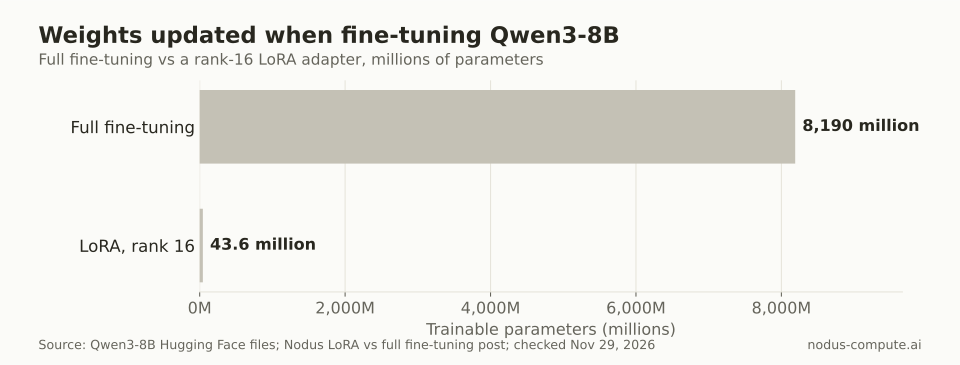 LoRA trains about 1 in 188 of the weights, which is why it fits on much smaller GPUs.
Continued pretraining is a different job. It trains on raw domain text with no prompt and answer split, to add knowledge or vocabulary, while fine-tuning trains on examples of the behavior you want. Our continued pretraining vs fine-tuning post separates the two. Distillation, training a small model on a large model’s outputs, is a third relative, covered in distillation vs fine-tuning.
What does a fine-tuning training example look like?
Section titled “What does a fine-tuning training example look like?”A fine-tuning dataset is usually a JSONL file: one JSON object per line, each a single example. For SFT, each line holds a prompt and the completion you want. This is an illustrative support-ticket dataset:
{"prompt": "Ticket: My invoice shows two charges for November.", "completion": "Category: billing\nPriority: high\nReply: Sorry about the double charge. I have flagged it for a refund."}{"prompt": "Ticket: How do I rotate my API key?", "completion": "Category: account\nPriority: low\nReply: Open Settings, then API keys, and choose Rotate."}{"prompt": "Ticket: The export button does nothing in Firefox.", "completion": "Category: bug\nPriority: medium\nReply: Thanks for the report. Which Firefox version are you on?"}Preference data adds a second answer. TRL’s dataset formats page shows the shape: {"prompt": "The sky is", "chosen": " blue.", "rejected": " green."}.
The examples matter more than the GPU. Every inconsistency in them gets trained in, so a few hundred clean examples usually beat thousands of sloppy ones. Keep a held-out test set the model never trains on; our post on splitting data with repeated prompts shows why that split is easy to get wrong.
When do you need to fine-tune, and when is a prompt enough?
Section titled “When do you need to fine-tune, and when is a prompt enough?”Fine-tune when the gap is behavior, a well-written prompt cannot close it on held-out cases, and you can measure the change. This is our short rule, condensed from Is fine-tuning still worth it?, which walks through the research behind it.
| Your situation | What to do |
|---|---|
| The model lacks facts, or the facts change | Use retrieval, not fine-tuning |
| A prompt with a few examples already passes your test set | Ship the prompt |
| It knows the facts but gets format, tone or judgment wrong, and prompting has plateaued | Fine-tune with SFT |
| Outputs are acceptable, but you want it to prefer one style of answer | Preference tuning such as DPO, usually after SFT |
| It lacks the vocabulary of a whole domain and you have lots of raw text | Continued pretraining, then SFT |
| A long prompt runs on many requests | Fine-tune a smaller model to drop the prompt, if the math pays |
Two cautions. Fine-tuning can erode skills the model had before, which our post on catastrophic forgetting measures and explains how to check. And decide the acceptance test before training, or you cannot tell a bad fine-tune from a bad evaluation.
How much does a small LoRA fine-tuning run cost on Nodus?
Section titled “How much does a small LoRA fine-tuning run cost on Nodus?”Usually under a few dollars of GPU time per run. We worked it out with the formula from our fine-tuning cost post, for LoRA on Llama 3.1 8B, which has 8.03 billion parameters per its Hugging Face files.
The formula takes about 6 operations per parameter per training token, a rule from Kaplan et al.’s scaling-laws paper, and assumes the job sustains 30% of the GPU’s dense BF16 peak. That 30% is a planning assumption, not a measurement. The peaks are 362.05 TFLOPS for the L40S, from NVIDIA’s L40S page, and 989 TFLOPS for the H100, as used in that post. We add 15 minutes of billed startup per run for loading the model, the same allowance our other cost posts use.
Here is the arithmetic once, for 5,000 examples of about 800 tokens trained for 2 epochs: 8 million training tokens. Each token costs 6 x 8.03 billion = 48.18 billion operations, so the run needs 3.85 x 10^17. At 30% of 362.05 TFLOPS that is 3,549 seconds, or 0.99 hours on one L40S. At $0.793/hr the training costs $0.78, and 15 minutes of startup adds $0.20, so $0.98 in total.
| Training tokens | 1 x L40S time | 1 x L40S cost | 1 x H100 time | 1 x H100 cost |
|---|---|---|---|---|
| 2M | 0.25 h | $0.39 | 0.09 h | $0.88 |
| 8M | 0.99 h | $0.98 | 0.36 h | $1.59 |
| 20M | 2.46 h | $2.15 | 0.90 h | $3.00 |
| 50M | 6.16 h | $5.08 | 2.26 h | $6.51 |
Costs include 15 minutes of billed startup. Rates: L40S listed at $0.793/hr and H100 SXM listed at $2.600/hr on the Nodus pricing page. Prices checked November 29, 2026.
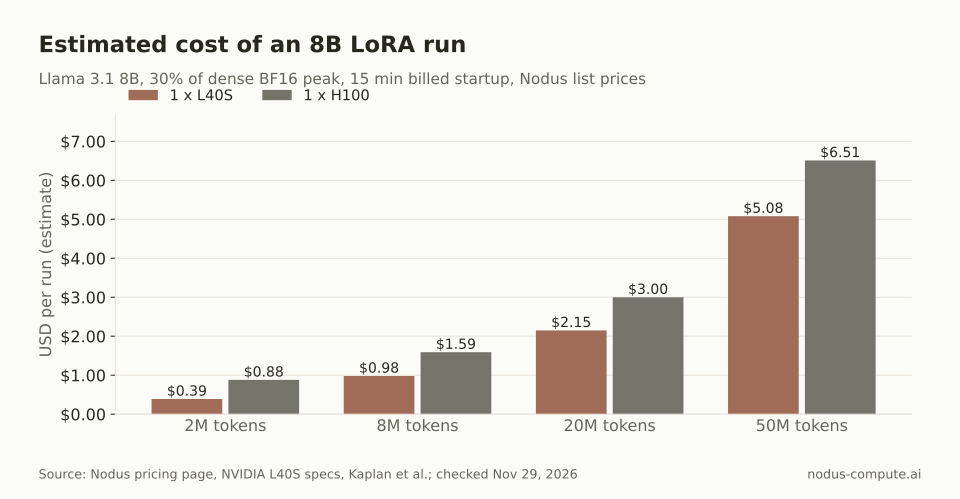 At these list prices the L40S is the cheaper card at every size; the H100 buys about 2.7 times shorter runs.
Two things stand out. Startup dominates a tiny run: at 2 million tokens, the H100’s $0.65 of startup is most of its $0.88. And price per unit of compute favors the L40S here, so the H100 only makes sense when you are waiting on the result.
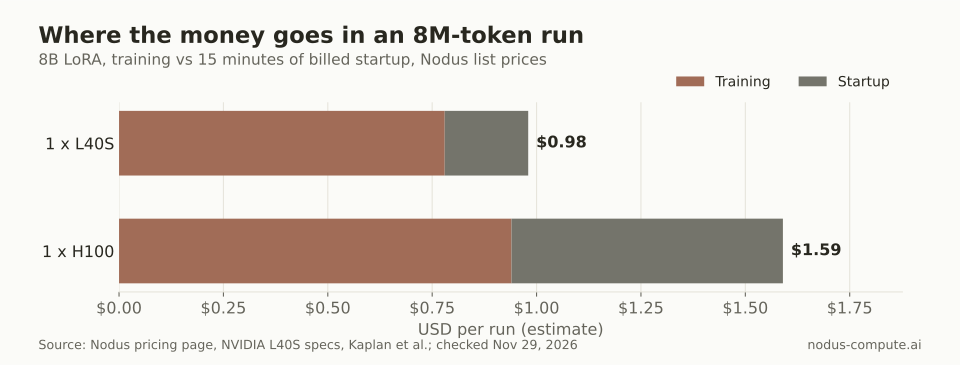 For a run this small, the H100’s startup minutes cost almost as much as its training.
The bigger cost is repetition. A first project rarely ships its first run; if you try three recipes and then train the final one, the 8 million token project is 4 x $0.98 = $3.92 on the L40S. Writing and checking 5,000 good examples costs far more of your time than any of this. Check that an 8B LoRA fits your card with our VRAM guide for fine-tuning, and pick a base model with which open model to fine-tune.
How do you run a fine-tune on Nodus?
Section titled “How do you run a fine-tune on Nodus?”You describe the run in a TrainingJob manifest, check the price with a dry run, then apply it. The managed nodus/sft runtime does supervised fine-tuning, full or LoRA/QLoRA, from prompt and completion JSONL. This example is copied from the Nodus training guide:
apiVersion: nodus.dev/v1beta1kind: TrainingJobmetadata: name: support-sftspec: runtime: nodus/sft model: uri: hf://Qwen/Qwen3-0.6B@c1899de289a04d12100db370d81485cdf75e47ca secret: hf-token # only for gated repositories data: volume: support-chats # a Volume holding chats.jsonl path: chats.jsonl format: JSONL columns: {prompt: question, completion: answer} parameters: steps: 2000 lora: {r: 16, alpha: 32} maxCostUSD: "20.00"$ pip install nodus-compute$ nodus login$ nodus apply -f sft.yaml --dry-run -o yaml # status.estimate: cost to completion, first hold, start time$ nodus apply -f sft.yamlThe dry run prices the job from measured seconds per step before anything is charged, and maxCostUSD caps the spend. The columns line maps your own field names onto prompt and completion. Training is in Beta, and the same guide covers the nodus/dpo runtime for preference tuning and task: Pretrain for continued pretraining. For a full walkthrough on your own data, see fine-tune Llama on your own data.
How many examples do you need to fine-tune an LLM?
Section titled “How many examples do you need to fine-tune an LLM?”Hundreds to a few thousand consistent examples are typical for teaching a format or style. The LIMA research our worth-it post cites used 1,000 carefully curated ones. Quality and consistency matter more than count.
Is fine-tuning the same as training a model from scratch?
Section titled “Is fine-tuning the same as training a model from scratch?”No. Training from scratch starts from random weights and needs trillions of tokens, while fine-tuning starts from a pretrained model and uses millions. Our post on how many tokens it takes to train an LLM gives the scale of the difference.
Can you fine-tune a closed model?
Section titled “Can you fine-tune a closed model?”Only through the vendor’s own fine-tuning service, and you never get the weights. With an open-weight model you own the result and can serve it anywhere. On Nodus, the adapter or full weights come back as files you download with nodus cp.
Does a LoRA adapter slow down inference?
Section titled “Does a LoRA adapter slow down inference?”No, according to the LoRA paper: the adapter can be merged into the base weights, so it adds no extra latency. Keeping it separate instead lets one server host many adapters on one base model.
More from the blog
training9 min read
Which open-source model is best to fine-tune in 2026?
Qwen3.5 and Gemma 4 are the best open models to fine-tune for most tasks in 2026. A task-by-size table, licenses, a decision rule and worked VRAM math.
Read the postinference8 min read
How do you run vLLM in Docker on a cloud GPU?
Run the official vllm/vllm-openai image with --gpus all, --ipc=host and port 8000. Fixes for common errors, worked VRAM math and the same model on Nodus.
Read the post