
Which open-source model is best to fine-tune in 2026?
Qwen3.5 and Gemma 4 are the best open models to fine-tune for most tasks in 2026. A task-by-size table, licenses, a decision rule and worked VRAM math.
For most fine-tuning jobs in 2026, start with Qwen3.5 (0.8B to 27B) or Gemma 4 (E2B to 31B): both are Apache 2.0, multilingual and long-context, and the right size depends on your task more than any leaderboard. On Nodus, our estimate puts a QLoRA fine-tune of Qwen3.5-9B on a 24 GB RTX 3090 listed at $0.180/hr and Gemma 4 31B on a 48 GB RTX A6000 at $0.333/hr. Reach for Devstral Small 2 for coding agents, gpt-oss-20b for reasoning, and Llama only when an existing Llama pipeline is worth its license terms.
This guide is about which model to tune. For where to run it, see our comparison of fine-tuning platforms. We read every model card, license and config below on November 29, 2026, and computed the memory figures ourselves with the method in our fine-tuning VRAM guide.
Which open models are worth fine-tuning right now?
Section titled “Which open models are worth fine-tuning right now?”Seven families cover nearly every case. Parameter counts are the safetensors totals on each Hugging Face repository, which include any vision or audio encoder.
| Family | Sizes worth tuning | License | Native context | Strength per its model card |
|---|---|---|---|---|
| Qwen3.5 | 0.8B, 2B, 4B, 9B (9.65B), 27B, 35B-A3B MoE | Apache 2.0 | 262,144 tokens | 201 languages and dialects |
| Qwen3.8-27B | 27B | Apache 2.0 | 262,144 tokens | Thinking on by default, evaluated on SWE-bench Pro |
| Gemma 4 | E2B, E4B, 12B, 26B A4B MoE, 31B (31.27B) | Apache 2.0 | 128K small, 256K medium | Over 140 languages, configurable thinking |
| Ministral 3 | 3B, 8B, 14B | Apache 2.0 | 256K | Edge deployment, lists fine-tuning as a use case |
| Devstral Small 2 | 24B | Apache 2.0 | 256K | Software engineering agents |
| gpt-oss | 20b (3.6B active), 120b (5.1B active) | Apache 2.0 | n/a | Reasoning; 20b tunable on consumer hardware |
| Phi-4-mini | 3.8B | MIT | 128K | Reasoning-dense data, mainly English |
| Granite 4.2 | 3B, 8B, 30B | Apache 2.0 | 128K, extends to 512K | Enterprise use, 12 tested languages |
| Llama 3.x | 3.1 8B, 3.3 70B | Llama community license | 128K | Fits existing Llama pipelines |
Checked November 29, 2026 on each linked model card. The gpt-oss card does not state a context length, so we left it out.
Two shifts matter for this year’s list. Gemma 4 moved to Apache 2.0, so the old Gemma terms of use no longer apply to it. And the newest open weights on Meta’s Hugging Face organization are the Llama 4 models and guard models from April 2025, so Llama is no longer where new small models appear first.
Which model should you fine-tune for each task?
Section titled “Which model should you fine-tune for each task?”Match the size to the job first, then the family. Fine-tuning mostly teaches a format, a domain and a style; it rarely adds reasoning the base model lacks. That makes the smallest model that already half-solves your task the cheapest one to tune.
| Task | Start with | Step up to | Why |
|---|---|---|---|
| Classification, extraction, routing | Qwen3.5-2B or 4B, Phi-4-mini | Qwen3.5-9B | Short outputs at high volume favor small models |
| Chat and instruction following | Qwen3.5-9B, Gemma 4 12B, Ministral 3 8B | Gemma 4 31B, Qwen3.5-27B | Instruction-tuned checkpoints already follow chat templates |
| Coding and agents | Devstral Small 2 24B | Qwen3.8-27B | Both cards target software engineering at 24B to 27B |
| Reasoning and math | gpt-oss-20b, Qwen3.8-27B | gpt-oss-120b | Both are built and released as reasoning models |
| Multilingual | Qwen3.5 at any size | Gemma 4 31B | 201 languages and over 140 languages on the cards |
| Long documents | Qwen3.5-9B, Granite 4.2 8B | Qwen3.5-27B | 262,144 and 128K native context; memory grows with training length |
| On-device | Gemma 4 E2B or E4B | Ministral 3 3B | Both cards target phones, laptops or edge hardware |
The table is a starting shortlist built from licenses, sizes and each vendor’s stated focus, not from a benchmark we ran. Treat the left column as two candidates to compare, not a verdict.
Does the license matter for a fine-tuned model?
Section titled “Does the license matter for a fine-tuned model?”Yes, because your adapter or merged model is a derivative of the base. Under Apache 2.0 and MIT you can ship the result commercially as long as you keep the license and copyright notices. That covers Qwen3.5, Qwen3.8-27B, Gemma 4, Ministral 3, Devstral Small 2, gpt-oss, Phi-4 and Granite.
Llama is different. The Llama 3.3 license requires you to show “Built with Llama” on a related page and include a copy of the agreement when you distribute it. Companies with more than 700 million monthly active users must ask Meta for a license, and the Llama 4 license has the same threshold. The weights are also gated on Hugging Face behind a manual approval.
Read the license on the exact repository, not the family. Most Qwen models are Apache 2.0, but Qwen3.8-Flash-Next ships under a separate “qwen-community-1.0” license.
What decision rule should you use?
Section titled “What decision rule should you use?”We use these five steps when choosing a base model for a new fine-tune:
- Filter by license. Keep Apache 2.0 and MIT models unless you already depend on Llama.
- Pick the task row above and take its two smallest candidates.
- Run both untuned on 50 held-out examples. Drop any that get nothing right; tuning rarely rescues a model that cannot start.
- Choose 16-bit LoRA if the estimate below fits 90% of a cheap card, otherwise QLoRA. The LoRA vs QLoRA guide covers the speed and quality trade.
- Prefer a dense model for your first run. MoE models need adapters on the experts, which Google’s Gemma 26B A4B recipe handles with extra target settings, as our Gemma LoRA guide shows.
Then tune both survivors on the same data and keep the one that wins on your held-out set.
How much GPU memory does a LoRA or QLoRA fine-tune need?
Section titled “How much GPU memory does a LoRA or QLoRA fine-tune need?”Use one formula for every dense model, the same one as in our VRAM guide and VRAM calculator post:
memory = frozen base + adapter params x 16 + 2 x seq x hidden x layers # activations with gradient checkpointing + 4 x seq x vocab # FP32 logitsLoRA keeps the base at 2 bytes per parameter. QLoRA stores the language model’s linear layers at 0.516 bytes (4-bit NF4 plus double-quantized scales) and leaves embeddings, norms and any vision encoder at 2 bytes. The adapter is rank 16 on every linear layer of the language model. We assume one 4,096-token sequence per step and BF16.
We counted the parameters by building each model on PyTorch’s meta device with Transformers 5.24.1 and PEFT 0.22.0 on a CPU, which reads only the config, and attaching the rank-16 adapter. Here is the full Gemma 4 31B QLoRA calculation:
- Linear layers: 29.29B x 0.516 = 15.11 GB
- Everything else (embeddings, norms, vision encoder): 1.99B x 2 = 3.97 GB
- Adapter: 122.4M parameters x 16 = 1.96 GB
- Activations: 2 x 4,096 x 5,376 x 60 = 2.64 GB
- Logits: 4 x 4,096 x 262,144 = 4.29 GB
That totals 27.97 GB, or 28.0 GB, and 71.4 GB for 16-bit LoRA. The same method gives 24.7 GB with LoRA and 14.4 GB with QLoRA for Qwen3.5-9B (9.41B loaded parameters, 43.3M adapter parameters). For Llama 3.3 70B (70.55B, 207.1M) it gives 151.9 GB and 50.3 GB.
Qwen3.5-9B loads 9.41B parameters rather than the 9.65B on its repository, because Transformers skips the extra multi-token-prediction layer. Its layers mix linear and full attention, so treat its activation figure as an estimate. The Llama 3.3 70B figures match our earlier VRAM post exactly.
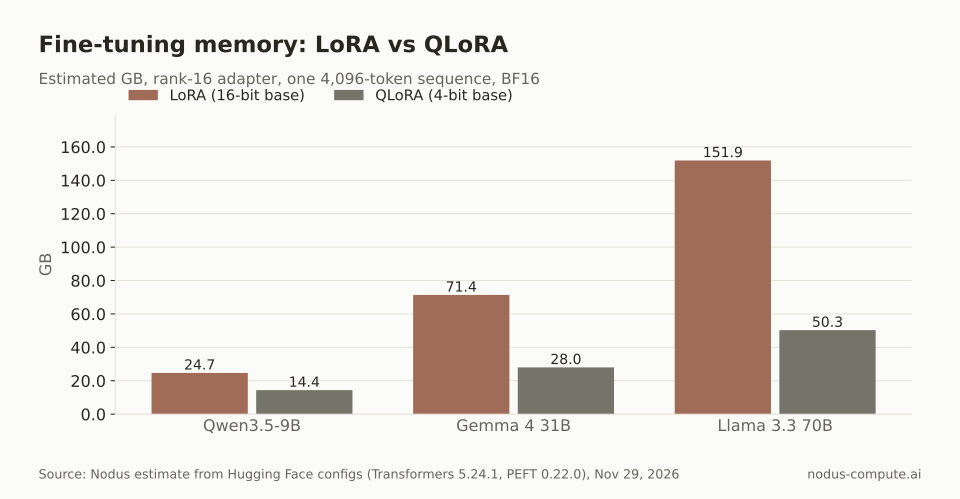 The frozen base is almost all of the memory, so QLoRA’s savings grow with model size.
Large vocabularies make small models heavier than they look. Qwen3.5’s 248,320-token vocabulary puts 4.07 GB in logits for the 9B model, more than its 1.07 GB of activations. Google measures Gemma 4 31B QLoRA at 18 to 22 GB, as cited in our Gemma guide. Our 28.0 GB is higher because it counts FP32 logits over a 4,096-token sequence.
Which GPU does each fine-tune need on Nodus?
Section titled “Which GPU does each fine-tune need on Nodus?”Pick the cheapest card where the estimate stays under 90% of its memory, leaving room for the CUDA context and fragmentation. Prices checked November 29, 2026 on the Nodus pricing page:
| Run | Estimate | Cheapest card with room | Listed price |
|---|---|---|---|
| Qwen3.5-9B QLoRA | 14.4 GB | RTX 3090, 24 GB | $0.180/hr |
| Qwen3.5-9B LoRA | 24.7 GB | RTX A6000, 48 GB | $0.333/hr |
| Gemma 4 31B QLoRA | 28.0 GB | RTX A6000, 48 GB | $0.333/hr |
| Gemma 4 31B LoRA | 71.4 GB | RTX PRO 6000, 96 GB | $1.350/hr |
| Llama 3.3 70B QLoRA | 50.3 GB | A100, 80 GB | $1.090/hr |
| Llama 3.3 70B LoRA | 151.9 GB | B200, 180 GB | $5.500/hr |
Three rows sit near a boundary. The 9B QLoRA run lands exactly on a 16 GB RTX A4000’s 14.4 GB budget, too tight to trust, so we chose the 24 GB card. A 24 GB card would hold the 9B LoRA run only below 21.6 GB, and the 32 GB RTX 5090 at $0.480/hr fits but costs more than the A6000. Gemma 4 31B LoRA fits an 80 GB A100 on paper with 0.6 GB to spare, so we listed the 96 GB card instead.
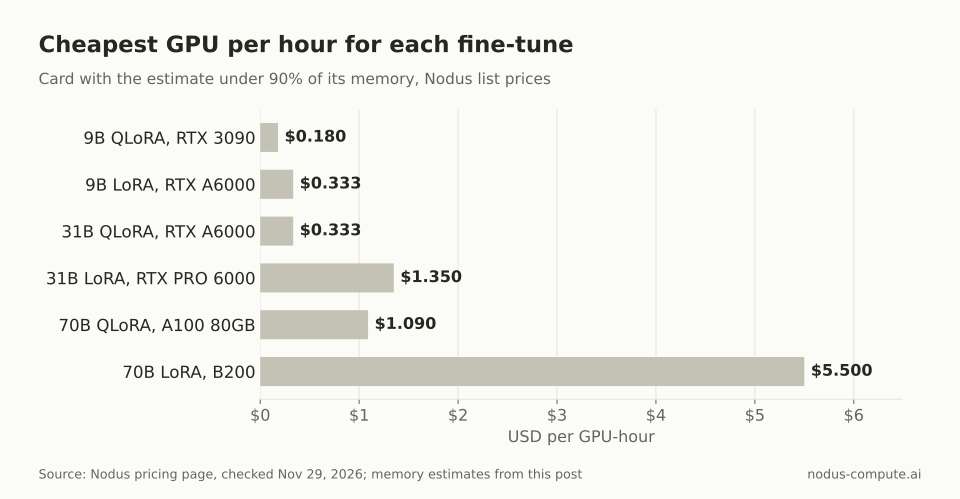 QLoRA keeps a 31B model at the same hourly price as a 9B LoRA run.
The jump from 31B to 70B is the expensive one. At QLoRA it more than triples the hourly price, from $0.333 to $1.090, so a 70B model has to beat a 31B one clearly on your eval to earn it.
When is Llama or a bigger model the better choice?
Section titled “When is Llama or a bigger model the better choice?”Llama 3.x is still the right base when your serving stack, quantized builds or evaluation history already assume it. Switching bases resets your evals and any tooling you built around one model. If you are under 700 million monthly users and fine with the attribution line, the license is rarely a blocker.
Go bigger when the untuned small models fail your step 3 check. gpt-oss-120b can be fine-tuned on a single H100 node, per its model card. DeepSeek V4 Flash, at 284B parameters with 13B activated and an MIT license, is a multi-node job. Qwen3.5-122B-A10B sits between them.
How do you run one of these fine-tunes on Nodus?
Section titled “How do you run one of these fine-tunes on Nodus?”Nodus’s managed nodus/sft runtime does full, LoRA and QLoRA fine-tuning as a TrainingJob, per the training guide, with single-GPU presets for Qwen3. For Qwen3.5, Gemma 4 and the rest, run your own TRL script as a Job. The flags below come from the nodus run reference:
$ nodus run --name gemma4-31b-qlora --gpu A6000 --image nodus/pytorch \ --checkpoint /nodus/state --interruptible \ --max-cost 10 --timeout 24h -d -- python train.pyAdd --dry-run to see the estimate first. --max-cost is a cap, and --interruptible allows cheaper capacity that can be reclaimed; save checkpoints under /nodus/state so the Job resumes from them on the next machine. Our Qwen LoRA guide has a TrainingJob manifest for the presets.
Is Qwen or Llama better to fine-tune?
Section titled “Is Qwen or Llama better to fine-tune?”For a new project, Qwen3.5: it has more current sizes from 0.8B to 27B, a 262,144-token native context and an Apache 2.0 license with no “Built with Llama” style display rule. Llama wins only when your stack already depends on it.
Can you fine-tune a 31B model on one consumer GPU?
Section titled “Can you fine-tune a 31B model on one consumer GPU?”With QLoRA, yes. Our estimate for Gemma 4 31B is 28.0 GB at 4,096 tokens, inside the 28.8 GB budget of a 32 GB RTX 5090, though a 48 GB card leaves room for longer sequences.
Should you fine-tune the base or the instruct checkpoint?
Section titled “Should you fine-tune the base or the instruct checkpoint?”Start from the instruct checkpoint for chat, extraction and agents, since it already follows the chat template. Use the base checkpoint for continued pretraining on raw domain text, then add instruction data afterwards.
Are MoE models cheaper to fine-tune?
Section titled “Are MoE models cheaper to fine-tune?”Not on memory. Every expert must sit on the GPU, so gpt-oss-20b loads all 21B parameters even though 3.6B are active per token. You also need to target the experts in your LoRA config, or most of the model stays untouched.
Which models does Nodus support for fine-tuning?
Section titled “Which models does Nodus support for fine-tuning?”Any model you can load in a container runs as a Nodus Job, on GPUs from an RTX 3070 at $0.133/hr to a B300 at $6.943/hr on the pricing page. The managed nodus/sft presets currently cover Qwen3.
More from the blog
image-generation6 min read
How do you evaluate a text-to-image model beyond image quality?
A beautiful image can still fail the brief. Count usable results per request, check object relationships and compare models under the same selection budget.
Read the postspot9 min read
Can you run LLM inference on spot GPUs safely?
Batch inference on spot GPUs is safe. Online serving is safe only with an on-demand floor, spread replicas and a drain on notice. The rule and math.
Read the post