
What is the best platform to fine-tune open-source LLMs?
Nodus, Together AI, Modal, RunPod and AWS SageMaker compared for fine-tuning open models, with choose-if rules, a priced 8 x H100 run and a break-even rule.
The best platform to fine-tune an open-source LLM is usually the one that charges least per finished run. Of the hourly platforms we priced, Nodus lists the lowest NVIDIA H100 rate at $2.60/hr and resumes a run from its latest checkpoint if a machine is lost. Together AI is the better pick if you would rather pay per training token and never choose a GPU, and Modal, RunPod or AWS SageMaker suit teams that already run their own trainer there.
No single platform wins every job, so this guide gives you rules instead of a ranking. Every fact about another company links to its own pricing page or docs, and since we build Nodus, every cost below shows its arithmetic so you can check us.
Which fine-tuning platform should you pick?
Section titled “Which fine-tuning platform should you pick?”Pick by how much of the training stack you want to own, then by price. These are the rules we would give a friend.
- Choose Nodus if you want managed recipes (SFT with full, LoRA or QLoRA, plus DPO, ORPO, KTO, distillation and GRPO) on a GPU you can choose, a price estimate before anything runs, a hard dollar cap per job and automatic resume after a lost machine.
- Choose Together AI if you want a fine-tuning API priced per token, your base model is in its catalog or on the Hugging Face Hub, and you plan to serve the result on its endpoints.
- Choose Modal if your training code already runs as Modal functions and you are happy to write your own checkpoint and resume logic.
- Choose RunPod if you want a console form that launches an Axolotl fine-tuning pod, or a GPU pod you control end to end.
- Choose AWS SageMaker if your data, credits and compliance reviews already live in AWS, and an 8-GPU instance is the size of job you run.
Hugging Face AutoTrain is no longer a candidate for new work. Its docs say the project is no longer maintained and bugs will not be fixed; our AutoTrain alternatives post covers what to move to.
How do Nodus, Together AI, Modal, RunPod and SageMaker compare?
Section titled “How do Nodus, Together AI, Modal, RunPod and SageMaker compare?”They split into a managed API that prices tokens and platforms that price GPU time. That split decides most of what follows.
| Platform | What you run | How you pay | Listed H100 price | If the GPU is lost |
|---|---|---|---|---|
| Nodus | Managed TrainingJob recipes, or your own script as a Job | Prepaid credits, hourly price per GPU | $2.60/hr (H100 SXM) | Resumes from the latest full checkpoint (optimizer, scheduler and RNG state) |
| Together AI | Fine-tuning API, LoRA or full | Per 1M training tokens, minimum charge per job | Not applicable | Not stated on the pricing page |
| Modal | Your own trainer as Python functions | Per second | $0.001097/s, or $3.9492/hr | Restarts the function on the same input; you write the checkpoints |
| RunPod | Axolotl fine-tuning pod, or your own pod | Per second | $2.69/hr Community Cloud, $3.99/hr Secure Cloud (H100 SXM) | Not stated in its fine-tuning docs |
| AWS SageMaker | Training jobs with your own container or script | Per instance-hour | $63.296/hr for ml.p5.48xlarge (8 x H100) | With managed spot training and checkpoints, copies them back from S3 and resumes |
Prices checked October 28, 2026 on the Nodus pricing page, Together AI pricing, Modal pricing, RunPod pricing and the AWS price list for SageMaker (US East, N. Virginia). Behavior on a lost GPU comes from the Nodus training guide, Modal’s preemption docs, RunPod’s fine-tuning docs and SageMaker’s managed spot training docs.
What does a full fine-tune on 8 H100s cost on each platform?
Section titled “What does a full fine-tune on 8 H100s cost on each platform?”At listed rates, the same 80 H100-hours cost $208.00 on Nodus and $632.96 on SageMaker, with RunPod and Modal in between. We picked 8 x H100 because that is the preset the Nodus sft runtime uses for a full fine-tune of Qwen3-8B, and we assumed a 10-hour run. The duration is our assumption, not a measurement; scale it to your own job.
| Platform | Listed rate | 8 GPUs x 10 hours |
|---|---|---|
| Nodus, H100 SXM | $2.60 per GPU-hour | 80 x $2.60 = $208.00 |
| RunPod Community Cloud, H100 SXM | $2.69 per GPU-hour | 80 x $2.69 = $215.20 |
| Modal, H100 | $0.001097 per GPU-second | 80 x 3,600 x $0.001097 = $315.94 |
| RunPod Secure Cloud, H100 SXM | $3.99 per GPU-hour | 80 x $3.99 = $319.20 |
| AWS SageMaker, ml.p5.48xlarge | $63.296 per instance-hour | 10 x $63.296 = $632.96 |
These are GPU line items only. Storage, egress and any separate CPU or memory charges are left out for every platform, and SageMaker’s figure is the whole 8-GPU instance.
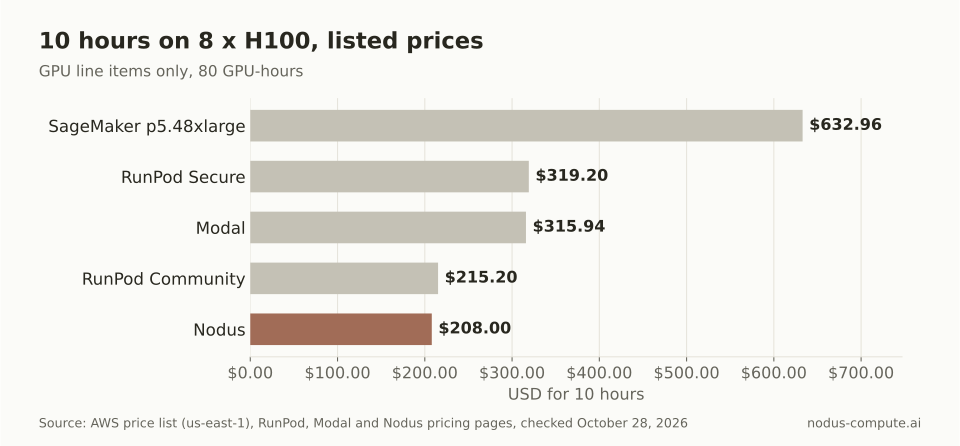 At list prices, the same 80 H100-hours cost about a third as much on Nodus as on a SageMaker training instance.
SageMaker’s own managed spot training docs say spot can cut that cost by up to 90%. The same page says managed spot never falls back to on-demand: if spot capacity is unavailable, the job waits until its maximum wait time and then stops.
Is paying per token cheaper than paying per GPU-hour for a LoRA run?
Section titled “Is paying per token cheaper than paying per GPU-hour for a LoRA run?”The answer turns on one number you can measure: training tokens per second. Below the break-even speed, Together AI’s per-token price is cheaper; above it, an hourly GPU is.
Here is the rule we worked out. Together AI lists LoRA fine-tuning of Llama 3.1 8B and Qwen3.5 9B at $0.34 per 1M training tokens, with a $4.00 minimum per job, on its pricing page. An H100 on Nodus is $2.60/hr. Dividing one by the other gives the break-even:
$2.60 / $0.34 per 1M tokens = 7.65M tokens per hour, or 7,647,059 / 3,600 = 2,124 tokens per second.
If your LoRA run trains faster than about 2,124 tokens per second on one H100, the Nodus hour costs less than the same tokens at Together AI. The same division for the other hourly rates in this post gives the bars below.
| GPU and platform | Listed hourly rate | Break-even vs $0.34 per 1M tokens |
|---|---|---|
| RTX 4090, Nodus | $0.29 | 237 tokens/s |
| L40S, Nodus | $0.793 | 648 tokens/s |
| H100, Nodus | $2.60 | 2,124 tokens/s |
| H100 SXM, RunPod Community Cloud | $2.69 | 2,198 tokens/s |
| H100, Modal | $3.9492 | 3,226 tokens/s |
Nodus rates are from the pricing page, checked October 28, 2026, alongside the RunPod and Modal pages linked above.
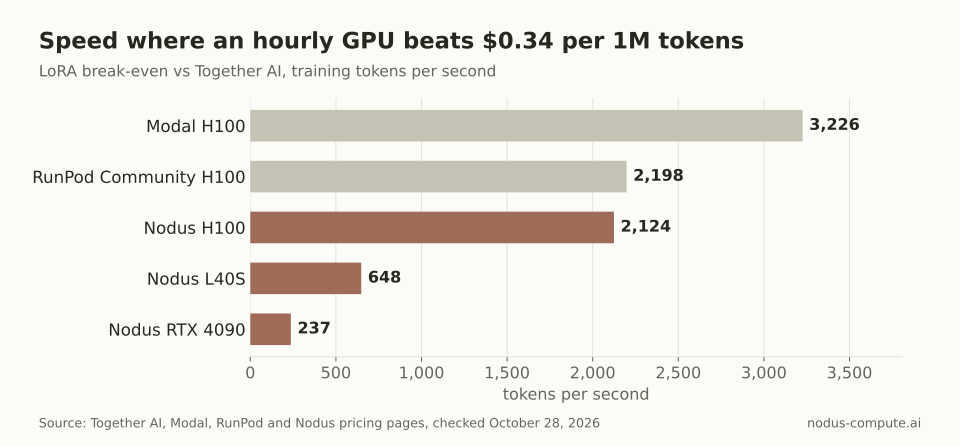 A cheaper GPU lowers the bar: a small LoRA job only has to beat 237 tokens per second on an RTX 4090.
You do not have to guess your speed. A short Nodus run reports it: nodus describe tj/<name> shows the step, loss and tokens per second, per the training guide. Run a few hundred steps, read the number, and compare it with the break-even for the GPU you used. Remember that Together AI also bills evaluation tokens, and small jobs pay at least the minimum charge.
Do you need automatic checkpoints and resume?
Section titled “Do you need automatic checkpoints and resume?”For any run longer than an hour, yes, because a lost GPU otherwise means paying twice for the same steps. The platforms differ in who writes the checkpoint and who restarts from it.
On Nodus, the managed runtimes write full checkpoints with optimizer, scheduler and RNG state, and a new attempt on another machine starts from the latest one. Each TrainingJob also carries a maxCostUSD cap, and a dry run prices the job before it starts. Modal’s preemption docs say a preempted function restarts on the same input, recommend checkpointing long training yourself, and note that the nonpreemptible option is not supported for GPU functions. SageMaker restores checkpoints from S3 when you turn on managed spot training and configure a checkpoint path.
Recovery is also where a fine-tune quietly gets expensive. Our fine-tuning benchmark against Modal was a pilot with one small model on one NVIDIA L4. Both platforms returned identical trained weights, Nodus charged 67% less for the successful run, and including a failed Nodus attempt the total was still 24.7% lower.
Where are Together AI, Modal, RunPod or SageMaker the better choice?
Section titled “Where are Together AI, Modal, RunPod or SageMaker the better choice?”Each of them beats Nodus for a specific kind of team, and the reasons are concrete.
- Together AI, when you do not want to size hardware at all. Its fine-tuning docs cover upload, training, hosting and inference in one product, and its pricing page lists fine-tuning for very large models such as DeepSeek-V3.1 and Kimi K2.6. On Nodus, a model without a runtime preset gets the default single-GPU resources unless you set larger ones yourself.
- Modal, when your inference and data jobs already run as Modal functions and you want training in the same codebase. Its pricing page also offers $30 a month in free compute, which covers small experiments.
- RunPod, when you want a form instead of a config file. Its fine-tuning page takes a Hugging Face model ID and dataset ID and launches an Axolotl pod. Its Community Cloud H100 is within 9 cents an hour of the Nodus rate.
- AWS SageMaker, when the deciding factor is AWS itself: existing credits, data that must stay in your account, or a security review that already approved SageMaker. Note that Nodus can also run work in your own AWS account, GCP project or Azure subscription (Beta).
Nodus has limits too. TrainingJobs are in Beta, so fields can change before v1, and runs start from the CLI or the Python SDK rather than a web form.
How do you start a fine-tune on Nodus?
Section titled “How do you start a fine-tune on Nodus?”Install the SDK, sign in, and call a recipe with a GPU and a dollar cap. The commands and the recipe call are copied from the training guide and the Python recipe reference.
$ pip install nodus-compute$ nodus loginsft = finetune.sft(model="Qwen/Qwen3-1.7B", data=nodus.Volume.from_name("support-chats"), lora=finetune.LoRA(r=16), max_steps=2000).run(gpu="H100", max_cost=20)Run it after import nodus and from nodus.recipes import finetune, with your JSONL data already in a Volume named support-chats. Nothing runs until .run(), and max_cost=20 caps the job at $20. The same job as a YAML TrainingJob, with nodus apply -f sft.yaml --dry-run -o yaml to see the estimate first, is in the training guide.
What is the best platform to train AI models from scratch?
Section titled “What is the best platform to train AI models from scratch?”The same price rules apply, but the deciding factor shifts to multi-node support and recovery across machines. Nodus runs pretraining with the same sft runtime using task: Pretrain, including from a fresh initialization, and the 8 x H100 cost comparison above scales linearly with the number of machines.
Is LoRA enough, or do I need full fine-tuning?
Section titled “Is LoRA enough, or do I need full fine-tuning?”Start with LoRA. Together AI’s own docs call it the right choice for most use cases because it is faster and cheaper, and say full fine-tuning can outperform it when the base model’s behavior needs to shift substantially. Full fine-tuning also moves you up a GPU class: the Nodus preset for a full Qwen3-8B run is 8 x H100.
Can I keep the fine-tuned weights?
Section titled “Can I keep the fine-tuned weights?”On Nodus, the adapter or full model is written as job outputs that you download with nodus cp, and each file is checked against a recorded sha256. Together AI’s docs say you can serve a fine-tuned model on a dedicated endpoint or download it.
Can a coding agent launch the fine-tune for me?
Section titled “Can a coding agent launch the fine-tune for me?”Yes. nodus mcp install claude adds the Nodus MCP server to Claude Code, and any TrainingJob the agent starts is still bound by its maxCostUSD cap.
More from the blog
training7 min read
How do you fine-tune with Unsloth on a cloud GPU?
Pick the smallest GPU in Unsloth's VRAM table, save Trainer checkpoints where they survive a restart, and run the script as a capped job.
Read the postcheckpointing9 min read
Which GPU platforms checkpoint and resume training for you?
Who saves, who restarts and who resumes a training run after a lost GPU, compared across Nodus, Modal, AWS SageMaker, RunPod and Vast.ai.
Read the post