
Continued pretraining vs fine-tuning: which do you need?
Continued pretraining teaches a model new domain text. Fine-tuning teaches it behavior from examples. A decision rule, cost math and Nodus configs.
Use continued pretraining when the model lacks knowledge or vocabulary from your domain, and use fine-tuning when it knows enough but behaves wrong for your task. Nodus runs both from one managed runtime, nodus/sft, and in our October 2026 pilots it produced byte-identical weights to Modal at 42.5% lower charges for continued pretraining and 67% lower for fine-tuning. Most teams need fine-tuning only; continued pretraining pays off when you hold a large body of domain text the base model has rarely seen.
What is the difference between continued pretraining and fine-tuning?
Section titled “What is the difference between continued pretraining and fine-tuning?”The difference is the data and what the model learns from it. Continued pretraining keeps the original next-token objective and feeds the model raw, unlabeled text: contracts, papers, internal docs, a codebase. The model absorbs vocabulary, style and facts from that corpus.
Fine-tuning trains on labeled examples: prompt and completion pairs, chat transcripts, or chosen and rejected answers for preference methods. It teaches the model how to respond, in what format, and when to refuse.
| What you want | Method | Data you need |
|---|---|---|
| Domain vocabulary and facts | Continued pretraining | Raw text |
| A fixed output format or tone | Supervised fine-tuning (SFT) | Prompt/completion pairs |
| Better instruction following on your task | SFT | Chat examples |
| Answers people prefer | DPO, ORPO or KTO | Chosen/rejected pairs or labels |
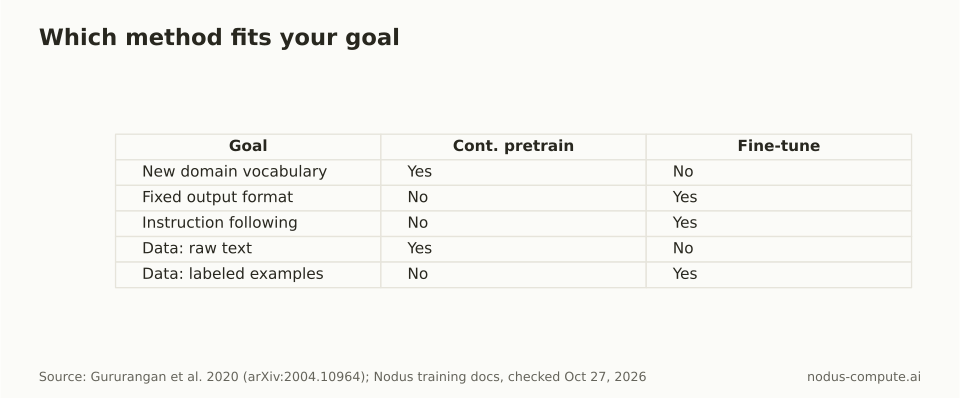 Start from the data you actually have: raw text points to pretraining, examples point to fine-tuning.
When does continued pretraining pay off?
Section titled “When does continued pretraining pay off?”It pays off when the base model keeps misreading your domain, not when it merely answers in the wrong shape. The strongest evidence is Gururangan et al., “Don’t Stop Pretraining” (ACL 2020). Across four domains (biomedical papers, computer science papers, news and reviews) and eight classification tasks, a second pretraining phase on in-domain text improved results in both high- and low-resource settings.
Our decision rule has three checks:
- The base model mangles your terms, abbreviations or code conventions even with good prompts.
- You have far more raw domain text than labeled examples, typically hundreds of millions of tokens or more.
- The knowledge is stable. Facts that change weekly belong in retrieval, not in weights.
If all three hold, continued pretraining is worth the compute. If only the first holds, try fine-tuning on a few thousand examples first and measure. Continued pretraining can also erode general skills, so keep a held-out general benchmark next to your domain test. Our post on catastrophic forgetting after fine-tuning shows how to measure that.
When is fine-tuning enough?
Section titled “When is fine-tuning enough?”Fine-tuning is enough when the model already understands the material and you need consistent behavior. Typical cases are a JSON schema it must always follow, a support tone, a classification label set, or tool calls in your format.
It needs much less data than people expect. Zhou et al. fine-tuned a 65B model on 1,000 curated examples in “LIMA: Less Is More for Alignment” and reported strong instruction following.
Quality and coverage of the examples matter more than raw count. LoRA and QLoRA train a small adapter instead of every weight, which cuts memory enough to fit larger models on one GPU (see how much VRAM a 70B model needs).
How much more does continued pretraining cost?
Section titled “How much more does continued pretraining cost?”Cost grows with the tokens you train on, so continued pretraining usually costs tens of times more than fine-tuning. Here is the math for a 7B model, full-weight training on one NVIDIA H100, listed at $2.60/hr on the Nodus pricing page (price checked October 27, 2026).
Training compute is roughly 6 x parameters x tokens floating-point operations, the standard estimate from Kaplan et al. (2020). NVIDIA lists the H100 SXM at 1,979 BF16 teraFLOPS with sparsity, about 990 without it.
We assume 40% utilization, so about 396 teraFLOPS of useful work. That utilization is an assumption, not a measurement; your real number depends on sequence length, kernels and batch size.
- Continued pretraining on 1 billion tokens: 6 x 7B x 1B = 4.2 x 10^19 FLOPs. At 396 teraFLOPS that is 106,000 seconds, about 29.5 hours, or about $77.
- Fine-tuning on 50,000 examples of about 500 tokens (25 million tokens): 1.05 x 10^18 FLOPs, about 0.74 hours, or about $1.92.
The ratio is 40 to 1 because the token count is 40 to 1. Change the assumed utilization and both numbers move together, so the ratio holds. LoRA lowers the fine-tuning side further because frozen weights need no weight gradients or optimizer state.
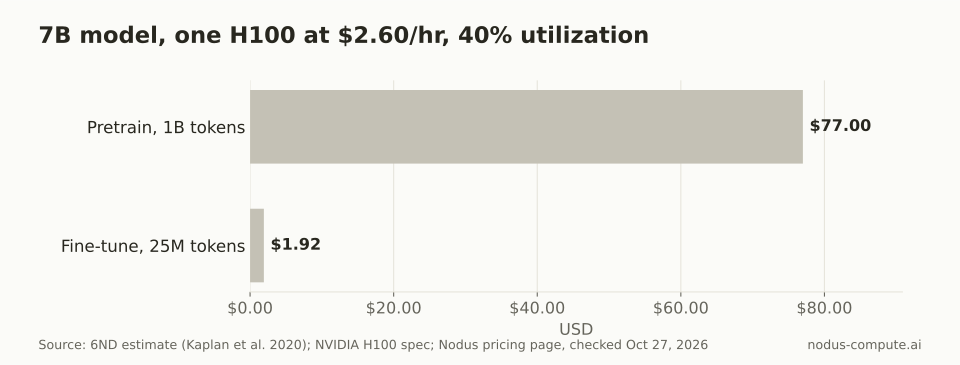 Same model, same GPU, same rate: the 40x gap comes entirely from tokens trained.
How did Nodus compare with Modal on both jobs?
Section titled “How did Nodus compare with Modal on both jobs?”We ran the same continued-pretraining and fine-tuning recipes on Nodus and on Modal with Qwen2.5-0.5B on one NVIDIA L4. In both pilots the exported weights matched byte for byte, so the only difference was the bill.
| Pilot | Nodus charge | Modal charge | Nodus share of Modal |
|---|---|---|---|
| Supervised fine-tuning | $0.048696 | $0.14746756 | 33.0% |
| Continued pretraining | $0.121164 | $0.21090282 | 57.5% |
Recorded charges for successful attempts before credits, October 2026 pilots, one seed and one accepted run per platform. The pilots used standalone Nodus Jobs, not TrainingJobs. In the chart, Modal’s charge is the 100.0% baseline.
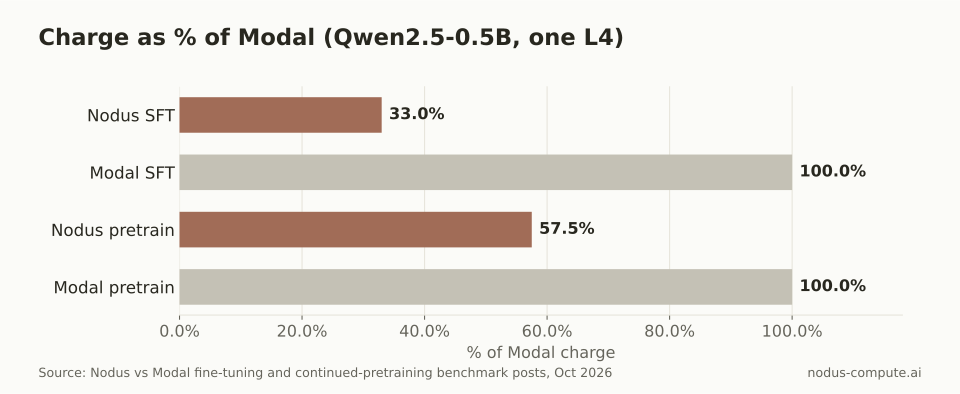 Identical weights in both pilots, so the lower charge bought the same model.
Two caveats from those posts. The fine-tuning pilot also had one failed Nodus attempt; counting it, Nodus cost 24.7% less than Modal instead of 67%. And a 0.5B model on one L4 says nothing certain about a 70B run, so treat the ratio as evidence for this job size only.
How do you run continued pretraining on Nodus?
Section titled “How do you run continued pretraining on Nodus?”Use the nodus/sft runtime with task: Pretrain on the spec, and point it at a Volume of text rows. The default initialization: Continued starts from the model’s existing weights, and method: Full trains every weight rather than an adapter.
apiVersion: nodus.dev/v1beta1kind: TrainingJobmetadata: name: domain-pretrainspec: runtime: nodus/sft task: Pretrain model: uri: hf://Qwen/Qwen3-0.6B@c1899de289a04d12100db370d81485cdf75e47ca data: volume: domain-corpus path: corpus.jsonl format: JSONL parameters: steps: 5000 initialization: Continued method: Full packing: true appendEOS: false maxCostUSD: "50.00"Set appendEOS: false when your rows are chunks or paragraphs rather than whole documents, so the trainer does not insert an end-of-sequence token after every row. Packing fills each training block with text instead of padding. Price it before it runs:
$ pip install nodus-compute$ nodus login$ nodus apply -f pretrain.yaml --dry-run -o yaml$ nodus apply -f pretrain.yamlThe dry run returns a cost estimate, and maxCostUSD stops the run at the cap. Long pretraining runs checkpoint with optimizer state, so a lost GPU resumes the run instead of restarting it.
How do you run fine-tuning on Nodus?
Section titled “How do you run fine-tuning on Nodus?”Same runtime, no task field, and a columns map onto your prompt and completion fields. The lora block makes it an adapter run; leave it out for full fine-tuning.
apiVersion: nodus.dev/v1beta1kind: TrainingJobmetadata: name: support-sftspec: runtime: nodus/sft model: uri: hf://Qwen/Qwen3-0.6B@c1899de289a04d12100db370d81485cdf75e47ca data: volume: support-chats path: chats.jsonl format: JSONL columns: {prompt: question, completion: answer} parameters: steps: 2000 lora: {r: 16, alpha: 32} maxCostUSD: "20.00"The Training (Beta) guide covers validation-based checkpoint selection and preference tuning. A model you trained earlier can be the input of the next TrainingJob, which is how you chain the two methods.
Should you do both, and in what order?
Section titled “Should you do both, and in what order?”Do both only when you have both kinds of data, and always pretrain first. Gururangan et al. found that adapting to the task’s own unlabeled text helped even after domain-adaptive pretraining, so the stages stack.
A sequence that works: continued pretraining on the domain corpus, then SFT on labeled examples, then preference tuning if you have chosen and rejected answers. Each stage starts from the previous stage’s exported model. Evaluate after every stage on the same held-out set, plus a general benchmark, so you can see which stage helped and which one cost you general skill.
What is the difference between pretraining and fine-tuning?
Section titled “What is the difference between pretraining and fine-tuning?”Pretraining teaches a model language and facts from huge amounts of raw text with a next-token objective. Fine-tuning adjusts an already pretrained model with labeled examples so it behaves a certain way. Continued pretraining sits between them: more raw-text pretraining, but on your domain.
Can continued pretraining replace retrieval (RAG)?
Section titled “Can continued pretraining replace retrieval (RAG)?”Not for facts that change. Weights are a snapshot, and retraining every time a document changes is slow and expensive. Teams often pretrain for vocabulary and reasoning style, then use retrieval for current facts.
What learning rate should continued pretraining use?
Section titled “What learning rate should continued pretraining use?”Lower than the original pretraining peak, with a warmup, because a high rate on a narrow corpus speeds up forgetting. Run a short sweep on a small slice and keep the setting whose held-out general score drops least.
How do you know continued pretraining worked?
Section titled “How do you know continued pretraining worked?”Measure perplexity on held-out domain text before and after, then check a general benchmark for forgetting. In our continued-pretraining pilot, held-out perplexity fell 21.8%, from 21.0 to 16.4, on both Nodus and Modal.
Which is cheaper on Nodus?
Section titled “Which is cheaper on Nodus?”Fine-tuning, by roughly the ratio of tokens trained. Both run at the same listed GPU rates on the pricing page, and the dry run shows the estimate before anything is charged.
More from the blog
checkpointing9 min read
Which GPU platforms checkpoint and resume training for you?
Who saves, who restarts and who resumes a training run after a lost GPU, compared across Nodus, Modal, AWS SageMaker, RunPod and Vast.ai.
Read the postcapacity7 min read
What are cheaper alternatives to AWS for GPU training?
AWS p5 lists at $6.88 per H100 hour. Nodus, Modal, Lambda and RunPod list 42 to 62 percent less. Spend AWS credits first, then burst.
Read the post