
What are the best Hugging Face AutoTrain alternatives?
AutoTrain is no longer maintained. Compare Nodus, Together AI, Modal, RunPod, Vertex AI and Axolotl or Unsloth for fine-tuning, with worked costs.
Hugging Face now marks AutoTrain as no longer maintained, so the best alternative depends on whether you want a managed recipe, a fine-tuning API or your own training script. Nodus is the closest managed replacement for LLM fine-tuning: its recipes take a Hugging Face model and a dataset, run on the GPU you choose and resume from the latest checkpoint if a machine is lost. Pick Together AI if you want to pay per token without choosing hardware, and Axolotl or Unsloth if you want to run open-source trainers on hardware you already have.
We build Nodus, so read this with that in mind. Every fact about another product links to its own pricing page or docs, and the arithmetic is written out so you can redo it with today’s prices.
What happened to Hugging Face AutoTrain?
Section titled “What happened to Hugging Face AutoTrain?”AutoTrain still works, but it is frozen. The AutoTrain docs and the GitHub README both open with the same notice: no new features will be added and bugs will not be fixed. Hugging Face recommends Axolotl, TRL or transformers.Trainer instead.
The tool itself is free. You pay only for compute, per the AutoTrain cost page. Locally that is your own hardware; as a Space it is billed per minute for the Hugging Face Spaces hardware you attach. The Spaces quickstart has you duplicate the AutoTrain Space, pick hardware, and train from the web UI, with logs in TensorBoard and the model pushed to a Hub repository.
That setup is pleasant for a first fine-tune. The trouble starts when a new model architecture or library version needs a fix that will not come, or when you want a GPU that the Spaces hardware list does not offer.
How do the AutoTrain alternatives compare?
Section titled “How do the AutoTrain alternatives compare?”The short version: Nodus and Together AI replace the managed part, Modal, RunPod and Vertex AI replace the compute part, and Axolotl or Unsloth replace the trainer.
| Option | What you get | How you pay | GPU choice | If a machine is lost |
|---|---|---|---|---|
| AutoTrain on Spaces | No-code UI, frozen codebase | Per minute of Spaces hardware | Spaces list (T4 up to A100 and RTX PRO 6000) | PAUSE_ON_FAILURE pauses the Space on a failed run |
| Nodus | Managed recipes: SFT, LoRA, QLoRA, DPO, ORPO, KTO, distillation, GRPO | Prepaid credits, listed hourly price per GPU | You allow GPU types, or take the recipe’s preset | Resumes from the latest full checkpoint |
| Together AI | Fine-tuning API | Per 1M training tokens, minimum charge per job | None, managed | Not stated on the pricing page |
| Modal | Run your own trainer as Python functions | Per second | You pick per function | Restarts the function on the same input; you write checkpoints |
| RunPod | GPU pods for your own trainer | Per second | You pick the pod | You handle restarts; data without a network volume is lost if the balance hits $0 |
| Google Vertex AI | Custom training jobs | Machine type plus attached accelerator | You pick machine and accelerator | Not stated on the pricing page |
| Axolotl or Unsloth | Open-source trainers (Apache-2.0) | Free; you supply hardware | Whatever you run them on | Your own checkpoint and restart logic |
Checked October 27, 2026: AutoTrain cost, Spaces quickstart, Hugging Face pricing, Nodus training guide, Together AI pricing, Modal pricing and preemption docs, RunPod pricing and Pods pricing docs, Vertex AI pricing, Axolotl and Unsloth.
Which is cheapest for a 10-hour fine-tune on one A100?
Section titled “Which is cheapest for a 10-hour fine-tune on one A100?”At listed prices, Nodus is the cheapest of the hourly options we priced for the same GPU, and AutoTrain on Spaces sits near the top. We priced one NVIDIA A100 80GB for 10 hours, GPU compute only, from each company’s own page.
| Where it runs | Listed price for one A100 80GB | 10 hours |
|---|---|---|
| Hugging Face Spaces (AutoTrain), A100 large | $2.50/hr | $25.00 |
| Modal | $0.000694/s, or $2.4984/hr | $24.98 |
| RunPod Secure Cloud, A100 SXM | $1.79/hr | $17.90 |
| RunPod Community Cloud, A100 SXM | $1.39/hr | $13.90 |
| Nodus | $1.09/hr | $10.90 |
Prices checked October 27, 2026 on the Hugging Face pricing page, Modal pricing, RunPod pricing and the Nodus pricing page, where the A100 80GB is listed at $1.09/hr. Modal’s per-second rate is multiplied by 36,000 seconds.
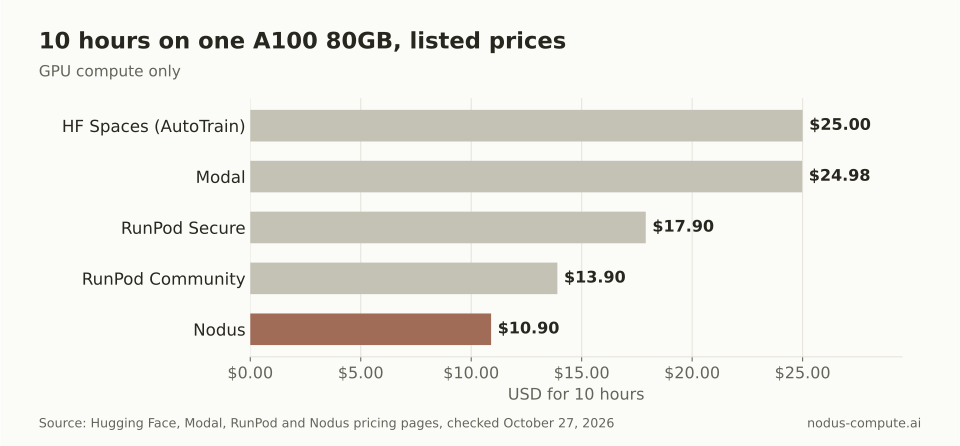 The same 10 A100-hours cost $14.10 less on Nodus than on an AutoTrain Space.
Google Vertex AI is harder to put in one line because it adds charges together. Its pricing page lists the A100 80GB accelerator for custom training at $3.92808/hr in Iowa (us-central1), so $39.28 for 10 hours before the cost of the machine type is added.
Together AI does not bill by the hour at all. Its pricing page charges for tokens processed: training set size times epochs, plus any evaluation tokens. A LoRA fine-tune of Llama 3.1 8B is $0.34 per 1M tokens with a $4.00 minimum.
A 20M-token dataset trained for 3 epochs is 60M tokens, so 60 x $0.34 = $20.40. That is predictable, and you never size a GPU, but you also cannot make it cheaper by picking a smaller one.
Does your GPU choice matter for a LoRA run?
Section titled “Does your GPU choice matter for a LoRA run?”Yes, and often more than the platform. A recipe that lets you pick the GPU lets you skip paying H100 prices for a job that a 24 GB card finishes for less.
Here is how we checked it. The nodus/sft runtime page publishes the measured seconds per step that its dry-run estimate uses: 0.45 on H100, 0.7 on A100 80GB, 1 on L40S, 1.2 on RTX 4090 and 1.3 on RTX A6000. Multiply by 2,000 steps, the step count in the docs’ own LoRA example, then by the listed price on the Nodus pricing page.
| GPU | Time for 2,000 steps | Listed price | Estimated GPU cost |
|---|---|---|---|
| RTX 4090 | 40 min | $0.290/hr | $0.19 |
| RTX A6000 | 43.3 min | $0.333/hr | $0.24 |
| A100 80GB | 23.3 min | $1.090/hr | $0.42 |
| L40S | 33.3 min | $0.793/hr | $0.44 |
| H100 SXM | 15 min | $2.600/hr | $0.65 |
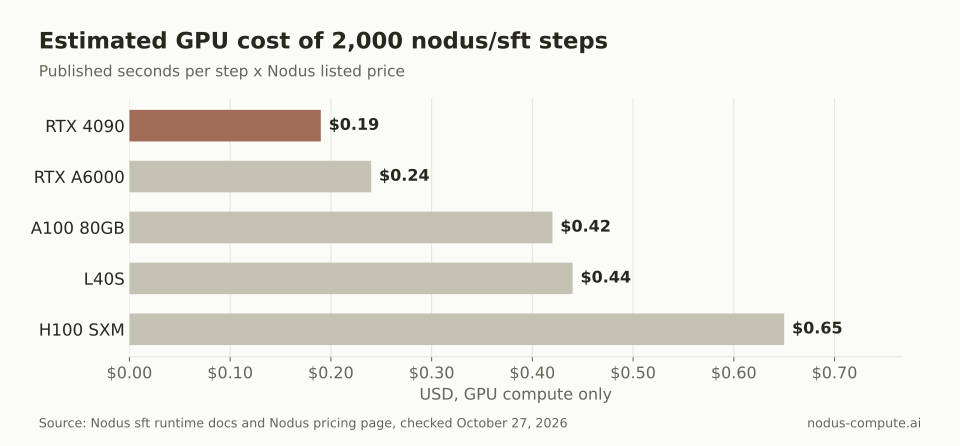 The H100 finishes first, but the RTX 4090 does the same 2,000 steps for less than a third of the cost.
This is arithmetic from published numbers, not a bill from a run. Real step time moves with model size, sequence length and batch size, which is why the dry run prices your actual configuration. The rule still holds: if the job fits in 24 GB and nobody is waiting on it, take the cheaper card. If someone is waiting, the H100 buys back 25 minutes for 46 cents.
The runtime’s presets already make that call for small models. Qwen3-1.7B with LoRA defaults to one RTX 4090, L40S or RTX A6000, while full fine-tuning of Qwen3-8B defaults to 8 x H100.
What happens when a fine-tuning run fails halfway?
Section titled “What happens when a fine-tuning run fails halfway?”On Nodus the run resumes from its last checkpoint. On a GPU you rent directly, the restart is your job.
The training guide says recovery uses full checkpoints with optimizer, scheduler and RNG state, and the sft runtime saves one every 200 steps by default (saveSteps). If a node in a multi-node run is lost, the whole group restarts from the latest checkpoint every rank committed, up to 3 times. The spending cap behaves the same way: when maxCostUSD is reached the run is suspended, not failed, and raising the cap resumes it from the checkpoint. Our post on automatic checkpointing and resume compares how other platforms handle this.
Modal’s preemption docs say a preempted function restarts on the same input and recommend checkpointing long training runs yourself. RunPod’s Pods pricing docs say pods stop when your balance reaches $0, and pods without a network volume lose their data. With Axolotl or Unsloth, noticing the failure and restarting from a saved checkpoint is up to you.
Where is AutoTrain still the better choice?
Section titled “Where is AutoTrain still the better choice?”AutoTrain is still a reasonable pick in a few specific cases.
- You want a point-and-click UI. Nodus starts runs from the CLI or Python SDK; its console shows runs, curves and costs but does not launch them.
- Your task is not an LLM. AutoTrain covers image classification, tabular data, token classification, extractive question answering and more, per its docs and README. The Nodus training catalog is built around language models.
- You run it locally on your own GPU, where the AutoTrain cost page says it costs nothing.
- You have a working AutoTrain config for a model it already supports, and you need one more run of it.
- Your whole workflow lives on the Hugging Face Hub, and a Space that pushes the model and TensorBoard logs straight to a repository is the point.
If none of those apply, the maintenance notice is the deciding fact. A trainer that will not get fixes is a risk for anything you plan to repeat.
How do you fine-tune a Hugging Face model on Nodus instead?
Section titled “How do you fine-tune a Hugging Face model on Nodus instead?”Upload your data to a Volume, write a TrainingJob that names the Hugging Face model, dry-run it, then apply it. These commands and the manifest are copied from the Nodus training guide and the Volumes guide.
$ pip install nodus-compute$ nodus login$ nodus create volume support-chats --size 100Gi$ nodus volume put support-chats ./chats.jsonl /apiVersion: nodus.dev/v1beta1kind: TrainingJobmetadata: name: support-sftspec: runtime: nodus/sft model: uri: hf://Qwen/Qwen3-0.6B@c1899de289a04d12100db370d81485cdf75e47ca secret: hf-token # only for gated repositories data: volume: support-chats # a Volume holding chats.jsonl path: chats.jsonl format: JSONL columns: {prompt: question, completion: answer} parameters: steps: 2000 lora: {r: 16, alpha: 32} maxCostUSD: "20.00"$ nodus apply -f sft.yaml --dry-run -o yaml # status.estimate: cost to completion, first hold, start time$ nodus apply -f sft.yaml$ nodus get tj -w$ nodus cp tj/support-sft:outputs/adapter/adapter_model.safetensors ./adapter_model.safetensorsThe columns map plays the same role as AutoTrain’s column mapping, so an AutoTrain dataset usually moves over without edits. Pin the model to a 40-character commit. Nodus imports that revision once into a read-only Volume and runs the trainer offline, so billed GPU time is never spent downloading weights. To pin a GPU type, add resources: {gpu: {type: [h100-sxm-80g], count: 1}}.
From Python, the same run is one line from the finetune recipe reference, after import nodus and from nodus.recipes import finetune:
sft = finetune.sft(model="Qwen/Qwen3-1.7B", data=nodus.Volume.from_name("support-chats"), lora=finetune.LoRA(r=16), max_steps=2000).run(gpu="H100", max_cost=20)TrainingJobs are in Beta, so fields can still change before v1. In our fine-tuning benchmark against Modal, a pilot with one small model on one NVIDIA L4, Nodus produced byte-identical weights at 67% lower charges for the successful run. If you already have cloud credits, the cloud accounts docs show how Nodus can run work in your own AWS, GCP or Azure account, or in a RunPod or Lambda account you connect with its API key.
Is AutoTrain shutting down?
Section titled “Is AutoTrain shutting down?”Hugging Face has not said it is shutting down; its docs say it is no longer maintained. The Space and the autotrain-advanced package still work, but bugs will not be fixed and new model architectures will not be added.
What does Hugging Face recommend instead of AutoTrain?
Section titled “What does Hugging Face recommend instead of AutoTrain?”Its notice names Axolotl, TRL and transformers.Trainer. Those are trainers, not compute, so you still need a GPU to run them on. The Nodus sft runtime page lists its checkpoint format as HFTrainer, so the concepts carry over.
Can I run Axolotl or Unsloth on Nodus?
Section titled “Can I run Axolotl or Unsloth on Nodus?”Yes, as your own code. A custom TrainingRuntime can run any image, and Nodus decides when to checkpoint the state directory your trainer writes to. See Bring your own runtime in the training guide, or our Modal alternatives for training post for running scripts as plain Jobs.
Can a coding agent start the fine-tune for me?
Section titled “Can a coding agent start the fine-tune for me?”Yes. nodus mcp install claude adds the Nodus MCP server to Claude Code, and the agent must accept a dry-run estimate before it creates anything. Runs stay inside your account’s budgets and the job’s maxCostUSD cap.
Is there a free tier like AutoTrain’s local mode?
Section titled “Is there a free tier like AutoTrain’s local mode?”Running Axolotl, Unsloth or AutoTrain on your own GPU costs nothing beyond the hardware. Modal’s $0 plan includes $30 of free credits a month, per its pricing page. Nodus uses prepaid credits; current GPU rates are on the pricing page, and our RunPod alternatives post compares hourly rates more widely.
More from the blog
checkpointing9 min read
Which GPU platforms checkpoint and resume training for you?
Who saves, who restarts and who resumes a training run after a lost GPU, compared across Nodus, Modal, AWS SageMaker, RunPod and Vast.ai.
Read the postdata7 min read
Continued pretraining vs fine-tuning: which do you need?
Continued pretraining teaches a model new domain text. Fine-tuning teaches it behavior from examples. A decision rule, cost math and Nodus configs.
Read the post