
Can you run LLM inference on spot GPUs safely?
Batch inference on spot GPUs is safe. Online serving is safe only with an on-demand floor, spread replicas and a drain on notice. The rule and math.
Yes for batch inference, and yes for online serving only if losing every spot replica at once still leaves you a working service. On Nodus, a self-hosted model can run as a Function on interruptible capacity, and a reclaimed worker is replaced on a new machine, but that worker must load the model before it answers. That load time, not the reclaim itself, is the real cost of serving on spot, so the safe layout is an on-demand floor plus spot replicas you can afford to lose.
This post is about the online case. The reclaim warnings come from the Amazon Web Services (AWS), Google Cloud and Microsoft Azure docs, checked November 28, 2026. The model start-up times come from the Nodus GPU snapshot docs. The capacity and cost math is our own scenario arithmetic, shown in full so you can rerun it with your numbers.
Is batch inference on spot GPUs safe?
Section titled “Is batch inference on spot GPUs safe?”Yes, and it is the easiest win spot capacity offers. Nobody waits on a single answer, so a reclaim costs only the chunk in flight. That holds as long as finished results land somewhere durable and the job skips them on restart.
We cover that pattern in detail, with offline vLLM, sharded inputs and resume code, in how to run batch LLM inference cheaply. The rest of this post is about the harder case: a server with users waiting on the other end.
Why is online serving on spot harder than batch?
Section titled “Why is online serving on spot harder than batch?”A server has no checkpoint to fall back on. When a replica disappears, its in-flight requests fail, its share of traffic moves to the survivors, and the capacity stays missing until a replacement has loaded the model.
Reclaims can also arrive together. AWS’s Spot best practices say: “We do not recommend Spot Instances for workloads that are intolerant of occasional periods when the entire target capacity is not completely available.” Spreading across instance types and Availability Zones helps, the same page adds, but nothing is guaranteed. So ask what your service does when every spot replica is gone at once.
How much warning do you get before a spot GPU is reclaimed?
Section titled “How much warning do you get before a spot GPU is reclaimed?”Between 30 seconds and 2 minutes, depending on the cloud and how you configure it. Each figure below comes from the cloud’s own documentation.
| Cloud | Warning before reclaim | Source |
|---|---|---|
| AWS EC2 Spot | 2 minutes (120 s); a rebalance recommendation can arrive sooner, or together with the notice | interruption notices, rebalance recommendations |
| Google Cloud Spot VMs | 0 s notice by default, then a best-effort shutdown of up to 30 s; a 120 s notice can be set at creation | Spot VMs |
| Azure Spot VMs | 30 seconds | Azure Spot Virtual Machines |
Checked November 28, 2026.
A replacement takes longer than that to serve. The Nodus GPU snapshot docs report a vLLM engine on an NVIDIA A10 that served Qwen3-8B 2 min 11 s to 2 min 13 s (131 to 133 s) after a cold worker started. Qwen3-0.6B took 91.5 to 95.5 s, and neither figure includes finding a machine. Even the full 2-minute AWS notice is shorter than the 8B cold start, so a replacement started on the notice cannot be ready before the old replica is gone.
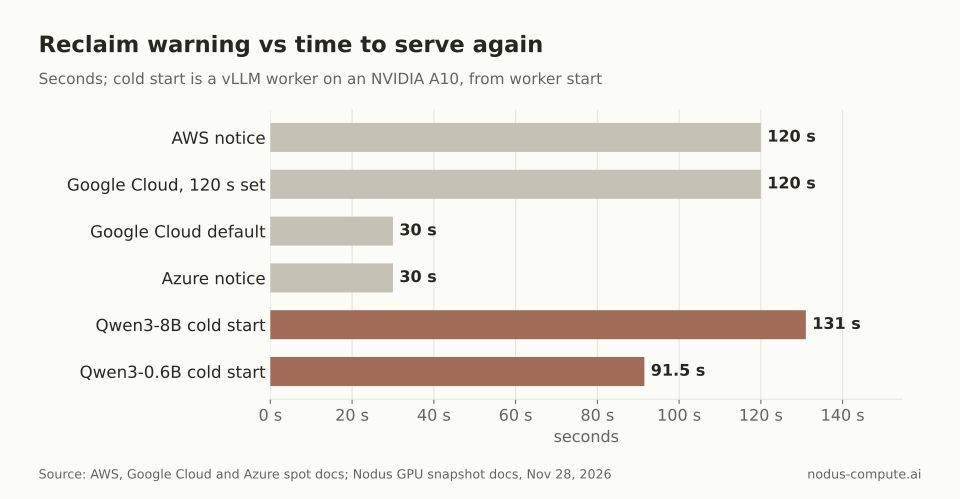 A replacement replica cannot outrun the notice, so spare capacity has to be running before the reclaim.
What decision rule tells you if serving on spot is safe?
Section titled “What decision rule tells you if serving on spot is safe?”Serve on spot only when you can answer yes to all four of these. We wrote the rule from the reclaim behavior above; it is a sizing rule, not a measured benchmark.
- Your on-demand floor alone carries the traffic you cannot shed or queue. Call the peak replica count N and the floor F. If every spot replica vanished, F replicas is what you get.
- Your spot replicas are spread across several capacity pools, and the floor plus the spot replicas minus the largest single pool is still at least N. AWS defines a capacity pool as one instance type in one Availability Zone.
- The spare replica is already warm. Because a cold start outlasts the notice, the headroom has to exist before the reclaim, not after it.
- The spot discount d beats the extra replicas you now run. With S spot replicas, the layout is cheaper than N on-demand replicas only when d is greater than (F + S - N) / S.
If you fail the first test, keep the service on on-demand capacity and put only your batch work on spot.
What does the math look like for a four-replica service?
Section titled “What does the math look like for a four-replica service?”Take a service that needs four replicas at peak (N = 4) and compare three layouts. A is four on-demand replicas, B is two on-demand plus three spot replicas in three capacity pools, and C is five spot replicas across three pools (two, two and one).
| Layout | Normal | One pool lost | All spot lost |
|---|---|---|---|
| A: 4 on-demand | 4 | 4 | 4 |
| B: 2 on-demand + 3 spot | 5 | 4 | 2 |
| C: 5 spot | 5 | 3 | 0 |
Layout B passes the rule: losing a pool leaves 4 replicas, and losing every spot replica leaves 2, half of peak. Layout C drops below peak when its largest pool goes and serves nothing when all spot capacity goes.
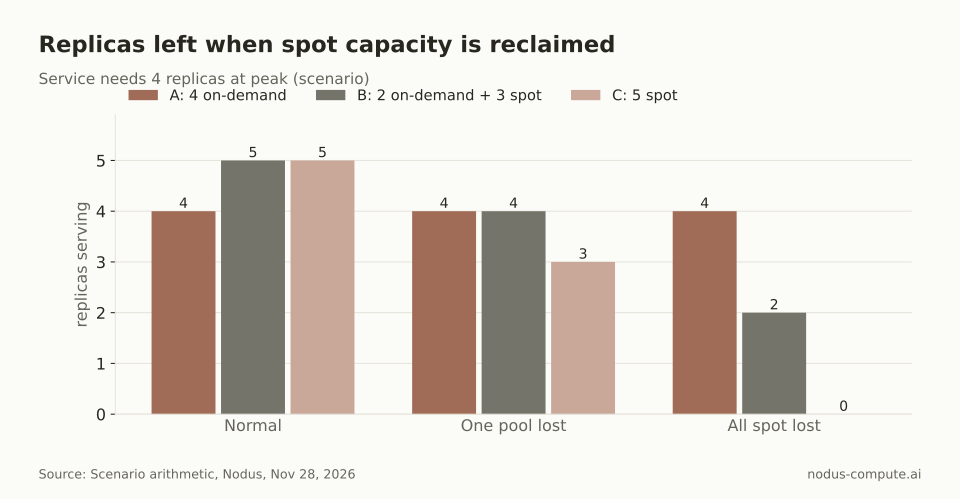 Only the layout with an on-demand floor still serves traffic when every spot replica is reclaimed at once.
Cost, in on-demand replica-hours per hour, is F + S x (1 - d). Layout A is always 4.0. Layout B is 2 + 3 x (1 - d) and breaks even at d = 1/3, a 33% discount. Layout C is 5 x (1 - d) and breaks even at a 20% discount.
| Spot discount | A | B | C |
|---|---|---|---|
| 30% | 4.0 | 4.1 | 3.5 |
| 50% | 4.0 | 3.5 | 2.5 |
| 70% | 4.0 | 2.9 | 1.5 |
| 90% | 4.0 | 2.3 | 0.5 |
At a 70% discount, layout B costs 2.9 against 4.0, a 27.5% saving, while keeping half of peak capacity through a full spot outage. The 90% row is a ceiling, not a forecast: AWS advertises savings of up to 90% and Google Cloud up to 91%. Google Cloud also notes that spot prices can change up to once every day. To put units on the table, the NVIDIA H100 SXM is listed at $2.600/hr on the Nodus pricing page (checked November 28, 2026), so 4.0 replica-hours of H100s is $10.40 an hour, or $249.60 a day.
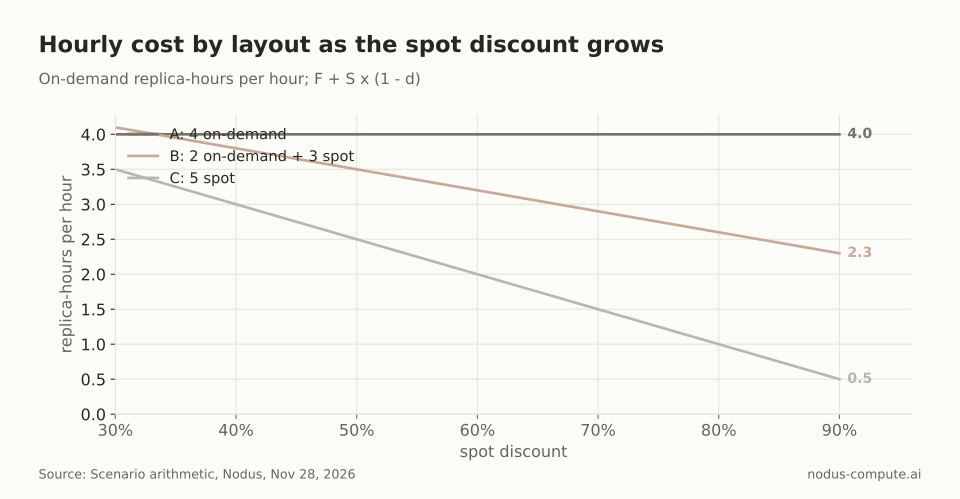 The floored layout only saves money once the discount passes 33%, and it saves 27.5% at 70%.
How do you drain a spot replica without dropping requests?
Section titled “How do you drain a spot replica without dropping requests?”Treat the notice as a signal to stop taking work, not to start saving it. A clean drain has four steps.
- Watch for the notice from inside the replica. AWS exposes it through instance metadata and Amazon EventBridge, Google Cloud through the
preemptedmetadata value, and Azure through Scheduled Events. Our spot vs on-demand post has the polling code for all three. - Fail the readiness check at once, so the load balancer stops sending new requests. Keep liveness separate, and only report ready after the model has loaded.
- Let in-flight requests finish within the time left. Check your load balancer’s drain setting: an AWS Application Load Balancer waits 300 seconds by default before finishing deregistration, longer than the 120 s notice, so lower it below the notice.
- Make clients retry what the drain cut off. A long streamed generation may not finish in 30 seconds, so the client needs to detect a truncated stream and resend the request with an idempotency key that your server honors.
On Google Cloud, set the 120-second preemption notice when you create the VM. The default leaves only the best-effort shutdown period of up to 30 seconds.
What does Nodus do for inference when capacity goes away?
Section titled “What does Nodus do for inference when capacity goes away?”Nodus gives you two documented paths, and they handle capacity differently.
The first is the hosted Nodus inference API (Beta), an OpenAI-compatible API for open-weight models. Shared models need no endpoint deployment or GPU reservation, so you never size replicas. The docs say chat inference prefers ready, compatible fast capacity, with standard capacity as a fallback. The accepted rate stays fixed even if a more expensive fallback serves the request.
A 502 or 503 means the model is unavailable or at capacity, and you are not charged. Sending an Idempotency-Key header makes retries safe: a repeat within 24 hours returns the same answer with no second charge. An interrupted stream ends without the data: [DONE] marker, which gives your client a clean signal to retry.
The second is serving your own model as a Nodus Function. Functions accept interruptible to allow interruptible capacity, and min_workers keeps workers warm.
The attempts and recovery docs describe how a worker slot survives a reclaim: on the notice, Nodus starts preparing a replacement, and starts it only once the old machine is provably gone. A machine that stops sending heartbeats gets a replacement prepared after 20 seconds. With GPU snapshots (Beta), a later worker restores the loaded engine instead of loading it again. The docs report Qwen3-8B serving 68 s after the worker started, against 2 min 11 s to 2 min 13 s cold, measured with a test object store rather than Nodus storage.
Here is what the docs do not describe: a latency guarantee for interruptible workers, or one endpoint that splits traffic between an on-demand floor and spot workers. The floor-plus-spot layout from the worked example is still yours to set up. The Nodus Spot direct-SSH pilot is different: its preemption webhook arrives after the node is gone, with no advance warning and no restart. A server on those nodes needs its own floor and load balancer.
When should you keep inference off spot entirely?
Section titled “When should you keep inference off spot entirely?”Keep it on on-demand capacity when the service has one replica or cannot shed or queue any traffic. The same goes for a model that takes many minutes to load on a GPU that few capacity pools offer. In those cases a single reclaim is an outage, and the discount does not buy it back.
Spot still fits around such a service. Run its evals, embedding backfills and synthetic data on spot, and keep the server itself on capacity that stays.
How often will my spot inference replicas be reclaimed?
Section titled “How often will my spot inference replicas be reclaimed?”It depends on the GPU and region more than the cloud. In AWS’s published Spot Instance Advisor data, 85% of H100 pools sat in the under-5% monthly band. Roughly half of T4, A10G, L4 and L40S pools sat in the over-20% band; our breakdown shows the method.
Does autoscaling make spot serving safe on its own?
Section titled “Does autoscaling make spot serving safe on its own?”No. An autoscaler adds replicas after load rises, and each new replica pays the full cold start before it answers. On Nodus, a Function’s scaledown_window keeps an idle worker for up to 20 minutes, so a burst that returns inside the window finds it still running.
Should spot replicas use a different GPU type from the floor?
Section titled “Should spot replicas use a different GPU type from the floor?”They can, and more types means more capacity pools to spread across. AWS’s rule of thumb is to stay flexible across at least 10 instance types per workload. For serving, add a GPU type only after you have checked that it fits the model and meets your latency target.
What is the cheapest way to serve an open-weight model without managing replicas?
Section titled “What is the cheapest way to serve an open-weight model without managing replicas?”Call a shared model on a hosted per-token API. On Nodus, the catalog shows each model’s input, cached-input and output rates, and nodus inference models lists the models you can call now.
More from the blog
distributed9 min read
Nodus vs SkyPilot: which runs training across clouds better?
Nodus vs SkyPilot for training across clouds: who runs the control plane, the same job in each, preemption recovery, real costs, and when SkyPilot wins.
Read the postbenchmark9 min read
How do you train a Flux or SDXL LoRA on a cloud GPU?
Run diffusers' DreamBooth LoRA script as one GPU job: SDXL fits a 24 GB card, Flux dev needs 26 GB in BF16 or 9 GB with QLoRA. Recipe, VRAM and cost.
Read the post