
How do you train a Flux or SDXL LoRA on a cloud GPU?
Run diffusers' DreamBooth LoRA script as one GPU job: SDXL fits a 24 GB card, Flux dev needs 26 GB in BF16 or 9 GB with QLoRA. Recipe, VRAM and cost.
A Flux or SDXL LoRA trains as one GPU job running Hugging Face diffusers’ DreamBooth LoRA script: SDXL fits a 24 GB card, and Flux dev needs about 26 GB in BF16 or 9 GB with QLoRA. On Nodus, an SDXL or Flux QLoRA job is a single nodus run on an RTX 4090 listed at $0.29/hr, with checkpoints in /nodus/state so a lost machine resumes instead of starting over. A published 700-step Flux QLoRA run took 41 minutes on that card, about $0.20 of GPU time at that rate.
This post is the training recipe. For which card to buy or rent for generation, see the best GPU for Stable Diffusion and Flux. The memory and cost figures come from the trainers’ own docs and Hugging Face’s published runs, linked where they appear. The adapter sizes and the resume test are ours, and we say how we got them.
Which GPU do you need for an SDXL or Flux LoRA?
Section titled “Which GPU do you need for an SDXL or Flux LoRA?”Memory decides the GPU, and the method you pick decides the memory. SDXL’s denoiser has 2.57 billion parameters and Flux dev’s has 11.9 billion, so the same LoRA settings need very different cards.
| Setup | Peak memory published | Source | Cheapest Nodus GPU that fits |
|---|---|---|---|
| SDXL LoRA with memory flags | under 16 GB | diffusers SDXL README | RTX 4090 24 GB, $0.29/hr |
| Flux dev QLoRA, cached text embeddings | about 9 GB | Hugging Face Flux QLoRA post | RTX 4090 24 GB, $0.29/hr |
Flux dev LoRA, kohya --fp8_base |
24 GB card, batch size 2 | kohya sd-scripts Flux docs | RTX 4090 24 GB, $0.29/hr |
| Flux dev LoRA, BF16 | 26 GB | Hugging Face Flux QLoRA post | RTX A6000 48 GB, $0.333/hr |
| Flux dev LoRA, FP8 training on H100 | 36.57 GB | Hugging Face Flux QLoRA post | RTX 6000 Ada 48 GB, $0.743/hr |
| Flux dev LoRA, rank 16, all components | over 40 GB | diffusers Flux README | RTX A6000 48 GB, $0.333/hr |
| SDXL full fine-tune | about 41 GB before activations | our arithmetic below | A100 80 GB, $1.09/hr |
| Flux dev full fine-tune | about 120 GB, estimated | Hugging Face Flux QLoRA post | H200 141 GB, $3.593/hr |
Sources: the diffusers SDXL DreamBooth LoRA README and Flux README, Hugging Face’s Flux QLoRA post, the kohya sd-scripts Flux guide, and the Nodus pricing page, where rates are listed as hourly supply prices. Prices checked November 28, 2026.
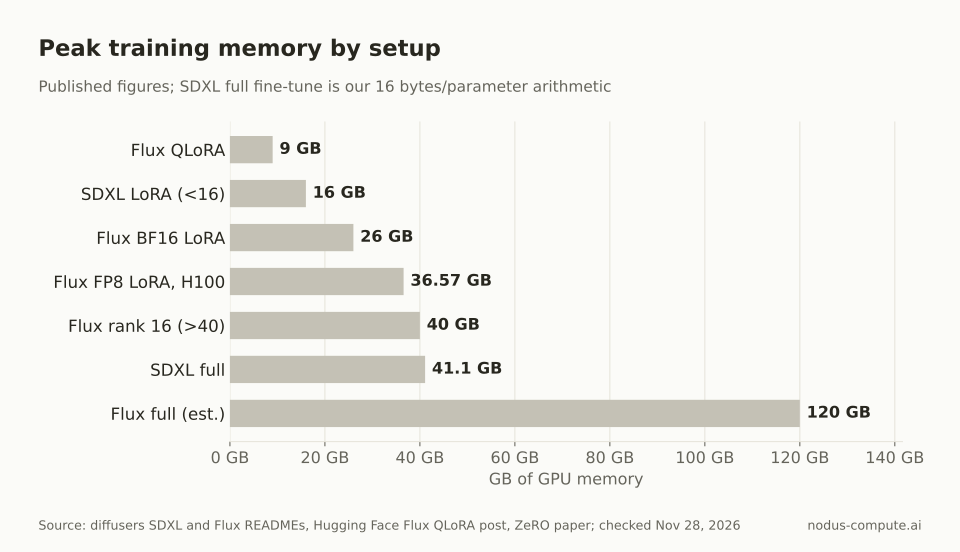 Every LoRA setup here fits a 48 GB card; only full fine-tunes need an 80 GB card or more.
The FP8 row needs more than memory. Hugging Face describes FP8 training through torchao for GPUs with compute capability 8.9 or higher, and NVIDIA’s CUDA GPU list puts the RTX A6000 at 8.6. That is why the FP8 row skips it for the RTX 6000 Ada, which is 8.9.
The SDXL full fine-tune figure is our arithmetic. Mixed-precision Adam keeps about 16 bytes per trained parameter, per the ZeRO paper: 2,567,463,684 x 16 bytes = 41.1 GB, before activations. For the trade-offs between the two methods, see LoRA vs full fine-tuning.
How big is a Flux or SDXL LoRA?
Section titled “How big is a Flux or SDXL LoRA?”Small: the adapter is well under 1% of the model, so the frozen base weights, not the LoRA, fill the GPU. We counted the trainable parameters with the exact module lists the two diffusers scripts use. We built each model on PyTorch’s meta device (shapes only, no weights) with diffusers 0.43.0 and attached the adapter with PEFT 0.22.0.
- SDXL: the script targets
to_k,to_q,to_vandto_out.0, which is 560 layers. Rank 4 trains 5,806,080 parameters, 0.23% of the 2,567,463,684 in the UNet. That base count matches the header of Stability AI’s published UNet file exactly. - Flux dev: the default list adds the text-stream projections and both feed-forward stacks, 342 layers in all. Rank 16 trains 44,826,624 parameters, 0.38% of the 11,901,408,320 in the transformer. Flux dev’s weights are gated, so we used its architecture with guidance embeddings switched on, as the dev model has.
| Rank | SDXL adapter, BF16 | Flux dev adapter, BF16 |
|---|---|---|
| 4 (script default) | 11.6 MB | 22.4 MB |
| 16 | 46.4 MB | 89.7 MB |
| 32 | 92.9 MB | 179.3 MB |
| 64 | 185.8 MB | 358.6 MB |
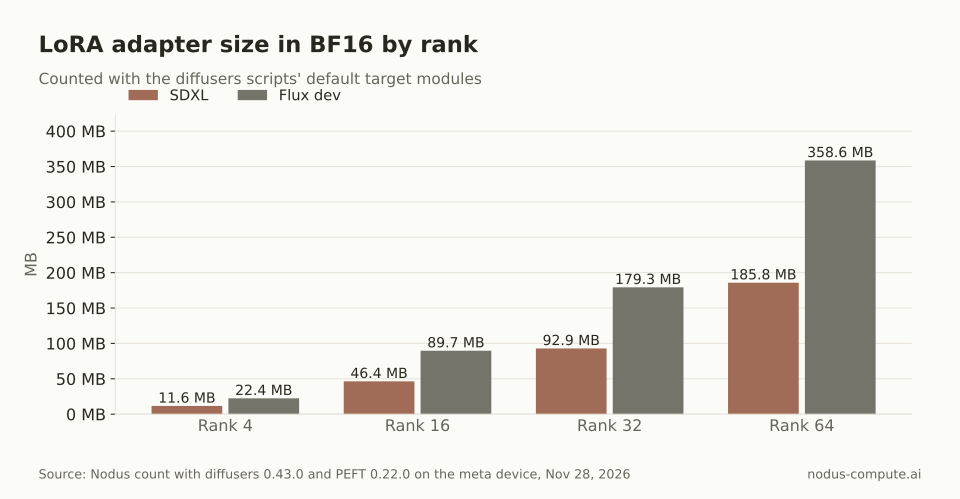 Even a rank-64 Flux adapter is under 400 MB; the 23.8 GB of frozen Flux weights pick your GPU.
Two things follow. Rank matters less for memory than the base. Even at rank 64, the Flux adapter’s weights, gradients and Adam states come to about 179.3 million x 16 bytes = 2.9 GB. The frozen BF16 weights are 11.9 billion x 2 bytes = 23.8 GB.
Checkpoints are cheap too. In our test, each one held only the adapter, optimizer, scheduler and random state, never the base model.
What does a LoRA training run cost?
Section titled “What does a LoRA training run cost?”Measure seconds per step on your data, then multiply: cost = seconds per step x steps / 3,600 x the hourly rate. Hugging Face’s two published Flux dev runs give a starting point, priced at Nodus list rates:
- QLoRA on an RTX 4090: 700 steps in about 41 minutes. 41 / 60 x $0.29 = $0.20.
- FP8 LoRA on an H100 SXM: 700 steps in about 20 minutes. 20 / 60 x $2.60 = $0.87.
The runs are not matched, so do not read them as a GPU speed test. The RTX 4090 run used a trimmed script with precomputed text embeddings and accumulated 4 batches per step, so it processed four times as many images. The H100 run used a modified FP8 script with 1 batch per step.
Scaling the first run is simple. At 41 / 700 = 3.5 seconds per step, a 2,000-step QLoRA run takes about 117 minutes, or 117 / 60 x $0.29 = $0.57. That is an extrapolation from one published run, not a measurement of ours.
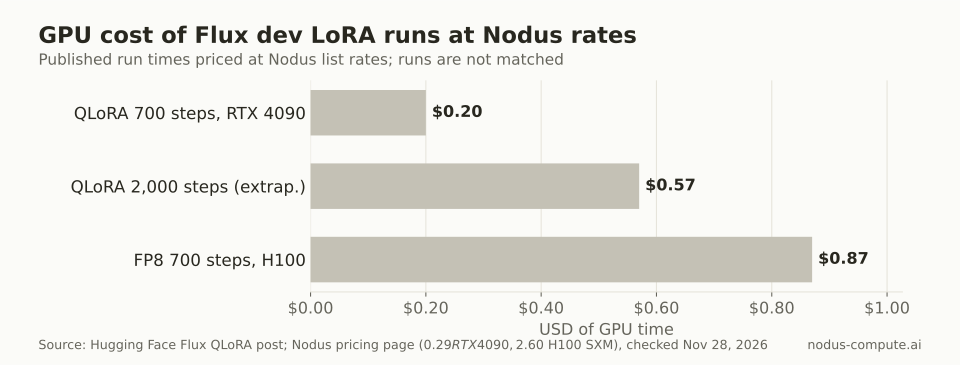 At these rates the GPU time for a LoRA costs less than a dollar; model downloads and setup can cost as much.
The run is not the whole bill. The Jobs guide says preparing a Job’s inputs is billed time, and your script also spends time downloading and loading the base model. For a sub-dollar LoRA that overhead can match the training itself, so check the estimate before launching.
How do you run the training job on Nodus?
Section titled “How do you run the training job on Nodus?”Upload the diffusers example folder with your images and run the script as one Job. Pin the scripts to a diffusers release: the scripts on the main branch check for an unreleased diffusers version and exit when run with the pip release.
$ pip install nodus-compute$ nodus login$ git clone --depth 1 --branch v0.43.0 https://github.com/huggingface/diffusers$ cd diffusers/examples/dreambooth$ mkdir my-imagesCopy your training photos into my-images. The diffusers examples use five photos of one subject with an instance prompt such as “a photo of sks dog”. If you fetch images with huggingface_hub, delete any .cache folder it leaves inside the image folder: the script tried to open it as an image and crashed in our test.
This is the SDXL job. The training flags come from the diffusers SDXL README, including its low-memory flags. Three are ours: --output_dir points into /nodus/state, checkpoints are written every 100 steps, and --resume_from_checkpoint=latest picks up the newest one.
$ nodus run --name sdxl-lora --gpu rtx-4090 --image nodus/pytorch \ --max-cost 3 --timeout 3h --output lora=/nodus/outputs/pytorch_lora_weights.safetensors \ -- bash -lc 'pip install diffusers==0.43.0 peft accelerate transformers torchvision ftfy tensorboard Jinja2 bitsandbytes && \ accelerate launch train_dreambooth_lora_sdxl.py \ --pretrained_model_name_or_path=stabilityai/stable-diffusion-xl-base-1.0 \ --pretrained_vae_model_name_or_path=madebyollin/sdxl-vae-fp16-fix \ --instance_data_dir=my-images --instance_prompt="a photo of sks dog" \ --resolution=1024 --train_batch_size=1 --gradient_accumulation_steps=4 \ --learning_rate=1e-4 --lr_scheduler=constant --lr_warmup_steps=0 --max_train_steps=500 \ --mixed_precision=fp16 --gradient_checkpointing --use_8bit_adam --seed=0 \ --output_dir=/nodus/state/sdxl-lora --checkpointing_steps=100 --resume_from_checkpoint=latest && \ cp /nodus/state/sdxl-lora/pytorch_lora_weights.safetensors /nodus/outputs/'$ nodus cp job/sdxl-lora:outputs/lora ./pytorch_lora_weights.safetensorsnodus run prints the expected cost before anything starts, --max-cost 3 saves state and suspends the Job when it reaches $3, and /nodus/state is the directory Nodus saves and restores when capacity is lost. Because the script resumes from that directory, adding --interruptible allow to use interruptible capacity is reasonable. The flags are from the Jobs guide and the nodus run reference, and automatic checkpointing and resume explains what happens on a loss.
For Flux dev, accept the model’s license on its Hugging Face page and store your token as a Nodus Secret, using the command from the Secrets guide:
$ nodus secret create hf-token --from-literal HF_TOKEN=hf_xxxThen change four things in the SDXL command. Run train_dreambooth_lora_flux.py on --gpu A6000 and add --secret hf-token.
Add sentencepiece to the pip line, which the Flux requirements file lists. Swap the model flags for --pretrained_model_name_or_path=black-forest-labs/FLUX.1-dev --mixed_precision=bf16 --resolution=512 --guidance_scale=1 --cache_latents, and drop the VAE flag. The Hugging Face libraries read HF_TOKEN from the environment, per their environment variable docs.
We have not run either GPU job end to end on Nodus. What we did run, on CPU, is the part most likely to break: the v0.43.0 SDXL and Flux scripts on Hugging Face’s tiny test models (hf-internal-testing/tiny-stable-diffusion-xl-pipe and tiny-flux-pipe). We used diffusers 0.43.0, PEFT 0.22.0, Transformers 5.24.1, Accelerate 1.16.0 and PyTorch 2.15.
Each ran 2 steps and saved checkpoint-2. Relaunched with a 4-step target, each logged “Resuming from checkpoint checkpoint-2” and finished at step 4. The README’s peft==0.7.0 pin was not needed with these versions.
When should you do a full fine-tune instead of a LoRA?
Section titled “When should you do a full fine-tune instead of a LoRA?”Almost never for one subject, style or character; that is the job DreamBooth LoRA was built for. Our rule, from the memory table above:
- SDXL LoRA: RTX 4090. It has 24 GB against the README’s under-16 GB figure, which leaves room for a higher rank or no 8-bit optimizer.
- Flux dev LoRA on a budget: QLoRA or kohya’s
--fp8_baseon the RTX 4090. You give up some speed and add quantization, but stay at $0.29/hr. - Flux dev LoRA in BF16, or at rank 16 and up: the 48 GB RTX A6000 at $0.333/hr, 4.3 cents an hour more than the RTX 4090. Probe first, because the README only says rank 16 “can exceed 40GB”.
- Full fine-tune: only when you are teaching the model a broad new domain from a large dataset, and a LoRA trained on the same data has already fallen short. Budget an 80 GB card for SDXL, and a 141 GB H200 or several GPUs for Flux dev.
The cheapest test of the rule is a short probe. Run 50 steps with the same flags and a $1 cap, read the seconds per step from the logs, and price the full run with the formula above before committing to it.
Can you use a Flux dev LoRA commercially?
Section titled “Can you use a Flux dev LoRA commercially?”Check the license first. FLUX.1 dev uses the FLUX.1 dev non-commercial license, per its model card, while FLUX.1 schnell is Apache 2.0. The diffusers recipe above trains dev; we have not tried it on schnell.
Will the LoRA load in ComfyUI or Automatic1111?
Section titled “Will the LoRA load in ComfyUI or Automatic1111?”The diffusers SDXL README says --output_kohya_format also writes pytorch_lora_weights_kohya.safetensors, a format those tools read. Add the flag to the SDXL command if that is where the LoRA is going.
Should I use kohya sd-scripts instead of diffusers?
Section titled “Should I use kohya sd-scripts instead of diffusers?”Use kohya if you need its memory options. Its Flux guide lists settings for 24 GB down to 8 GB cards with --fp8_base and --blocks_to_swap, trading speed for memory. The Nodus side is the same: a Job, a cost cap, and state written under /nodus/state.
Does a bigger GPU make a LoRA run cheaper?
Section titled “Does a bigger GPU make a LoRA run cheaper?”Only if it shortens the run by more than its price ratio. An H100 SXM is listed at $2.60/hr against $0.29/hr for an RTX 4090, so it must finish 2.60 / 0.29 = 9.0 times faster to cost less. A 50-step probe on each card answers that for your settings.
More from the blog
kubernetes8 min read
Do you need Kubernetes to run GPU training jobs?
Most teams don't. Kubernetes earns its cost for GPU training when a platform team, shared inference or many teams already exist. Decision rule and cost math.
Read the postgpu11 min read
FSDP vs Megatron-LM: which scales LLM training better?
FSDP is simpler and enough while a model fits on one 8-GPU machine. Megatron-LM's tensor and pipeline split wins across machines on slow links.
Read the post