
Do you need Kubernetes to run GPU training jobs?
Most teams don't. Kubernetes earns its cost for GPU training when a platform team, shared inference or many teams already exist. Decision rule and cost math.
No, most teams do not need Kubernetes to run GPU training jobs. Nodus runs each training job on capacity it finds for that job, with checkpoints restored if the machine is lost, so a small team can train without operating any cluster. Kubernetes earns its operating cost when you already have a platform team, the same GPUs also serve inference, or several teams need quotas on one shared pool.
This post is about whether you need a cluster orchestrator at all. If you have already decided you need one and are choosing between schedulers, read Slurm vs Kubernetes for GPU clusters instead.
What do you actually have to run for GPU training on Kubernetes?
Section titled “What do you actually have to run for GPU training on Kubernetes?”You run a stack of five or six components, not one. Kubernetes itself does not know how to start a multi-GPU training run well. Each missing piece is an add-on that someone has to install, upgrade and debug.
| Layer | Why training needs it | Common choice |
|---|---|---|
| GPU drivers and device plugin | Pods can only request nvidia.com/gpu after an administrator installs vendor drivers and the vendor’s device plugin (Kubernetes: Schedule GPUs) |
NVIDIA GPU Operator, which manages drivers, the device plugin, the Container Toolkit, node labels and DCGM monitoring (GPU Operator) |
| Gang scheduling | A multi-node job must start all its pods or none | Native gang scheduling is Beta since v1.37 and off by default behind the GenericWorkload feature gate (gang scheduling); or Volcano (Volcano) |
| Queueing and quotas | Decides which job waits, starts or gets preempted | Kueue (Kueue overview) |
| Training operator | Turns “run this PyTorch job on 16 GPUs” into pods with ranks and rendezvous | Kubeflow Trainer and its TrainJob (Kubeflow Trainer) |
| Checkpoint storage | Training state must outlive the pod and the node | Persistent volumes or object storage (persistent volumes) |
| Node autoscaling | Adds and removes GPU nodes as jobs arrive | Cluster autoscaler; Kueue’s own docs leave autoscaling to it (Kueue overview) |
There is one more limit worth knowing before you plan around sharing. GPUs go in the limits section, and if you also set requests the two must be equal (Kubernetes: Schedule GPUs). A pod that asks for a GPU holds a whole one until it exits.
None of this is a reason to avoid Kubernetes. It is the bill you sign up for. If a platform team already runs most of these layers for other workloads, adding training is a modest step. If nobody does, training on Kubernetes means building that team first.
When does Kubernetes earn its cost for training?
Section titled “When does Kubernetes earn its cost for training?”Kubernetes earns its cost when your GPUs would be busy anyway and someone is already on call for the cluster. Three situations make that true.
You already run Kubernetes in production with a platform team. The drivers, monitoring, storage classes and upgrade process exist. Training becomes one more workload on infrastructure you already pay people to keep healthy.
The same GPUs serve inference. A fleet that serves models by day and trains overnight keeps its GPUs busy, and Kubernetes is the natural home for long-running serving. Our Slurm vs Kubernetes post covers that mixed case in detail.
Several teams share one pool and need fair limits. Kueue exists for exactly this: quotas per tenant, queueing and preemption between them. Three research teams fighting over 64 GPUs is a scheduling problem, and Kubernetes plus Kueue is a reasonable answer.
When is Kubernetes just overhead?
Section titled “When is Kubernetes just overhead?”Kubernetes is overhead when you have a few training runs, a small team and no standing cluster. The orchestrator then exists only to start a handful of jobs a month, and the GPUs under it sit idle between them.
Here is our own illustrative arithmetic. Take one node of 8 x NVIDIA H100 kept for a month of 730 hours. That is 5,840 GPU-hours. At the $2.60/hr listed for an H100 SXM on the Nodus pricing page, the node is worth $15,184 a month.
Now say the team runs 3 fine-tuning jobs a month, each on 8 GPUs for 20 hours. That is 480 GPU-hours, or $1,248 of work at the same rate. The node is busy 8.2% of the time. The other 5,360 GPU-hours, worth $13,936, are idle.
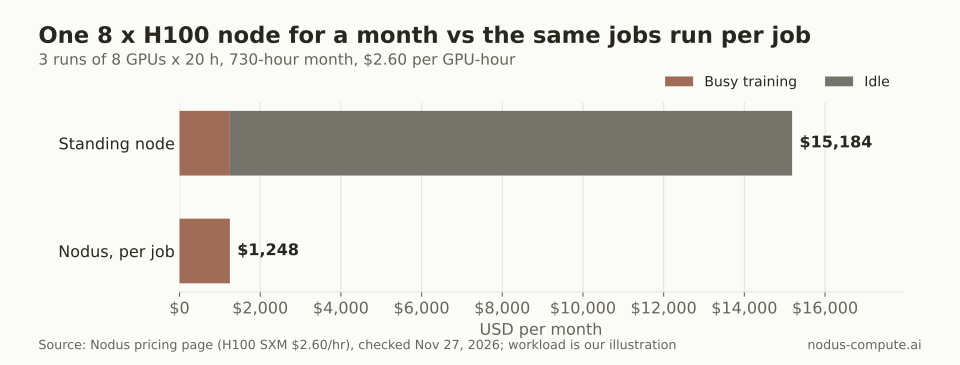 At 8% utilization, almost all of a standing node’s cost is idle time, before anyone is paid to run the cluster.
The Kubernetes stack does not cause that idle cost. It does make it sticky, because a cluster you spent weeks setting up is hard to switch off between runs.
How do you decide whether your team needs Kubernetes?
Section titled “How do you decide whether your team needs Kubernetes?”Use Kubernetes for training only if you can answer yes to both of the first two questions, or yes to the third.
- Will your GPUs be busy more than the break-even share of the month? If standing capacity costs a fraction R of what you would pay per job, the break-even busy share is R. Standing capacity at 40% below the per-job rate breaks even at 60% busy.
- Is someone already paid to run Kubernetes, with drivers, monitoring and upgrades in place?
- Do the same GPUs serve inference, or do three or more teams need quotas on one pool?
If none apply, run training as jobs and let the platform find the capacity. If only the first applies, a fixed cluster can still pay, but price the engineering time honestly before you commit.
We derived the break-even from the costs above. A standing node costs R x P x 5,840 a month at any utilization u, and the same work run per job costs P x 5,840 x u. They are equal when u = R.
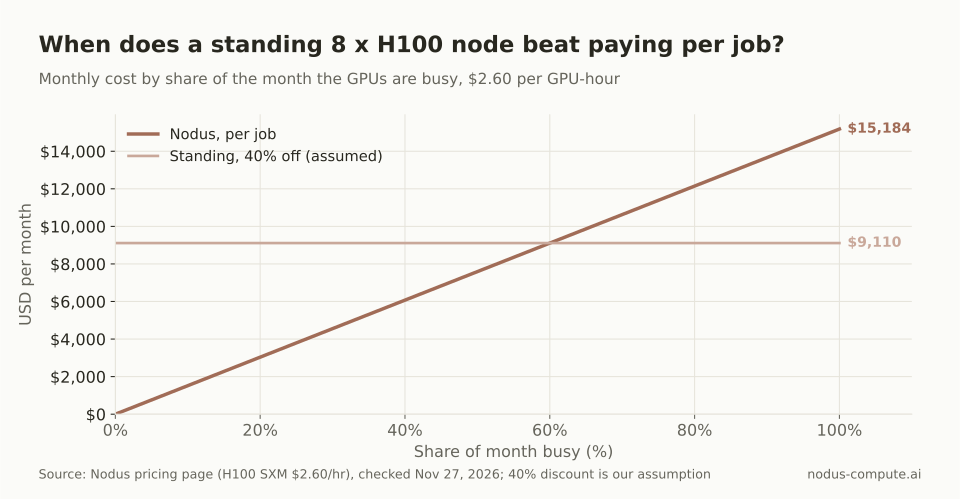 At an assumed 40% discount, a standing 8 x H100 node only beats per-job pricing once it is busy more than 60% of the month.
The 40% discount is our assumption for illustration, not a quote from any provider. Plug in your own rate. GPU price from the Nodus pricing page, prices checked November 27, 2026.
How do you run training on Nodus without operating a cluster?
Section titled “How do you run training on Nodus without operating a cluster?”You submit a job, and Nodus places it, meters it and stops it. There are no nodes, device plugins or schedulers on your side. This is the documented quickstart command, which reviews the estimate without creating the job:
nodus run --name cli-quickstart --gpu L4 --image nodus/pytorch \ --max-cost 1 --timeout 10m --no-warm --dry-run \ --output metrics=/nodus/outputs/metrics.json -- python train.pyDrop --dry-run to start it. --max-cost sets the job’s spending limit and --timeout stops it after that wall-clock time. If you know kubectl, the CLI will feel familiar: Nodus resources are Kubernetes-style objects with the same get, describe, apply and logs verbs (Nodus for kubectl users).
The pieces you would otherwise install map onto built-in features. Nodus checkpoints a job’s state directory while it runs and restores it on the next attempt if the capacity is reclaimed (checkpoints). Multi-node training is in Beta, with an API ceiling of 8 machines, and Nodus starts your command only after every member is acquired and can reach the others (multi-node). We covered the launcher side in how to run multi-node training across machines.
Can Nodus use the Kubernetes cluster you already have?
Section titled “Can Nodus use the Kubernetes cluster you already have?”Yes, in Beta: Nodus can run your work as pods in one namespace of your own cluster, first, before other capacity (run work in your Kubernetes cluster). This is for teams that hold reserved GPUs in a managed Kubernetes cluster and want them used before anything else.
The setup is a dedicated namespace plus a scoped manifest the console shows you:
kubectl create namespace noduskubectl apply -n nodus -f nodus.yamlThe manifest creates a ServiceAccount whose Role can create, list and delete pods, read their logs, and manage Secrets in that namespace only. Nodus refuses a token that can list pods in every namespace. Each pod asks for whole GPUs on the nodes you pick by label, and you keep paying for the cluster as you do today. Nodus meters your credit limit at the hourly rate per GPU you enter.
It behaves sensibly when your cluster is full. A pod waits up to 10 minutes by default for your autoscaler, then Nodus deletes it and runs the work elsewhere. If your ResourceQuota refuses a pod, Nodus skips that GPU type in the namespace for an hour (docs). Your cluster still needs working GPU drivers and a device plugin, since that is how Kubernetes exposes GPUs to any pod.
Where is Kubernetes the better choice?
Section titled “Where is Kubernetes the better choice?”Kubernetes is better when training is one workload among many on a platform you already run well. It gives you one control plane for serving, batch and services, a large ecosystem of operators, and full control over networking, images and data locality. If your security team requires that every process run inside your own cluster, Kubernetes with Kueue and a training operator is a sound design. The Nodus namespace option can still help there, but your cluster remains the system of record.
Is Kubernetes required for multi-node GPU training?
Section titled “Is Kubernetes required for multi-node GPU training?”No. Multi-node training needs every machine started together, a rendezvous and a fast network, not Kubernetes specifically. Plain torchrun on a few machines, Slurm, or a platform that assembles the machines for you all work.
Can I start without Kubernetes and move to it later?
Section titled “Can I start without Kubernetes and move to it later?”Yes, if your training code reads its rank and peers from environment variables and saves checkpoints to durable storage. Those two habits make a script portable across torchrun, Kubeflow Trainer and Nodus. Our post on saving checkpoints to S3 or GCS covers the storage half.
Do I need the NVIDIA GPU Operator?
Section titled “Do I need the NVIDIA GPU Operator?”On Kubernetes you need drivers and a device plugin on every GPU node; the operator is one way to manage them together. If your cluster is managed, check whether your provider already installs drivers before adding the operator on top.
Does Nodus replace my Kubernetes cluster?
Section titled “Does Nodus replace my Kubernetes cluster?”Not necessarily. Nodus can run training without one, or place work in a namespace of a cluster you keep. The namespace option is in Beta, and Nodus only creates and deletes its own labelled pods there.
More from the blog
gpu11 min read
FSDP vs Megatron-LM: which scales LLM training better?
FSDP is simpler and enough while a model fits on one 8-GPU machine. Megatron-LM's tensor and pipeline split wins across machines on slow links.
Read the postpricing11 min read
GPU vs TPU: which is better for training LLMs?
GPUs are the safer default for LLM training because PyTorch and CUDA target them first. TPUs win on JAX, long runs and committed capacity. The math inside.
Read the post