
What is the best GPU for Stable Diffusion and Flux?
Pick by VRAM: 16 GB for SD 1.5, SDXL and SD 3.5 Medium, 32 GB for Flux. Plus the hours of use before buying beats paying by the hour.
The best GPU for Stable Diffusion and Flux is the one with enough memory for your model: a 16 GB NVIDIA GeForce RTX 5060 Ti ($429) for SD 1.5, SDXL and SD 3.5 Medium, and a 32 GB RTX 5090 ($1,999) for Flux dev and schnell. Nodus lists that same RTX 5090 at $0.48/hr, so buying one only beats paying by the hour after about 4,165 hours of generation, roughly 5.7 hours a day for two years. If your card would sit idle most days, keep a cheaper one at home, or none, and run Flux and LoRA training on Nodus when you need them.
Our rule is memory first, then speed, then a break-even on the hours you will really generate. Every memory figure below comes from a model card, a Hugging Face file listing or a published benchmark, linked where it appears.
How much VRAM do Stable Diffusion and Flux need?
Section titled “How much VRAM do Stable Diffusion and Flux need?”Start with memory, because running out of it does not make generation a little slower; it makes it unusable. AEC Magazine’s Stable Diffusion GPU test with the UL Procyon benchmark shows it plainly. The SD 1.5 test uses 4.6 GB and the SDXL test uses 9.8 GB. An 8 GB NVIDIA RTX A1000, about 2 GB short, took 13 minutes per SDXL image, 70 times slower than the RTX 6000 Ada.
| Model | What the source publishes | Card that runs it comfortably |
|---|---|---|
| SD 1.5 | 4.6 GB in the Procyon SD 1.5 test | 8 GB |
| SDXL | 9.8 GB in the Procyon SDXL test | 12 GB, 16 GB with room for LoRAs and upscaling |
| SD 3.5 Medium (2.5B) | 9.9 GB excluding text encoders | 16 GB |
| SD 3.5 Large (8.1B) | 16.3 GB of 16-bit transformer weights | 24 GB with text encoders offloaded, 32 GB with room to spare |
| Flux dev and schnell (12B) | 23.8 GB weights file; about 50 GB for every component | 32 GB, or 24 GB with an FP8 or quantized transformer |
Sources: Procyon figures from AEC Magazine; SD 3.5 sizes and the 9.9 GB figure from Stability AI’s SD 3.5 announcement; SD 3.5 Large weights from its transformer files (9.99 GB plus 6.31 GB); Flux from the FLUX.1 dev model card and files and the diffusers Flux docs.
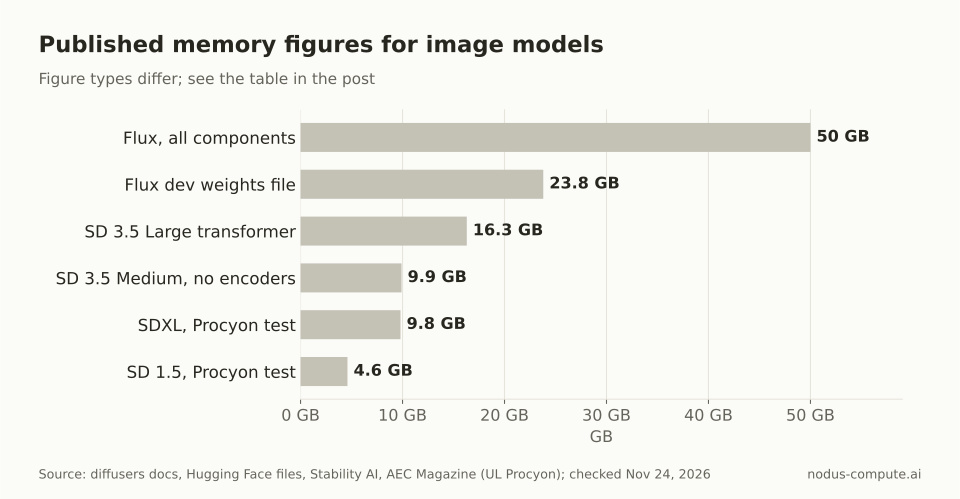 Flux is the line between a 16 GB card and a 32 GB one; the Stable Diffusion models fit well below it.
Flux is the model that changes the purchase. Its 12B transformer alone is a 23.8 GB file, and the diffusers docs say loading every component takes about 50 GB. No consumer card holds all of that at once, so even on a 32 GB card the text encoders move to system memory, as the model card’s example does with CPU offload. The same docs show Flux running in under 16 GB with quantization and offloading, which works but costs time on every image.
This table stays at the level of a buying decision; a separate post covers VRAM model by model.
Which consumer GPU should you buy for each model?
Section titled “Which consumer GPU should you buy for each model?”Match the card to the largest model you will run often, not the one you might try once. NVIDIA’s launch prices give a clean ladder:
| Card | VRAM | NVIDIA launch price | Good for | Listed on Nodus |
|---|---|---|---|---|
| RTX 5060 Ti 16GB | 16 GB | $429 | SD 1.5, SDXL, SD 3.5 Medium, Flux with quantization | Not listed |
| RTX 5070 Ti | 16 GB | $749 | Same models, faster | Not listed |
| RTX 5080 | 16 GB | $999 | Same models, faster | Not listed |
| RTX 4090 | 24 GB | $1,599 | Adds SD 3.5 Large and FP8 Flux | $0.29/hr |
| RTX 5090 | 32 GB | $1,999 | Flux dev and schnell with headroom | $0.48/hr |
Prices checked November 24, 2026. Sources: NVIDIA’s RTX 50 series announcement ($1,999, $999, $749), RTX 5060 family post ($429 for 16 GB), RTX 40 series announcement ($1,599), and the Nodus pricing page. Store prices can sit above launch prices, and the RTX 4090 is a previous-generation card.
The three 16 GB cards, from $429 to $999, run the same models. The RTX 5070 Ti and 5080 finish images sooner but load nothing the RTX 5060 Ti cannot, so pay for speed only once memory is settled.
Speed differences at the top are smaller than the price gap suggests. In Puget Systems’ RTX 5090 and 5080 AI review, the RTX 5090 and RTX 4090 were nearly identical on SDXL at batch size 4. At larger batches the 5090 saved roughly 0.15 seconds per image. Puget used early PyTorch builds for the new cards, so the gap may have grown since, but the lesson holds: you buy the RTX 5090 for its 32 GB, not its SDXL speed.
When is running Stable Diffusion on Nodus cheaper than buying a GPU?
Section titled “When is running Stable Diffusion on Nodus cheaper than buying a GPU?”Divide the card’s price by the hourly rate for the same GPU. Nodus lists both top cards, so the comparison is like for like:
- RTX 5090: $1,999 / $0.48 per hour = 4,165 hours
- RTX 4090: $1,599 / $0.29 per hour = 5,514 hours
Over two years (730 days), that is 5.7 hours of generation every day for the RTX 5090 and 7.6 hours for the RTX 4090. Those are busy hours, with the GPU working, not hours the PC is switched on.
To make that concrete, we priced three usage patterns on Nodus and divided each card’s price by the yearly cost:
| Usage | Hours a year | Nodus RTX 5090 a year | Years before a 5090 pays off | Nodus RTX 4090 a year | Years before a 4090 pays off |
|---|---|---|---|---|---|
| Weekend hobby, 5 h a week | 260 | $124.80 | 16.0 | $75.40 | 21.2 |
| Freelance work, 20 h a week | 1,040 | $499.20 | 4.0 | $301.60 | 5.3 |
| Around the clock | 8,760 | $4,204.80 | 0.5 (5.7 months) | $2,540.40 | 0.6 (7.6 months) |
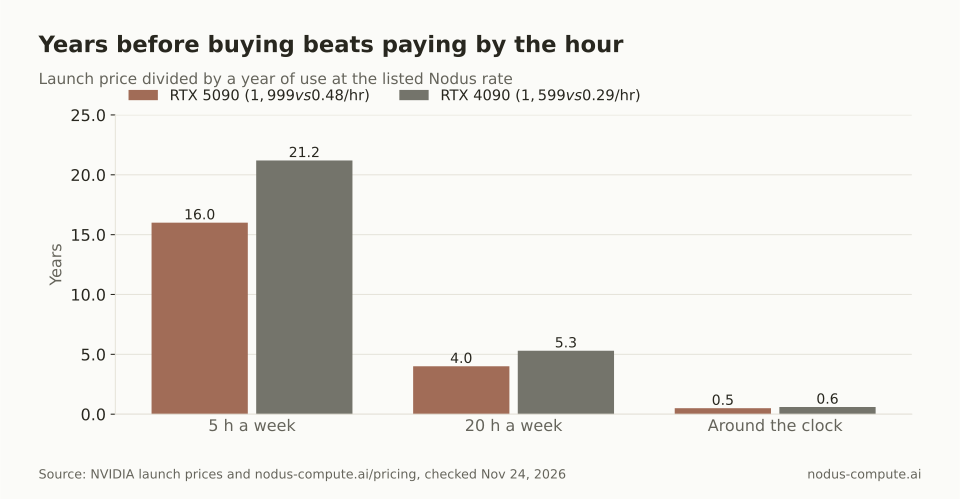 A card running around the clock pays for itself within a year; a weekend hobby card never does.
The division flatters buying. A card also needs a PC around it and power: NVIDIA’s RTX 5090 specs list 575 W of total graphics power and a 1,000 W system power supply. If you pay more than launch price, the break-even moves later in proportion. On the Nodus side, a job’s billed time includes preparing its inputs and the minutes your script spends loading the model, so a short session costs a little more than its images alone.
Our rule from this table: buy the RTX 5090 if you will generate for more than about 4 hours a day, every day, for at least three years. Below that, a 16 GB card at home for SDXL plus Nodus for Flux and training costs less. We did the same math for language models in running an LLM locally vs in the cloud, and for 12 and 16 GB cards in the best budget GPU for AI.
What does training a Flux LoRA cost by the hour?
Section titled “What does training a Flux LoRA cost by the hour?”Training needs more memory than generating, unless you quantize. Hugging Face measured a Flux dev QLoRA fine-tune on an RTX 4090 at about 9 GB peak. Standard BF16 LoRA on the same setup used 26 GB, more than the 4090 has, and they estimate full fine-tuning at about 120 GB.
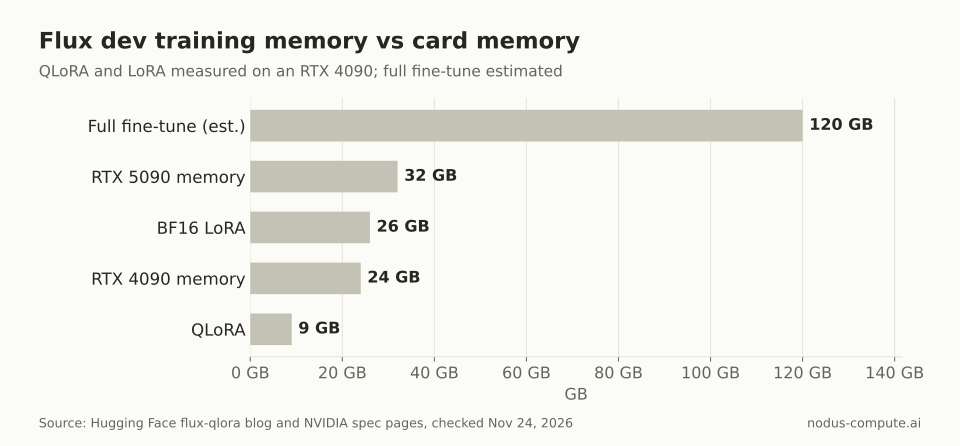 QLoRA brings Flux training within reach of a 16 GB card; full fine-tuning needs more memory than any consumer card has.
Their 700-step QLoRA run took about 41 minutes on the RTX 4090. At the listed Nodus rate that is 41 / 60 x $0.29 = $0.20 of GPU time. We have not repeated the run on Nodus, and the job also bills input preparation and model loading, so treat $0.20 as the floor. For SD 3.5 Large, Hugging Face’s SD 3.5 post shows LoRA training on 24 GB cards with quantization.
A monthly LoRA is the case where owning a bigger card makes least sense. A 26 GB BF16 LoRA needs the $1,999 RTX 5090 at home; on Nodus you pay $0.48 for each hour it runs on the same card.
When is a GPU on your desk the better choice?
Section titled “When is a GPU on your desk the better choice?”Buy a card when generation is your daily work. Interactive work in ComfyUI or a similar tool means short bursts all day, and a local GPU answers instantly with no startup. Your prompts, reference images and outputs never leave the machine. At more than 4 or 5 busy hours a day, the payback table says the card wins on cost too.
How do you run a Stable Diffusion or Flux job on Nodus?
Section titled “How do you run a Stable Diffusion or Flux job on Nodus?”Install the CLI, sign in, and run your generation or training script on the GPU you name. These commands come from the Jobs guide:
$ pip install nodus-compute$ nodus login$ nodus run --gpu L4 --image nodus/pytorch -- python hello.pyReplace L4 with rtx-4090 or any name nodus get gpus lists, and hello.py with your own script. Before anything starts, nodus run prints the expected cost; add --max-cost 5 to stop the job if it would spend more than $5. A long LoRA run can be paused with nodus suspend job/train, which saves state and stops billing.
If you already own a card, you can still use both. Enroll the machine in a Nodus pool and jobs go to it first, with other capacity used only under rules you set and a routing fee you agree to when you create the pool.
Is 12 GB of VRAM enough for SDXL?
Section titled “Is 12 GB of VRAM enough for SDXL?”Yes for generation: the Procyon SDXL test uses 9.8 GB, which leaves about 2 GB on a 12 GB card such as the $549 RTX 5070. That headroom disappears once you stack ControlNets, LoRAs and upscalers, which is why we recommend 16 GB.
Should I run Flux dev or Flux schnell?
Section titled “Should I run Flux dev or Flux schnell?”They are the same 12B size, so they need the same memory. The FLUX.1 schnell card says it generates images in 1 to 4 steps and is released under Apache 2.0 for commercial use, while Flux dev uses a non-commercial license for the model itself. Fewer steps means fewer GPU-seconds per image on any card.
Can I run Flux on an 8 GB card?
Section titled “Can I run Flux on an 8 GB card?”The diffusers docs show quantization and offloading options that cut Flux’s memory, with a worked example under 16 GB, so it can run. Expect it to be slow: AEC Magazine’s 8 GB card, 2 GB short for SDXL, took 13 minutes per image. For occasional Flux work, an RTX 5090 on Nodus at $0.48/hr is cheaper than waiting.
Is an image API cheaper than running the model on a GPU?
Section titled “Is an image API cheaper than running the model on a GPU?”It can be at low volume, because you pay per image and nothing sits idle. Once you generate steadily, paying for the GPU time wins; our fal.ai alternatives post works out the images per hour where that switch happens.
More from the blog
training8 min read
What are the best GMI Cloud alternatives for AI training?
GMI Cloud alternatives for AI training: Nodus, RunPod, Modal, Lambda and CoreWeave compared on H100 price, access, billing and spend caps.
Read the postinference6 min read
How do you estimate batch inference completion time?
A fast sample is not a delivery forecast. Measure accepted records over elapsed time, include fixed overhead and test the slow end before committing to a deadline.
Read the post