
How do you run batch LLM inference cheaply on GPUs?
Skip the server: run vLLM offline on sharded, resumable jobs on interruptible GPUs. Cost math, a batch API vs self-host rule, and resume code.
The cheapest way to run batch LLM inference is offline: load an open-weight model with vLLM’s LLM.generate, split the input into resumable shards and run them on interruptible GPUs, so a reclaim costs one chunk, not the job. Nodus runs each shard as one index of a Job and restores its finished chunks after a reclaim. If you need a closed model, the OpenAI and Anthropic batch APIs cost 50% less than their standard APIs.
Batch work is the easy case for cheap compute. Nobody waits on a single response, and a result written an hour late is still correct. That covers evals, synthetic data, labeling a corpus and backfilling embeddings.
Should you use a batch API, offline vLLM or an online server?
Section titled “Should you use a batch API, offline vLLM or an online server?”Pick by model first, then by volume. If the quality you need only exists in a closed model, the provider’s batch API is the cheapest way to call it. If an open-weight model is good enough, offline vLLM on your own GPUs is usually cheaper at volume. An online server only makes sense for batch work if you already run one for live traffic and it has idle hours.
| Option | Use it when | What you trade |
|---|---|---|
| OpenAI Batch API | You need an OpenAI model and can wait | 50% off synchronous prices, results within 24 hours |
| Anthropic Message Batches | You need a Claude model and can wait | 50% off standard prices, most batches finish within 1 hour, expiry at 24 hours |
vLLM offline (LLM.generate) |
An open model is good enough and the job is large | You pay for GPU-hours, so throughput sets your price |
| vLLM online server | You already serve live traffic with spare hours | Request overhead and rate limits you set yourself |
Sources: the OpenAI and Anthropic batch pages linked above and the vLLM quickstart, checked November 25, 2026.
Our decision rule: run a 1,000-document sample through the open model and score it the same way you would score the API output. If it passes, price the full job on GPUs with the math below and compare it to the API’s batch price per document. If it fails, the batch API is the answer and no GPU math matters.
Why does offline inference beat running a server for batch jobs?
Section titled “Why does offline inference beat running a server for batch jobs?”Offline inference keeps the GPU full. With llm.generate(prompts, sampling_params), vLLM adds every prompt to the engine’s waiting queue and works through them with continuous batching, as the vLLM quickstart describes. There is no HTTP layer, no client concurrency to tune and no idle gap between requests. If you are new to the engine itself, what vLLM is covers paged attention and batching in more depth.
The cost consequence is simple. A server is billed for every hour it is up, busy or not, which is why self-hosting only pays off at high utilization. A batch job is busy from the first prompt to the last and then exits, so you pay for work, not for waiting.
How much does a batch inference job cost on GPUs?
Section titled “How much does a batch inference job cost on GPUs?”Cost is tokens divided by throughput, times the hourly rate. Throughput is the one number you must measure yourself, because it depends on the model, the GPU, prompt length and output length. Treat the figure below as a parameter of the example, not a benchmark.
Take a labeling job over 1,000,000 documents that averages 180 output tokens each, so 180 million output tokens. Suppose a calibration run shows your setup sustaining 5,000 output tokens per second on one H100, prompt processing included.
- GPU time: 180,000,000 / 5,000 = 36,000 seconds, or 10 GPU-hours.
- Cost: 10 x $2.60 = $26.00, which is $0.026 per 1,000 documents.
- Per million output tokens: $26.00 / 180 = $0.144.
Throughput matters as much as the hourly rate. At 2,500 tokens per second the same job takes 20 GPU-hours and costs $52.00. At 1,000 tokens per second it takes 50 GPU-hours and costs $130.00.
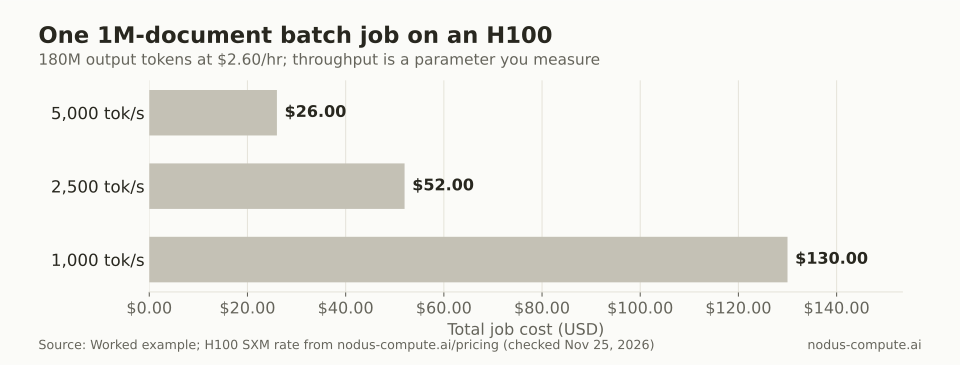 Halving throughput doubles the bill, so measure it on a real sample before you price the job.
The GPU is a choice too. A 7B or 8B model in 16-bit fits on an NVIDIA L40S 48 GB, listed at $0.793/hr on the Nodus pricing page, against $2.60/hr for the H100 SXM. Run the same calibration shard on both and keep the one with the lower cost per document, not the lower hourly rate.
Sharding changes the clock, not the bill. Split the job into 8 shards on 8 single-GPU machines and each one runs for 1.25 hours. The total is still 10 GPU-hours and $26.00, plus one model load per shard, and you get results in about an hour and a quarter instead of ten.
How do you make a batch job survive spot preemption?
Section titled “How do you make a batch job survive spot preemption?”Make every unit of work idempotent and small. Interruptible capacity is cheaper because the provider can take it back; how often that happens depends on the GPU and region. A batch job that restarts from zero after a reclaim gives the savings back, so design it so a reclaim costs one chunk.
Three rules make that work:
- Split the input deterministically, so shard 3 gets the same rows on every attempt.
- Process each shard in fixed chunks, and write each finished chunk to its own file.
- Write to a temp file and rename it, so a chunk file is either complete or absent, and skip chunks that already exist.
Here is the pattern as one script. It reads its shard number from NODUS_INDEX and the shard count from NODUS_COMPLETIONS, keeps finished chunks in NODUS_CHECKPOINT_DIR and writes the merged shard to NODUS_OUTPUTS_DIR. These are the environment variables every Nodus Job sees, per the Jobs guide.
import json, osfrom pathlib import Pathfrom vllm import LLM, SamplingParams
INDEX = int(os.environ["NODUS_INDEX"])SHARDS = int(os.environ["NODUS_COMPLETIONS"])STATE = Path(os.environ["NODUS_CHECKPOINT_DIR"]) / f"shard-{INDEX}"OUT = Path(os.environ["NODUS_OUTPUTS_DIR"]) / "shards"CHUNK = 1000
rows = [json.loads(line) for line in open("prompts.jsonl")]mine = rows[INDEX::SHARDS]  # same split on every attemptSTATE.mkdir(parents=True, exist_ok=True)
llm = LLM(model="Qwen/Qwen2.5-7B-Instruct")params = SamplingParams(temperature=0, max_tokens=256)
for start in range(0, len(mine), CHUNK):    done = STATE / f"chunk-{start:09d}.jsonl"    if done.exists():        continue  # finished by an earlier attempt    batch = mine[start:start + CHUNK]    outs = llm.generate([r["prompt"] for r in batch], params)    tmp = done.with_suffix(".tmp")    with open(tmp, "w") as f:        for r, o in zip(batch, outs):            f.write(json.dumps({"id": r["id"], "output": o.outputs[0].text}) + "\n")    os.replace(tmp, done)  # a chunk file is either complete or absent
OUT.mkdir(parents=True, exist_ok=True)with open(OUT / f"part-{INDEX}.jsonl", "w") as f:    for p in sorted(STATE.glob("chunk-*.jsonl")):        f.write(p.read_text())
We tested the resume logic on a CPU with vLLM replaced by a stub: 10,500 prompts in 2 shards, each process killed after 3 of its 6 chunks, then restarted. The restarts ran only the 3 missing chunks each, and the merged output held all 10,500 IDs exactly once. We have not published a GPU throughput run of this script, so the 5,000 tokens per second above stays a parameter.
How do you run the shards on Nodus?
Section titled “How do you run the shards on Nodus?”Submit the script as an Indexed Job on interruptible capacity. Every flag below is from the nodus run reference; use an image that has vLLM installed, and review the dry-run estimate before dropping --dry-run.
nodus run --name label-corpus --gpu H100 --image YOUR_VLLM_IMAGE \ --completions 8 --parallelism 8 --interruptible --profile Cost \ --max-cost 40 --dry-run \ --output shards=/nodus/outputs/shards -- python batch.py--interruptible with no value means prefer, and the Cost profile picks the lowest expected cost to completion, lost work included. The default recovery mode is Checkpointed, so Nodus saves /nodus/state on a schedule and again when the capacity gives a reclaim notice. The replacement attempt starts with that directory restored, and your script skips the chunks it finds. --max-cost is a hard cap: at $40 the Job saves its state and suspends instead of spending more.
What a reclaim costs depends on how you split the work. Using the example above, each chunk of 1,000 documents is 180,000 output tokens, or 36 seconds of GPU time.
| Setup | Work at risk per reclaim | Cost at $2.60/hr |
|---|---|---|
| One 10-hour run, no saved progress | Up to 10 GPU-hours | Up to $26.00 |
| 8 shards, restart the shard | Up to 1.25 GPU-hours | Up to $3.25 |
| 8 shards, resume from chunks | Up to 36 GPU-seconds | About $0.03 |
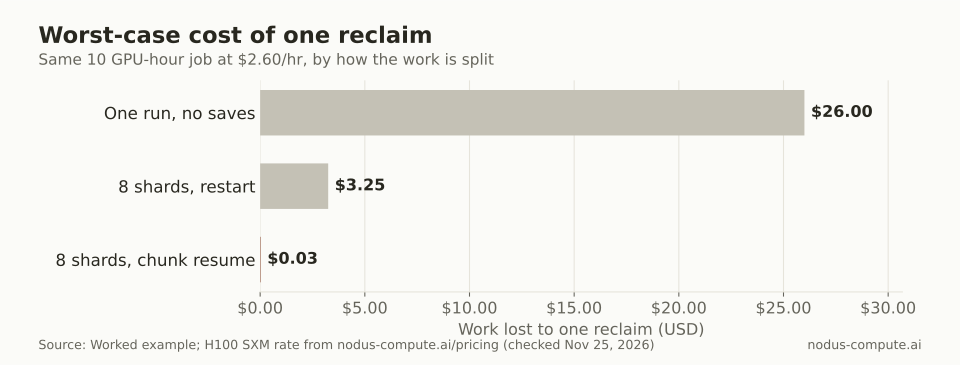 Chunked resume turns a reclaim from a lost job into a rounding error.
The last row assumes the reclaim comes with notice, so the urgent checkpoint captures every finished chunk.
A machine that disappears without notice falls back to the last periodic checkpoint, and the attempts and recovery docs explain exactly what carries over. Even then, the loss is bounded: with automatic intervals, a Job gets at least four checkpoints over its expected run time. With notice, one 36-second chunk is 0.8% of a 1.25-hour shard. The same idea for training runs is in resuming training after spot preemption.
When is a batch API the better choice?
Section titled “When is a batch API the better choice?”Use the batch API when the model is the product. If your eval measures a closed model, or your synthetic data needs the quality of a frontier model, no open-weight GPU job replaces it. OpenAI and Anthropic both cut batch prices by 50%, and Anthropic says its batch discount stacks with prompt caching.
It also wins on small jobs. A few thousand requests do not justify building an image, calibrating throughput and loading weights on a GPU. Self-hosting starts to pay when the job is large, repeats often, or must stay on hardware you control.
Does vLLM offline inference support sampling parameters and chat models?
Section titled “Does vLLM offline inference support sampling parameters and chat models?”Yes, but llm.generate does not apply the chat template, so instruct models need it applied by you or a call to llm.chat with OpenAI-style messages. If you omit SamplingParams, vLLM uses the model’s generation_config.json defaults.
How big should each chunk be?
Section titled “How big should each chunk be?”Large enough that vLLM can batch well and the per-chunk file overhead is small, and small enough that losing one is cheap. A chunk that takes under a minute of GPU time is a good starting point; ours was 36 seconds.
Do I need temperature 0 for resumable batch jobs?
Section titled “Do I need temperature 0 for resumable batch jobs?”No. A lost chunk was never written, so the output holds each row once either way. Use temperature 0 or a fixed seed only if a rerun must reproduce the same text.
Can I cap what a Nodus batch job spends?
Section titled “Can I cap what a Nodus batch job spends?”Yes. --max-cost (or maxCostUSD in a manifest) suspends the Job with its state saved when it reaches the cap, and you raise the cap to resume. Nodus also supports budgets on an org, a project or a labelled group of work.
Should embeddings jobs use the same pattern?
Section titled “Should embeddings jobs use the same pattern?”Yes. Embedding a corpus has the same shape: fixed input, independent rows and output you can write per chunk. Swap the generation call and keep the rest.
More from the blog
inference9 min read
Q4_K_M vs Q5_K_M vs Q8_0: which GGUF quant should you use?
Pick Q4_K_M by default, Q5_K_M or Q6_K when memory allows, Q8_0 as a reference. Bits per weight, perplexity, 8B and 70B size math and a fit rule.
Read the postgpu8 min read
What is gradient checkpointing, and when should you use it?
Gradient checkpointing recomputes activations in the backward pass to save GPU memory. How it works, PyTorch and Hugging Face code, and when it pays.
Read the post