
What is vLLM, and why is it faster than plain Transformers?
vLLM is an open-source LLM serving engine. PagedAttention and continuous batching let it fit far more requests per GPU than a plain generate() loop.
vLLM is an open-source engine for serving large language models: it loads a Hugging Face model and exposes it through an OpenAI-compatible API, and it serves many concurrent requests far more efficiently than a plain Transformers generate() loop. On Nodus you can run vLLM yourself on an NVIDIA H100 listed at $2.60/hr, or skip the engine and call open models through Nodus Inference (Beta). The speed comes mostly from memory management, not faster math: vLLM wastes very little KV cache memory, so far more requests fit on the GPU at once.
Memory is the whole story, and you can check it with arithmetic. Below we work through the KV cache math for Llama 3.1 8B on one H100, quote the published speedups with their dates, and say when plain Transformers is still the better tool. We have not run our own vLLM vs Transformers benchmark, so every speed figure here comes from its source.
What is vLLM used for?
Section titled “What is vLLM used for?”vLLM is used to serve open-weight models to many users or programs at once. You point it at a model and get an HTTP server that speaks the OpenAI API. The vLLM quickstart starts one with a single command:
vllm serve Qwen/Qwen2.5-1.5B-InstructBy default that server listens on http://localhost:8000, so any client written for the OpenAI API can switch to it by changing the base URL. It suits chat backends, large batch jobs, agent loops and evaluation harnesses: anywhere tokens per GPU-hour matter.
The project started in the Sky Computing Lab at UC Berkeley. Its documentation home page lists what it does beyond the core engine:
- PagedAttention for KV cache memory, plus continuous batching, chunked prefill and prefix caching
- Quantization, including FP8, INT8, INT4, GPTQ/AWQ and GGUF
- Tensor, pipeline, data, expert and context parallelism across GPUs
- Speculative decoding, structured outputs, tool calling and multi-LoRA serving
- NVIDIA and AMD GPUs and x86, ARM and PowerPC CPUs, with plugins for TPUs and other chips
The same page says it supports more than 200 model architectures from Hugging Face.
Why is a plain Transformers loop slow for serving?
Section titled “Why is a plain Transformers loop slow for serving?”A plain model.generate() loop does one of two things, and both waste the GPU. Either it serves one request at a time, so the GPU spends most of each step reading weights for a single sequence. Or it pads a fixed batch of prompts, and the whole batch keeps running until its longest answer finishes, while short answers sit idle.
Decoding is limited by memory, not compute. Every new token needs the model’s weights and the KV cache of every earlier token. The PagedAttention paper (Kwon et al., SOSP 2023) makes the case directly: batching more requests is how you get throughput, and KV cache memory is what limits the batch.
vLLM attacks both problems. Continuous batching reschedules the batch at every step, so a finished request leaves and a waiting one joins immediately. PagedAttention stores each sequence’s KV cache in small fixed-size blocks, like pages in an operating system, and allocates them as tokens arrive. The paper’s vLLM used 16-token blocks by default, so a sequence wastes at most part of its last block.
How much memory does PagedAttention save?
Section titled “How much memory does PagedAttention save?”The paper measured it. Before vLLM, serving systems typically reserved one contiguous chunk of KV memory per request, sized for the longest output it might produce. The authors built three versions of the Orca serving system that reserve differently: up to the model’s 2,048-token maximum (Max), up to 2x the true output length (Pow2), and exactly the true length, which is impossible in practice (Oracle).
In their profiling, only 20.4% of KV cache memory held actual token states with Orca (Max), 26.8% with Orca (Pow2) and 38.2% with Orca (Oracle). The rest went to reservations and fragmentation. vLLM used 96.3% for token states.
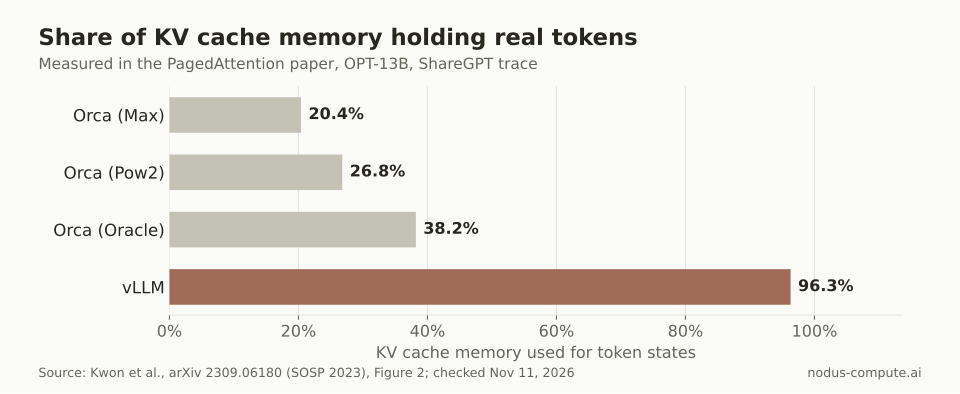 Even a reservation system that knows every output length in advance leaves most of its KV memory unused.
That gap turns into batch size. Serving OPT-13B on the ShareGPT trace, the paper reports an average of 30.42 requests batched with vLLM against 7.00 for Orca (Max), 9.81 for Pow2 and 13.62 for Oracle. More requests in each step is where the throughput comes from.
How many requests fit on one H100?
Section titled “How many requests fit on one H100?”Here is the same effect for a model people serve today. This is arithmetic from public numbers, not a benchmark, and it ignores activation and CUDA graph memory, so treat each result as an upper bound.
Llama 3.1 8B has 8,030,261,248 parameters stored in bf16, according to its Hugging Face model page. Its config.json lists 32 layers, 8 key-value heads and a head dimension of 128, with a 131,072-token maximum context. Meta’s repository is gated, so we read the identical config from the ungated mirror unsloth/Meta-Llama-3.1-8B-Instruct.
The math, once:
- KV cache per token: 2 (key and value) x 32 layers x 8 heads x 128 dims x 2 bytes = 131,072 bytes, or 128 KiB.
- Weights: 8,030,261,248 x 2 bytes = 16.06 GB.
- Treat the H100 as 80 GB and give vLLM 90% with
--gpu-memory-utilization 0.9. That is our choice; the default differs between releases. The budget is 72 GB. - KV budget: 72 GB minus 16.06 GB = 55.94 GB, or 55.9 GB rounded.
- Tokens of KV cache: 55,939,477,504 / 131,072 = 426,784 tokens.
Now compare reservation with paging. One full 131,072-token context needs 17.18 GB of KV cache, so reserving the maximum for every request fits only 3 sequences.
Cap the context at 8,192 tokens and each reservation is 1.07 GB, which fits 52. With paging, a request only holds what it has used. If your requests average 2,000 tokens of prompt plus output, each holds about 0.262 GB, and 213 fit.
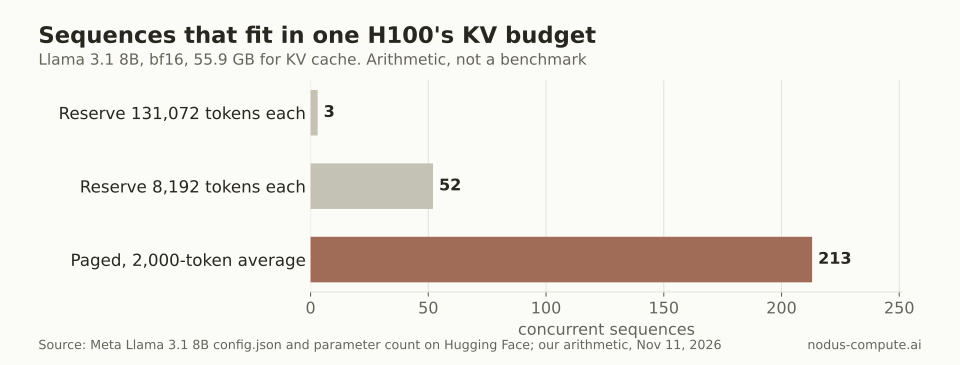 Same GPU, same model: paging fits about 4.1x more 2,000-token conversations than 8,192-token reservations.
213 against 52 is 4.1x. That is close to the paper’s own ratio of 96.3% to 20.4%, which is 4.7x. The 2,000-token average is an assumption; plug in your own traffic. vLLM’s --max-num-seqs setting also caps concurrency, whatever the memory allows.
Is vLLM faster than Hugging Face Transformers?
Section titled “Is vLLM faster than Hugging Face Transformers?”For serving many requests, yes, by a wide gap in every published comparison we found. vLLM’s launch post on June 20, 2023 tested LLaMA-7B on an NVIDIA A10G and LLaMA-13B on an NVIDIA A100 40GB, with request lengths sampled from ShareGPT. With one output per request it reported 14x to 24x the throughput of Hugging Face Transformers and 2.2x to 2.5x that of Text Generation Inference (TGI). With three parallel outputs per request it reported 8.5x to 15x over Transformers and 3.3x to 3.5x over TGI.
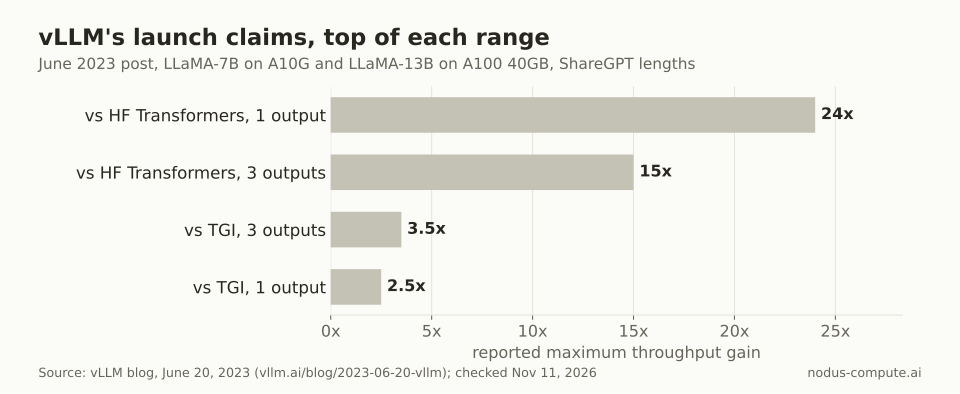 The large multiples are against a plain Transformers baseline; against another serving engine the gap was 2.2x to 3.5x.
The paper itself, posted September 12, 2023, is more conservative: 2x to 4x the throughput of FasterTransformer and Orca at the same latency, with bigger gains for longer sequences, larger models and complex decoding.
Read those as 2023 numbers, because Transformers has changed since. Its docs now describe continuous batching through generate_batch(), a paged attention option, and a transformers serve command with an OpenAI-compatible endpoint. The 24x gap describes a naive loop, not current Transformers at its best.
Even so, the Transformers serving docs position transformers serve for evaluation, experimentation and moderate load, and recommend vLLM or SGLang for large-scale production.
When is plain Transformers the right tool?
Section titled “When is plain Transformers the right tool?”Use Transformers when you are not serving traffic. Pick it in these cases:
- Training and fine-tuning. vLLM is an inference engine; the training loop, LoRA adapters and gradient work live in Transformers and the libraries built on it.
- Research that changes the model. Hooks, attention probes and custom forward passes are easier in eager PyTorch than inside an optimized engine.
- One-off scripts and small evaluations, where setting up a server takes longer than the prompts.
- Architectures vLLM does not support yet. Check the supported models list first: vLLM can also load many models through its Transformers modeling backend with
--model-impl transformers.
Switch to vLLM once you have concurrent users, a large batch job or a cost per token you care about. If you are also weighing SGLang, our vLLM vs SGLang comparison covers which engine wins on which workload.
How do you run vLLM on Nodus?
Section titled “How do you run vLLM on Nodus?”There are two routes on Nodus, depending on whether you want to operate an engine at all.
If you only need tokens from an open-weight model, Nodus Inference serves models such as GPT-OSS through one OpenAI-compatible API. Its docs mark it Beta: “this feature may change.” From the CLI:
$ nodus inference models$ nodus inference chat --model nodus/gpt-oss-20b --max-tokens 64 "What is the capital of France?"If you want vLLM itself, with your own model, settings and engine version, run it in a GPU Function class. The Nodus docs include a Transformers generate() class and a vLLM engine class on the same page, the GPU snapshots guide. This is the vLLM class exactly as the docs show it, where app, image and MODEL are defined as in that guide’s full example, with vLLM installed in the image:
@app.cls(gpu="A10", image=image, gpu_snapshot=True)class Server:    @nodus.enter()    def load(self) -> None:        from vllm import LLM
        self.llm = LLM(MODEL, enable_sleep_mode=True, worker_extension_cls="nodus.runtime.VLLMWorkerExtension")        nodus.exclude_from_gpu_snapshot(self.llm)
GPU snapshots are Beta and must be enabled for your organization; this vLLM path is tested with vLLM 0.30.x on one GPU. The point is cold starts. On an A10, the docs report a vLLM engine serving Qwen3-0.6B restored in about 6 s with its weights and KV cache kept out of the snapshot, against about 90 s for a cold start. Without snapshots, the same class still runs; it just loads the model each time a worker starts.
On an H100 listed at $2.60/hr on the Nodus pricing page, the 55.9 GB KV budget above is yours to fill. Prices checked November 11, 2026. For larger models, our guide to VRAM for a 70B model shows how much KV room each GPU leaves after weights, and H100 vs H200 covers when the bigger card pays off for long contexts.
Does vLLM change a model’s outputs?
Section titled “Does vLLM change a model’s outputs?”It runs the same weights, but different kernels and batch composition can change floating-point results, so do not expect token-for-token identical text. Compare on your own evaluation set when you move from Transformers.
Do I need a GPU to run vLLM?
Section titled “Do I need a GPU to run vLLM?”No. The vLLM docs list x86, ARM and PowerPC CPUs as supported, plus AMD GPUs and plugins for other chips. CPU serving is far slower for anything but small models.
What is prefix caching?
Section titled “What is prefix caching?”It reuses the KV cache of a prompt prefix that an earlier request already computed, such as a long system prompt. vLLM’s V1 engine turned it on by default in January 2025, so repeated prefixes skip most prefill work.
Is vLLM free to use commercially?
Section titled “Is vLLM free to use commercially?”The vLLM repository is Apache 2.0 licensed. The model you serve has its own license, such as the Llama 3.1 Community License, and that is the one to check.
Can Nodus Inference run my own fine-tuned model?
Section titled “Can Nodus Inference run my own fine-tuned model?”The self-service API serves models from the Nodus catalog. To serve your own weights, run vLLM in a Nodus Function or Job on the GPU you choose, or ask Nodus about a dedicated capacity plan.
More from the blog
pricing8 min read
What are the best Paperspace alternatives in 2026?
Paperspace alternatives for moving from notebooks to real training: Nodus, RunPod and Kaggle, with one run priced on each and when Paperspace still wins.
Read the postbenchmark9 min read
B200 vs H100: how much faster is Blackwell for training?
B200 vs H100 for training: MLPerf shows 2.04x to 2.08x faster at equal GPU count. On Nodus a B200 must be 2.115x faster to cost less per run.
Read the post