
vLLM vs SGLang: which LLM inference engine is faster?
Neither engine is faster everywhere. SGLang leads on shared-prefix and structured workloads, vLLM on breadth. A decision rule and cost math.
Neither engine is reliably faster: SGLang’s published wins are on long shared prefixes and JSON output, vLLM leads on ecosystem breadth, and the gap flips between releases. On Nodus you can run both on the same GPU, such as an H100 SXM listed at $2.60/hr, and compare cost per million tokens on your own prompts.
That test matters more than any blog chart, ours included. This post reads the published numbers from both teams, explains why they disagree, and turns them into a rule you can apply to your workload. We have not run our own vLLM vs SGLang benchmark, so every speed figure below is quoted from its source with the version and date.
Is SGLang faster than vLLM?
Section titled “Is SGLang faster than vLLM?”Sometimes, by a lot, and sometimes not at all. It depends on the version pair, the model, and above all the shape of the traffic.
The strongest SGLang claims come from workloads where many requests share a prefix. The SGLang paper (first posted December 2023, revised June 2024) reports up to 6.4x higher throughput than other systems. Its test workloads included agent control, few-shot benchmarks, JSON decoding, RAG pipelines and multi-turn chat. Its baselines included vLLM v0.2.5, an older version the authors chose because newer vLLM releases had partially integrated RadixAttention.
A later head-to-head on plain serving narrowed the question. In July 2024, LMSYS benchmarked SGLang v0.2 against vLLM 0.5.2 with prefix caching turned off for every engine. It reported up to 3.1x higher throughput on Llama 70B, with the gap shrinking on the 405B model, where GPU kernels dominate.
Six weeks later, the vLLM team released v0.6.0 on September 5, 2024 with 1.8x to 2.7x more throughput than its own v0.5.3. In its comparison against SGLang v0.3.0 on Llama 3 8B and 70B, vLLM reported the highest H100 throughput on ShareGPT and decode-heavy data, and lower throughput on prefill-heavy data.
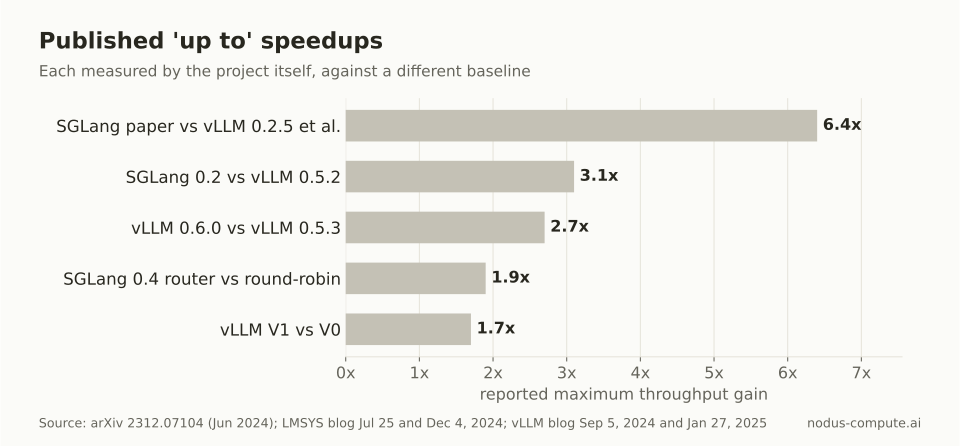 Every headline number is measured against a different, usually older, baseline.
Both posts can be true at once. Each team tuned its own engine, picked datasets, and compared against a competitor version that was already weeks old. Read any single “up to” number as evidence that a workload exists where it holds, not as a forecast for yours.
Where does SGLang win?
Section titled “Where does SGLang win?”SGLang’s published advantages cluster around reuse. RadixAttention, described in the paper, keeps the KV cache of previous requests in a radix tree so a new request with the same prefix skips recomputing it. Long system prompts, agent loops, few-shot templates and multi-turn chats all repeat prefixes.
The SGLang v0.4 release (December 4, 2024) pushed the same idea across replicas. Its cache-aware load balancer routes each request to the worker most likely to hold its prefix. The post reports up to 1.9x more throughput with a 3.8x higher cache hit rate. The same release reports structured output with xgrammar up to 10x faster than other open-source solutions on JSON decoding.
SGLang has also published detailed work on large mixture-of-experts serving. Its May 5, 2025 post serves DeepSeek-V3 on 96 NVIDIA H100 GPUs with prefill-decode disaggregation and expert parallelism. It reports 22,282 output tokens per second per 8-GPU decode node with 2,000-token inputs.
Two caveats keep this from being a clean win. vLLM V1 turned prefix caching on by default in January 2025, reporting under 1% throughput loss at a 0% hit rate. And vLLM’s structured output docs list xgrammar as a backend too. The specific mechanisms SGLang pioneered are no longer exclusive to it, so the size of its edge on your workload is an empirical question.
Where does vLLM win?
Section titled “Where does vLLM win?”vLLM’s clearest advantage is reach. It is the older project, its PagedAttention paper appeared in September 2023, and its December 2025 large-scale serving post names llm-d, NVIDIA Dynamo and Ray Serve LLM as deployment options. If your platform team already standardizes on one of those, vLLM is usually the path of least resistance.
It also keeps closing performance gaps quickly. The V1 engine (alpha January 27, 2025) reported up to 1.7x more throughput than V0, mostly from cutting CPU overhead. By v0.11.0 the old engine was gone, and that December 17, 2025 post reports DeepSeek wide expert parallelism at 2.2k tokens/s per NVIDIA H200 in community benchmarks.
Community size is a rough proxy for how fast new models and bugs get handled. On November 7, 2026 the vLLM repository showed about 96,500 GitHub stars and the SGLang repository about 38,600, and both are Apache 2.0.
Hardware is no longer a strong separator: the vLLM installation docs and SGLang hardware docs both cover NVIDIA, AMD and Intel GPUs, TPUs and CPUs. Check your exact chip and model in each before you pick.
Which should you choose?
Section titled “Which should you choose?”Use this rule, in order:
- If your traffic shares long prefixes (agents, multi-turn chat, few-shot or fixed RAG templates) or most responses are constrained JSON, start with SGLang. That is where its published wins concentrate.
- If you depend on a serving control plane, a hardware plugin or a model recipe that exists for only one engine, use that engine. Integration work costs more than a throughput gap you have not measured.
- Otherwise, start with whichever engine your team already operates, and default to vLLM if you run neither, for the larger community.
- Then measure both on a sample of your real traffic. Switch only if the other engine is at least 10% cheaper per million tokens at your latency target, since switching has its own cost.
The 10% threshold is our own judgment, not a published figure. It reflects how fast gaps close: the 3.1x lead SGLang reported in July 2024 had disappeared from vLLM’s own comparison six weeks later, while migration work does not disappear.
| vLLM | SGLang | |
|---|---|---|
| Signature technique | PagedAttention KV memory | RadixAttention prefix reuse |
| Prefix caching | On by default since V1 | Radix cache, cache-aware router |
| Structured output | xgrammar, guidance backends | xgrammar, published up to 10x on JSON |
| OpenAI-compatible server | Yes | Yes |
| Benchmark tool | vllm bench |
bench_serving |
| Release notes | GitHub releases | GitHub releases |
| License | Apache 2.0 | Apache 2.0 |
Sources are each project’s docs, blog and GitHub releases page, linked above; checked November 7, 2026.
How much does a throughput difference save?
Section titled “How much does a throughput difference save?”Throughput converts straight into cost per token, so you can price an engine choice with one formula. Cost per million output tokens is the hourly GPU rate divided by tokens per hour, times one million.
On an H100 SXM listed at $2.60/hr on the Nodus pricing page, and an H200 SXM listed at $3.593/hr, that gives:
| Sustained output tokens/s per GPU | H100 SXM, $ per 1M tokens | H200 SXM, $ per 1M tokens |
|---|---|---|
| 500 | $1.444 | $1.996 |
| 1,000 | $0.722 | $0.998 |
| 2,000 | $0.361 | $0.499 |
| 3,000 | $0.241 | $0.333 |
We computed each row as rate / (tokens per second x 3,600) x 1,000,000. Prices checked November 7, 2026.
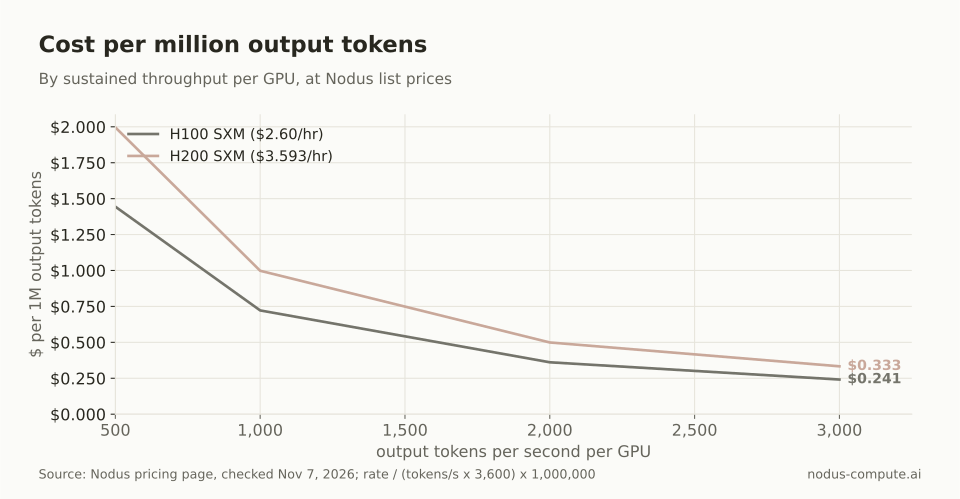 Doubling throughput halves the cost per token, whichever engine delivers it.
Now apply a real published figure. SGLang’s DeepSeek-V3 decode result of 22,282 output tokens/s per 8 x H100 node is 80.2 million tokens per hour. One node at Nodus list prices is 8 x $2.60 = $20.80/hr, so decode costs $20.80 / 80.2152 = $0.259 per million output tokens.
That counts decode GPUs only; the setup ran prefill on separate nodes, which add their own cost. We did not price vLLM’s 2.2k tokens/s per H200 figure the same way, because its post does not say whether that counts output tokens alone.
The scale effect is easy to see. Serving one billion output tokens on H100s at 2,000 tokens/s takes 138.9 GPU-hours, or $361.11. An engine that is 20% faster, at 2,400 tokens/s, takes 115.7 GPU-hours, or $300.93. That $60.18 per billion tokens is real money at volume and noise at low volume, which is why rule 4 says measure first.
How do you run vLLM or SGLang on Nodus?
Section titled “How do you run vLLM or SGLang on Nodus?”There are two routes, depending on whether you want to operate an engine at all.
If you only need tokens from an open-weight model, Nodus Inference (Beta) serves models such as GPT-OSS through one OpenAI-compatible API, so there is no engine to pick or tune. From the docs:
$ nodus inference models$ nodus create inferenceendpoint support-bot --model nodus/gpt-oss-120b --rpm 120 --max-concurrent 8 --max-cost 50If you want to choose the engine, run it yourself in a Job. A Job runs a container image, and the Jobs docs use public images such as python:3.12-slim as well as the catalog image. Put the official vLLM or SGLang container where the docs example has nodus/pytorch:
$ pip install nodus-compute$ nodus login$ nodus run --gpu L4 --image nodus/pytorch -- python hello.pyAdd --max-cost and --timeout to bound the run. To compare the two engines head to head, a Sweep runs the same Job across GPU types and your own parameters, then reports cost, wall time and throughput per cell. This is the Python form exactly as the docs show it, with a batch-size parameter:
import nodus
sweep = nodus.Sweep(    {"image": "nodus/pytorch", "command": ["python", "bench.py"]},     # the Job spec every cell runs    grid={"gpu": ["L4", "H100"], "BATCH_SIZE": [8, 16, 32]},           # gpu and region are dimensions; the rest are parameters    repetitions=2, max_parallel=6, max_cost=25,).run()report = sweep.wait()                  # a Sweep with failed cells is Failed (CellsFailed) and still has its reportprint(report.phase, report.best.by_cost)for cell in sweep.cells():    print(cell.index, cell.phase, cell.cost_usd, cell.wall_seconds)
For an engine comparison, run one Sweep per engine with that engine’s image, and have bench.py replay a sample of your prompts. Throughput comes from units your program reports with nodus.log.unit. Log one unit per request or per thousand tokens, and the Sweep ranks the cells for you. repetitions runs each cell more than once, which matters here: engine benchmarks vary run to run.
For a large model, our VRAM guide for 70B models shows how much KV cache room each GPU leaves. H100 vs H200 covers when the bigger GPU pays off for long-context serving.
Do vLLM and SGLang give the same outputs for the same model?
Section titled “Do vLLM and SGLang give the same outputs for the same model?”Do not expect identical tokens, since the engines use different kernels and batching. Check quality on your own evaluation set, not only speed, when you switch.
Can I switch engines without changing client code?
Section titled “Can I switch engines without changing client code?”Usually, yes. Both expose an OpenAI-compatible server, so a client that talks to /v1/chat/completions keeps working. Engine-specific request fields, such as structured output parameters, may need renaming.
Which engine is better for latency rather than throughput?
Section titled “Which engine is better for latency rather than throughput?”The published comparisons measure both, and the winner changes by dataset and load. Measure time to first token and time per output token at your target concurrency; our guide to measuring streaming LLM latency explains how.
Does Nodus Inference let me choose vLLM or SGLang?
Section titled “Does Nodus Inference let me choose vLLM or SGLang?”No. The hosted API serves catalog models and does not expose an engine choice. To pick the engine yourself, run it in a Nodus Job or Workspace on the GPU you choose.
Why not just trust the most recent benchmark?
Section titled “Why not just trust the most recent benchmark?”Because both projects ship new releases every few weeks, and the fixes that close a gap land in those releases. A benchmark older than a few releases describes software you would not deploy today, so check the version pair before you trust the result.
More from the blog
gpu7 min read
What is an MCP server, and how can it give agents GPUs?
MCP explained: what an MCP server is, why it needs no GPU of its own, and how Nodus uses one to let coding agents price and run GPU jobs.
Read the postagents7 min read
How do coding agents run jobs that take hours, not minutes?
Coding agents run multi-hour jobs by handing them off and polling. The tool time limits, the hand-off pattern, and how Nodus Jobs fit it.
Read the post