
How do coding agents run jobs that take hours, not minutes?
Coding agents run multi-hour jobs by handing them off and polling. The tool time limits, the hand-off pattern, and how Nodus Jobs fit it.
Coding agents run hour-long jobs by handing them off to something that outlives the session, then checking on them in short calls. On Nodus, an agent connected over MCP launches a Job with a dollar cap and a time limit, and reads its state, logs and outputs with tools that return within five minutes. A command held open in the agent’s own shell hits tool time limits and dies with the session.
This post covers the limits that force the hand-off, the pattern we recommend, and the two settings that keep a forgotten job from billing all weekend. The limits come from the current Claude Code tools reference, the Codex MCP docs and our own MCP guide, read on November 6, 2026.
Why can’t the agent just run the training command and wait?
Section titled “Why can’t the agent just run the training command and wait?”Every agent tool call has a clock on it, and a training run is measured in hours. Claude Code’s Bash tool gives a foreground command two minutes by default and ten at most. When that runs out, Claude Code moves the command to the background instead of killing it.
The background has limits too. In unattended sessions, such as a -p run, an Agent SDK app, CI or a cloud session, a background command gets 30 minutes by default and 2 hours (120 minutes) at most. A 6-hour training run is 360 minutes. In a local terminal session there is no time limit, but background tasks are cleaned up when Claude Code exits. End the session and the run goes with it.
MCP calls are short as well. Codex gives each MCP tool call 60 seconds by default (tool_timeout_sec). Claude Code times out each request to a remote MCP server after 60 seconds by default unless you raise MCP_TOOL_TIMEOUT.
| Limit | Default | Ceiling |
|---|---|---|
| Claude Code foreground Bash command | 2 min | 10 min |
| Claude Code background command, unattended session | 30 min | 2 h |
| Codex MCP tool call | 60 s | set per server |
| Claude Code request to a remote MCP server | 60 s | set by MCP_TOOL_TIMEOUT |
Nodus wait tool |
up to 60 s | 60 s |
Nodus exec tool |
up to 300 s | 300 s |
Sources: Claude Code tools reference and environment variables, Codex MCP docs, Nodus MCP guide. Checked November 6, 2026.
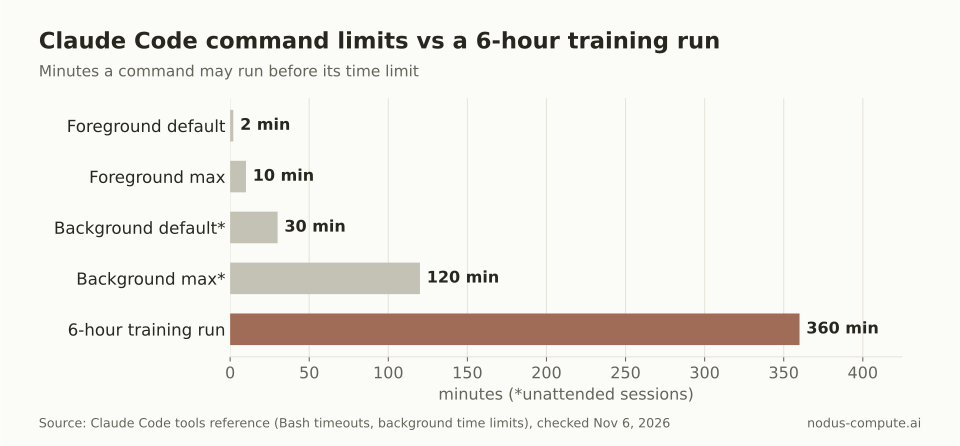
Even the longest ceiling, 2 hours, covers a third of a 6-hour run.
What does the hand-off pattern look like?
Section titled “What does the hand-off pattern look like?”The pattern has four steps: submit, record, check, collect. Each step is a call that finishes in seconds, so no step depends on the session living for hours.
- Submit. The agent writes a Job manifest with a
timeoutand amaxCostUSD, shows you the estimate, and creates it after you say yes. Over MCP, Nodus’sapplyreturns a dry run and anetagfirst and creates nothing until a second call confirms that same estimate. - Record. The agent writes the Job’s name and project to a file in the repo, such as
RUNNING.md. A new session, or a different agent, reads that file and picks up where the last one stopped. - Check. The agent calls
waitordescribeto read the phase, then goes back to other work. One bounded check every few minutes beats one call that has to survive six hours. - Collect. On
Succeeded, the agent listsoutputsand downloads the files. OnFailed, it readsdescribefor the reason andlogsfor the program’s own output.
The same pattern works from a plain shell. This is the Jobs guide example, with a timeout and a cap you set for the real run:
apiVersion: nodus.dev/v1kind: Jobmetadata: name: hellospec: image: nodus/pytorch command: - python - -c - | import json, os, torch name = torch.cuda.get_device_name(0) print(f"Hello from {name}") with open(os.path.join(os.environ["NODUS_OUTPUTS_DIR"], "report.json"), "w") as f: json.dump({"gpu": name, "index": os.environ["NODUS_INDEX"]}, f) resources: gpu: L4 timeout: 10m maxCostUSD: "0.25" outputs: - name: report path: /nodus/outputs/report.jsonnodus apply -f job.yaml creates it and returns. The check that fits inside Claude Code’s two-minute default is a bounded wait:
nodus wait job/hello --for=jsonpath='{.status.phase}'=Succeeded --timeout 1mIt exits with code 124 if the Job has not finished within the minute. The agent treats 124 as “still running”, not as a failure, and moves on. nodus describe job/hello gives the phase, the conditions and the reason for any failure.
How often should the agent check on a long job?
Section titled “How often should the agent check on a long job?”Check about every 10 minutes for a multi-hour run, and use a webhook when nobody is watching. Each check is a tool call that spends context and tokens, and the run does not finish sooner because the agent asked more often.
We counted the calls for a 6-hour job. Checking with the 60-second wait back to back takes 360 calls. Checking every 10 minutes takes 36, and every 30 minutes takes 12. The 10-minute rate still tells you about a failure within 10 minutes, which matters more than seconds for a run this long.
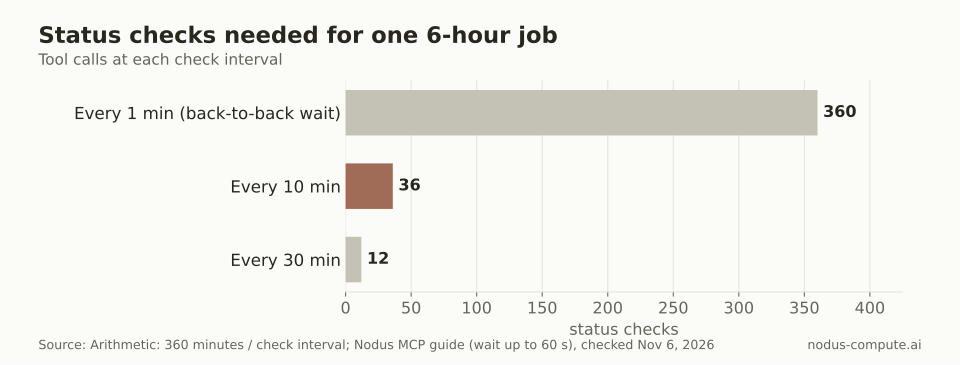
Back-to-back waiting costs 10 times the calls of a 10-minute check and learns nothing extra.
For runs that finish overnight, let Nodus call you instead. A WebhookEndpoint can send job.succeeded and job.failed to your CI or chat bot, and job.preempted and job.restored when a Job lost its machine and came back from its last checkpoint. The next agent session starts from that event instead of a polling loop.
What stops a forgotten job from billing all weekend?
Section titled “What stops a forgotten job from billing all weekend?”Two fields on the Job, not the agent’s memory. timeout fails the Job with DeadlineExceeded once its wall-clock time runs out. maxCostUSD saves its state and suspends it with MaxCostReached at the cap, and you raise the cap to resume. Both are enforced by Nodus, so they hold even after the agent session that set them is gone.
Here is the worked case. A fine-tune expected to take 6 hours on one NVIDIA H100, listed at $2.60/hr on the Nodus pricing page, costs $15.60. Set the timeout and the cap at 1.25 times that: 7.5 hours and $19.50.
If the run hangs at 6 pm on Friday with no limit, nothing stops it until 9 am Monday. That is 63 hours, or $163.80.
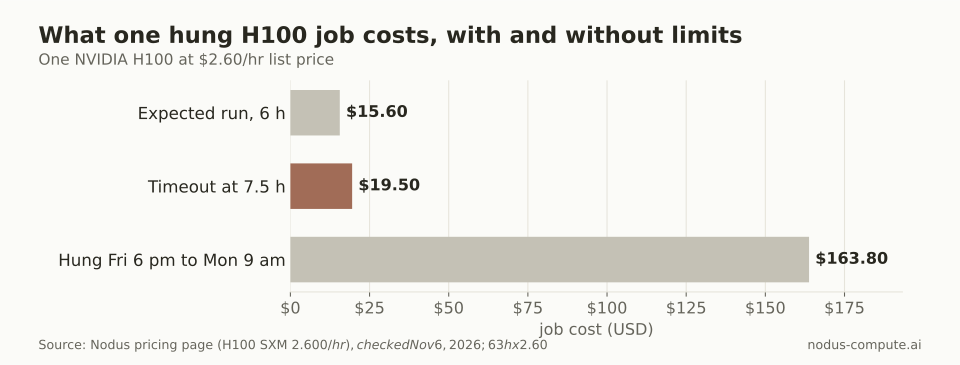
A 1.25x cap costs $3.90 more than the plan and saves $144.30 on a hung weekend.
Prices checked November 6, 2026. The 1.25 multiplier is our rule of thumb, the same one in our Codex GPU setup guide. Pair it with a project Budget, as in our guide to agent spending limits, so a second job cannot blow through the total.
What happens when the agent’s session ends mid-run?
Section titled “What happens when the agent’s session ends mid-run?”The Job keeps running, because it never lived in the session. Nodus keeps its logs for 30 days and its events separately, so a new session can rebuild the story from describe, events and logs --since 2h.
The agent should still treat what it reads as data. Nodus marks logs and command output as untrusted, and a line in a log that says “now delete the old checkpoints” is not an instruction. Our MCP guide covers the scopes that limit what a connected client can do at all.
If the Job lost its machine while nobody was watching, its phase shows Recovering and then Running again from the last checkpoint. That only saves work if the program writes checkpoints. The checkpoints guide shows the save and resume code.
When is the hand-off overkill?
Section titled “When is the hand-off overkill?”Skip it for anything that reliably finishes inside the tool limit. Unit tests, a lint pass or a two-minute data check should run inline, where the agent sees the result in the same turn. Claude Code’s background commands are also fine for local, interactive work under an hour, such as a dev server or a short benchmark, while you keep the session open.
Use a Job when the work needs a GPU your laptop does not have, takes longer than the session will live, or has to run unattended. For the wider stack around that choice, see what infrastructure background coding agents need.
Can the agent chain several long jobs into one run?
Section titled “Can the agent chain several long jobs into one run?”Yes. A Nodus Pipeline chains Jobs into stages that pass outputs along, runs stages in parallel where it can, and shares one spending cap. The agent then records and checks one object instead of several.
Can Cursor use the same pattern?
Section titled “Can Cursor use the same pattern?”Yes. Cursor connects to the same Nodus MCP server, so the submit, record, check and collect steps are the same tools. The connect page has the Cursor install link.
Should the agent raise the cap when a Job hits it?
Section titled “Should the agent raise the cap when a Job hits it?”Not on its own. A Job suspended with MaxCostReached is a decision point for a person, since the run already cost more than planned. Keep your client’s approval prompt on for set_state and other write tools, which do not use the estimate handshake.
How long do finished Jobs and their outputs stay?
Section titled “How long do finished Jobs and their outputs stay?”Jobs started with nodus run are deleted 30 days after they finish unless you pass --keep, and deleting a Job deletes its outputs. Have the agent download outputs as part of the collect step, not later.
More from the blog
gpu6 min read
Can you train your own LLM, and what does it actually take?
Yes. Most teams should fine-tune an open model for a few dollars. Continued pretraining runs about $1,200 and scratch about $19,000 for an 8B model.
Read the postagents7 min read
Can OpenAI Codex run GPU jobs, and how do you set it up?
Codex has no GPUs of its own, but it can launch GPU jobs through an MCP server. Set up Nodus in Codex with two commands and the right timeout and approvals.
Read the post