
How do you calculate how much VRAM an LLM needs?
Add weights (params x bytes) to the KV cache (2 x layers x KV heads x head size x bytes x tokens), then divide by 0.92. Worked examples and GPU sizes.
To serve an LLM, add the weights (parameters x bytes per parameter at your precision) to the KV cache (2 x layers x key-value heads x head size x bytes x tokens in flight), then divide by 0.92 for the headroom a serving engine keeps. Nodus turns that number into hardware: set minMemory on a Job and it runs on an accelerator with at least that much memory, such as an A100 80 GB listed at $1.090/hr on the Nodus pricing page. For Llama 3.1 8B in BF16 serving 32 requests of 8,192 tokens, the sum is 16.06 + 34.36 = 50.42 GB, about 55 GB of GPU, so an 80 GB card fits and a 48 GB card does not.
This post is the general method. Every input comes from a model’s config.json and its checkpoint files on Hugging Face, which we read on November 14, 2026.
If you only care about one model size, our answer for 70B models goes deeper on that case. If you are training and hitting out-of-memory errors, the CUDA OOM guide breaks down training memory. We use decimal gigabytes throughout.
What is the formula for LLM VRAM?
Section titled “What is the formula for LLM VRAM?”Serving memory has three parts, and only one of them grows with traffic.
weights = parameters x bytes per parameterKV cache = 2 x layers x kv_heads x head_dim x bytes per value x tokens in flightGPU needed = (weights + KV cache) / 0.92The weights are fixed once you pick a precision. The KV cache scales with every token of every request held at once. The 0.92 is the share of GPU memory that vLLM claims by default through --gpu-memory-utilization; the rest covers the CUDA context and anything else on the card.
“Tokens in flight” means prompt plus generated tokens, summed over concurrent requests. Thirty-two chats of 8,192 tokens each are 262,144 tokens in flight.
How much memory do the weights take at FP16, FP8 and INT4?
Section titled “How much memory do the weights take at FP16, FP8 and INT4?”Start from 2 bytes per parameter for FP16 or BF16, 1 byte for FP8 and half a byte for INT4, then expect the quantized versions to come out larger. We summed the safetensors files of public checkpoints to see by how much:
| Model | Parameters | BF16 | FP8 | INT4 (AWQ) | KV cache per token | KV for 32,768 tokens |
|---|---|---|---|---|---|---|
| Llama 3.1 8B | 8.03 B | 16.06 GB | 9.08 GB | 5.73 GB | 0.131 MB | 4.29 GB |
| Qwen3-8B | 8.19 B | 16.38 GB | 9.44 GB | 6.10 GB | 0.147 MB | 4.83 GB |
| Qwen3-32B | 32.76 B | 65.52 GB | 34.32 GB | 19.33 GB | 0.262 MB | 8.59 GB |
| Llama 3.3 70B | 70.55 B | 141.11 GB | 72.67 GB | 39.77 GB | 0.328 MB | 10.74 GB |
Checkpoints used: RedHatAI FP8 and hugging-quants AWQ for Llama 3.1 8B, Qwen’s own FP8 and AWQ releases (and their 32B FP8 and 32B AWQ versions), and the RedHatAI FP8 and casperhansen AWQ builds of Llama 3.3 70B. KV columns assume a BF16 cache. Sizes summed November 14, 2026.
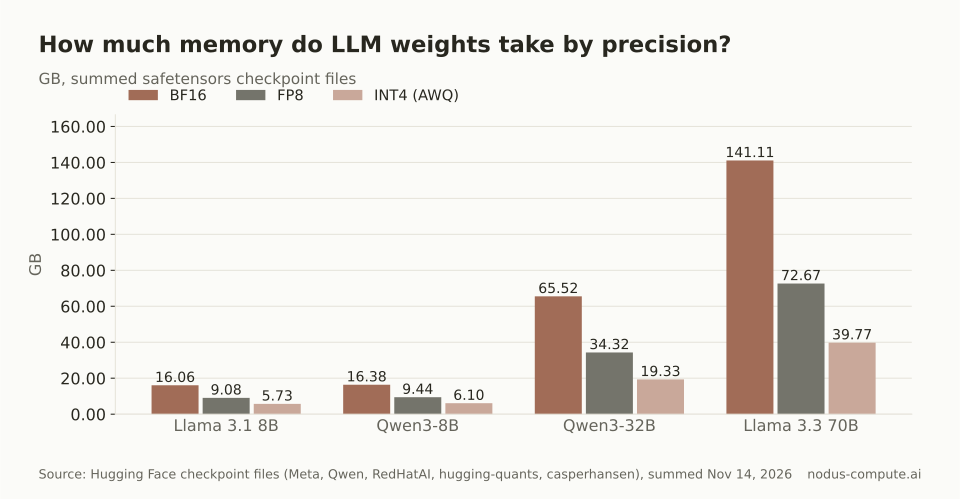 4-bit cuts the weights to roughly a quarter on big models, but only to about a third on 8B ones.
The gap comes from layers that stay at 16 bits plus the quantization scales. We can rebuild the Llama 3.1 8B numbers exactly.
Its embedding and output layers each hold 128,256 x 4,096 parameters, 1.05 billion together, and both quantized checkpoints keep them at 16 bits (2.10 GB). The other 6.98 billion parameters cost 6.98 GB at FP8, which gives 9.08 GB. At INT4 they cost 3.49 GB, plus one 16-bit scale and one 4-bit zero point per group of 128 weights (the checkpoint’s group_size is 128), or 0.14 GB. That totals 5.73 GB, matching the files.
So the effective bytes per parameter were 1.13 at FP8 and 0.71 at INT4 for Llama 3.1 8B, but 1.03 and 0.56 for Llama 3.3 70B, where the embeddings are a smaller share. When a checkpoint exists, use its file size. When it does not, these four models suggest about 1.1 and 0.7 bytes for 8B-class models and 1.05 and 0.6 for 32B and up.
Mixture-of-experts models follow the same rule with total parameters, not active ones. Every expert has to sit in memory even though each token uses a few.
How do you calculate the KV cache from config.json?
Section titled “How do you calculate the KV cache from config.json?”Read four fields: num_hidden_layers, num_key_value_heads, head_dim (or hidden_size / num_attention_heads when it is missing) and the cache precision. Llama 3.1 8B has 32 layers, 8 key-value heads and a head size of 128 in its config (a public mirror of Meta’s gated file), so one token costs 2 x 32 x 8 x 128 x 2 bytes = 131,072 bytes.
The key-value head count is where people go wrong. Llama 3.1 8B has 32 query heads but only 8 key-value heads, a design called grouped-query attention (GQA). Plugging in 32 heads gives 524,288 bytes per token, four times too much.
The same mistake on Qwen3-32B’s config (64 layers, 64 query heads, 8 key-value heads) turns 262,144 bytes into 2,097,152, eight times too much. For Qwen3-8B (36 layers, 32 query heads, 8 key-value heads) it is 147,456 versus 589,824 bytes, and for Llama 3.3 70B (80 layers, 64 query heads, 8 key-value heads) it is 327,680 versus 2,621,440.
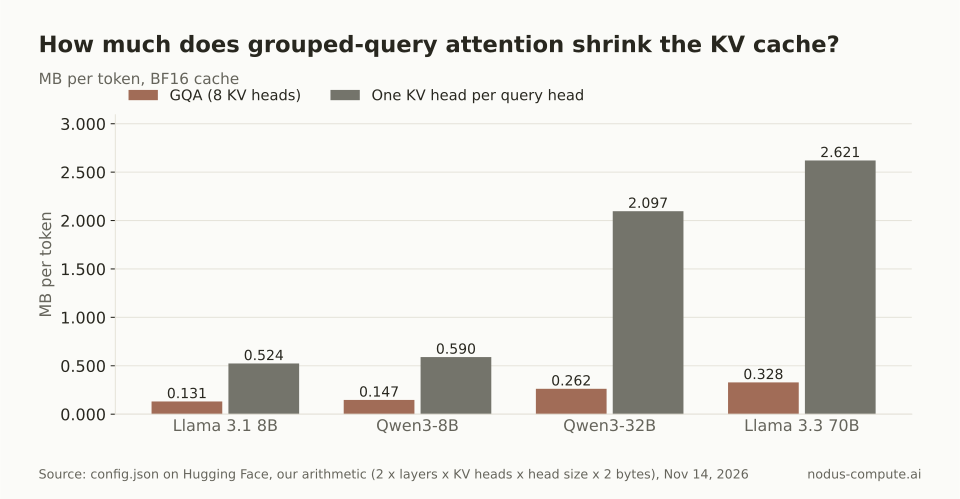 Reading the query head count instead of num_key_value_heads overstates the cache 4x to 8x.
Two cases need a different formula. Models with multi-head latent attention, such as DeepSeek V3, cache a compressed vector per layer instead of per-head keys and values. Models with sliding-window layers only keep the window on those layers. For both, read the model card before trusting the generic formula.
You can also halve the cache by storing it in FP8 with vLLM’s --kv-cache-dtype fp8, described on the same engine arguments page. Check quality on your own evaluations first.
How much extra memory does the runtime need?
Section titled “How much extra memory does the runtime need?”Plan on the 8% that vLLM leaves free by default, and treat the result as a floor. At startup vLLM also runs a profiling pass and sets aside the peak activation memory from inside its 92% before sizing the cache, so real cache room comes out a little smaller than our arithmetic. The engine logs the KV cache size it actually got, in tokens, so read that line on the first launch and compare it with your estimate.
Other runtimes differ. A plain Hugging Face generate() loop without a paged cache wastes more memory per request, so leave more room there.
Worked example: does Llama 3.1 8B fit on a 48 GB GPU?
Section titled “Worked example: does Llama 3.1 8B fit on a 48 GB GPU?”Not in BF16 at 32 concurrent 8,192-token requests, and here is the check. Tokens in flight are 32 x 8,192 = 262,144. The KV cache is 262,144 x 131,072 bytes = 34.36 GB. Weights plus cache are 16.06 + 34.36 = 50.42 GB, and 50.42 / 0.92 = 54.80 GB.
Re-checking the other way: a 48 GB card gives 48 x 0.92 = 44.16 GB to the engine, 6.26 GB short of 50.42. An 80 GB card gives 73.60 GB, which leaves 23.18 GB of slack.
There are two ways to stay on 48 GB. An FP8 cache halves the KV term to 17.18 GB, so the total becomes 33.24 GB and the GPU needed is 36.13 GB, well inside 44.16. FP8 weights alone are not enough: 9.08 + 34.36 = 43.44 GB leaves 0.72 GB, too little once activations take their share.
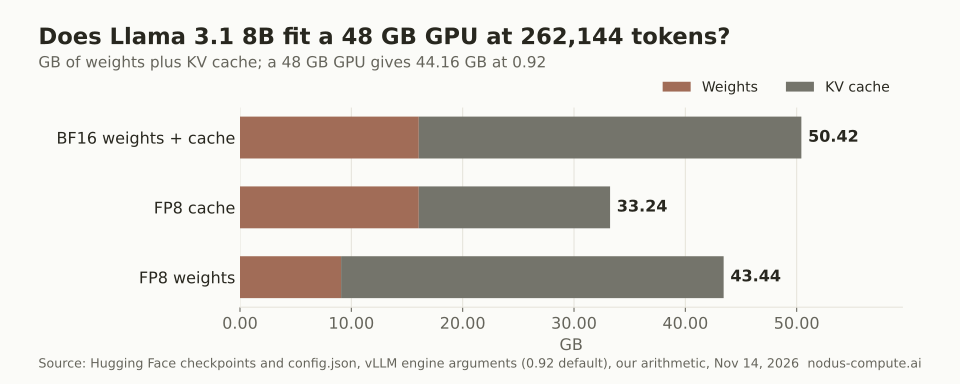 At real concurrency the cache, not the weights, decides the GPU: here it is twice the size of the model.
Which GPU size fits your model?
Section titled “Which GPU size fits your model?”Take the smallest GPU class whose memory x 0.92 is at least weights plus cache. This is the rule we use, with the GPUs the Nodus pricing page lists in each class:
| GPU memory | Usable at 0.92 | GPUs on the Nodus pricing page, listed price per hour | Example that fits, cache room left |
|---|---|---|---|
| 24 GB | 22.08 GB | RTX 3090 $0.180, RTX 4090 $0.290, L4 $0.430 | Llama 3.1 8B BF16, 6.02 GB (about 45,900 tokens) |
| 48 GB | 44.16 GB | RTX A6000 $0.333, RTX 6000 Ada $0.743, L40S $0.793 | Qwen3-32B INT4, 24.83 GB (about 94,700 tokens) |
| 80 GB | 73.60 GB | A100 80 GB $1.090, H100 SXM $2.600 | Llama 3.3 70B INT4, 33.83 GB (about 103,200 tokens) |
| 96 GB | 88.32 GB | RTX PRO 6000 $1.350 | Llama 3.3 70B INT4, 48.55 GB (about 148,100 tokens) |
| 141 GB | 129.72 GB | H200 SXM $3.593 | Llama 3.3 70B FP8, 57.05 GB (about 174,100 tokens) |
| 180 GB | 165.60 GB | B200 $5.500 | Llama 3.3 70B FP8, 92.93 GB (about 283,600 tokens) |
Cache room is usable memory minus the checkpoint size, and tokens are that room divided by the model’s BF16 bytes per token. Prices checked November 14, 2026, on the Nodus pricing page.
Precision also limits which hardware works. vLLM’s FP8 documentation says FP8 compute runs on Ada Lovelace, Hopper and Blackwell GPUs, while Turing and Ampere cards such as the A100 and RTX A6000 run FP8 checkpoints as weight-only. If your number is larger than one GPU holds, split the model across GPUs with tensor parallelism: each GPU then holds its share of the weights and cache.
How does Nodus pick a GPU that fits?
Section titled “How does Nodus pick a GPU that fits?”You give Nodus the memory floor and it picks the hardware. Set resources.gpu.minMemory instead of a GPU type, and the Jobs guide says Nodus picks any accelerator with at least that much memory per GPU. Among the GPUs that qualify, the scheduler chooses by expected cost to finish.
spec: resources: gpu: minMemory: 80GiIf you leave out minMemory, a nodus.dev/model annotation sets a floor from the model size: 24Gi for 7B and 8B models, 32Gi for 13B and 14B, 48Gi for 34B and 40B and 80Gi for 70B and 72B. That default covers the weights and a modest cache. Our worked example needs about 55 GB, so a busy 8B endpoint should set minMemory from the formula rather than rely on the 24Gi default.
Before launching, nodus apply -f job.yaml --dry-run=server -o estimate shows the offering Nodus would use and the expected cost, without starting anything.
Can you script the estimate in Python?
Section titled “Can you script the estimate in Python?”This is the whole method in one function. We ran it on the worked example above and it prints the same numbers.
def llm_vram_gb(weights_gb, layers, kv_heads, head_dim, tokens,                kv_bytes=2, gpu_util=0.92):    """Serving estimate in decimal GB: (weights, KV cache, GPU memory needed)."""    kv_gb = 2 * layers * kv_heads * head_dim * kv_bytes * tokens / 1e9    return weights_gb, kv_gb, (weights_gb + kv_gb) / gpu_util
# Llama 3.1 8B, BF16, 32 requests x 8,192 tokensw, kv, need = llm_vram_gb(16.06, layers=32, kv_heads=8, head_dim=128,                          tokens=32 * 8192)print(f"weights {w:.2f} GB, KV {kv:.2f} GB, need {need:.2f} GB")# weights 16.06 GB, KV 34.36 GB, need 54.80 GB
Pass kv_bytes=1 for an FP8 cache. For weights_gb, use the checkpoint size on Hugging Face, or parameters x the effective bytes from the weights section.
What changes when you fine-tune instead of serve?
Section titled “What changes when you fine-tune instead of serve?”Training multiplies the weight term, because gradients and optimizer state live next to every trainable parameter. Mixed-precision training with Adam takes about 16 bytes per parameter, so Llama 3.1 8B needs 128.5 GB before a single activation. LoRA and QLoRA freeze the base model and cut that to a fraction. The CUDA out-of-memory guide walks through each bucket and the fixes in order, and the 70B post prices full, LoRA and QLoRA fine-tuning at that size.
How much VRAM do you need to run an LLM locally?
Section titled “How much VRAM do you need to run an LLM locally?”An 8B model in 4-bit fits on a 24 GB card with room for long chats: Qwen3-8B AWQ is 6.10 GB, leaving 15.98 GB, about 108,000 tokens of cache. Even a 12 GB card can hold the weights, but then the cache limits how long a conversation can run.
Are online LLM VRAM calculators accurate?
Section titled “Are online LLM VRAM calculators accurate?”They are as accurate as the key-value head count and the precision they assume. Check that a calculator reads num_key_value_heads rather than the query heads, and that its INT4 figure includes the 16-bit embeddings and scales.
Does a longer context window use more VRAM if I do not fill it?
Section titled “Does a longer context window use more VRAM if I do not fill it?”With vLLM, the engine reserves its cache up front from the memory fraction, not from the context window. The maximum context length only matters because one request must fit in the cache, so a 131,072-token Llama 3.1 8B request needs 17.18 GB of cache by itself.
Can Nodus tell me before launch which GPU memory floor it will use?
Section titled “Can Nodus tell me before launch which GPU memory floor it will use?”Yes. nodus apply -f job.yaml --dry-run=server -o yaml shows the floor Nodus picked from your minMemory or model annotation, and the -o estimate form shows the offering and expected cost. Neither starts a machine.
Does tensor parallelism split the KV cache too?
Section titled “Does tensor parallelism split the KV cache too?”Yes, each GPU stores the cache for its own key-value heads, so the per-GPU cache shrinks with the GPU count. With 8 key-value heads, as in every model above, that split stops helping past 8 GPUs, because engines then replicate heads instead of dividing them.
More from the blog
training9 min read
How do you fix CUDA out of memory errors in PyTorch?
Read what the OOM error says, then cut the biggest consumer: activations, optimizer state or fragmentation. An ordered checklist with GB math and code.
Read the postgpu9 min read
How do you keep training alive now that Runpod spot Pods are gone?
Runpod retired spot Pods. Where checkpoints should live on Runpod today, what a stop costs, and how Nodus restores interrupted runs for you.
Read the post