
How do you fine-tune Llama on your own data in the cloud?
Pick the right Llama, accept Meta's license, format your data in the Llama 3 chat template, then run a LoRA job on a cloud GPU with a cost cap.
To fine-tune Llama on your own data, pick the smallest Llama Instruct model that can do the task, accept Meta’s license on Hugging Face, render every example in the exact Llama 3 chat template you will serve with, and train a LoRA adapter on one cloud GPU. On Nodus that last step is one TrainingJob file: the managed nodus/sft runtime pulls the gated model with your Hugging Face token, checkpoints the run and suspends it at the dollar cap you set. The parts that are specific to Llama, and easy to get wrong, are the license step and the template.
For GPU cost math, see the cheapest way to fine-tune Llama on an H100; for data collection and evaluation in general, see training a model on your own data.
Which Llama should you fine-tune on your data?
Section titled “Which Llama should you fine-tune on your data?”Start with Llama 3.1 8B Instruct unless you have a reason not to. It is the middle of the family, it fits one mid-range GPU with LoRA, and it is big enough for most support, extraction and house-style tasks. Our rule of thumb, which you should confirm on a held-out test set:
| Your task and data | Start with | Method |
|---|---|---|
| One narrow job (classify, extract fields, rewrite), or the model must run on a phone or a small GPU | Llama 3.2 1B or 3B Instruct | LoRA |
| Domain chat, support answers, structured output, house style | Llama 3.1 8B Instruct | LoRA |
| The 8B still fails your test set after a clean fine-tune, and the task needs more reasoning | Llama 3.3 70B Instruct | QLoRA |
| Raw domain text with no question and answer pairs | Llama 3.1 8B Base, as continued pretraining | LoRA or full |
All four share a 128k context length and a December 2023 knowledge cutoff, per the Llama 3.1, Llama 3.2 and Llama 3.3 model cards. Fine-tuning does not move that cutoff in a useful way, so put fresh facts in retrieval, not training.
Size is mostly a memory question. Hugging Face lists exact parameter counts on each model page: 1,235,814,400 for Llama 3.2 1B, 3,212,749,824 for 3.2 3B, 8,030,261,248 for 3.1 8B and 70,553,706,496 for 3.3 70B.
At 2 bytes per parameter in bf16, the frozen weights alone are 2.47 GB, 6.43 GB, 16.06 GB and 141.11 GB. A 4-bit base (QLoRA) cuts that to 0.62 GB, 1.61 GB, 4.02 GB and 35.28 GB. Activations and the adapter come on top.
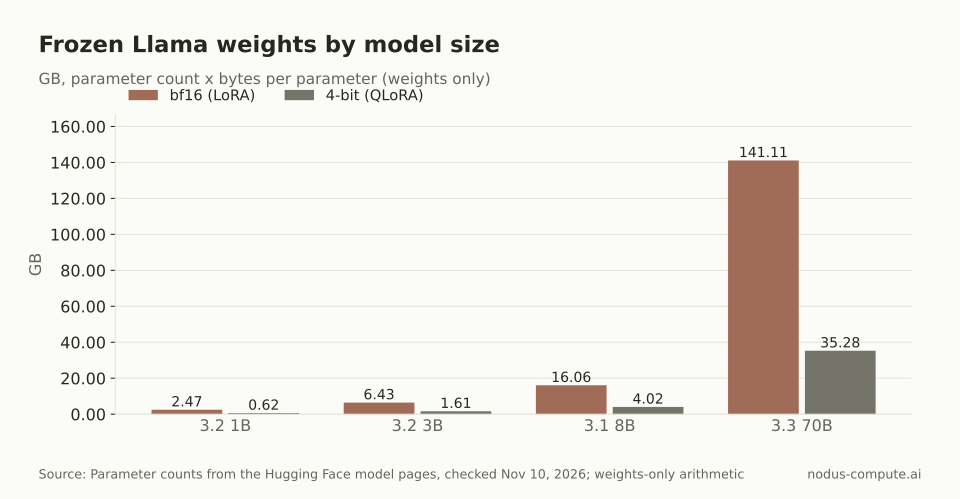 Only the 70B forces QLoRA on a single 80 GB card; everything smaller fits in bf16.
Should you fine-tune Llama Base or Instruct?
Section titled “Should you fine-tune Llama Base or Instruct?”Fine-tune Instruct for almost any dataset of prompts and answers. Instruct already knows the chat format, when to stop and how to follow a system prompt, so your data only has to teach the task.
Base makes sense for continued pretraining on a large pile of raw text, or when you want a format of your own. The catch is concrete: in our check of an ungated copy of the 3.1 8B Base tokenizer, it has no chat template and its end token is <|end_of_text|>, while Instruct ends turns with <|eot_id|>. Meta’s Llama 3.1 prompt format page says <|end_of_text|> is generated only by the base models. Llama 3.3 ships only as a 70B instruction-tuned model, so there is no 3.3 Base to pick.
How do you get access to a gated Llama model?
Section titled “How do you get access to a gated Llama model?”Accept the license on the model’s Hugging Face page with the same account your token belongs to, then wait for approval. A token alone is not enough. When we requested a Llama 3.1 config file with a valid write token on an account that had not accepted the license, Hugging Face returned HTTP 403 and “you are not in the authorized list”. Without a token the message is “You must have access to it and be authenticated”.
Approval is per repository, so accepting 3.1 8B does not cover 3.2 1B or 3.3 70B. Once approved, store the token once as a Nodus Secret, using the command from the Secrets guide:
$ nodus secret create hf-token --from-literal HF_TOKEN=hf_xxxHow do you format your data into the Llama 3 chat template?
Section titled “How do you format your data into the Llama 3 chat template?”Render each example with the tokenizer’s own apply_chat_template, then check the tokens. We wrote the script below and ran it on a CPU-only machine with transformers 5.22.2 against unsloth/Llama-3.1-8B-Instruct, an ungated copy of the tokenizer, so you can test formatting before Meta approves you. It writes the prompt and completion columns the nodus/sft runtime reads:
import jsonfrom transformers import AutoTokenizer
# Ungated copy of the Llama 3.1 8B Instruct tokenizer, pinned to a commit.tok = AutoTokenizer.from_pretrained(    "unsloth/Llama-3.1-8B-Instruct",    revision="4699cc75b550f9c6f3173fb80f4703b62d946aa5")SYSTEM = "You are the support assistant for Acme."DATE = "26 Jul 2024"  # pin the date line; serve with the same oneBOS = tok.bos_token   # <|begin_of_text|>
with open("raw.jsonl") as src, open("chats.jsonl", "w") as out:    for line in src:        row = json.loads(line)        msgs = [{"role": "system", "content": SYSTEM},                {"role": "user", "content": row["question"]}]        prompt = tok.apply_chat_template(            msgs, tokenize=False, add_generation_prompt=True, date_string=DATE)        prompt = prompt.removeprefix(BOS)  # the tokenizer adds BOS itself        out.write(json.dumps({"prompt": prompt,                              "completion": row["answer"]}) + "\n")
        # Check: prompt + completion + EOS must equal the official template.        ids = (tok(prompt)["input_ids"]               + tok(row["answer"], add_special_tokens=False)["input_ids"]               + [tok.eos_token_id])        ref = tok.apply_chat_template(            msgs + [{"role": "assistant", "content": row["answer"]}],            tokenize=True, date_string=DATE)        ref = ref if isinstance(ref, list) else ref["input_ids"]        assert ids == ref, "token mismatch"        assert ids.count(tok.bos_token_id) == 1print("ok, eos =", tok.eos_token)
It printed ok, eos = <|eot_id|> on our sample rows. The assertions are the point: they prove that prompt, answer and end token re-tokenize to exactly what the official template produces. Leave <|eot_id|> off the completion, because the Nodus training guide says SFT appends the EOS token, and for Instruct that token is <|eot_id|>.
Two things surprised us. Our first version kept <|begin_of_text|> in the prompt, and tokenizing it produced two BOS tokens, [128000, 128000, ...], because the tokenizer adds its own. And the template adds a system block with “Cutting Knowledge Date: December 2023” and a “Today Date” line to every conversation, even when you pass no system message.
Which Llama-specific mistakes break a fine-tune?
Section titled “Which Llama-specific mistakes break a fine-tune?”Most of them are a mismatch between training and serving, which fails quietly.
- The date line. The 3.1 and 3.3 templates we tested default to “26 Jul 2024”, but the 3.2 template stamped the current date when we rendered it. Data rendered on different days then differs, and so does serving. Pass one fixed
date_stringin training and in your server. - The pad token. Meta’s prompt format page names
<|finetune_right_pad_id|>as the padding token; it is id 128004 in the tokenizer. If you pad with the EOS token and your collator masks padding out of the loss, it can mask the real end token too, and the model never learns to stop. - The stop tokens. The generation config in the copy we checked stops on three ids: 128001, 128008 and 128009, that is
<|end_of_text|>,<|eom_id|>and<|eot_id|>. A server that stops only on<|eot_id|>can run past a tool-call turn that ends in<|eom_id|>. - A different template at serving. If you serve through a raw completion endpoint with your own prompt string, it has to match the training text byte for byte, including the blank line after each header.
The Nodus sft runtime reference documents prompt and completion or text columns, but not whether it re-applies a chat template to string prompts. Before a long run, train a few steps under a small cap and generate from the adapter; header tokens in the output mean the template was applied twice.
How do you run the Llama fine-tune on Nodus?
Section titled “How do you run the Llama fine-tune on Nodus?”Upload the JSONL to a Volume, point a TrainingJob at the gated repo with your secret, and dry-run it. The commands and fields below come from the Training guide, the sft runtime reference and the Volumes guide:
$ pip install nodus-compute$ nodus login$ nodus create volume support-chats --size 10Gi$ nodus volume put support-chats ./chats.jsonl /chats.jsonlapiVersion: nodus.dev/v1beta1kind: TrainingJobmetadata: name: llama-support-sftspec: runtime: nodus/sft model: uri: hf://meta-llama/Llama-3.1-8B-Instruct@0e9e39f249a16976918f6564b8830bc894c89659 secret: hf-token data: volume: support-chats path: chats.jsonl format: JSONL columns: {prompt: prompt, completion: completion} parameters: steps: 2000 completionOnlyLoss: true lora: {r: 16, alpha: 32} resources: {gpu: {type: [L40S, A100-80GB], count: 1}} maxCostUSD: "20.00"$ nodus apply -f sft.yaml --dry-run -o yaml$ nodus apply -f sft.yaml$ nodus get tj -wPin the 40-character commit, as the guide asks; this one is what Hugging Face reported for the repo when we checked. The first run imports the weights once, and later runs reuse them. We set resources because the runtime’s presets cover Qwen models, not Llama. completionOnlyLoss trains on the answers only.
For the GPU, here is where we would start each size, at rates listed on the Nodus pricing page: an RTX 4090 24 GB at $0.290/hr for 3.2 1B or 3B, an L40S 48 GB at $0.793/hr for 3.1 8B with LoRA, and for 3.3 70B with QLoRA an A100 80 GB at $1.090/hr or an H100 SXM 80 GB at $2.600/hr. Prices checked November 10, 2026.
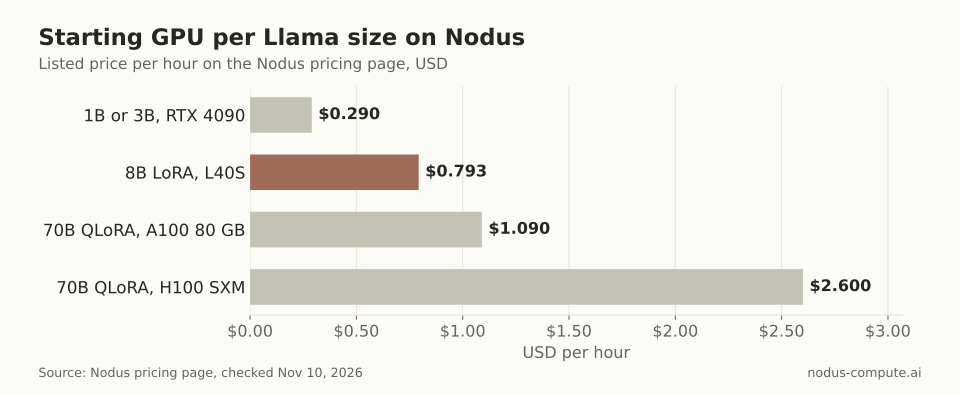 An H100 hour for the 70B costs 3.3 times an L40S hour for the 8B, so prove the 8B falls short first.
When the run succeeds, the adapter lands under adapter/ with the tokenizer beside it. Serve with that tokenizer’s template and the same date_string. The LoRA vs QLoRA post covers when the 4-bit base is worth it.
What does the Llama license require for a fine-tuned model?
Section titled “What does the Llama license require for a fine-tuned model?”Your fine-tune is a derivative work, and you own it as between you and Meta, but it carries the license with it. The Llama 3.1, 3.2 and 3.3 Community Licenses share these terms:
- If you distribute or make available the model, or a product that contains it, you must include a copy of the license and prominently display “Built with Llama” on a related website, interface, blog post, about page or product documentation.
- A model you fine-tune from Llama and distribute or make available must have “Llama” at the beginning of its name.
- Copies you distribute need a “Notice” file with the line “Llama 3.1 is licensed under the Llama 3.1 Community License, Copyright © Meta Platforms, Inc. All Rights Reserved.” (with your version number).
- Use must follow the Acceptable Use Policy, which the license incorporates.
- A licensee with more than 700 million monthly active users on the version’s release date must request a separate license from Meta.
The Llama 3.2 Acceptable Use Policy also withholds rights to the 3.2 multimodal models from individuals and companies based in the European Union; the 1B and 3B text models are not multimodal. This is a summary, not legal advice, so have your counsel read the text before you ship.
How many examples do I need to fine-tune Llama?
Section titled “How many examples do I need to fine-tune Llama?”Fewer than most people expect for a narrow format or style, and more for new behavior. Hold out a test set first, train on a few hundred examples, and add data only while the held-out score keeps improving.
Can I fine-tune Llama 3.2 Vision with the same steps?
Section titled “Can I fine-tune Llama 3.2 Vision with the same steps?”Not with this script. The vision models use a different prompt format with image inputs, and their use policy carries the EU restriction described above.
Does Nodus pick a GPU for Llama if I leave out resources?
Section titled “Does Nodus pick a GPU for Llama if I leave out resources?”Yes. Without a matching preset, the sft runtime falls back to its default of one RTX 4090, L40S, RTX A6000 or A100 80 GB. That is fine for the 1B and 3B, but name the GPU for the 70B.
More from the blog
benchmark9 min read
B200 vs H100: how much faster is Blackwell for training?
B200 vs H100 for training: MLPerf shows 2.04x to 2.08x faster at equal GPU count. On Nodus a B200 must be 2.115x faster to cost less per run.
Read the postagents7 min read
Should Claude Code run on your laptop or a cloud machine?
Keep Claude Code on your laptop for hands-on work; move it to a cloud machine when it must outlive the lid, outgrow 16 GB or touch GPUs. Costs inside.
Read the post