
What is the cheapest way to fine-tune Llama on an H100?
Use the lightest method that fits one H100, checkpoint every few minutes and pay only while the job runs. Memory math, a worked cost and a decision rule.
The cheapest way to fine-tune Llama on one H100 is the lightest method that fits (LoRA for Llama 3.1 8B, QLoRA for a 70B), a checkpoint every few minutes and billing only while the job runs. Nodus lists the H100 SXM at $2.60/hr on its pricing page, stops billing when the job finishes and restores the latest checkpoint on a new machine if the GPU is reclaimed. In our worked example, that keeps a 50-million-token Llama 3.1 8B LoRA run at $8.35, where an idle hour or one unprotected preemption pushes the same run to $10.95 or $15.50.
We build Nodus, so weigh that. Memory and speed figures below come from Hugging Face, torchtune and Unsloth, other platforms’ prices link to their own pages, and every cost shows its arithmetic.
Which fine-tuning method fits Llama on one H100?
Section titled “Which fine-tuning method fits Llama on one H100?”LoRA and QLoRA fit the 8B comfortably, and only QLoRA fits a 70B. The figures are Hugging Face’s own estimates from its Llama 3.1 launch post, which describes them as approximate:
| Method | Llama 3.1 8B | Llama 3.1 70B | Fits one H100 80 GB? |
|---|---|---|---|
| Full fine-tuning | 60 GB | 500 GB | 8B only, with memory-saving settings |
| LoRA (16-bit base) | 16 GB | 160 GB | 8B yes, 70B no |
| QLoRA (4-bit base) | 6 GB | 48 GB | Both |
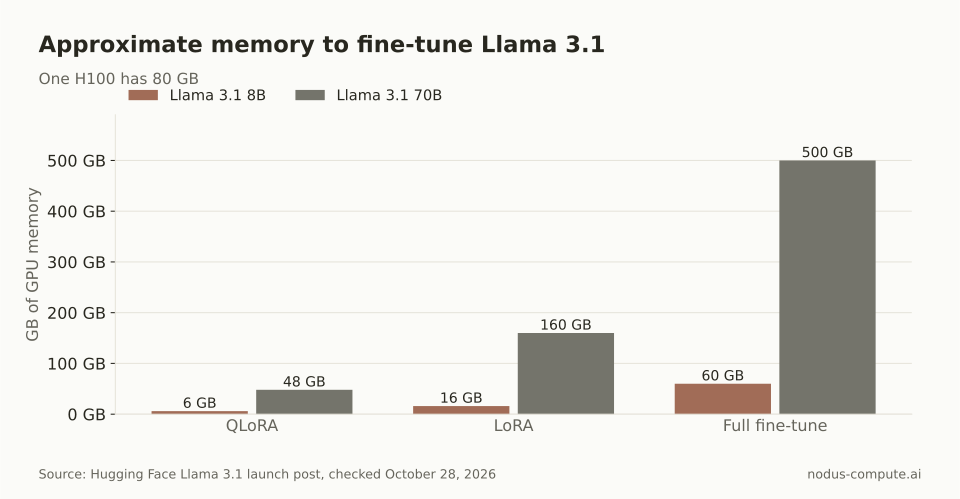 On one 80 GB H100, the 70B has exactly one option: QLoRA.
The full fine-tuning figure deserves a second look. The textbook cost of mixed-precision training with the AdamW optimizer is 16 bytes per parameter, as laid out in the ZeRO paper. Llama 3.1 8B has 8,030,261,248 parameters, so that is 128 GB before activations. Hugging Face’s lower 60 GB, and torchtune’s 18.9 GiB on a 24 GB RTX 4090 in its README, depend on lower-precision optimizer states and other memory savers.
For the 70B, Unsloth reports that QLoRA of Llama 3.3 70B fits in 41 GB in its Llama 3.3 post. A 16-bit LoRA needs two or more H100s, which our 70B VRAM guide works through in detail.
Is QLoRA cheaper than LoRA for Llama 3.1 8B on an H100?
Section titled “Is QLoRA cheaper than LoRA for Llama 3.1 8B on an H100?”Usually not. QLoRA saves memory, and on an 80 GB card the 8B does not need the saving, while the 4-bit base can slow every step.
torchtune measured both on the same hardware. For Llama 3.1 8B on an RTX 4090, LoRA trained at 3,083 tokens per second and QLoRA at 2,413, so QLoRA needed 28% more GPU time (3,083 / 2,413 = 1.28). For Llama 3.2 3B on an A100, the gap was small: 8,210 against 8,035 tokens per second. These are torchtune’s numbers on those GPUs, not H100 measurements.
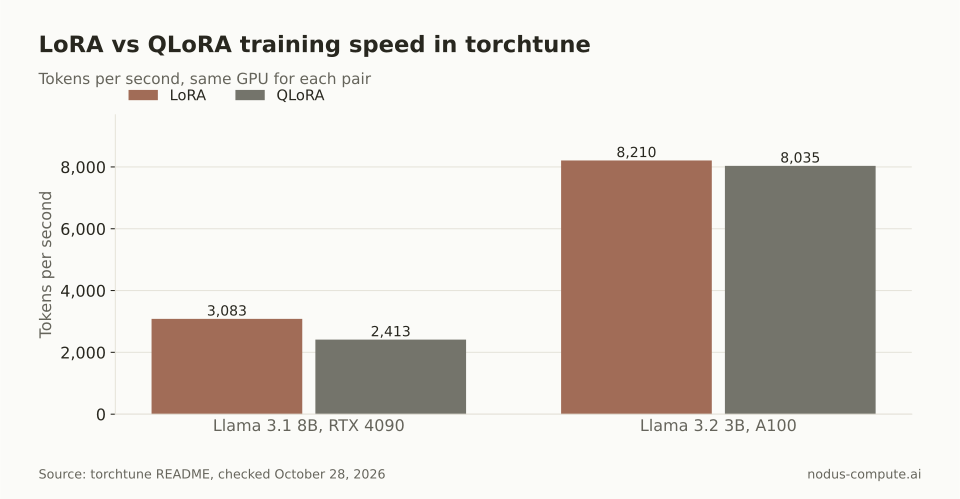 QLoRA’s slowdown ranged from 2% to 22% in torchtune’s tests, and you pay for every extra second.
GPU time is the bill, so the method that fits with the most headroom and runs fastest is the cheap one. For an 8B on an H100, that is 16-bit LoRA. Measure both on 100 steps if your sequences are long, because the trade can shift.
What does a Llama fine-tune cost per finished run?
Section titled “What does a Llama fine-tune cost per finished run?”It costs the hourly rate times every hour you are billed, not only the training hours. We use one formula:
cost per finished run = rate x (training tokens / tokens per second / 3,600 + startup + idle + redone hours)
Here is a worked example, built from stated assumptions rather than a measured run. The job is a LoRA fine-tune of Llama 3.1 8B: 25 million tokens of data, 2 epochs, so 50 million training tokens.
For speed we use torchtune’s 4,699 tokens per second for Llama 3.1 8B LoRA on one RTX A6000. We found no published H100 figure for this exact setup, so the A6000 number is a stand-in: replace it with the tokens per second you measure. We also assume 15 minutes of billed startup and teardown, as in our H100 and B200 cost-per-job post.
Training takes 50,000,000 / 4,699 = 10,641 seconds, or 2.96 hours. At $2.60/hr that is $7.70 of training plus $0.65 of startup, before anything goes wrong:
| Scenario | Billed hours | Cost |
|---|---|---|
| Clean run, billing stops when the job ends | 2.96 + 0.25 = 3.21 | $8.35 |
| Machine left on for 1 hour after training | 3.21 + 1 = 4.21 | $10.95 |
| Preempted at 2.5 hours, no usable checkpoint | 3.21 + 2.5 redone + 0.25 restart = 5.96 | $15.50 |
| Preempted at 2.5 hours, checkpoint every 10 minutes | 3.21 + at most 0.17 redone + 0.25 restart = 3.63 | $9.44 |
The rate is listed at $2.60/hr on the Nodus pricing page for the H100 SXM 80 GB. Prices checked October 28, 2026.
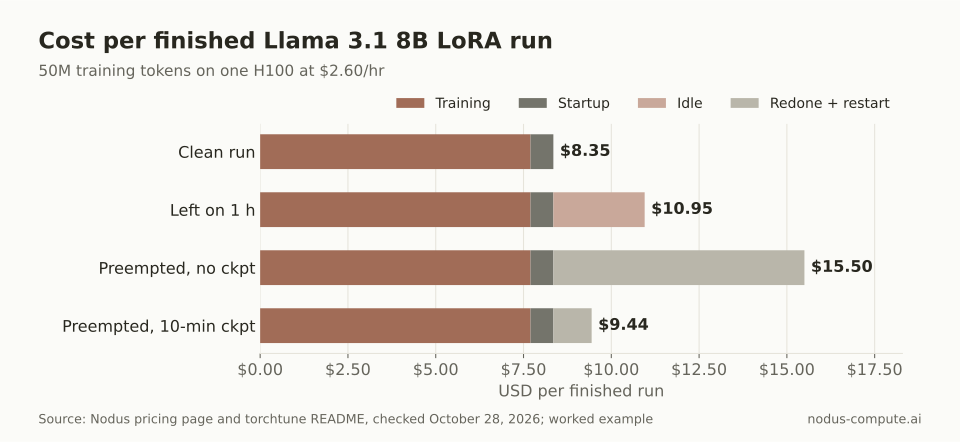 One preemption without a checkpoint adds $7.15 to the run; with 10-minute checkpoints it adds $1.09.
The lesson for Llama on an H100 is that the waste lines are bigger than any rate difference you can shop for. A one-hour idle tail adds $2.60, or 31% of this run. A lost run nearly doubles it.
Why are LoRA checkpoints cheap enough to save every few minutes?
Section titled “Why are LoRA checkpoints cheap enough to save every few minutes?”Because LoRA trains a tiny fraction of the model, its recovery checkpoint is small. Llama 3.1 8B has 32 layers, a hidden size of 4,096, key and value projections of 1,024 and an MLP size of 14,336, per the model config (we read an ungated copy on Hugging Face). A rank-16 adapter on all seven linear layers adds 16 x (in + out) parameters per layer:
16 x [(4,096 + 4,096) x 2 + (4,096 + 1,024) x 2 + (4,096 + 14,336) x 3] = 1,310,720 per layer
Over 32 layers that is 41,943,040 trainable parameters, 0.52% of the model. A full fine-tune has to save optimizer state for all 8 billion parameters, so frequent checkpoints get expensive. With LoRA they barely register, which is why the 10-minute row in the table above is realistic.
Nodus resumes from full checkpoints with optimizer, scheduler and RNG state, as the training guide describes. On a reclaim notice it also asks the job for an urgent checkpoint, and a checkpoint committed during that notice counts, per the attempts and recovery docs. Our spot preemption guide covers the same pattern for your own scripts.
How do you run a Llama LoRA job on Nodus?
Section titled “How do you run a Llama LoRA job on Nodus?”First, get access to the weights. Llama models on Hugging Face are gated: you accept Meta’s license on the model page, such as meta-llama/Llama-3.1-8B-Instruct, then use a Hugging Face token from that account. The terms are in the Llama 3.1 Community License.
Then install the CLI, sign in and store the token as a Secret. These commands are copied from the Nodus training and secrets docs:
$ pip install nodus-compute$ nodus loginnodus secret create hf-token --from-literal HF_TOKEN=hf_xxxThe manifest below is the LoRA example from the training guide with four changes: the Llama model pinned to its current Hugging Face commit, method, epochs, and one H100 under resources. The managed sft runtime publishes presets only for Qwen models, so a Llama run names its GPU. TrainingJobs are Beta, and we have not run this exact manifest, so start with the dry run.
apiVersion: nodus.dev/v1beta1kind: TrainingJobmetadata: name: llama-8b-loraspec: runtime: nodus/sft model: uri: hf://meta-llama/Llama-3.1-8B-Instruct@0e9e39f249a16976918f6564b8830bc894c89659 secret: hf-token # only for gated repositories data: volume: support-chats # a Volume holding chats.jsonl path: chats.jsonl format: JSONL columns: {prompt: question, completion: answer} parameters: method: LoRA epochs: 2 lora: {r: 16, alpha: 32} resources: {gpu: {type: [h100-sxm-80g], count: 1}} maxCostUSD: "20.00"$ nodus apply -f sft.yaml --dry-run -o yaml # status.estimate: cost to completion, first hold, start time$ nodus apply -f sft.yamlThe runtime saves a recovery checkpoint every saveSteps steps (200 by default), so set it to land roughly every 10 minutes once you know your step time. nodus describe tj/llama-8b-lora shows tokens per second while it trains, which is the number to put into the formula above. The maxCostUSD cap suspends the job at a checkpoint if spending reaches it, per the sft runtime reference and the budgets docs.
Where are Modal or RunPod the cheaper choice?
Section titled “Where are Modal or RunPod the cheaper choice?”Both can beat Nodus on this run, depending on how you work.
Modal includes $30 a month of free compute on its Starter plan, and charges $0.001097 per second for an H100, or $3.9492/hr, according to Modal’s pricing page. The clean run above bills 3.21 hours, which is $12.68 at that rate. That fits inside the monthly credit, so an occasional small Llama fine-tune can cost you nothing out of pocket on Modal. Modal restarts a preempted function on the same input, and you write the checkpoints yourself, per its preemption docs.
RunPod lists the H100 SXM at $2.69/hr on Community Cloud and $3.99/hr on Secure Cloud on its pricing page. If you stop the Pod the moment training ends, the clean run costs $8.63 on Community Cloud, 28 cents more than our example. Pods are billed by the second until they stop, per RunPod’s Pod pricing docs, so one forgotten hour makes it $11.32. RunPod also offers a form-driven Axolotl fine-tuning flow in its fine-tuning docs, and a Pod gives you a full machine to work in interactively.
Pick Modal if your runs are small and occasional, or your code already runs as Modal functions. Pick RunPod if you want a machine you drive by hand and you reliably shut it down. Pick Nodus if your runs are long enough that idle time and preemption are the real cost. Our fine-tuning platform comparison covers per-token APIs as well.
Which setup should you pick?
Section titled “Which setup should you pick?”Use this rule, in order:
- Llama 3.1 8B: 16-bit LoRA on one H100. Do not pay QLoRA’s slowdown for memory you have. If you do not need an H100’s speed, a 24 GB card is cheaper; our Unsloth guide shows the break-even.
- A 70B Llama on one H100: QLoRA. A 16-bit LoRA needs two or more GPUs.
- Full fine-tuning: only after LoRA has measurably fallen short. For comparison, the Nodus
sftruntime’s preset for a full fine-tune of Qwen3-8B is 8 x H100. - Every run: billing that stops when training stops, a checkpoint at least every 10 minutes, and 100 measured steps before you commit the full budget.
Can I use a fine-tuned Llama commercially?
Section titled “Can I use a fine-tuned Llama commercially?”Yes for most companies, under the Llama 3.1 Community License. If you distribute the model or a product built on it, the license requires “Built with Llama” to be displayed and the model’s name to start with “Llama”. Companies above 700 million monthly active users need a separate license from Meta.
How long a context can I fine-tune a 70B Llama on with one 80 GB GPU?
Section titled “How long a context can I fine-tune a 70B Llama on with one 80 GB GPU?”Unsloth reports up to 89,000 tokens of context for Llama 3.3 70B QLoRA on an 80 GB GPU with its long-context settings, against 6,900 with Hugging Face plus Flash Attention 2. Context length drives activation memory, so it is often what pushes a 70B run off a single GPU.
Should I pick a B200 instead of an H100 for Llama fine-tuning?
Section titled “Should I pick a B200 instead of an H100 for Llama fine-tuning?”Only if it finishes faster than its price ratio. The B200 is listed at $5.50/hr on the Nodus pricing page, 2.1 times the H100’s $2.60, so it has to train more than 2.1 times faster to cost less per finished run.
Does Nodus pick the GPU if I leave resources out?
Section titled “Does Nodus pick the GPU if I leave resources out?”For Llama, the sft runtime falls back to its default: one RTX 4090, L40S, RTX A6000 or A100 80 GB. That suits QLoRA of an 8B but not a 70B, so name the H100 explicitly when you need 80 GB.
More from the blog
pricing9 min read
What is the best platform to fine-tune open-source LLMs?
Nodus, Together AI, Modal, RunPod and AWS SageMaker compared for fine-tuning open models, with choose-if rules, a priced 8 x H100 run and a break-even rule.
Read the posttraining7 min read
How do you fine-tune with Unsloth on a cloud GPU?
Pick the smallest GPU in Unsloth's VRAM table, save Trainer checkpoints where they survive a restart, and run the script as a capped job.
Read the post