
How do you fine-tune a model and then run it in Ollama?
Ollama cannot train. Fine-tune on a GPU, merge the LoRA, convert to GGUF with llama.cpp, then ollama create with a Modelfile that matches the chat template.
Ollama only runs models, so you fine-tune somewhere with a GPU, merge the LoRA weights into the base model, convert the result to a GGUF file with llama.cpp, and import that file with a Modelfile and ollama create. Nodus runs the GPU half as one capped job: a QLoRA fine-tune of an 8B model fits an NVIDIA L4 listed at $0.43/hr, and the job hands back the GGUF for ollama run on your own machine. The merge is no longer optional, because current Ollama releases reject LoRA adapters outright.
Most guides that rank for this question were written before that change. Everything below was checked against the current Ollama, llama.cpp and Unsloth docs on November 22, 2026, and the import steps were run by us on CPU with Ollama 0.40.17 and a 135M-parameter model.
Why can’t Ollama fine-tune a model itself?
Section titled “Why can’t Ollama fine-tune a model itself?”Ollama is an inference server. Its ollama create command packages weights you already have into a model it can serve, and that is all. Training needs gradients, an optimizer and a GPU with room for both, which is a different program.
The packaging side also got narrower in 2026. The Ollama v0.34.1 release notes say GGUF model creation “now requires using llama.cpp tooling for safetensor conversion and quantization”. The same change removed ADAPTER from the Modelfile reference, and Ollama’s server code now returns “LoRA adapters are no longer supported”.
| Step in older guides | What current Ollama does |
|---|---|
ADAPTER ./lora.gguf on top of a base model |
Fails with “LoRA adapters are no longer supported” |
Point FROM at a safetensors folder and let Ollama convert it to GGUF |
Safetensors imports now go through Ollama’s MLX path; GGUF conversion is left to llama.cpp |
| Let Ollama quantize during import | The import docs say Ollama does not quantize GGUF models; use llama-quantize first |
We hit the first row ourselves. A Modelfile with FROM ./merged-Q8_0.gguf imported fine. Adding ADAPTER ./lora.gguf, a valid adapter produced by llama.cpp’s convert_lora_to_gguf.py, made ollama create stop with Error: LoRA adapters are no longer supported.
What does the full pipeline look like?
Section titled “What does the full pipeline look like?”Five steps, and only the first needs a GPU:
- Fine-tune with LoRA or QLoRA using Unsloth or Hugging Face TRL.
- Merge the adapter into the base weights and save them in 16-bit.
- Convert the merged model to GGUF and quantize it.
- Write a Modelfile whose template matches the format you trained on.
- Run
ollama create, thenollama run.
Steps 2 and 3 can happen at the end of the GPU job or later on a CPU. Our llama.cpp conversion and quantization of the small test model both ran on CPU only.
How do you run the fine-tune on a cloud GPU?
Section titled “How do you run the fine-tune on a cloud GPU?”For an 8B model, Unsloth’s requirements table lists a minimum of 6 GB of VRAM for 4-bit QLoRA and 22 GB for 16-bit LoRA. QLoRA therefore fits any 24 GB card. Our LoRA vs QLoRA guide covers when the 16-bit version is worth the bigger GPU, and our Unsloth on a cloud GPU walkthrough has a full training script with checkpoint resume.
Keep the training script as it is and add the export at the end. These two calls are copied from Unsloth’s saving to GGUF docs, with the output folders pointed at /nodus/outputs, the directory Nodus collects after a successful job:
model.save_pretrained_merged("/nodus/outputs/merged_model", tokenizer, save_method = "merged_16bit",)model.save_pretrained_gguf("/nodus/outputs/gguf", tokenizer, quantization_method = "q4_k_m")Then launch it from the folder holding train.py. The flags follow the Nodus quickstart; the cost cap and timeout are example choices:
nodus run --name llama8b-ollama --gpu L4 --image nodus/pytorch \ --max-cost 5 --timeout 6h --no-warm -- python train.pyEvery file under /nodus/outputs is collected and checksummed when the job succeeds, per the outputs guide. The exact file names appear in the job’s status.outputs, and nodus cp job/llama8b-ollama:outputs/<path> ./model.gguf downloads one after verifying its SHA-256.
How do you convert the merged model to GGUF yourself?
Section titled “How do you convert the merged model to GGUF yourself?”Use llama.cpp directly when you want control over the quant, or when Unsloth’s export fails. Our runs used llama.cpp at commit 8d60873. The two commands follow the llama.cpp quantize README:
python llama.cpp/convert_hf_to_gguf.py merged_model --outfile model-f16.gguf --outtype f16./llama.cpp/build/bin/llama-quantize model-f16.gguf model-Q4_K_M.gguf Q4_K_MConvert to F16 once and keep that file. Each extra quant is then one fast llama-quantize call instead of a fresh conversion.
Which GGUF quant should you pick for 8, 16 or 24 GB?
Section titled “Which GGUF quant should you pick for 8, 16 or 24 GB?”Pick the largest quant whose file, plus the KV cache for your context length, fits in memory with room to spare. The sizes below are the real file sizes in the public bartowski/Meta-Llama-3.1-8B-Instruct-GGUF repository. Bits per weight is file bytes x 8 / 8.03B parameters, where 8.03B comes from the repo’s F32 file (32.13 GB / 4 bytes).
| Quant | File size | Bits per weight | File + 8K-token KV cache |
|---|---|---|---|
| F16 | 16.06 GB (computed: 8.03B x 2 bytes) | 16 | 17.13 GB |
| Q8_0 | 8.54 GB | 8.51 | 9.61 GB |
| Q6_K | 6.60 GB | 6.57 | 7.67 GB |
| Q5_K_M | 5.73 GB | 5.71 | 6.80 GB |
| Q4_K_M | 4.92 GB | 4.90 | 5.99 GB |
| Q3_K_M | 4.02 GB | 4.00 | 5.09 GB |
| Q2_K | 3.18 GB | 3.17 | 4.25 GB |
The KV cache column uses the model’s config.json: 2 (keys and values) x 32 layers x 8 KV heads x 128 dimensions x 2 bytes = 131,072 bytes per token. At 8,192 tokens that is 1.07 GB.
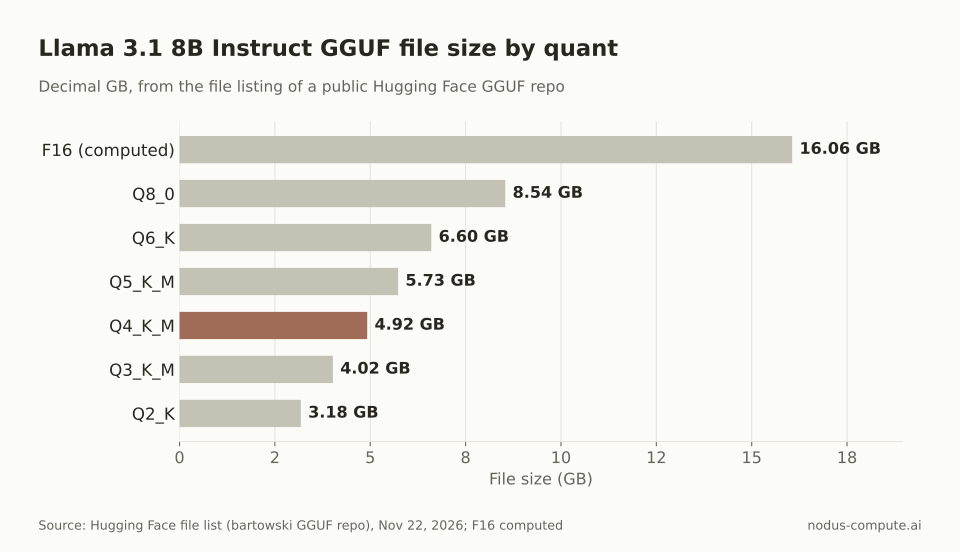 Q4_K_M is under a third of the F16 file, which is why it is the usual default for a fine-tuned 8B.
Our rule for an 8B fine-tune: on 8 GB, use Q4_K_M or Q5_K_M and keep Q6_K’s 7.67 GB for short contexts only. On 16 GB, Q8_0 at 9.61 GB is the easy choice. On 24 GB, the unquantized F16 fits at 17.13 GB, which is useful for checking whether a quality drop came from your training or from quantization.
Real use adds runtime buffers on top, so treat these as floors. Our 8, 16 and 24 GB VRAM guide works through longer contexts.
How do you write the Modelfile?
Section titled “How do you write the Modelfile?”Start from the GGUF and spell out the chat template and stop tokens you trained with. For a model trained in ChatML format, this is the template from the Modelfile reference plus one stop parameter:
FROM ./model-Q4_K_M.ggufTEMPLATE """{{ if .System }}<|im_start|>system{{ .System }}<|im_end|>{{ end }}{{ if .Prompt }}<|im_start|>user{{ .Prompt }}<|im_end|>{{ end }}<|im_start|>assistant"""PARAMETER stop "<|im_end|>"PARAMETER temperature 0.2For a Llama 3 format fine-tune, copy the TEMPLATE and the four PARAMETER stop lines from the ollama show --modelfile example in the same reference. Then build and run it:
ollama create my-model -f ./Modelfileollama run my-modelWhy does a fine-tuned model ramble or never stop in Ollama?
Section titled “Why does a fine-tuned model ramble or never stop in Ollama?”Almost always because the prompt format at run time differs from the one used in training, or the end-of-turn token is not a stop sequence. Unsloth’s GGUF troubleshooting section names an incorrect chat template as “the most common cause” of gibberish, endless generations or repeated outputs, followed by a wrong EOS token.
Our import test shows how this happens silently. When the GGUF carried SmolLM2’s standard ChatML template, Ollama 0.40.17 recognized it and filled in a ChatML TEMPLATE with <|im_start|> and <|im_end|> as stop sequences. When we swapped in a custom Alpaca-style template, ollama show --modelfile printed TEMPLATE {{ .Prompt }} and no stop parameters at all. Ollama’s template docs describe {{ .Prompt }} as the default, which sends your text to the model verbatim.
So the check takes ten seconds: run ollama show --modelfile my-model after every import and compare the template and stop lines with your training data. If they differ, write them into the Modelfile yourself and run ollama create again.
What does the GPU time cost?
Section titled “What does the GPU time cost?”Cost is the listed hourly price times the hours your job takes. We have not timed an 8B fine-tune for this post, so the table uses an assumed 3 GPU-hours to show the math. Replace 3 with your own measured hours.
| GPU on Nodus | Listed price | x 3 hours |
|---|---|---|
| RTX 4090 (24 GB) | $0.29/hr | $0.87 |
| L4 (24 GB) | $0.43/hr | $1.29 |
| L40S (48 GB) | $0.793/hr | $2.38 |
| H100 SXM (80 GB) | $2.60/hr | $7.80 |
Prices checked November 22, 2026 on the Nodus pricing page.
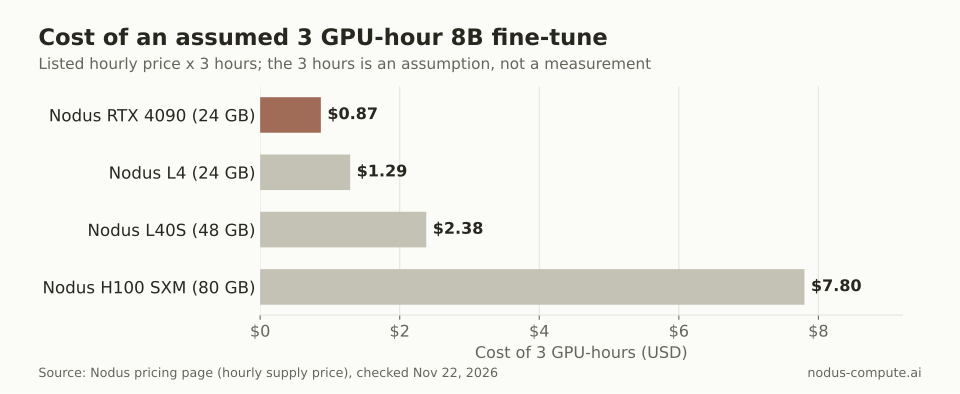 An H100 only wins on cost if it finishes the same QLoRA job about 9x faster than an RTX 4090.
That 9x is $2.60 / $0.29 = 8.97. For a QLoRA 8B job, a 24 GB card is the sensible first try. The merge and GGUF conversion are CPU work, so if your job spends long on them, consider running them on your own machine instead of the GPU clock.
Can I run the LoRA adapter in Ollama without merging?
Section titled “Can I run the LoRA adapter in Ollama without merging?”Not in current releases. Since v0.34.1 Ollama rejects LoRA adapters at ollama create, so merge with Unsloth’s save_pretrained_merged or PEFT’s merge_and_unload before converting.
Should I merge into the 4-bit base I trained QLoRA on?
Section titled “Should I merge into the 4-bit base I trained QLoRA on?”No. Merge into the 16-bit base weights, which is what Unsloth’s merged_16bit save method does, and quantize afterwards with llama.cpp. That gives you one clean F16 GGUF to make every quant from.
Can I serve the fine-tuned model to many users instead of just my laptop?
Section titled “Can I serve the fine-tuned model to many users instead of just my laptop?”Ollama is built for one machine and a few users. For shared traffic, the merged 16-bit folder works in vLLM directly; our vLLM vs Ollama comparison covers when to switch and what each concurrent user costs.
Does Ollama still accept safetensors directly?
Section titled “Does Ollama still accept safetensors directly?”Yes, through its MLX import path, which the v0.34.1 notes moved out of experimental status. If you want a GGUF that runs the same on Linux, Windows and macOS, convert with llama.cpp yourself.
More from the blog
gpu10 min read
What are the best Beam Cloud alternatives for serverless GPUs?
Beam Cloud alternatives for serverless GPUs: Nodus, Modal, RunPod Serverless, Baseten and Cerebrium compared on one 24 GB endpoint at list prices.
Read the postpricing9 min read
What is the best GPU for running and training LLMs?
Pick the cheapest GPU whose memory fits the job. A workload table from 8B to 70B, cheapest fitting GPU at Nodus list prices, and when an H100 pays.
Read the post