
Which LLMs can you run on 8GB, 16GB or 24GB of VRAM?
Named open models that fit in 8, 16 and 24 GB of VRAM at real quantizations, how much context each leaves, and when to move up to a bigger GPU on Nodus.
On 8 GB of VRAM you can run a 4-bit 8B or 9B model such as Qwen3.5-9B or Llama 3.1 8B, 16 GB adds OpenAI’s gpt-oss-20b with about 106,000 tokens of context, and 24 GB runs 4-bit 24B to 27B models such as Qwen3.8-27B with about 82,000 tokens. When a model or a context length needs more, Nodus runs the same job on a 48 GB NVIDIA RTX A6000 listed at $0.333/hr on the Nodus pricing page, $0.153 more than a 24 GB RTX 3090. Context, not weights, usually decides the tier, and the newest hybrid-attention models need a quarter of the cache per token that older 8B models do.
We got these numbers by reading each model’s config.json and the exact size of its quantized GGUF file on Hugging Face on November 21, 2026, then running a short script that works out how many tokens of KV cache fit beside the weights. The general method, and why we keep 8% of memory free, is in how to calculate LLM VRAM. This post applies it to the three memory sizes most people actually own.
Which models fit in each VRAM tier?
Section titled “Which models fit in each VRAM tier?”A model fits a tier when its file plus the cache for your longest conversation stays under 92% of the card’s memory. The last three columns are the tokens of context left for one conversation after loading the weights, capped at the model’s own maximum.
| Model and file | File size | KV cache per token | Context at 8 GB | Context at 16 GB | Context at 24 GB |
|---|---|---|---|---|---|
| Llama 3.1 8B, Q4_K_M | 4.92 GB | 131.07 KB | 18,610 | 74,762 | 130,914 |
| Qwen3.5-4B, Q8_0 | 4.48 GB | 32.77 KB | 86,209 | 262,144 | 262,144 |
| Qwen3.5-9B, Q4_K_M | 5.68 GB | 32.77 KB | 49,645 | 262,144 | 262,144 |
| Qwen3.5-9B, Q8_0 | 9.53 GB | 32.77 KB | does not fit | 156,854 | 262,144 |
| gpt-oss-20b, MXFP4 | 12.11 GB | 24.58 KB | does not fit | 106,090 | 131,072 |
| Mistral Small 3.2 24B, Q4_K_M | 14.33 GB | 163.84 KB | does not fit | 2,356 | 47,278 |
| Qwen3.8-27B, UD-Q4_K_M | 16.56 GB | 65.54 KB | does not fit | does not fit | 81,769 |
| Qwen3.5-35B-A3B, MXFP4_MOE | 21.59 GB | 20.48 KB | does not fit | does not fit | 20,825 |
File sizes from the Hugging Face repos linked above, KV cache from each model’s official config.json with a 16-bit cache, read November 21, 2026. Context is shared: two conversations at once each get half.
Two numbers in this table surprise people. A 9B model leaves more room on an 8 GB card than an 8B one, and a 24B model that loads on 16 GB is close to useless there. Both come from the cache column, which the next sections explain.
Why does a 9B model leave more context than an 8B one?
Section titled “Why does a 9B model leave more context than an 8B one?”Because Qwen3.5 only keeps a KV cache on a quarter of its layers. Its config lists 32 layers, of which 24 are linear_attention and 8 are full_attention. The linear layers keep a fixed-size state instead of a growing cache, so only 8 layers pay per token.
The arithmetic is the standard formula on those 8 layers: 2 (keys and values) x 8 layers x 4 key-value heads x 256 head size x 2 bytes = 32,768 bytes per token. Llama 3.1 8B caches on all 32 layers: 2 x 32 x 8 x 128 x 2 = 131,072 bytes. That is four times as much, so on 8 GB the Llama file is 0.76 GB smaller but leaves 18,610 tokens against Qwen3.5-9B’s 49,645.
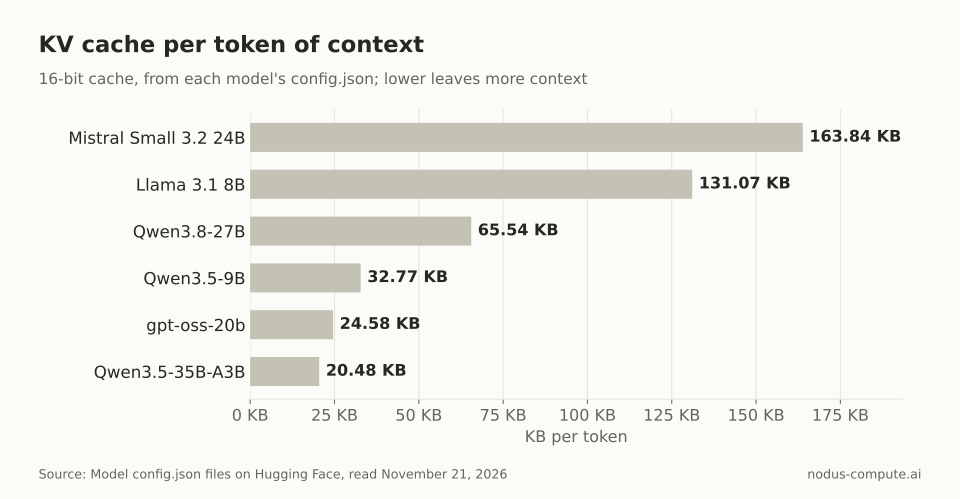 A 27B hybrid model caches half as much per token as Llama 3.1 8B, so parameter count is a poor guide to context room.
The fixed state is not free, but it is small. Each linear layer stores a recurrent state of value heads x key size x value size plus a short convolution buffer, which we count at 4 bytes per value because the config sets mamba_ssm_dtype to float32. That comes to 52.7 MB per conversation for Qwen3.5-9B and 156.9 MB for Qwen3.8-27B, whatever the context length.
gpt-oss-20b saves memory a different way. Half of its 24 layers use a 128-token sliding window, so only 12 layers grow with context, at 24,576 bytes per token. Mistral Small 3.2 uses plain attention on all 40 layers, which is why it has the biggest cache in the table.
What can you run on 8 GB of VRAM?
Section titled “What can you run on 8 GB of VRAM?”A 4-bit 8B or 9B model, or a 4B model at 8-bit, with room for real conversations. 8 GB gives a serving engine 7.36 GB after the 8% reserve.
Qwen3.5-9B at Q4_K_M is the best fit we found: a 5.68 GB file and 49,645 tokens of context, enough for a long document and a reply. Qwen3.5-4B at Q8_0 trades size for precision and leaves 86,209 tokens. Llama 3.1 8B at Q4_K_M still works for short chats and tool calls, but 18,610 tokens fills quickly once a coding agent pastes in files.
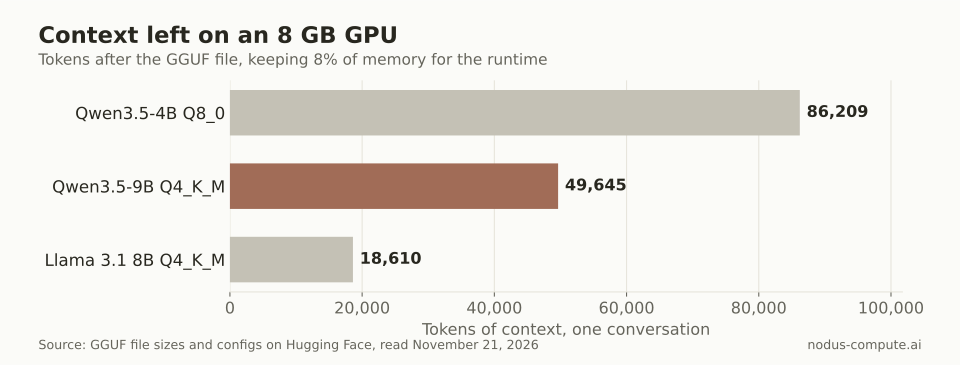 On 8 GB, the hybrid Qwen3.5 models leave 2.7x to 4.6x the context of Llama 3.1 8B.
Nothing at 8-bit above 4B fits here: Qwen3.5-9B at Q8_0 is 9.53 GB on its own.
What can you run on 16 GB of VRAM?
Section titled “What can you run on 16 GB of VRAM?”gpt-oss-20b in its native MXFP4 format, or any 8B to 9B model at 8-bit with long context. The usable budget is 14.72 GB.
gpt-oss-20b is a 12.11 GB file and leaves 106,090 tokens, most of its 131,072 maximum. Qwen3.5-9B at Q8_0 leaves 156,854 tokens, and the 4-bit 9B and 4B files reach their full 262,144-token window.
The trap at this size is a 24B model at 4-bit. Mistral Small 3.2 24B at Q4_K_M is 14.33 GB, which loads, but leaves 0.39 GB for cache: 2,356 tokens. Tools such as llama.cpp can keep some layers in system RAM to make room, but those layers then run at CPU memory speed. If you want a 24B model, treat 16 GB as too small.
The best budget GPU post covers which 16 GB cards to buy if this tier is your target.
What can you run on 24 GB of VRAM?
Section titled “What can you run on 24 GB of VRAM?”A 4-bit model of 24B to 27B parameters with tens of thousands of tokens, or a 4-bit 35B mixture-of-experts model with a short context. The budget is 22.08 GB.
Qwen3.8-27B at UD-Q4_K_M is a 16.56 GB file and leaves 81,769 tokens. Mistral Small 3.2 24B leaves 47,278, because its cache per token is 2.5 times larger. Qwen3.5-35B-A3B fits in its MXFP4_MOE file of 21.59 GB, but only with 20,825 tokens: every one of its 256 experts has to sit in memory even though each token uses a few.
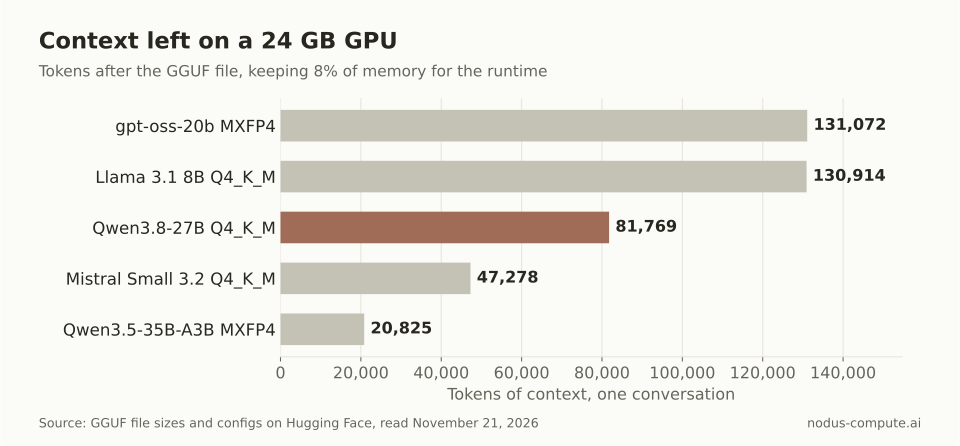 At 24 GB the bigger model is not always the tighter fit: Qwen3.8-27B leaves more context than the smaller Mistral Small 3.2.
A 70B model does not fit on 24 GB at any useful precision. Its 4-bit weights alone are 39.8 GB, as our 70B VRAM post shows.
How did we compute the context numbers?
Section titled “How did we compute the context numbers?”With the script below, which reads each config and the exact GGUF file size from the Hugging Face API and uses only the Python standard library. It handles the three layer types in this table: full attention, sliding windows and linear attention.
import json, urllib.request
def get(url):    with urllib.request.urlopen(url) as r:        return json.load(r)
def kv_cost(repo):    """Bytes per token and fixed bytes per conversation, 16-bit cache."""    c = get(f"https://huggingface.co/{repo}/resolve/main/config.json")    c = c.get("text_config", c)    types = c.get("layer_types") or ["full_attention"] * c["num_hidden_layers"]    hd = c.get("head_dim") or c["hidden_size"] // c["num_attention_heads"]    per_layer = 2 * c["num_key_value_heads"] * hd * 2          # K and V, 2 bytes each    per_token = per_layer * types.count("full_attention")    fixed = per_layer * (c.get("sliding_window") or 0) * types.count("sliding_attention")    if "linear_attention" in types:                              # fixed fp32 state per layer        nk, nv = c["linear_num_key_heads"], c["linear_num_value_heads"]        dk, dv = c["linear_key_head_dim"], c["linear_value_head_dim"]        state = nv * dk * dv + (c["linear_conv_kernel_dim"] - 1) * (2 * nk * dk + nv * dv)        fixed += state * 4 * types.count("linear_attention")    return per_token, fixed, c["max_position_embeddings"]
def gguf_size(repo, name):    for f in get(f"https://huggingface.co/api/models/{repo}/tree/main"):        if f["path"] == name:            return f["lfs"]["size"]
w = gguf_size("unsloth/Qwen3.8-27B-GGUF", "Qwen3.8-27B-UD-Q4_K_M.gguf")per_tok, fixed, maxlen = kv_cost("Qwen/Qwen3.8-27B")for vram in (8, 16, 24):    room = vram * 0.92e9 - w - fixed                             # keep 8% for the runtime    print(vram, "GB:", "does not fit" if room < 0 else min(int(room // per_tok), maxlen))
For Qwen3.8-27B it prints “does not fit” for 8 and 16 GB and 81,769 tokens for 24 GB. Our full run loops the same two functions over the eight files in the table. Re-checking one row by hand: 24 GB x 0.92 = 22.08 GB, minus the 16.56 GB file and 0.157 GB of fixed state, leaves 5.36 GB, and 5.36 GB divided by 65,536 bytes is about 81,770 tokens.
Treat the results as a ceiling. The 8% reserve matches vLLM’s default, but llama.cpp and Ollama also allocate compute buffers, and on a desktop the display takes its share of the same card. Image input adds a vision projector file, 0.92 GB at 16-bit for Qwen3.5-9B. Read the cache size your engine logs on the first launch and compare.
We left Gemma 4 out of the context columns. Its configs mix sliding-window layers with global layers that use a different head size and key-value layout, and our formula does not model that. By file size, the Gemma 4 12B Q4_K_M is 7.12 GB, which leaves only 0.24 GB on an 8 GB card, so treat it as a 16 GB model. The Gemma 4 26B-A4B UD-Q4_K_M is 16.95 GB, a 24 GB model.
When should you move to a bigger GPU on Nodus?
Section titled “When should you move to a bigger GPU on Nodus?”Move up when the file size plus your longest context times the per-token cache is more than 92% of your card. Also move up when several people or agents need that context at once, since they share it.
Mistral Small 3.2 at its full 131,072-token window is a clean example. The cache is 131,072 x 163,840 bytes = 21.47 GB, plus the 14.33 GB file makes 35.81 GB, and 35.81 / 0.92 = 38.92 GB. That needs a 48 GB card. Qwen3.8-27B at its full 262,144 tokens works out to 33.90 GB of weights, cache and state, or 36.85 GB of GPU, so it lands on the same card.
The Nodus pricing page lists a GPU at every one of these sizes:
| GPU memory | Cheapest listed GPU on Nodus | Listed price per hour |
|---|---|---|
| 8 GB | RTX 3070 | $0.133 |
| 16 GB | RTX A4000 | $0.173 |
| 24 GB | RTX 3090 | $0.180 |
| 32 GB | RTX 5090 | $0.480 |
| 48 GB | RTX A6000 | $0.333 |
| 80 GB | A100 80 GB | $1.090 |
Prices checked November 21, 2026, on the Nodus pricing page.
The 48 GB row is the useful one for readers of this post. It costs $0.153/hr more than the 24 GB RTX 3090 and less than the 32 GB RTX 5090, and it holds every model in our table at its full context.
You do not have to name the card. A Job that asks for a memory floor and no GPU type runs on any accelerator with at least that much memory, picked by expected cost to finish (GPU guide):
spec: resources: gpu: {minMemory: 40Gi, count: 1}After pip install nodus-compute and nodus login, nodus get gpus shows current availability and rates, and nodus run with --dry-run returns the estimate before anything starts. If you are deciding between a local card and paying by the hour, the break-even math is in should you run an LLM locally or in the cloud.
Does an 8-bit KV cache double the context?
Section titled “Does an 8-bit KV cache double the context?”Roughly, yes: storing the cache at 8 bits halves the bytes per token, so the context columns above would about double. Check output quality on your own prompts first. Our VRAM calculation post shows the vLLM setting and its effect on a worked example.
Is 16 GB enough to fine-tune these models?
Section titled “Is 16 GB enough to fine-tune these models?”For LoRA or QLoRA on the 4B to 9B models, usually, because the base weights stay frozen at low precision. Full fine-tuning keeps gradients and optimizer state for every parameter, which is far beyond 16 GB even for a 4B model. Training memory also depends on sequence length and batch size, so measure a short run before committing.
Why does my 24 GB card run out of memory with Qwen3.5-35B-A3B?
Section titled “Why does my 24 GB card run out of memory with Qwen3.5-35B-A3B?”The MXFP4_MOE file is 21.59 GB, which leaves only 20,825 tokens under the 8% reserve and less once your desktop and compute buffers take their share. Shorten the maximum context you configure, or run it on a 48 GB card such as the RTX A6000, listed at $0.333/hr on the Nodus pricing page, where its full 262,144-token window fits.
Do Macs follow the same tiers?
Section titled “Do Macs follow the same tiers?”The same math applies to Apple Silicon unified memory, but the operating system and your apps share that memory. A 24 GB Mac has less free for the model than a 24 GB graphics card, so plan one tier down.
More from the blog
gpu10 min read
What are the best Beam Cloud alternatives for serverless GPUs?
Beam Cloud alternatives for serverless GPUs: Nodus, Modal, RunPod Serverless, Baseten and Cerebrium compared on one 24 GB endpoint at list prices.
Read the postpricing7 min read
What is the best budget GPU for AI, and when should you rent?
Budget AI GPUs ranked by list price per GB of VRAM, what 12 and 16 GB fit, and the hours-per-month rule for when per-hour jobs on Nodus beat buying.
Read the post