
vLLM vs Ollama: which should you use to serve an LLM?
Use Ollama to run a model on your own machine for one user, and vLLM to serve many concurrent users from a GPU. The difference is how each spends KV memory.
Use Ollama to run a model on your own laptop or workstation for yourself, and use vLLM when many users or programs hit the same GPU at once. Nodus covers the production side: it serves open models such as GPT-OSS through an OpenAI-compatible API, or runs vLLM with your own weights on GPUs such as an NVIDIA L40S listed at $0.793/hr on the Nodus pricing page. The gap between the two engines is mostly memory accounting: Ollama reserves a full context window for every parallel slot, while vLLM gives each request only the KV cache it actually uses.
That last point decides most real choices, so this post works it through with arithmetic for Qwen3 8B on one 48 GB GPU. We have not run our own vLLM vs Ollama benchmark. Every capacity figure below is calculated from the model’s config and the two projects’ docs, and every step is shown so you can redo it for your model.
What is the difference between vLLM and Ollama?
Section titled “What is the difference between vLLM and Ollama?”Ollama is an MIT-licensed app for running open models on macOS, Windows and Linux. Its README lists llama.cpp as its supported backend, and it pulls models from its own library by short names. Two commands get you a chat:
curl -fsSL https://ollama.com/install.sh | shollama run gemma4vLLM is an Apache 2.0 serving engine built for throughput. Its quickstart lists Linux and Python 3.11 to 3.14 as prerequisites and starts an OpenAI-compatible server on http://localhost:8000:
uv venv --python 3.12 --seedsource .venv/bin/activateuv pip install vllm --torch-backend=autovllm serve Qwen/Qwen2.5-1.5B-InstructOur explainer What is vLLM? covers PagedAttention and continuous batching in depth. This post is about choosing between the two.
| Ollama | vLLM | |
|---|---|---|
| Built for | Local use on your own machine | Serving many requests per GPU |
| Operating systems | macOS, Windows, Linux | Linux; macOS via the community vllm-metal plugin |
| NVIDIA GPUs | Compute capability 5.0 and newer | Compute capability 7.5 and newer |
| Model format | Ollama library tags; imports GGUF files | Hugging Face weights; GGUF through a plugin marked highly experimental |
| Default port | 11434, bound to 127.0.0.1 | 8000 |
| OpenAI-compatible API | A subset, at /v1 |
Yes |
| Parallel requests per model | OLLAMA_NUM_PARALLEL, default 1 |
Continuous batching, limited by KV cache |
| Models per server | Several, up to OLLAMA_MAX_LOADED_MODELS |
One model per server |
| License | MIT | Apache 2.0 |
Sources: Ollama FAQ, Ollama hardware support, Ollama OpenAI compatibility, Ollama import docs, vLLM quickstart, vLLM GPU installation, vLLM CPU installation, vLLM GGUF docs. Checked November 18, 2026.
Why is vLLM faster than Ollama?
Section titled “Why is vLLM faster than Ollama?”For one person typing into one chat, it often is not meaningfully faster, and we have no measurement that says otherwise. The difference shows up under concurrency, and it starts with defaults.
The Ollama FAQ says each model processes OLLAMA_NUM_PARALLEL requests at the same time, with a default of 1. Extra requests wait in a queue of up to 512 (OLLAMA_MAX_QUEUE), and past that the server answers with a 503 overloaded error. Raising the parallel setting works, but the same page warns that “Required RAM will scale by OLLAMA_NUM_PARALLEL * OLLAMA_CONTEXT_LENGTH”. Every slot is sized for the longest conversation it might hold.
vLLM does not size anything per slot. It stores KV cache in small blocks and hands them out as tokens arrive, and it adds and removes requests from the running batch at every step. A request holding 2,000 tokens uses memory for 2,000 tokens, even if the server allows 32,768. When the cache does fill up, the vLLM optimization docs say it preempts a request and recomputes it later, which costs latency but keeps the server up.
Decoding is limited by memory bandwidth, so a GPU produces far more total tokens when it works on many requests in each step. Our post on LLM tokens per second shows how large that batching effect is. More requests in memory means a bigger batch, and that is where vLLM’s production speed comes from.
How many concurrent users fit on one GPU with each?
Section titled “How many concurrent users fit on one GPU with each?”Here is the arithmetic for Qwen3 8B, which both projects can serve. Its config.json lists 36 layers, 8 key-value heads and a head dimension of 128, in bfloat16. Its model page reports 8,190,735,360 parameters. We use 16-bit weights in both engines so only the KV accounting differs; Ollama’s library has this as the qwen3:8b-fp16 tag.
- KV cache per token: 2 (key and value) x 36 layers x 8 heads x 128 dims x 2 bytes = 147,456 bytes.
- Weights: 8,190,735,360 x 2 bytes = 16.38 GB.
- GPU: an NVIDIA L40S, treated as 48 GB. That leaves 48 minus 16.38 = 31.62 GB for KV cache. This ignores activations and CUDA graph memory, so every count below is an upper bound.
- One Ollama slot at a 32,768-token context: 32,768 x 147,456 bytes = 4.83 GB, reserved whether the conversation uses it or not.
- One Ollama slot at 4,096 tokens: 4,096 x 147,456 bytes = 0.604 GB.
- One vLLM request that averages 2,000 tokens of prompt plus output: 2,000 x 147,456 bytes = 0.295 GB.
The 2,000-token average is our assumption for a typical chat turn with some history. Replace it with your own logs.
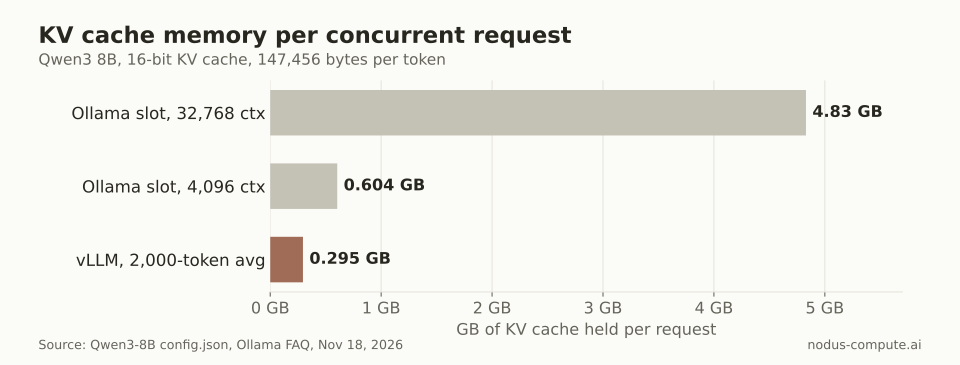 Ollama pays for the maximum context on every slot; vLLM pays for the tokens a request actually holds.
Now divide the 31.62 GB budget. At a 32,768-token context, Ollama fits 6 parallel slots. Cut the context to 16,384 and it fits 13, at 8,192 it fits 26, and at 4,096 it fits 52. vLLM fits about 107 requests averaging 2,000 tokens, and that number does not change when you raise the maximum context, because the maximum is no longer reserved up front.
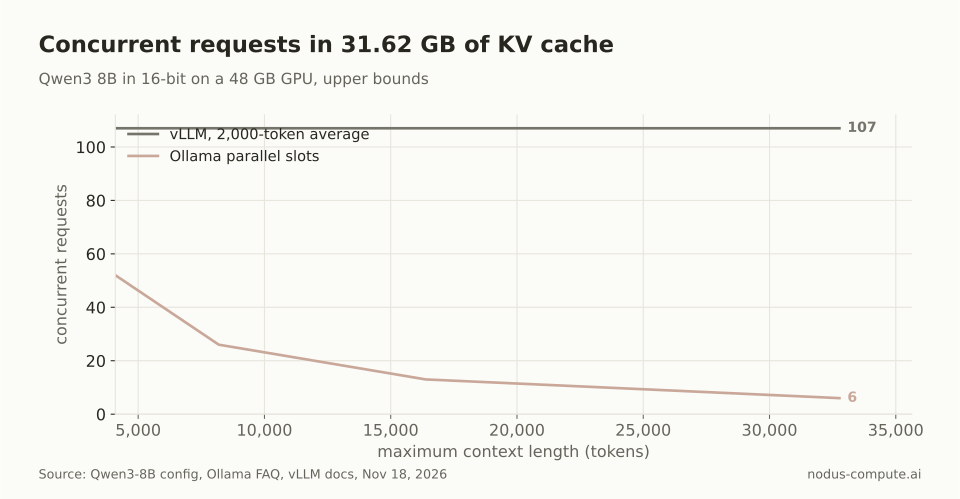 Doubling Ollama’s context halves its parallel slots; vLLM’s ceiling depends on average use, not the maximum.
This is why Ollama’s own advice pulls against concurrency. Its context length page recommends at least 64,000 tokens for agents, web search and coding tools, and every extra token of context is multiplied by every slot.
Ollama can stretch the budget. The FAQ says OLLAMA_KV_CACHE_TYPE=q8_0 uses about half the memory of the default f16, with a very small loss in precision. That would take the 32,768-token case from 6 slots to about 13. vLLM has a comparable option in --kv-cache-dtype fp8, listed in its engine arguments, so quantizing the cache helps both engines rather than closing the gap.
What does each concurrent user cost per hour?
Section titled “What does each concurrent user cost per hour?”Spread the same GPU across those slots. On an L40S listed at $0.793/hr on the Nodus pricing page, the cost of holding room for one concurrent request for an hour is the hourly price divided by the slot count.
| Setup on one L40S, Qwen3 8B | Concurrent requests | $ per concurrent request-hour |
|---|---|---|
| Ollama, 32,768-token context | 6 | $0.132 |
| Ollama, 32,768 context, q8_0 KV cache | about 13 | $0.061 |
| Ollama, 4,096-token context | 52 | $0.015 |
| vLLM, any max context, 2,000-token average | about 107 | $0.0074 |
Prices checked November 18, 2026. For example, $0.793 / 6 = $0.132, and $0.793 / 107 = $0.0074.
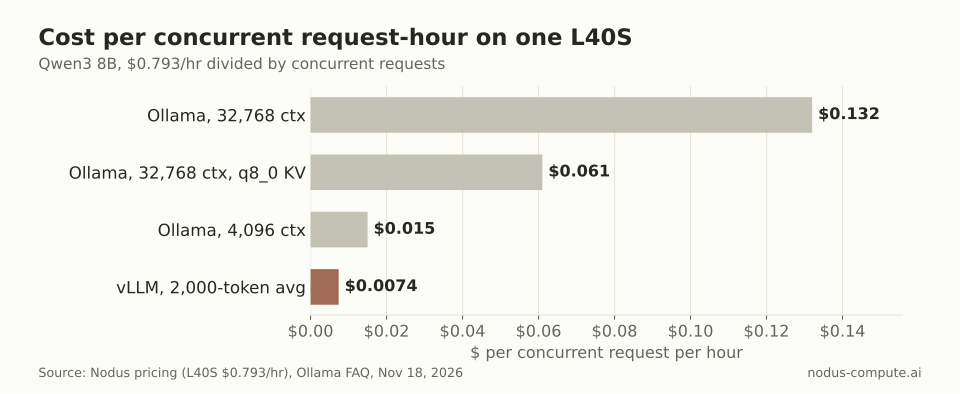 At a production-length context, room for one concurrent user costs about 18 times more under Ollama’s fixed slots.
Two caveats keep this honest. Holding a request in memory is not the same as serving it fast, since per-user speed drops as the batch grows. And vLLM’s 107 assumes your average holds; a burst of long conversations fills the cache sooner and triggers preemption.
Which should you choose?
Section titled “Which should you choose?”Use this rule, worked from the arithmetic above:
- Work out your KV budget: GPU memory minus weights.
- Work out one Ollama slot: the context you need x KV bytes per token.
- If your peak concurrent requests fit in budget / slot, Ollama is fine, and simpler to run.
- If they do not, or your context is long and your average use is short, use vLLM. Its capacity is roughly the budget / (average tokens x KV bytes per token), so its advantage is about your maximum context divided by your average tokens. In our example that ratio is 32,768 / 2,000, or about 16x.
A developer on a Mac, a private notebook, or an internal tool with a handful of users belongs on Ollama. An API behind a product, an agent fleet, or a batch job over millions of prompts belongs on vLLM.
Where is Ollama the better choice?
Section titled “Where is Ollama the better choice?”Ollama is much easier on a personal machine. It installs as an app on macOS and Windows. Its hardware docs say it uses Apple’s Metal API for GPU acceleration and supports NVIDIA cards back to compute capability 5.0. vLLM’s quickstart lists Linux, its GPU builds start at compute capability 7.5, and its GPU path on a Mac goes through a community plugin.
It also juggles models better on one box. The FAQ says Ollama can keep up to 3 models per GPU loaded by default if they fit, and unloads idle ones to make room. The vLLM quickstart says its server hosts one model at a time. For trying five models in an afternoon, that matters more than throughput.
Quantized GGUF files are native to Ollama: its import docs load one from a one-line Modelfile. vLLM’s GGUF docs call its support highly experimental and under-optimized, and now require a separate plugin. If you only have a GGUF file, Ollama is the natural home.
Privacy is simple too. The FAQ says Ollama does not see your prompts or data when you run locally. For data that cannot leave a laptop, our guide on running an LLM locally vs in the cloud covers when that trade is worth it.
How do you move from Ollama to production on Nodus?
Section titled “How do you move from Ollama to production on Nodus?”Both Ollama and Nodus speak the OpenAI API, so the smallest move is a base URL and a key. This is the local example from Ollama’s OpenAI compatibility page:
from openai import OpenAI
client = OpenAI(    base_url='http://localhost:11434/v1/',    api_key='ollama',  # required but ignored)
And this is the client from the Nodus inference guide, which marks the feature Beta:
from openai import OpenAI
client = OpenAI(base_url="https://platform-inference.nodus-compute.ai/v1", api_key="YOUR_NODUS_API_KEY")reply = client.chat.completions.create(    model="nodus/gpt-oss-120b",    messages=[{"role": "user", "content": "What is the capital of France?"}],)print(reply.choices[0].message.content)
Ollama’s docs use gpt-oss:20b locally, and the Nodus catalog serves the same model as nodus/gpt-oss-20b. The guide says Nodus adds no request-rate, token-rate or concurrency caps to inference, though available model capacity and balance checks still apply. There are no slots to size.
If you need your own fine-tuned weights or exact engine settings, run vLLM itself on a Nodus GPU you choose. Our guide to hosting your own LLM behind an OpenAI-style API walks through vllm serve as a Nodus Job, including the API-key gap in vLLM’s server.
Can Ollama run in production?
Section titled “Can Ollama run in production?”It can serve a small internal tool well, especially with OLLAMA_NUM_PARALLEL raised and the context kept short. Watch the queue: once 512 requests are waiting, the server returns 503, so plan the slot count from the arithmetic above rather than discovering it under load.
Does Ollama protect its API with a key?
Section titled “Does Ollama protect its API with a key?”Not locally: its OpenAI compatibility page says the client needs an API key value but Ollama ignores it. The server binds to 127.0.0.1 by default, so put an authenticating proxy in front before you set OLLAMA_HOST to expose it.
Can vLLM load the models I downloaded with Ollama?
Section titled “Can vLLM load the models I downloaded with Ollama?”vLLM can serve GGUF files after you install vllm-gguf-plugin, and its docs recommend passing the base model’s tokenizer with --tokenizer. Support is marked highly experimental, so for production it is usually better to serve the original Hugging Face weights.
Why does Ollama use so much memory when I raise the context?
Section titled “Why does Ollama use so much memory when I raise the context?”The KV cache for every parallel slot is allocated for the full context. For Qwen3 8B in 16-bit, each 32,768-token slot holds 4.83 GB before a single token arrives, and four slots need 19.3 GB.
Is vLLM worth it for a single user?
Section titled “Is vLLM worth it for a single user?”Usually not. Continuous batching pays off when there are several requests to batch, and for one user Ollama’s simpler setup wins.
More from the blog
api8 min read
How do you host your own LLM behind an OpenAI-style API?
Run vLLM's OpenAI-compatible server on a GPU that fits the model, lock it down, and change one base_url. Commands, GPU costs and a decision rule.
Read the postbenchmark8 min read
How many tokens per second should an LLM serve on one GPU?
One H100 serves an 8B model at 1,300 to 26,000 output tokens/s in aggregate, but one user sees far less. How to read tok/s and price it.
Read the post