
How do you host your own LLM behind an OpenAI-style API?
Run vLLM's OpenAI-compatible server on a GPU that fits the model, lock it down, and change one base_url. Commands, GPU costs and a decision rule.
To host your own LLM behind an OpenAI-style API, run vLLM’s server (vllm serve <model>) on a GPU that holds the weights and cache, require an API key behind a proxy, and point your OpenAI client at the new base_url. On Nodus you can skip the server with a named inference endpoint for a catalog open model, or run vllm serve with your own weights as a Job on a GPU such as an L4 listed at $0.430/hr. Use a managed endpoint when a catalog model passes your evals, and run vLLM yourself only when you need your own weights or engine settings.
This guide gives the vLLM commands, the API key gap most tutorials skip, monthly GPU costs for four model sizes, and both routes on Nodus. We have not run every command here end to end; where a step is assembled from docs rather than tested by us, we say so.
Can you host your own LLM?
Section titled “Can you host your own LLM?”Yes, if three things line up: the model’s weights are downloadable, its license allows your use, and you have a GPU that holds it. Open-weight families such as Llama, Qwen and gpt-oss meet the first condition. Licenses differ by model, so read the model card before you ship.
The GPU is the part people get wrong. A model needs memory for its weights plus a KV cache that grows with every concurrent request. Our guide to calculating LLM VRAM has the full formula and worked numbers, and we only use its results below.
You also need a serving engine. vLLM is the common choice because it ships an HTTP server that speaks the OpenAI API, so clients written for OpenAI work once you change their base URL. If you want to know why it batches requests so well, read what vLLM is; this post is about getting it online.
How do you start vLLM’s OpenAI-compatible server?
Section titled “How do you start vLLM’s OpenAI-compatible server?”Install vLLM on a Linux machine with an NVIDIA GPU, then start the server with one command. The vLLM quickstart installs it with uv:
uv venv --python 3.12 --seedsource .venv/bin/activateuv pip install vllm --torch-backend=autovllm download-kernelsThen serve a model:
vllm serve Qwen/Qwen2.5-1.5B-InstructThe quickstart says the server starts at http://localhost:8000 by default and accepts --host and --port to change that. Check it with a request:
curl http://localhost:8000/v1/chat/completions \ -H "Content-Type: application/json" \ -d '{ "model": "Qwen/Qwen2.5-1.5B-Instruct", "messages": [ {"role": "system", "content": "You are a helpful assistant."}, {"role": "user", "content": "Who won the world series in 2020?"} ] }'If you prefer containers, the vLLM Docker guide runs the prebuilt vllm/vllm-openai image. The image’s start command is the server, so the model goes in as an argument:
docker run --runtime nvidia --gpus all \ -v ~/.cache/huggingface:/root/.cache/huggingface \ --env "HF_TOKEN=$HF_TOKEN" \ -p 8000:8000 \ --ipc=host \ vllm/vllm-openai:latest \ --model Qwen/Qwen3-0.6BThe mounted cache keeps downloaded weights between restarts. HF_TOKEN is only needed for gated models such as Llama.
How do you add an API key, and is it enough?
Section titled “How do you add an API key, and is it enough?”Pass --api-key or set the VLLM_API_KEY environment variable, and the server checks the bearer token on its OpenAI routes. The quickstart notes that you can pass several keys after --api-key, which helps when you rotate them.
That key does not protect the whole server. vLLM’s security guide says --api-key only covers paths under /v1, /v2, /inference and /cohere. Other routes on the same port, including an /invocations path that reaches the same inference functions as /v1, answer without a key. The guide’s own advice is not to rely on --api-key alone.
What to do instead:
- Bind vLLM to localhost or a private network, never straight to the internet.
- Put a reverse proxy in front that forwards only the
/v1/...routes your clients use and terminates TLS. - Keep the key in a secret store or environment variable, not in a command line that ends up in shell history.
How do you switch an existing OpenAI client to your server?
Section titled “How do you switch an existing OpenAI client to your server?”Change the base_url and the model name; the rest of your code stays the same. This is the client from the vLLM quickstart, with the key you set on the server in place of its "EMPTY" placeholder:
from openai import OpenAI
client = OpenAI(    api_key="YOUR_VLLM_KEY",    base_url="http://localhost:8000/v1",)
chat_response = client.chat.completions.create(    model="Qwen/Qwen2.5-1.5B-Instruct",    messages=[        {"role": "system", "content": "You are a helpful assistant."},        {"role": "user", "content": "Tell me a joke."},    ],)print(chat_response)
Two details trip people up. The model field must match the name the server loaded, which GET /v1/models returns. And the URL ends in /v1, because the SDK appends /chat/completions itself.
Which GPU do you need, and what does it cost to keep it on?
Section titled “Which GPU do you need, and what does it cost to keep it on?”Pick the smallest GPU class whose usable memory covers the weights plus the cache you need, then multiply its hourly price by the hours the API stays up. The fit for each model below comes from the GPU-class table in our VRAM guide. We priced the cheapest GPU the Nodus pricing page lists in each class on two schedules. Always on is 730 hours, an average month; business hours are 10 hours a day for 22 days, or 220 hours.
| Model and precision | GPU class | Cheapest listed GPU in class | Always on, 730 h | Business hours, 220 h |
|---|---|---|---|---|
| Llama 3.1 8B, BF16 | 24 GB | RTX 3090, $0.180/hr | $131.40 | $39.60 |
| Qwen3-32B, INT4 | 48 GB | RTX A6000, $0.333/hr | $243.09 | $73.26 |
| Llama 3.3 70B, INT4 | 80 GB | A100 80 GB, $1.090/hr | $795.70 | $239.80 |
| Llama 3.3 70B, FP8 | 141 GB | H200 SXM, $3.593/hr | $2,622.89 | $790.46 |
Prices checked November 18, 2026, on the Nodus pricing page. The arithmetic is price x hours: for example, $1.090 x 730 = $795.70 and $1.090 x 220 = $239.80.
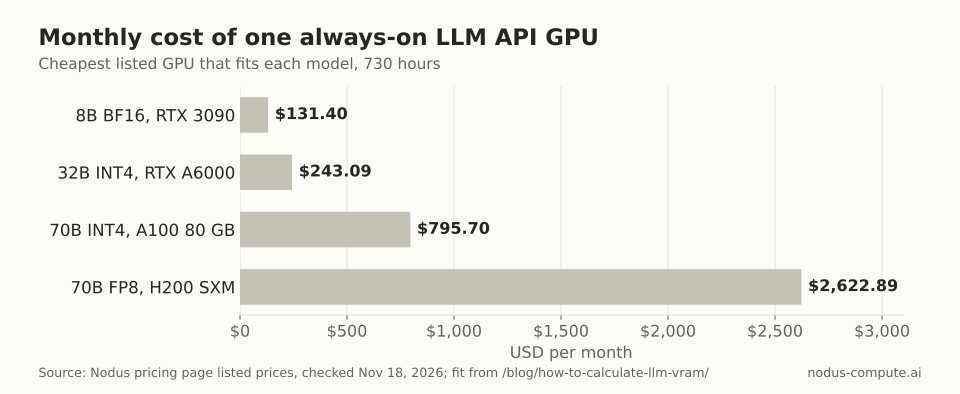 Model size sets the bill: the same API costs 20 times more per month at 70B FP8 than at 8B.
The cheapest card in a class is not always the right one. The RTX 3090 and RTX A6000 are older consumer and workstation cards. Data-center options in the same classes cost more, such as the L4 at $0.430/hr and the L40S at $0.793/hr, so a busy production endpoint may justify the step up. The 70B rows also show the precision trade: FP8 needs the 141 GB class and costs over three times as much as INT4 on an 80 GB card.
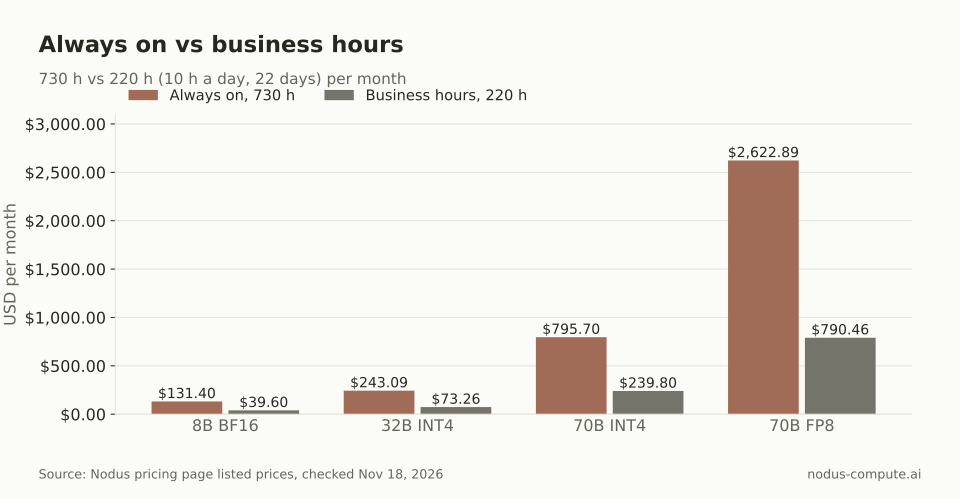 Turning the server off outside working hours cuts each bill by about 70%, if nobody needs it at night.
These are GPU costs only. They leave out the engineer who keeps the server patched and the idle hours when it serves nothing, which is why “can I afford the GPU” is the wrong question. Our self-hosting vs API cost post works out how many tokens a day a GPU must serve before it beats a per-token API.
How do you host an LLM API on Nodus?
Section titled “How do you host an LLM API on Nodus?”There are two routes on Nodus, and the choice depends on whose weights you serve.
If a model in the Nodus catalog does the job, create a named inference endpoint. The Nodus inference guide marks this feature Beta. An endpoint gives one model its own base URL, a list of allowed API keys and an optional dollar cap, and there is no server to run. The commands, exactly as the docs show them:
$ nodus create inferenceendpoint support-bot --model nodus/gpt-oss-120b --max-cost 50$ nodus wait ep/support-bot --for=jsonpath={.status.phase}=Running$ nodus get ep$ nodus inference chat --endpoint support-bot "Where is my order?"Your OpenAI client then uses https://inference.nodus-compute.ai/endpoints/<project>/support-bot/v1 as its base_url. A key created for an endpoint can call only that endpoint, and once its requests have spent the cap, the next one gets 402 BudgetExceeded. That covers the key and spending problems from the vLLM section without a proxy.
If you need your own weights, a fine-tune or specific engine flags, run vllm serve as a Nodus Job. The quickstart and nodus run reference document every flag below, the images guide allows public registry images such as vllm/vllm-openai, and the secrets guide passes secret keys in as environment variables. We assembled this from those pages and have not run this exact combination ourselves:
nodus secret create hf-token --from-literal HF_TOKEN=hf_xxxnodus secret create vllm-key --from-literal VLLM_API_KEY=your-keynodus run --name vllm-api --gpu L4 --image vllm/vllm-openai:latest \ --secret hf-token --secret vllm-key --no-source \ --max-cost 5 --timeout 8h -d -- vllm serve Qwen/Qwen2.5-1.5B-Instructnodus logs -f job/vllm-apinodus port-forward job/vllm-api 8000Because vLLM reads VLLM_API_KEY from the environment, the key never appears in the command. nodus port-forward listens on 127.0.0.1 by default, so your OpenAI client keeps http://localhost:8000/v1 while the GPU runs on Nodus. Eight hours of an L4 at $0.430/hr is $3.44, inside the $5 cap. Check the first lines of nodus logs to confirm the server started before you send traffic.
That port-forward suits development, evals and internal tools. Nodus Functions do not expose public web endpoints; the Modal migration guide says to use an inference endpoint for model serving. For a public, always-on API on your own weights, Nodus offers dedicated capacity plans through the inference console’s Contact us option.
When should you not host your own LLM API?
Section titled “When should you not host your own LLM API?”Do not host your own when a per-token API serves the same model and your traffic is low or bursty. You pay for every hour the GPU is up, busy or not, while a per-token API charges only for tokens. Our post on LLM inference cost per token shows how wide those per-token prices range.
The decision rule we use:
- Try the model on a per-token API or a Nodus endpoint first. If it passes your evals and the bill is fine, stop there.
- Host vLLM yourself when you need weights the catalog does not have, engine settings an API will not expose, or data that must stay on hardware you control.
- Keep the GPU on 24/7 only when traffic fills it across the day. Otherwise run it on a schedule or as a Job you start when work arrives.
Can one vLLM server host several models?
Section titled “Can one vLLM server host several models?”No. The vLLM quickstart says the server hosts one model at a time. To offer two models, run two servers on separate ports or GPUs and route between them in your proxy by the model field.
What if my model does not fit on one GPU?
Section titled “What if my model does not fit on one GPU?”Split it across GPUs on one machine with vLLM’s --tensor-parallel-size option from its engine arguments, or quantize it to the next GPU class down. On Nodus, --gpu H100:8 asks for eight GPUs in one Job.
How do you retry a request on a Nodus endpoint without paying twice?
Section titled “How do you retry a request on a Nodus endpoint without paying twice?”Send an Idempotency-Key header. The inference guide says a repeat within 24 hours returns the same answer with no second charge, and a request that failed without a charge frees the key so the retry runs again.
Does streaming work the same as OpenAI?
Section titled “Does streaming work the same as OpenAI?”For the Nodus inference API, yes: its guide says streaming works as in the OpenAI API with stream: true, and completed streams end with data: [DONE]. vLLM’s online serving docs include streaming chat examples for its server, so test your own client against it once before switching.
More from the blog
evaluation6 min read
How do you evaluate citations in RAG answers?
A working citation can point to an on-topic page that does not support the claim. Score support, claim coverage, and answer completeness separately.
Read the postgpu7 min read
What are the best fal.ai alternatives for model inference?
Nodus, Replicate, Modal, Runpod Serverless and Baseten compared with fal.ai: H100 rates, 200 GPU-hours priced, and a break-even rule for self-hosting.
Read the post