
What is the best GPU for running and training LLMs?
Pick the cheapest GPU whose memory fits the job. A workload table from 8B to 70B, cheapest fitting GPU at Nodus list prices, and when an H100 pays.
The best GPU for an LLM is the cheapest one whose memory holds your workload, and for most single-person work that is a 24 GB or 48 GB card, not an H100. On the Nodus pricing page, a 48 GB NVIDIA RTX A6000 listed at $0.333/hr covers 4-bit serving and QLoRA fine-tuning of models up to 70B. The H100 ($2.60/hr) and B200 ($5.50/hr) earn their price for full fine-tuning, sharded training and tight deadlines.
Pick by memory first, then pay for a bigger card only if it finishes your job more times faster than it costs more per hour. This post turns that rule into one table: five common jobs, three model sizes, the memory each needs, and the cheapest GPU on the Nodus pricing page that holds it. The memory floors come from published sources (Unsloth’s fine-tuning requirements, the Hugging Face training memory guide and vLLM’s defaults), and the arithmetic is shown so you can redo it for your model.
Why does memory decide the GPU before speed does?
Section titled “Why does memory decide the GPU before speed does?”A job that does not fit either fails with an out-of-memory error or crawls while it swaps, so capacity is a hard filter and speed is a preference. Once a job fits, a faster card only changes how long you wait and how many hours you pay for.
Memory needs depend more on the task than on the model. The same 70B model needs 35 GB of weights to serve at 4-bit and about 1,260 GB of training state to fully fine-tune. That is why “best GPU for LLMs” has no single answer, but “best GPU for this job” usually does.
How much GPU memory does each LLM job need?
Section titled “How much GPU memory does each LLM job need?”We used one source per task so the floors are consistent and checkable:
- Serving: weights are parameters x bytes (2 bytes at 16-bit, 0.5 at 4-bit), divided by 0.92 because vLLM claims 92% of GPU memory by default. This is a floor with almost no room for context; our post on how to calculate LLM VRAM adds the KV cache.
- QLoRA and LoRA: the minimums in Unsloth’s VRAM requirements table, which Unsloth describes as “the absolute minimum”; larger batches need more.
- Full fine-tuning: 18 bytes per parameter for mixed-precision AdamW (6 for weights, 8 for optimizer states, 4 for gradients), from the Hugging Face model memory anatomy guide. Activations come on top.
Worked through for 8B, 32B and 70B models:
| Job | 8B | 32B | 70B |
|---|---|---|---|
| Serve at 4-bit | 4 / 0.92 = 4.35 GB | 16 / 0.92 = 17.39 GB | 35 / 0.92 = 38.04 GB |
| Serve at 16-bit | 16 / 0.92 = 17.39 GB | 64 / 0.92 = 69.57 GB | 140 / 0.92 = 152.17 GB |
| QLoRA fine-tune | 6 GB | 26 GB | 41 GB |
| LoRA fine-tune | 22 GB | 76 GB | 164 GB |
| Full fine-tune | 18 x 8 = 144 GB | 18 x 32 = 576 GB | 18 x 70 = 1,260 GB |
For a 70B model at its full context, see how much VRAM a 70B model needs, which adds cache and activations to these floors.
Which GPU is cheapest for each job?
Section titled “Which GPU is cheapest for each job?”For every floor above, we took the lowest-priced GPU on the Nodus pricing page with at least that much memory. When no single card fits for a reasonable price, we multiplied the per-GPU rate by 2, 4 or 8. Those multi-GPU rows use only datacenter cards (A100, H100, H200, B200, B300).
Sharded training and tensor-parallel serving pass data between GPUs constantly. NVIDIA lists NVLink at 600 GB/s on the A100 and 900 GB/s on the H100, against 112 GB/s for a bridged pair of RTX A6000s.
| Job | 8B | 32B | 70B |
|---|---|---|---|
| Serve at 4-bit | RTX 3070 8 GB, $0.133/hr | RTX 3090 24 GB, $0.180/hr | RTX A6000 48 GB, $0.333/hr |
| Serve at 16-bit | RTX 3090 24 GB, $0.180/hr | A100 80 GB, $1.090/hr | 2 x A100 80 GB, $2.180/hr |
| QLoRA fine-tune | RTX 3070 8 GB, $0.133/hr | RTX A6000 48 GB, $0.333/hr | RTX A6000 48 GB, $0.333/hr |
| LoRA fine-tune | RTX 3090 24 GB, $0.180/hr | A100 80 GB, $1.090/hr | 4 x A100 80 GB, $4.360/hr |
| Full fine-tune | 2 x A100 80 GB, $2.180/hr | 8 x A100 80 GB, $8.720/hr | 8 x B200 180 GB, $44.000/hr |
Prices checked November 21, 2026 on the Nodus pricing page, which lists per-GPU hourly rates. Multi-GPU rows are count x rate: 2 x $1.090 = $2.180, 4 x $1.090 = $4.360, 8 x $1.090 = $8.720 and 8 x $5.500 = $44.000. Whether a given count is available right now shows up in nodus get gpus.
Three rows sit right at the edge and deserve a step up if your sequences are long. A 22 GB LoRA on a 24 GB card, a 76 GB LoRA on an 80 GB card, and 576 GB of training state on 640 GB of A100s all leave little room for activations. For 70B LoRA, one B200 at $5.500/hr holds the 164 GB on a single GPU and skips sharding, and you may prefer that to the cheaper four A100s.
Why is a 48 GB card the sweet spot?
Section titled “Why is a 48 GB card the sweet spot?”Because GPU prices on the Nodus list do not rise smoothly with memory. The cheapest card with at least 32 GB, and the cheapest with at least 40 GB, is the 48 GB RTX A6000 at $0.333/hr. It costs less than the 32 GB RTX 5090 ($0.480/hr) and the A100 40 GB ($0.904/hr). The next step up, 80 GB on an A100, costs $1.090/hr, or 3.27 times as much ($1.090 / $0.333).
Below 48 GB the steps are small: $0.133/hr for an 8 GB RTX 3070, $0.173/hr for a 16 GB RTX A4000 and $0.180/hr for a 24 GB RTX 3090. Above 80 GB they are large: $1.350/hr for a 96 GB RTX PRO 6000, $3.593/hr for a 141 GB H200, $5.500/hr for a 180 GB B200 and $6.943/hr for a 288 GB B300.
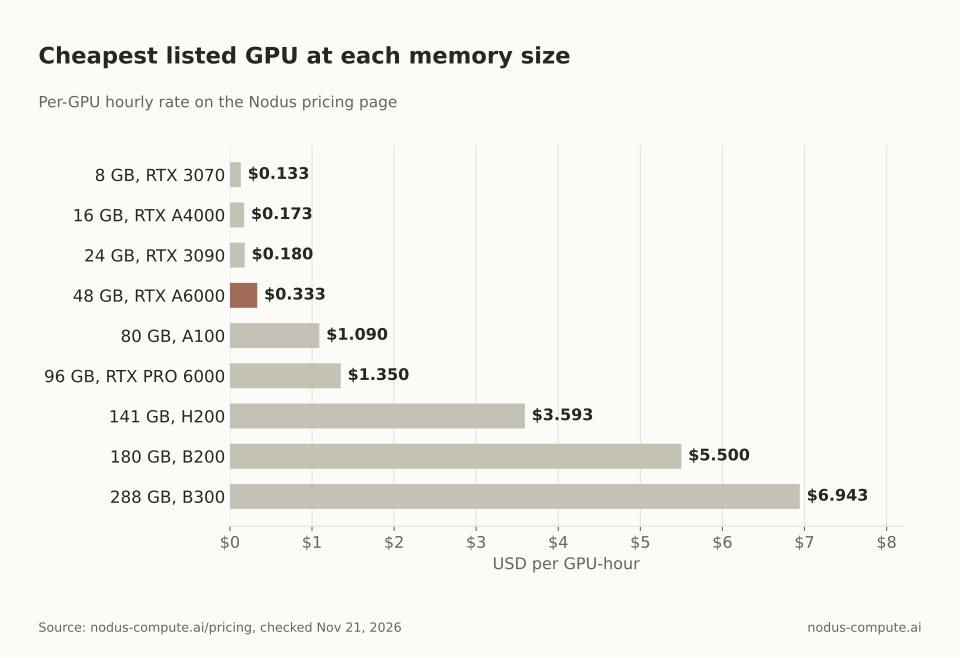 Everything up to 48 GB costs a third of a dollar an hour or less; the jump to 80 GB is where the bill starts to move.
So the practical question for most LLM work is whether your job fits in 48 GB. If it does, you are choosing between cards under $0.35/hr. If it does not, you are in datacenter territory, and the right card depends on speed as much as memory.
The same split shows up across the tasks for one model. For a 70B model, serving at 4-bit and QLoRA both fit the $0.333/hr A6000. Serving at 16-bit needs $2.18/hr of A100s and LoRA $4.36/hr, while full fine-tuning needs a $44.00/hr machine, 132 times the A6000’s rate ($44.00 / $0.333).
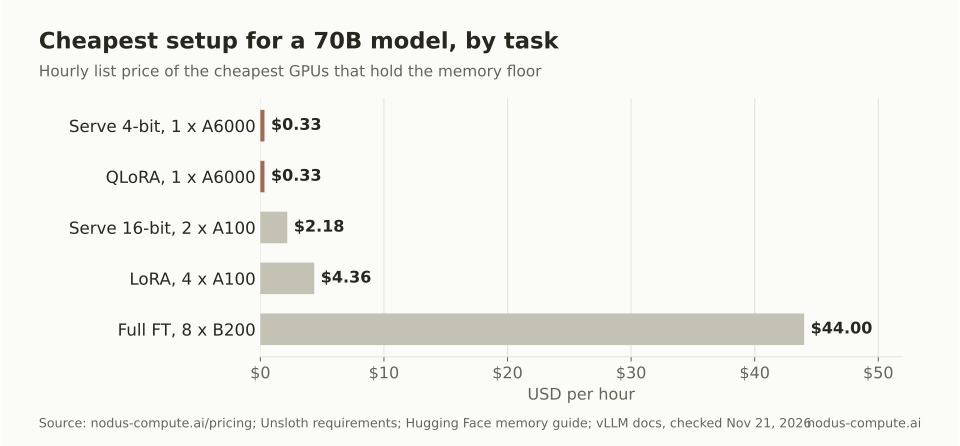 For a 70B model the task, not the model, decides whether you need one workstation card or eight B200s.
Should you use a consumer GPU or a datacenter GPU?
Section titled “Should you use a consumer GPU or a datacenter GPU?”Use a consumer or workstation card (RTX 3090, RTX 4090, RTX A6000) when the job fits on one of them. Move to a datacenter card (A100, H100, B200) when it needs more than 48 GB, fast links between GPUs, or a result by a deadline. The consumer cards cost far less per hour, and a job that fits on one GPU does not need NVLink or 80 GB of memory.
If you want to run models at home, the same table tells you what to buy. A 24 GB card runs 4-bit models up to about 32B and LoRA-tunes 8B models; a 48 GB card adds 4-bit 70B serving and 70B QLoRA. Named models per memory tier are in which LLMs fit in 8, 16 or 24 GB, and the buy-versus-hourly break-even is in should you run an LLM locally or in the cloud.
When is an H100 or B200 worth paying for?
Section titled “When is an H100 or B200 worth paying for?”A bigger card is worth it when it finishes your job more times faster than its price ratio. Divide its hourly rate by the rate of the cheapest card that fits, and that is the speedup it has to beat. We have not benchmarked these cards against each other, so the rule needs your own measurement, not ours.
Take a LoRA fine-tune of a 32B model. Its 76 GB floor fits an A100 80 GB at $1.090/hr. If the run takes 10 hours there, it costs 10 x $1.090 = $10.90. An H100 at $2.600/hr costs 2.39 times as much per hour ($2.600 / $1.090), so it has to finish in 10 / 2.39 = 4.19 hours or less to cost the same.
| GPU that fits 76 GB | Listed rate | Price vs A100 80 GB | Hours to match $10.90 |
|---|---|---|---|
| A100 80 GB | $1.090/hr | 1.00x | 10.00 h |
| RTX PRO 6000 96 GB | $1.350/hr | 1.24x | 8.07 h |
| H100 80 GB | $2.600/hr | 2.39x | 4.19 h |
| H200 141 GB | $3.593/hr | 3.30x | 3.03 h |
| B200 180 GB | $5.500/hr | 5.05x | 1.98 h |
Rates from the Nodus pricing page, checked November 21, 2026. Hours to match are $10.90 divided by each rate.
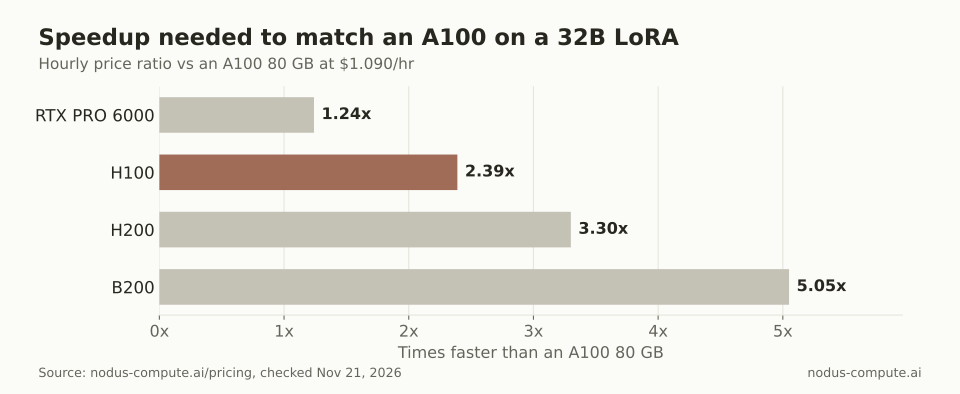 An H100 pays for itself on this job only if it trains the model at least 2.39 times faster than an A100.
For context, NVIDIA lists the H100 SXM at 3,350 GB/s of memory bandwidth and the A100 80 GB SXM at 2,039 GB/s, a 1.64x gap. Work limited by memory bandwidth, such as generating tokens one at a time, is unlikely to clear 2.39x on that alone. Large-batch training leans on compute, where the gap can be wider, which is why a short measured run beats any spec sheet. Our A100, H100, H200, B200 and B300 comparison covers the compute side, and how many GPUs you need to train a model covers deadlines.
How do you get the cheapest GPU that fits on Nodus?
Section titled “How do you get the cheapest GPU that fits on Nodus?”Ask Nodus for the memory instead of naming a card. A Job that sets minMemory and no GPU type runs on any accelerator with at least that much memory per GPU. The scheduler picks among them by expected cost to finish (GPU guide):
spec: resources: gpu: {minMemory: 80Gi, count: 1}After pip install nodus-compute and nodus login, nodus get gpus lists current availability and rates. Running nodus apply -f job.yaml --dry-run=server -o estimate returns the offering Nodus would use and the expected cost before anything starts. To measure the speedup from the previous section, run a short slice of your training on each candidate with --max-cost set on nodus run, then compare the time per step against the price ratio.
Is the RTX 4090 or RTX 3090 better for LLMs?
Section titled “Is the RTX 4090 or RTX 3090 better for LLMs?”Both have 24 GB, so they fit the same jobs from the table. On the Nodus pricing page the RTX 3090 is listed at $0.180/hr and the RTX 4090 at $0.290/hr, so the 4090 has to be 1.61 times as fast ($0.290 / $0.180) to cost less per job. Our RTX 5090 vs A100 vs H100 post covers the 32 GB step.
Can you fine-tune a 70B model on one GPU?
Section titled “Can you fine-tune a 70B model on one GPU?”Yes, with QLoRA: Unsloth’s table puts the floor at 41 GB, which fits one 48 GB RTX A6000 or one 80 GB A100. LoRA at 16-bit needs 164 GB, which fits on one B200 (180 GB) but not on one H100 or H200.
Does a datacenter GPU give better model quality?
Section titled “Does a datacenter GPU give better model quality?”No. The same training recipe produces the same model on any GPU that fits it; the card changes time and cost, not what the model learns. Precision is the exception, since QLoRA’s 4-bit base trades some fidelity for memory, which our LoRA vs QLoRA post discusses.
What is the best budget GPU for running LLMs at home?
Section titled “What is the best budget GPU for running LLMs at home?”A 16 GB card is the usual starting point, and our best budget GPU for AI post ranks them by price per gigabyte. If you can stretch, a used or new 24 GB card moves you from 8B-class models to 4-bit 32B models.
More from the blog
gpu10 min read
What are the best Beam Cloud alternatives for serverless GPUs?
Beam Cloud alternatives for serverless GPUs: Nodus, Modal, RunPod Serverless, Baseten and Cerebrium compared on one 24 GB endpoint at list prices.
Read the postinference9 min read
Which LLMs can you run on 8GB, 16GB or 24GB of VRAM?
Named open models that fit in 8, 16 and 24 GB of VRAM at real quantizations, how much context each leaves, and when to move up to a bigger GPU on Nodus.
Read the post