
A100, H100, H200, B200, B300: which GPU should you pick?
Pick by your bottleneck. At Nodus list prices the B200 buys BF16 math cheapest, the A100 buys memory cheapest, and the H200 and B300 sell headroom.
Pick the GPU by whatever limits your job: memory capacity, memory bandwidth or raw math. On the Nodus pricing page they run from $1.09/hr (A100 80GB) to $6.943/hr (B300), and at those rates the B200 buys BF16 math cheapest while the A100 buys memory cheapest. The H200 and B300 are worth their price when your model needs the extra memory, not for speed.
This page compares all five in one place and links to our head-to-head posts for each step up.
How do the five GPUs compare on paper?
Section titled “How do the five GPUs compare on paper?”Each newer GPU adds memory, bandwidth or math, but never all three in the same step. The table uses dense BF16 because that is what most training actually runs on, and every figure comes from NVIDIA.
| Per GPU | A100 80GB | H100 SXM | H200 SXM | B200 | B300 |
|---|---|---|---|---|---|
| Architecture | Ampere | Hopper | Hopper | Blackwell | Blackwell Ultra |
| Memory | 80 GB | 80 GB | 141 GB | 180 GB | 288 GB |
| Memory bandwidth | 2.039 TB/s | 3.35 TB/s | 4.8 TB/s | 8 TB/s | 8 TB/s |
| Dense BF16 | 312 TFLOPS | 989.5 TFLOPS | 989.5 TFLOPS | 2,250 TFLOPS | 2,250 TFLOPS |
| Listed on Nodus | $1.09/hr | $2.60/hr | $3.593/hr | $5.50/hr | $6.943/hr |
Specs from NVIDIA’s A100, H100 and H200 pages, the DGX B200 and HGX pages, and the Blackwell Ultra technical blog. NVIDIA lists Hopper and B200 BF16 with sparsity, so we halved those figures. It lists Blackwell figures per 8-GPU system, so we divided by 8. Prices checked November 12, 2026 on the Nodus pricing page.
Two rows explain most buying mistakes. The H200 has the same math as the H100, and the B300 has the same math and bandwidth as the B200. Those two GPUs sell memory.
Which GPU gives the most compute per dollar?
Section titled “Which GPU gives the most compute per dollar?”The B200 does, with the H100 close behind. We divided each list price by dense BF16 throughput. The result is what one PFLOPS of peak math costs for an hour on Nodus:
| GPU | Price per dense BF16 PFLOPS-hour | Price per GB of memory per hour | Price per TB/s of bandwidth per hour |
|---|---|---|---|
| A100 80GB | $3.49 | $0.0136 | $0.53 |
| H100 SXM | $2.63 | $0.0325 | $0.78 |
| H200 SXM | $3.63 | $0.0255 | $0.75 |
| B200 | $2.44 | $0.0306 | $0.69 |
| B300 | $3.09 | $0.0241 | $0.87 |
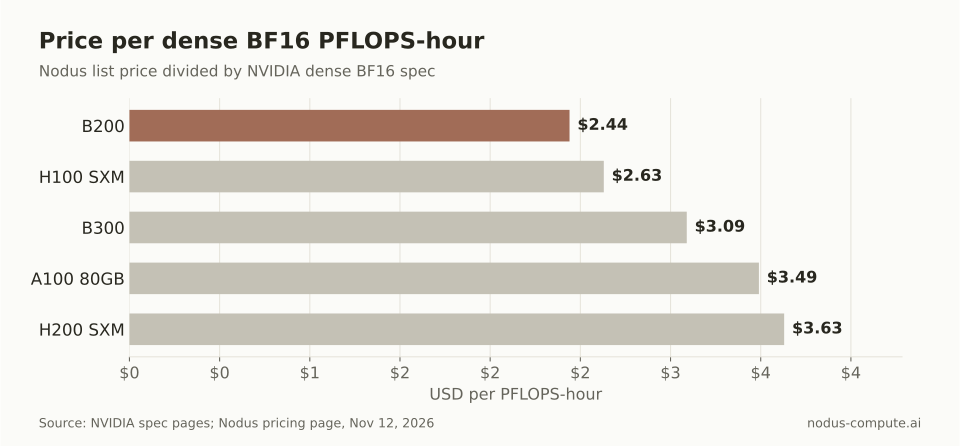 Peak BF16 math is cheapest on the B200 and H100; the H200 and B300 charge for memory you may not need.
Peak numbers are ceilings. Real jobs reach a fraction of them, and a newer chip can land well below its spec ratio. In MLPerf Training, 64 B200s finished Llama 3.1 8B pretraining 2.04 times faster than 64 H100s, below the 2.27x spec ratio, as we covered in B200 vs H100.
What does the same job cost on each GPU?
Section titled “What does the same job cost on each GPU?”It depends on which part of the chip your job waits on, and the two answers point in opposite directions. Take a job that needs 800 A100-hours, for example 8 A100s for 100 hours, and price it on each GPU at its spec ratio. This is our own arithmetic from the tables above, so treat the newer GPUs’ results as best cases.
| GPU | If compute-bound: GPU-hours | Cost | If bandwidth-bound: GPU-hours | Cost |
|---|---|---|---|---|
| A100 80GB | 800 | $872.00 | 800 | $872.00 |
| H100 SXM | 252.25 | $655.85 | 486.93 | $1,266.01 |
| H200 SXM | 252.25 | $906.33 | 339.83 | $1,221.02 |
| B200 | 110.93 | $610.13 | 203.90 | $1,121.45 |
| B300 | 110.93 | $770.21 | 203.90 | $1,415.68 |
Compute-bound hours scale with dense BF16 (312 TFLOPS on the A100 divided by each GPU’s figure). Bandwidth-bound hours scale with memory bandwidth (2.039 TB/s divided by each GPU’s figure). On 8 GPUs, the compute-bound job takes 100 hours on A100s and 13.87 hours on B200s.
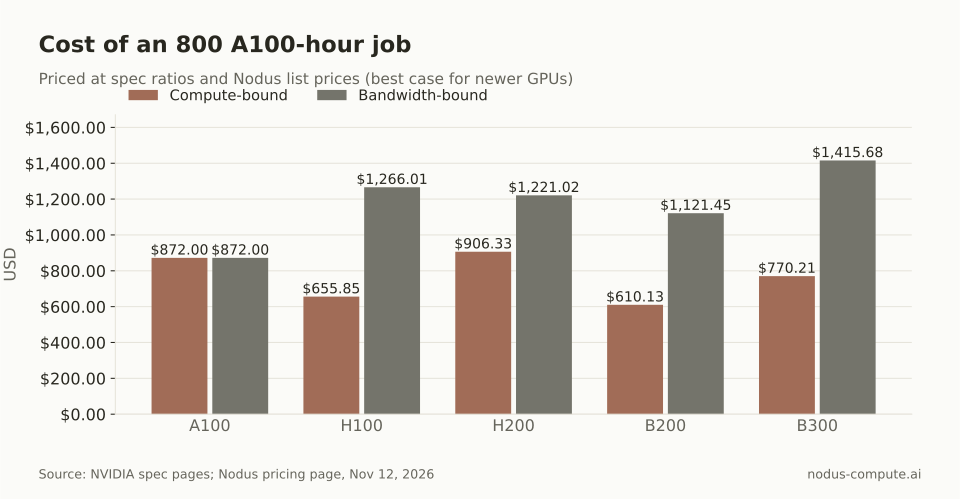 A large BF16 training run is cheapest on a B200; a memory-bound job is cheapest on the A100 it already fits on.
Large dense training with big batches tends to sit near the compute-bound column. Small models, small batches and token-by-token inference tend to sit near the bandwidth-bound column. Most real jobs land in between, which is why a short measured run beats any table.
Which GPU does your model need to fit on?
Section titled “Which GPU does your model need to fit on?”Start with memory, because a model that does not fit forces sharding, offloading or a second machine. Weights in BF16 take 2 bytes per parameter. Full fine-tuning with the Adam optimizer in mixed precision takes about 16 bytes per parameter before activations, as the ZeRO paper breaks down. We keep 10% of memory free for the runtime, so usable memory is 72 GB on the A100 and H100, 126.9 GB on the H200, 162 GB on the B200 and 259.2 GB on the B300.
| Workload on one GPU | Memory needed | GPUs that hold it |
|---|---|---|
| 8B model, BF16 weights | 16 GB | All five |
| 32B model, BF16 weights | 64 GB | All five (8 GB spare on A100 and H100) |
| 70B model, BF16 weights | 140 GB | B200 (22 GB spare) and B300 |
| 8B model, full fine-tune with Adam | 128 GB plus activations | B200 and B300 |
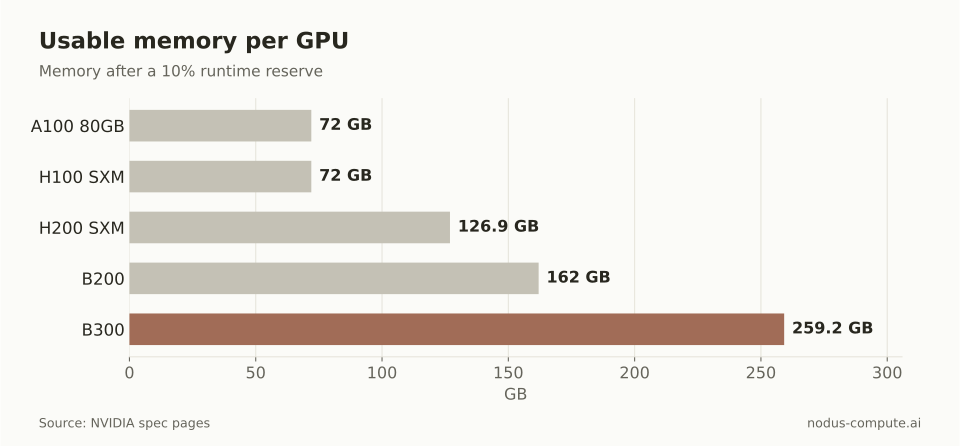 A 140 GB set of 70B weights clears the B200 and B300 but not the H200.
Inference also needs room for the KV cache, which grows with context length and the number of requests in flight. Our post on how much VRAM a 70B model needs works through that math.
Is there a GPU better than the H100?
Section titled “Is there a GPU better than the H100?”Yes, three of them, and each is better at something different. The H200 holds 1.76 times the memory with 1.43 times the bandwidth at the same math. The B200 has 2.27 times the dense BF16 math, 2.25 times the memory and 2.39 times the bandwidth. The B300 adds memory on top of the B200, 288 GB against 180 GB.
Better is not the same as cheaper per job. A newer GPU wins when it finishes your job faster than its price is higher. These are the break-even speedups at Nodus list prices:
| Step up | Prices on Nodus | Must finish faster by | Full comparison |
|---|---|---|---|
| A100 to H100 | $1.09 to $2.60/hr | 2.39x | A100 vs H100 |
| H100 to H200 | $2.60 to $3.593/hr | 1.38x | H100 vs H200 |
| H100 to B200 | $2.60 to $5.50/hr | 2.12x | B200 vs H100 |
| H200 to B200 | $3.593 to $5.50/hr | 1.53x | B200 vs H200 |
| B200 to B300 | $5.50 to $6.943/hr | 1.26x | B300 vs B200 |
Which GPU should you pick?
Section titled “Which GPU should you pick?”Use this rule, in order. It comes from the tables above, and each line names the cheaper choice at Nodus list prices.
- If the model needs more than 162 GB per GPU and you cannot shard it, pick the B300.
- If it needs 72 to 126.9 GB and you pay for hours held rather than work done, such as a lightly loaded inference server, pick the H200. If the job has a fixed amount of work and needs up to 162 GB, pick the B200, which is cheaper per PFLOPS and per TB/s.
- If it fits in 72 GB and the job is large BF16 or FP8 training, the B200 and H100 cost about the same per finished run. Pick the B200 when your code runs on Blackwell and the deadline matters, otherwise the H100.
- If it fits in 72 GB and the job is small, memory-bound or poorly fed, pick the A100.
The Blackwell caveat in step 3 is real. Hopper-specific kernels built for sm_90a do not run on Blackwell, according to NVIDIA’s Blackwell compatibility guide, so check your kernels before you plan a B200 run.
How do you let Nodus choose between them?
Section titled “How do you let Nodus choose between them?”List every GPU you would accept and Nodus picks by expected cost to finish. The GPU guide says resources.gpu.type takes a list, and order does not matter:
spec: resources: gpu: {type: [H100, H200], count: 8} placement: interruptible: Allow # use interruptible capacity only when it is cheaper to finish maxRateUSDPerHour: "30.00"If the constraint is memory, ask for memory instead of a name. The same guide documents minMemory with no type, which admits any accelerator with at least that much memory per GPU. Note the unit is GiB: 141 GB is about 131 GiB, so a floor of 100Gi admits the H200, B200 and B300 from the pricing page.
To measure instead of guess, run the same short benchmark on several GPUs with a Sweep. This is the documented Python form from the Sweeps guide, with the grid set to four GPU aliases from the GPU guide:
import nodus
sweep = nodus.Sweep(    {"image": "nodus/pytorch", "command": ["python", "bench.py"]},    grid={"gpu": ["A100-80GB", "H100", "H200", "B200"]},    repetitions=2, max_parallel=6, max_cost=25,).run()report = sweep.wait()print(report.phase, report.best.by_cost)for cell in sweep.cells():    print(cell.index, cell.phase, cell.cost_usd, cell.wall_seconds)
report.best.by_cost names the cheapest cell. If bench.py reports work with nodus.log.unit(id, ms, kind="request"), each cell also gets a throughput, so you can compare cost per unit of work directly.
Is the A100 still worth using?
Section titled “Is the A100 still worth using?”Yes, for jobs that fit in 80 GB and do not keep the Tensor Cores busy. At $1.09/hr on the Nodus pricing page it is the cheapest of the five per GB of memory and per TB/s of bandwidth, and it has no FP8 support, so FP8 training belongs elsewhere.
Should you buy B200 time over H100 time for training?
Section titled “Should you buy B200 time over H100 time for training?”Only if the B200 finishes your job more than 2.12 times faster. MLPerf results came in at 2.04x to 2.08x for two pretraining tasks on 64 GPUs, just under break-even. Well-tuned large runs are close to a tie on Nodus, and the B200 pulls ahead when its extra memory lets you drop sharding or offloading.
Why does the H200 cost more per PFLOPS than the H100?
Section titled “Why does the H200 cost more per PFLOPS than the H100?”Because it has the same math and you are paying for 141 GB of faster memory. That makes the H200 the most expensive of the five per peak PFLOPS-hour, and a good buy only when the memory or bandwidth changes your job.
Does Nodus offer all five GPUs?
Section titled “Does Nodus offer all five GPUs?”All five are listed on the Nodus pricing page today. Availability changes by the hour, so the GPU guide shows how to check live offerings and estimate a run’s cost before it starts.
More from the blog
b2008 min read
B200 vs H200: which is the better GPU for LLM work?
B200 vs H200: 1.28x the memory, 1.67x the bandwidth and 2.27x the FP8 math for 1.53x the price on Nodus. The B200 wins once it is kept busy.
Read the postpricing8 min read
What are the best Paperspace alternatives in 2026?
Paperspace alternatives for moving from notebooks to real training: Nodus, RunPod and Kaggle, with one run priced on each and when Paperspace still wins.
Read the post