
B300 vs B200: what does Blackwell Ultra add for training?
B300 vs B200 for training: 288 GB vs 180 GB and faster FP4, but the same BF16 and FP8 math. A B300 must be 1.26x faster to cost less on Nodus.
Blackwell Ultra adds memory, not BF16 or FP8 training speed. The NVIDIA B300 has 288 GB per GPU against the B200’s 180 GB, with the same FP8 throughput and memory bandwidth. On Nodus the B300 is listed at $6.943/hr and the B200 at $5.50/hr, so a B300 must finish a job 1.26 times faster to cost less. Pick the B300 when its memory saves you a second node or CPU offloading, or when you train in NVFP4, and keep the B200 for everything else.
The B300’s other gains, faster FP4 and faster attention math, matter most for inference. They can help training, but only for jobs that use them. The rest of this post shows where the line falls, with a priced job and the memory math.
What changed between the B200 and the B300?
Section titled “What changed between the B200 and the B300?”Memory capacity, FP4 throughput, attention math and node networking went up. Dense BF16 and FP8 compute, memory bandwidth and NVLink stayed the same. Every figure below comes from NVIDIA: the Blackwell Ultra technical blog for per-chip numbers, and the HGX platform page for the 8-GPU board.
| B200 (Blackwell) | B300 (Blackwell Ultra) | What it means for training | |
|---|---|---|---|
| Memory per GPU | 180 GB HBM3e | 288 GB HBM3e | 60% more room for weights, optimizer state and activations |
| Memory bandwidth per GPU | 8 TB/s | 8 TB/s | No change |
| FP8, dense, per GPU | 5 PFLOPS | 5 PFLOPS | No change |
| BF16, dense, 8-GPU HGX board | 18 PFLOPS | 18 PFLOPS | No change |
| NVFP4, dense, per GPU | 10 PFLOPS | 15 PFLOPS | 1.5x, only if you train in FP4 |
| Attention exponentials (SFU) | 5 TeraExponentials/s | 10.7 TeraExponentials/s | Faster softmax, a slice of each step |
| NVLink per GPU | 1,800 GB/s | 1,800 GB/s | No change inside a node |
| Networking, 8-GPU HGX board | 0.8 TB/s | 1.6 TB/s | Helps multi-node jobs |
| FP64, 8-GPU HGX board | 296 TFLOPS | 10 TFLOPS | B300 is a poor fit for FP64 science codes |
| Max power (TGP) | Up to 1,200 W | Up to 1,400 W | More heat for the same BF16 math |
| Listed on the Nodus pricing page | $5.50/hr | $6.943/hr | 26% more per GPU-hour |
The B200 row uses 180 GB because that is what NVIDIA ships in an 8-GPU system: the DGX B200 lists 1,440 GB total. The technical blog quotes 192 GB as Blackwell’s maximum. HGX lists BF16 as 36 PFLOPS with sparsity, and dense is half. Prices are from the Nodus pricing page, checked November 4, 2026.
Read the “no change” rows together. A dense BF16 or FP8 job is bound by tensor math, memory bandwidth or NVLink, and all three are equal. That is why the price ratio is a hard bar for ordinary training.
Is a B300 cheaper for the same training job?
Section titled “Is a B300 cheaper for the same training job?”Only if it runs at least 1.26 times faster, because that is the ratio of the listed prices: $6.943 ÷ $5.50 = 1.262. Take a fine-tune or pretraining run that needs 1,000 GPU-hours on B200s, for example 8 GPUs for 125 hours.
| Where it runs | GPU-hours | Cost at Nodus list prices |
|---|---|---|
| B200 | 1,000 | $5,500.00 |
| B300, same speed (BF16 or FP8, compute-bound) | 1,000 | $6,943.00 |
| B300, 1.262x faster (breakeven) | 792 | $5,500.00 |
| B300, 1.5x faster (NVFP4 spec ceiling) | 667 | $4,628.67 |
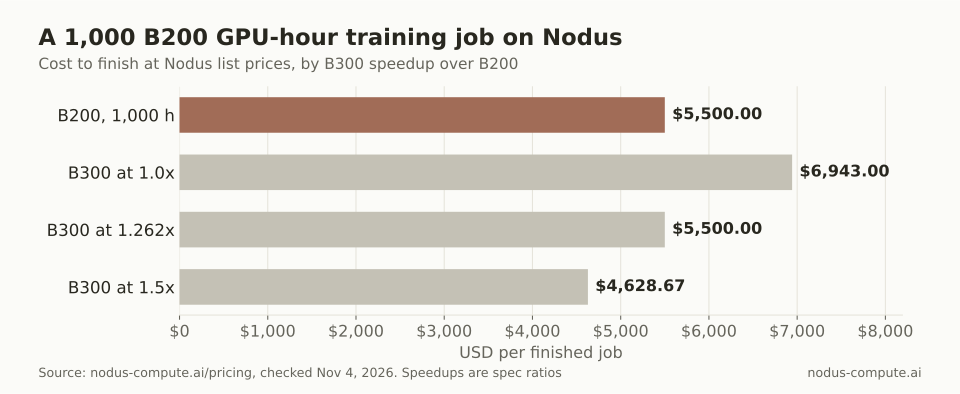 A BF16 job that runs no faster costs $1,443 more on B300s; only an FP4 job near the spec ceiling comes out ahead.
These speedups are spec ratios, not measurements of ours. The 1.5x row assumes a job that is entirely NVFP4 tensor math, which no real training step is. The attention speedup is real but covers only the softmax part of each step, so it cannot carry a whole job past 1.26x on its own.
When does 288 GB change the number of GPUs you need?
Section titled “When does 288 GB change the number of GPUs you need?”When it moves your job under a node boundary. Below that, extra memory changes how you shard, not what you pay.
The rule of thumb comes from the ZeRO paper: mixed-precision training with Adam keeps about 16 bytes per parameter. That is 2 for BF16 weights, 2 for gradients and 12 for the FP32 master copy and two Adam moments. Activations come on top and depend on batch size and sequence length.
Divide memory by 16 to get the largest model whose training state fits, before activations:
- One B200: 180 ÷ 16 = 11.25B parameters. One B300: 288 ÷ 16 = 18B.
- One 8-GPU B200 node, fully sharded with FSDP or ZeRO-3: 1,440 ÷ 16 = 90B. One B300 node: 2,304 ÷ 16 = 144B.
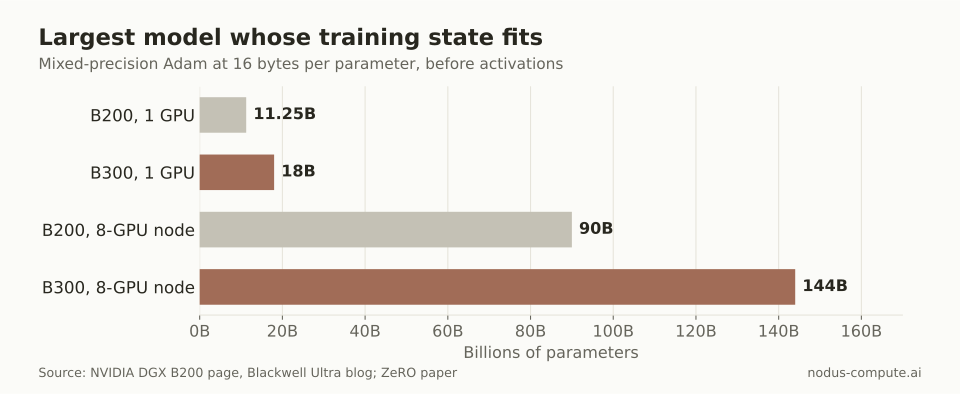 The B300 node fits 54B more parameters of training state, which matters most between 90B and 144B.
One caution: NVIDIA’s HGX page lists 2.1 TB for a whole HGX B300 board, below 8 x 288 GB, so check the memory your offering reports. At 2.1 TB the node limit drops to about 131B parameters, and the 100B example below still fits.
Now take a 14B full fine-tune. Its state is 14 x 16 = 224 GB, which fits on one B300 with 64 GB left for activations. On B200s you shard it across two GPUs at 112 GB each.
That sounds like twice the hardware, but two B200s also have twice the compute, so the job finishes in roughly half the time. GPU-hours, and the bill, barely move.
The math changes at the node edge. A 100B dense model needs 100 x 16 = 1,600 GB of state. That is more than a B200 node’s 1,440 GB, but it fits on one B300 node with 704 GB, or 88 GB per GPU, for activations. On B200s you need two nodes or CPU offloading.
How do you price one B300 node against two B200 nodes?
Section titled “How do you price one B300 node against two B200 nodes?”Divide the hourly rates and compare the result with your multi-node scaling. One B300 node costs 8 x $6.943 = $55.54/hr. Two B200 nodes cost 16 x $5.50 = $88.00/hr.
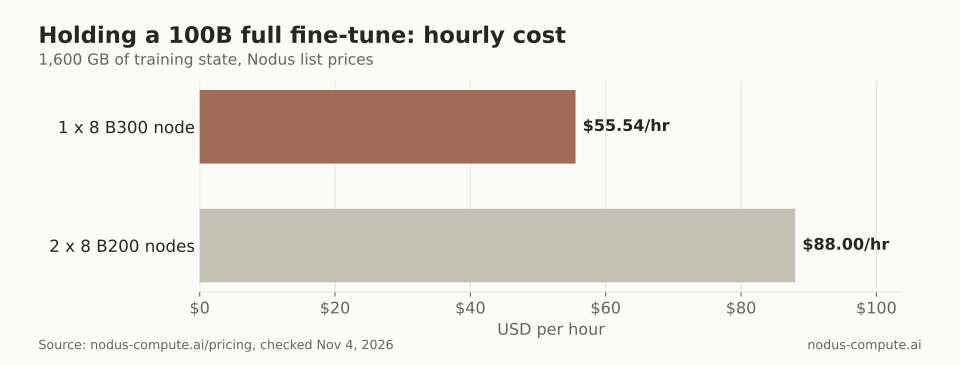 Sixteen B200s cost 1.58x as much per hour as eight B300s, so they must deliver 1.58x the throughput.
Sixteen B200s have twice the BF16 compute of eight B300s. The question is how much of it survives the trip across the network. They break even at $88.00 ÷ $55.54 = 1.584x the throughput of the B300 node, which is 79% scaling efficiency against a perfect 2x. Within a board, NVLink moves 14.4 TB/s total, while HGX B200 networking is 0.8 TB/s per board, so gradient traffic between nodes is the usual suspect.
If your two-node B200 run scales below 79%, the single B300 node is cheaper and simpler. Above it, the B200s finish sooner for less. Nodus runs both shapes: multi-node training is in Beta, with gangs of up to 8 nodes.
Memory headroom has a softer benefit too. With more free memory per GPU you can use larger micro-batches or recompute fewer activations. We have not measured how much that saves, so price it with a probe run, not a guess.
When is the B200 the better choice?
Section titled “When is the B200 the better choice?”For most training jobs that fit, which is most of them. Pick the B200 when:
- Your training state plus activations fits in 180 GB per GPU on the number of GPUs you would use anyway. The B300 offers nothing at BF16 or FP8 to justify 26% more per hour.
- You fine-tune models up to about 70B. A 70B full fine-tune needs 1,120 GB of state, which fits a B200 node with 40 GB per GPU spare.
- Your multi-node job already scales above 79% from one node to two.
- You run FP64 code. NVIDIA’s HGX table lists 296 TFLOPS of FP64 on a B200 board against 10 TFLOPS on a B300 board.
- You care about power per unit of BF16 work, since the B300’s maximum TGP is higher for the same dense math.
Pick the B300 when its memory removes a node or offloading, or when you train in NVFP4. It also fits teams whose GPUs serve long-context inference, where the memory and attention gains were aimed.
How do you ask Nodus for either GPU?
Section titled “How do you ask Nodus for either GPU?”Let memory decide and Nodus choose by expected cost. You can list what is available with:
$ nodus get gpusThen set a per-GPU memory floor instead of a type. The GPU guide documents resources.gpu.minMemory. The scheduler picks among matching accelerators by expected cost to finish:
spec: resources: gpu: {minMemory: 160Gi, count: 8}A floor of 160 GiB admits the B200 (180 GB is about 167.6 GiB) and the B300, and excludes the H200’s 141 GB. To pin the B200, use the documented alias, type: B200. Check the estimate before anything starts:
$ nodus apply -f job.yaml --dry-run=server -o estimateThe dry run shows the offering Nodus would use and the expected cost at p50 and p90. For what else goes into a finished-job price, see what an H100 or B200 hour costs per finished job. The same breakeven method for the previous generation is in A100 vs H100, and sharding basics are in multi-GPU training with PyTorch.
Is the B300 the successor to the B200?
Section titled “Is the B300 the successor to the B200?”Yes. NVIDIA calls the B300 Blackwell Ultra, and it uses the same TSMC 4NP process and 208 billion transistors as Blackwell. It is a refresh of the same architecture, not a new one. NVIDIA’s next generation after Blackwell is Rubin.
Does the B300 train faster than the B200 in BF16?
Section titled “Does the B300 train faster than the B200 in BF16?”Not on paper. NVIDIA lists the same 36 PFLOPS of sparse BF16 for both HGX boards, and the same 8 TB/s of memory bandwidth per GPU. Any BF16 speedup you see would come from attention-heavy steps or from changes that the extra memory allowed, such as less recomputation.
Should I train in NVFP4 to justify a B300?
Section titled “Should I train in NVFP4 to justify a B300?”Only if your training recipe already supports NVFP4 and you have checked that model quality holds. The 1.5x figure is a peak tensor ratio, and a real step also spends time in BF16 layers, communication and data loading.
How much is a B300 compared with an H200 on Nodus?
Section titled “How much is a B300 compared with an H200 on Nodus?”Nodus lists the H200 SXM at $3.593/hr with 141 GB, against $6.943/hr with 288 GB for the B300. The B300 has about twice the memory for about 1.93 times the price.
More from the blog
inference6 min read
How do you evaluate LLM extraction when documents contain conflicting values?
A correct-looking amount can come from the wrong document. Evaluate conflict resolution and evidence together before accepting extracted values.
Read the postdata7 min read
How do you fine-tune Mistral 7B on your own data?
Train a LoRA adapter on the bf16 Mistral 7B on one 48 GB GPU, with memory math, a TrainingJob manifest and the break-even rule for faster GPUs.
Read the post