
B200 vs H200: which is the better GPU for LLM work?
B200 vs H200: 1.28x the memory, 1.67x the bandwidth and 2.27x the FP8 math for 1.53x the price on Nodus. The B200 wins once it is kept busy.
Yes, the NVIDIA B200 is more powerful than the H200: per GPU it has 1.28 times the memory, 1.67 times the memory bandwidth and 2.27 times the dense FP8 math, plus FP4 Tensor Cores the H200 lacks. The B200 is listed at $5.50/hr and the H200 SXM at $3.593/hr on the Nodus pricing page, so the B200 costs 1.53 times as much and is the better buy whenever it finishes your job more than 1.53 times faster. The H200 stays the better buy when the GPU sits partly idle, or when 141 GB is all your model needs.
The interesting part is that the bandwidth gap is wider than the price gap. Token generation is mostly limited by memory bandwidth, so a fully loaded B200 serving an LLM should already sit near or past break-even before its extra math or FP4 counts. The rest of this post works through the specs, what fits on one GPU, and a priced 100-hour job.
What is actually different between the B200 and the H200?
Section titled “What is actually different between the B200 and the H200?”Everything that limits an LLM step went up, but by different amounts. Memory grew least, bandwidth grew more than the price, and dense math grew most.
| Per GPU | H200 SXM (Hopper) | B200 (Blackwell) | B200 / H200 |
|---|---|---|---|
| GPU memory | 141 GB HBM3e | 180 GB HBM3e | 1.28x |
| Memory bandwidth | 4.8 TB/s | 8 TB/s | 1.67x |
| FP8 Tensor Core, dense | 1,979 TFLOPS | 4,500 TFLOPS | 2.27x |
| FP4 Tensor Core, dense | not listed | 9,000 TFLOPS | new |
| Max power | up to 700 W | not listed per GPU (DGX B200 system: about 14.3 kW) | |
| Listed on the Nodus pricing page | $3.593/hr | $5.50/hr | 1.53x |
H200 figures are from NVIDIA’s H200 page, which lists FP8 with sparsity (3,958 TFLOPS), so we halved it. NVIDIA publishes B200 figures per 8-GPU system on the DGX B200 page: 1,440 GB, 64 TB/s, 72 PFLOPS FP8 with sparsity and 72 PFLOPS dense FP4. We divided by 8 and halved the sparse FP8 figure, the same method as our B200 vs H100 comparison. Prices checked November 11, 2026 on the Nodus pricing page.
Two variant notes matter when you compare quotes. The H200 also ships as the H200 NVL, a PCIe card with the same 141 GB and 4.8 TB/s but 1,670.5 TFLOPS dense FP8 and up to 600 W, so it does about 16% less math than the SXM part. The B200 row uses 180 GB because that is what NVIDIA ships per GPU in the DGX B200; our B300 vs B200 post explains the 192 GB figure you may see elsewhere.
Per dollar at those list prices, the B200 buys 9% more memory bandwidth and 49% more dense FP8 math than the H200. The H200 buys more memory: 39.2 GB per dollar-hour against 32.7 GB on the B200, about 20% more.
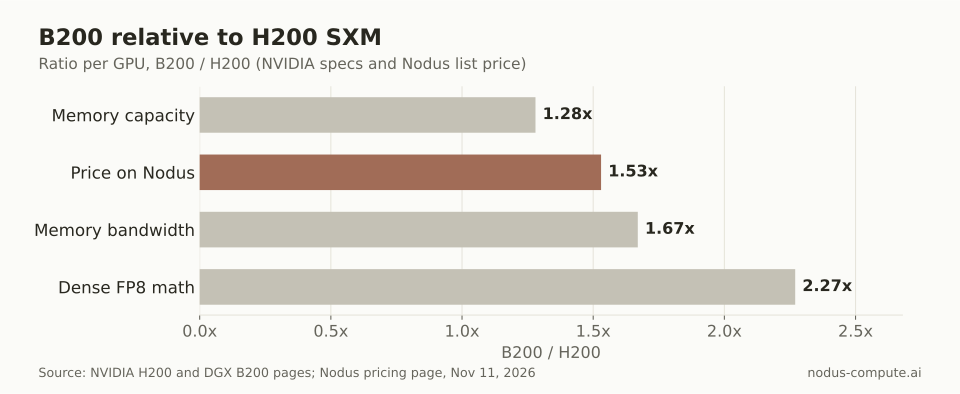 Only memory capacity grew less than the price; bandwidth and math grew more.
What fits on one H200 versus one B200?
Section titled “What fits on one H200 versus one B200?”A 70B model in 16-bit weights is the clearest dividing line: it fits on one B200 with room to serve, and does not usefully fit on one H200. We worked this out from the model’s own configuration, not from a benchmark.
The method is simple. Weights take 2 bytes per parameter in BF16 and 1 byte in FP8. We set aside 10% of the GPU for the runtime and activations, which leaves 126.9 GB usable on an H200 and 162 GB on a B200. Whatever remains after the weights holds the KV cache, the per-token memory a server keeps for every conversation in flight.
For Llama 3.3 70B, the model config lists 80 layers, 8 key-value heads and a head size of 128. In BF16 that is 2 x 80 x 8 x 128 x 2 bytes, or 327,680 bytes of KV cache per token.
| Llama 3.3 70B on one GPU | H200 (141 GB) | B200 (180 GB) |
|---|---|---|
| BF16 weights, about 140 GB | Does not fit with the 10% reserve | Fits, 22 GB left: 67,138 tokens of KV cache |
| FP8 weights, about 70 GB | Fits, 56.9 GB left: 173,645 tokens | Fits, 92 GB left: 280,761 tokens |
| 8,192-token conversations at once (FP8) | 21 | 34 |
| Cost per conversation slot per hour | $0.171 | $0.162 |
With FP8 weights both GPUs serve the model, but the B200 holds 1.62 times as much KV cache for 1.53 times the price. At full load that makes each concurrent conversation about 5% cheaper on the B200 ($5.50 / 34 against $3.593 / 21). If the B200 averages fewer than about 32 of its 34 slots busy while the H200 stays full, that edge is gone, which is why utilization decides this comparison more than specs do. If you want the paged KV cache mechanics behind these numbers, our vLLM explainer walks through them.
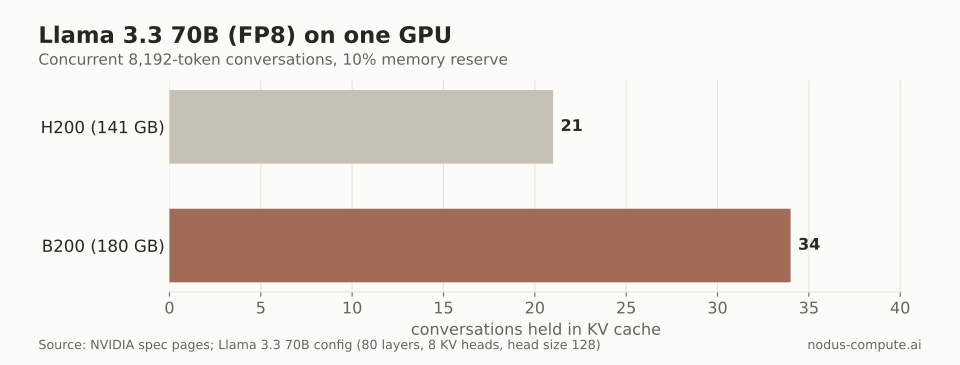 At full load, one B200 holds 34 long conversations for $5.50/hr; one H200 holds 21 for $3.593/hr.
Training follows the same pattern with bigger numbers. Full fine-tuning with mixed-precision Adam needs about 16 bytes per parameter before activations, per the ZeRO paper. That caps one H200 at about 8.8B parameters and one B200 at 11.25B, and an 8-GPU node at 70.5B (1,128 GB) against 90B (1,440 GB). Our H100 vs H200 post uses the same method.
Is a B200 cheaper than an H200 for the same job?
Section titled “Is a B200 cheaper than an H200 for the same job?”Only if it finishes more than 1.53 times faster, because $5.50 / $3.593 = 1.53. Take a job that needs 100 hours on one H200: it costs $359.30. The table prices the same job on a B200 at several speedups.
| B200 speedup over H200 | B200 hours | B200 cost | Versus H200 ($359.30) |
|---|---|---|---|
| 1.0x (no gain) | 100 | $550.00 | +53% |
| 1.3x | 76.9 | $423.08 | +18% |
| 1.53x (break-even) | 65.3 | $359.30 | same |
| 1.67x (bandwidth ratio) | 60 | $330.00 | -8% |
| 2.27x (dense FP8 ratio) | 44.0 | $241.88 | -33% |
The 1.67x and 2.27x rows are spec ratios, not measurements. They mark the ceiling for a job limited by bandwidth or by tensor math. Real jobs land below the ceiling, and a short test on your own workload is the only reliable number.
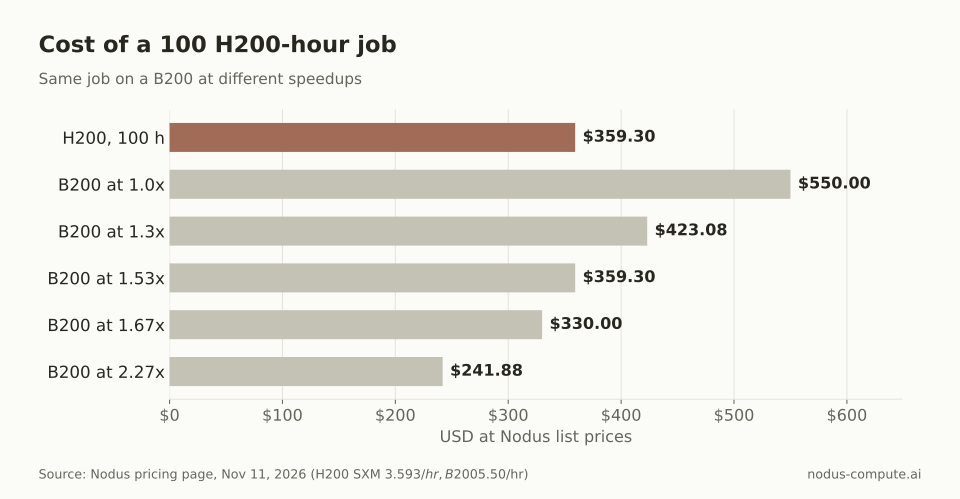 The B200 starts paying for itself once it is more than 1.53 times faster than the H200.
For training there is a published anchor. Our B200 vs H100 post found the B200 2.04 to 2.08 times faster than the H100 in MLPerf Training v6.0. The H200 has the same compute as the H100 plus more bandwidth, so we expect the B200’s lead over it to be the same or somewhat smaller. We have not seen a matched public training result to measure that.
Does FP4 change the answer?
Section titled “Does FP4 change the answer?”It can, but only on the B200, and only if your model and serving stack use it. NVIDIA lists no FP4 Tensor Core figure for the H200, while the DGX B200 lists 9,000 dense FP4 TFLOPS per GPU, double its FP8 rate.
FP4 also halves weight memory again. A 70B model in 4-bit weights is about 35 GB, which leaves far more room for KV cache on either GPU. Whether the quality holds is a per-model question you have to evaluate yourself; a faster format that fails your evals is not a saving.
When is the H200 the better choice?
Section titled “When is the H200 the better choice?”Pick the H200 when the GPU will not stay busy. A model server that idles between traffic spikes, a notebook, or an evaluation harness waiting on CPU work pays the hourly rate either way, and $3.593 is 35% less than $5.50.
It also wins when 141 GB is enough and memory is the only thing you need. If your FP8 model plus its cache fits comfortably, the H200 gives about 20% more memory per dollar. And if your stack has not been validated on Blackwell yet, the H200 runs the same Hopper software as an H100.
When is the B200 the better choice?
Section titled “When is the B200 the better choice?”Pick the B200 for steady, high-load serving and for training runs you can keep saturated. Above the 1.53x line it is cheaper per finished job, and it finishes sooner.
It is also the only one of the two that serves a 70B model in 16-bit weights on a single GPU, and the only one with FP4 Tensor Cores. If the B200 is still not enough memory, our B300 vs B200 post covers the 288 GB option.
Our decision rule: measure tokens or steps per second on 10 minutes of steady-state work from your real job. Above 1.53x, use B200s. Below that, use H200s, unless the B200 removes a second GPU or node or you need the result sooner.
How do you compare both GPUs on Nodus?
Section titled “How do you compare both GPUs on Nodus?”Run the same short job on both and let the numbers decide. Nodus Sweeps run one Job once per GPU type and report cost, wall time and throughput for each cell. This is the documented Python form from the Sweeps guide, with the grid set to the two GPUs:
import nodus
sweep = nodus.Sweep(    {"image": "nodus/pytorch", "command": ["python", "bench.py"]},    grid={"gpu": ["H200", "B200"]},    repetitions=2, max_parallel=6, max_cost=25,).run()report = sweep.wait()print(report.phase, report.best.by_cost)for cell in sweep.cells():    print(cell.index, cell.phase, cell.cost_usd, cell.wall_seconds)
Throughput appears only if bench.py reports units with nodus.log.unit(id, ms, kind="request"), for example once per request or per step. Divide the B200’s unitsPerSecond by the H200’s and compare it with 1.53.
If both GPUs are acceptable, you can also list both and let the scheduler choose. The GPU guide says resources.gpu.type lists every accelerator you accept and Nodus picks among them by expected cost to finish:
spec: resources: gpu: {type: [H200, B200], count: 8} placement: maxRateUSDPerHour: "50.00"nodus apply -f job.yaml --dry-run=server -o estimate shows the expected cost before anything starts. Startup, idle time and redone work also change the total; our post on what an H100 or B200 hour costs per finished job prices those extras.
Is the H200 NVL the same as the H200 SXM?
Section titled “Is the H200 NVL the same as the H200 SXM?”No. Both have 141 GB and 4.8 TB/s, but NVIDIA lists the NVL at 3,341 sparse FP8 TFLOPS and up to 600 W, against 3,958 TFLOPS and up to 700 W for the SXM. The Nodus pricing page lists the SXM version.
How many H200s or B200s does a 405B model need?
Section titled “How many H200s or B200s does a 405B model need?”In FP8 the weights alone are about 405 GB. That needs at least three H200s (423 GB) or three B200s (540 GB) before any KV cache, so in practice most people use four or eight, since tensor parallelism usually splits by a power of two.
Is 8 x H200 cheaper than 8 x B200 per hour?
Section titled “Is 8 x H200 cheaper than 8 x B200 per hour?”Yes: 8 x H200 is $28.744/hr and 8 x B200 is $44.00/hr at Nodus list prices. Per finished job the B200 node is cheaper only when it is more than 1.53 times faster.
Should I pick a B200 just because it is newer?
Section titled “Should I pick a B200 just because it is newer?”No. Newer silicon only saves money when it is kept busy; at low utilization you pay 53% more per hour for capacity you do not use.
More from the blog
pricing8 min read
What are the best Paperspace alternatives in 2026?
Paperspace alternatives for moving from notebooks to real training: Nodus, RunPod and Kaggle, with one run priced on each and when Paperspace still wins.
Read the postinference8 min read
What is vLLM, and why is it faster than plain Transformers?
vLLM is an open-source LLM serving engine. PagedAttention and continuous batching let it fit far more requests per GPU than a plain generate() loop.
Read the post