
FSDP vs DeepSpeed: which should you use for LLM training?
Use FSDP by default. Use DeepSpeed ZeRO-3 when only CPU optimizer offload makes the model fit. Memory math for 8B and 70B, configs and a decision rule.
PyTorch FSDP should be your default for LLM training, and DeepSpeed ZeRO earns its place when the model only fits if you move the optimizer, and nothing else, into CPU memory or onto NVMe, which FSDP cannot do. Nodus runs either one on a single machine with the same nodus run command, while its managed TrainingJobs reject DeepSpeed ZeRO sharding and its multi-machine recovery expects PyTorch Distributed Checkpoint. In our worked math, DeepSpeed’s optimizer-only offload is what puts a full 70B fine-tune on one 8 x NVIDIA H100 machine instead of 8 x B200.
Both tools implement the same idea from the ZeRO paper: split the weights, gradients and Adam state across GPUs instead of copying them to each one. So the choice comes down to the extra knobs each one has, and the tooling around it.
This post covers what our FSDP vs DDP guide does not: how ZeRO stages map onto FSDP settings, what CPU offload buys for 8B and 70B models, the memory we got from DeepSpeed’s own estimator, and how to run both on Nodus.
How do DeepSpeed ZeRO stages map to FSDP sharding strategies?
Section titled “How do DeepSpeed ZeRO stages map to FSDP sharding strategies?”Three of the four line up one to one. The Hugging Face Accelerate FSDP guide gives the mapping, and the DeepSpeed ZeRO tutorial defines what each stage splits.
| What is split across GPUs | DeepSpeed | PyTorch FSDP | Model state per GPU (N GPUs) |
|---|---|---|---|
| Nothing | ZeRO stage 0 | NO_SHARD (same as DDP) |
16 bytes x params |
| Optimizer state | ZeRO stage 1 | no equivalent | 4 + 12/N bytes x params |
| Optimizer state and gradients | ZeRO stage 2 | SHARD_GRAD_OP |
2 + 14/N bytes x params |
| Optimizer state, gradients and weights | ZeRO stage 3 | FULL_SHARD |
16/N bytes x params |
| Stage 3 inside a machine, copies across machines | ZeRO++ with zero_hpz_partition_size set to GPUs per node |
HYBRID_SHARD |
16 / (GPUs per machine) bytes x params |
| Optimizer state on CPU or NVMe, weights on GPU | offload_optimizer |
no equivalent | 2/N bytes x params with stage 3 |
| Everything on CPU | offload_param plus offload_optimizer |
CPUOffload(offload_params=True) |
the layer being computed |
The bytes column uses the ZeRO paper’s count for mixed precision with Adam: 2 bytes of 16-bit weights, 2 of 16-bit gradients and 12 of fp32 master weights and Adam moments. The offload rows follow the DeepSpeed memory docs. Activations come on top of every row.
The two gaps decide most cases, and partial offload is the one that matters.
PyTorch’s FSDP docs say CPUOffload(offload_params=True) “offloads gradients to CPU as well, meaning that the optimizer step runs on CPU”, and FSDP2’s CPUOffloadPolicy moves parameters, gradients and optimizer state together. The Accelerate FSDP vs DeepSpeed guide calls FSDP’s offload “all-or-nothing” and notes that DeepSpeed can also offload to NVMe.
How much GPU memory does each setting need for 8B and 70B?
Section titled “How much GPU memory does each setting need for 8B and 70B?”On one 8-GPU machine, an 8B model fits at almost any sharded setting, and a 70B model fits on 80 GB GPUs only with optimizer offload. Here is the table above worked for 8 GPUs, in decimal GB:
| Setting on 8 GPUs | 8B per GPU | 70B per GPU |
|---|---|---|
Stage 0 / NO_SHARD |
128 GB | 1,120 GB |
| ZeRO-1 | 44 GB | 385 GB |
ZeRO-2 / SHARD_GRAD_OP |
30 GB | 262.5 GB |
ZeRO-3 / FULL_SHARD |
16 GB | 140 GB |
| ZeRO-3 with CPU optimizer | 2 GB | 17.5 GB |
For 70B the arithmetic is 70 x 16 = 1,120; 70 x (4 + 12/8) = 385; 70 x (2 + 14/8) = 262.5; 70 x 16/8 = 140; and 70 x 2/8 = 17.5. The 8B column swaps 70 for 8. These are floors before activations and temporary buffers.
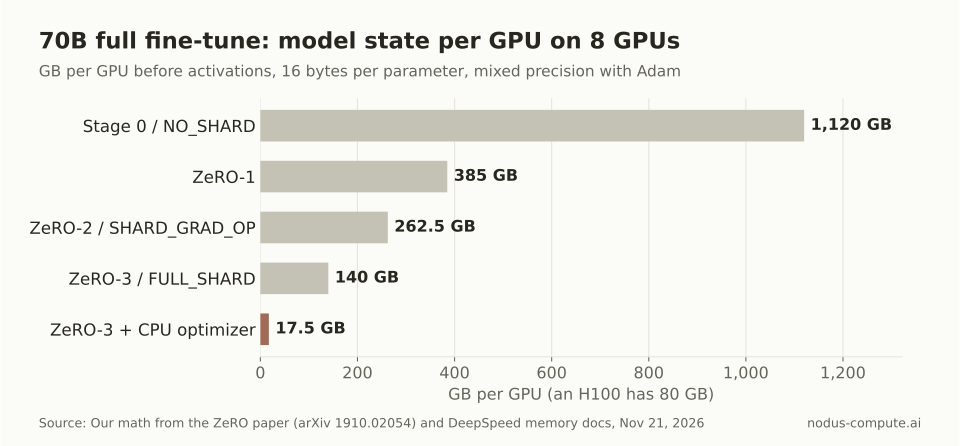 Only optimizer offload brings a 70B full fine-tune under an 80 GB H100’s memory on one machine.
The 8B model needs no offload at all. FULL_SHARD or ZeRO-3 holds it at 16 GB per GPU, so for 8B the two frameworks reach the same memory and you pick on tooling.
The 70B model is where they part. Fully sharded, it needs 140 GB per GPU, which an 80 GB H100 cannot hold. DeepSpeed can keep the 16-bit weights and gradients sharded on the GPUs and move the 12 bytes of optimizer state per parameter to CPU memory, which leaves 17.5 GB per GPU.
What did DeepSpeed’s memory estimator say about 70B?
Section titled “What did DeepSpeed’s memory estimator say about 70B?”It agreed on the GPU side and added a warning about CPU memory. We installed DeepSpeed 0.20.0 with CPU-only PyTorch 2.15.0 in a scratch environment on November 21, 2026 and ran the estimator from the DeepSpeed memory docs. No GPU is needed:
from deepspeed.runtime.zero.stage3 import estimate_zero3_model_states_mem_needs_all_coldestimate_zero3_model_states_mem_needs_all_cold(total_params=70e9, largest_layer_params=8192*128256, num_gpus_per_node=8, num_nodes=1)The largest layer is the embedding of Llama 3.1 70B: a hidden size of 8,192 times a vocabulary of 128,256, from its config.json. The estimator prints “GB”, but its source divides by 2^30, so these are GiB:
| ZeRO-3 option | Per GPU | CPU memory |
|---|---|---|
No offload, zero.Init on |
150.60 GiB | 46.97 GiB |
CPU optimizer, zero.Init on |
20.21 GiB | 1,564.62 GiB |
CPU optimizer, zero.Init off |
20.21 GiB | 3,129.24 GiB |
CPU weights and optimizer, zero.Init on |
3.91 GiB | 1,760.20 GiB |
The GPU numbers run higher than our table because the estimator is stricter. It counts 18 bytes per parameter for stage 3, since DeepSpeed’s docs say gradients are converted to fp32 for the update. It also reserves 4 bytes per parameter of the largest layer for gathering it, which is 4.2 GB here.
The CPU column is the real lesson. With the optimizer on the CPU, 70B x 16 bytes x DeepSpeed’s 1.5 safety factor is 1,680 GB, or 1,564.62 GiB. Without zero.Init, every one of the 8 processes first loads its own fp32 copy of the model, so the requirement doubles to 3,129.24 GiB. In Accelerate that switch is zero3_init_flag: true.
That matters on real machines. The example listing in the Nodus GPU guide shows an 8 x H100 machine with 1800Gi of memory. With zero.Init on, the optimizer-offload run fits with about 235 GiB to spare. With it off, it does not fit at all.
Is CPU offload cheaper than buying bigger GPUs?
Section titled “Is CPU offload cheaper than buying bigger GPUs?”It is cheaper per hour, and cheaper per run only if the slowdown stays under about 2.1 times. The two single-machine ways to fully fine-tune 70B are 8 x H100 with ZeRO-3 and CPU optimizer offload, or 8 x B200 with plain FULL_SHARD, where 140 GB fits in 180 GB.
H100 SXM 80 GB is listed at $2.60/hr and B200 180 GB at $5.50/hr on the Nodus pricing page. Eight of each is $20.80/hr and $44.00/hr. Prices checked November 21, 2026.
The catch is speed. DeepSpeed’s config docs say the optimizer computation moves to the CPU whenever optimizer state is offloaded, and every step copies gradients out and updated weights back. The two GPUs also differ in speed. We have not measured either gap, so here is the break-even instead: 44.00 / 20.80 = 2.12.
Say the B200 run takes 10 hours, which costs $440.00. The offload run on H100s costs:
| Offload run takes | Hours | Cost at $20.80/hr |
|---|---|---|
| 1.5 x as long | 15 | $312.00 |
| 2 x as long | 20 | $416.00 |
| 2.5 x as long | 25 | $520.00 |
| 3 x as long | 30 | $624.00 |
The slowdown factors are assumptions for the example, not measurements.
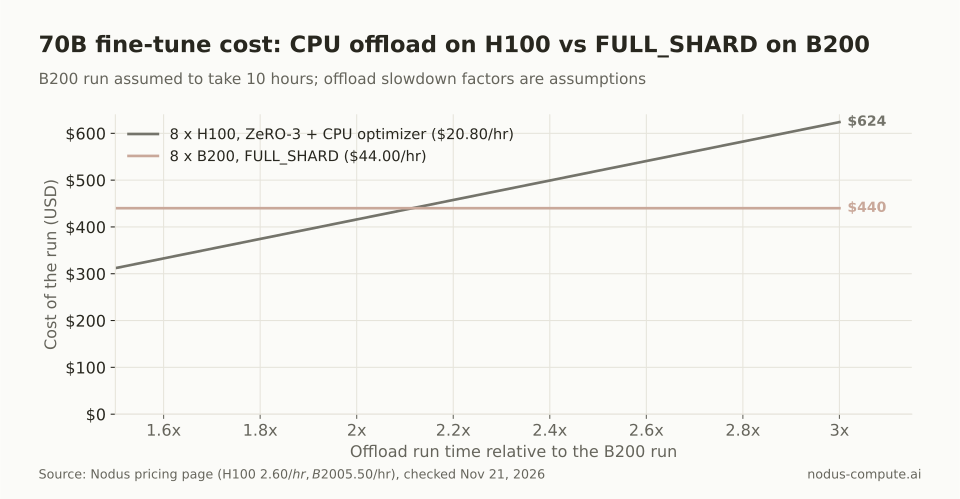 Offload wins only while the H100 run takes less than about 2.1 times as long as the B200 run.
Measure before you commit. A sweep on Nodus runs one Job across GPU types and compares cost, time and throughput per cell, which gives you the real ratio. If you only need to adapt the model rather than retrain every weight, LoRA avoids most of this memory, as our 70B VRAM guide shows.
How do you switch between them with Hugging Face Accelerate?
Section titled “How do you switch between them with Hugging Face Accelerate?”Change one config file and keep the script. Accelerate wraps both, and its docs show the two configs side by side. This is the FSDP config from the Accelerate FSDP guide, trimmed to the sharding keys:
distributed_type: FSDPfsdp_config: fsdp_auto_wrap_policy: TRANSFORMER_BASED_WRAP fsdp_cpu_ram_efficient_loading: true fsdp_offload_params: false fsdp_sharding_strategy: FULL_SHARD fsdp_state_dict_type: SHARDED_STATE_DICTmixed_precision: bf16This is the ZeRO-3 example from the Accelerate DeepSpeed guide, with offload_param_device changed from cpu to none so only the optimizer leaves the GPU:
distributed_type: DEEPSPEEDdeepspeed_config: gradient_accumulation_steps: 1 gradient_clipping: 1.0 offload_optimizer_device: cpu offload_param_device: none zero3_init_flag: true zero3_save_16bit_model: true zero_stage: 3Both launch with accelerate launch --config_file <file> train.py.
Three differences bite in practice, all from the Accelerate concept guide. FSDP needs an explicit wrap policy, while DeepSpeed handles it for you. DeepSpeed needs gradient accumulation and clipping in its config, where auto picks them up from your Trainer. And DeepSpeed always prepares parameters in fp32, so on a small number of GPUs its guide warns of “potentially significant memory overheads due to the upcasting”.
How do you run FSDP or DeepSpeed on Nodus?
Section titled “How do you run FSDP or DeepSpeed on Nodus?”On one machine, use the same nodus run command and change only what comes after --. The Nodus CLI reference uses this for FSDP or DDP with torchrun:
nodus run --gpu H100:8 --max-cost 40 -d -- torchrun train.pyNodus sets PET_NPROC_PER_NODE to the GPU count, so torchrun starts one process per GPU. For DeepSpeed, put its launcher after --, in an image with DeepSpeed installed. The DeepSpeed getting started guide says that on a single machine it needs no hostfile and finds the local GPUs itself:
nodus run --gpu H100:8 --max-cost 40 -d -- deepspeed train.py --deepspeed --deepspeed_config ds_config.json--max-cost 40 is a $40 cap, which is under two hours at $20.80/hr, so it suits a smoke test. Before a long offload run, check host memory with nodus get gpus --gpu H100 --count 8 --region us and read the MEMORY column against the estimator’s CPU number.
For recovery, save checkpoints under /nodus/state. The Nodus checkpoint guide says single-machine Jobs restore that directory on the next attempt, whatever wrote it, so a DeepSpeed checkpoint works there. Remember that checkpoints hold files, not memory: the offloaded optimizer state only survives if your checkpoint writes it to disk.
When does FSDP matter more on Nodus?
Section titled “When does FSDP matter more on Nodus?”Across machines, and in managed training. A stateful multi-node Job must use recovery.checkpoint.format: Dcp, per the checkpoint guide, and every rank saves through PyTorch Distributed Checkpoint. FSDP’s sharded state dicts are made for that format. The multi-node guide lists Accelerate and Deepspeed launchers as “Accepted in the Beta, qualified later”.
Managed TrainingJobs are stricter. Their docs say “DeepSpeed DCP checkpoints are not supported: managed runs reject ZeRO1, ZeRO2 and ZeRO3 with a distributed shape before launch”. So if you want Nodus to own restarts across several machines, FSDP is the path that works today. Our multi-GPU training guide walks through the multi-node torchrun launch.
Where is DeepSpeed the better choice?
Section titled “Where is DeepSpeed the better choice?”DeepSpeed wins when GPU memory is the binding constraint. Optimizer-only offload keeps the weights on the GPU, so it avoids the per-step host-to-device weight copies that FSDP2’s CPUOffloadPolicy docs describe. NVMe offload through ZeRO-Infinity goes further when even CPU memory runs out, and FSDP has nothing like it.
It is also the easier path inside Hugging Face Transformers. Per the Accelerate concept guide, Transformers turns on memory-efficient loading by itself with ZeRO-3, and DeepSpeed needs no wrap policy. If you already have a tuned DeepSpeed setup on one machine, it runs on Nodus unchanged.
Where is FSDP the better choice?
Section titled “Where is FSDP the better choice?”FSDP wins whenever the model fits without partial offload, which covers most fine-tuning up to the size of your GPUs. It ships with PyTorch, so there is no second package version to pin. Its sharded checkpoints save through PyTorch Distributed Checkpoint, which is what Nodus multi-machine recovery expects.
FSDP is also more flexible on precision. The Accelerate concept guide notes that, without mixed precision, FSDP can run the optimizer in bf16, which helps on a few GPUs. Our decision rule: start with FSDP FULL_SHARD; move to DeepSpeed ZeRO-3 only when the estimator shows you need optimizer offload or NVMe to fit, and the slowdown stays under your price break-even.
Is FSDP faster than DeepSpeed ZeRO-3?
Section titled “Is FSDP faster than DeepSpeed ZeRO-3?”At matching settings both move the same data: the ZeRO paper puts stage 3 at 1.5 times the traffic of plain data parallel, and FULL_SHARD does the same gathers. Real throughput depends on prefetch settings, interconnect and model, and we have not benchmarked it, so run both for a few hundred steps if the model fits either way.
Can I convert a DeepSpeed ZeRO-3 checkpoint to normal weights?
Section titled “Can I convert a DeepSpeed ZeRO-3 checkpoint to normal weights?”Yes. The Accelerate concept guide points to DeepSpeed’s zero_to_fp32.py script for sharded checkpoints, or zero3_save_16bit_model: true to save gathered 16-bit weights directly, which can be slow for large models.
Does pinned memory matter for CPU offload?
Section titled “Does pinned memory matter for CPU offload?”It can. DeepSpeed’s config docs say pin_memory now defaults to true for both offload targets, and suggest setting it to false if you hit out-of-memory errors on hosts with a low memlock limit.
Should I use ZeRO-2 or ZeRO-3 for an 8B model?
Section titled “Should I use ZeRO-2 or ZeRO-3 for an 8B model?”On 8 x 80 GB GPUs both fit: 30 GB per GPU for ZeRO-2 against 16 GB for ZeRO-3, before activations. ZeRO-2 avoids the extra weight gather, so try it first if activations still fit in the remaining 50 GB.
More from the blog
gpu10 min read
What are the best Beam Cloud alternatives for serverless GPUs?
Beam Cloud alternatives for serverless GPUs: Nodus, Modal, RunPod Serverless, Baseten and Cerebrium compared on one 24 GB endpoint at list prices.
Read the postpricing9 min read
What is the best GPU for running and training LLMs?
Pick the cheapest GPU whose memory fits the job. A workload table from 8B to 70B, cheapest fitting GPU at Nodus list prices, and when an H100 pays.
Read the post