
What are the best Vertex AI alternatives for model training?
Vertex AI alternatives for custom training: one 24-hour 8 x H100 run priced on seven platforms, what you lose by leaving, and how to keep GCP credits.
If you mostly use Vertex AI to run custom training jobs, the strongest alternative on price is Nodus: a 24-hour run on 8 NVIDIA H100 GPUs costs $499.20 at the Nodus listed rate, against $2,424.18 as a Vertex AI custom training job. Nodus can also run single-node jobs inside your own Google Cloud project, so your GCP credits are spent before Nodus capacity. Modal, RunPod, Amazon SageMaker AI and Azure Machine Learning are the other honest options, and Vertex AI stays the better choice when its managed datasets, Model Registry and TPUs are part of how you ship.
We build Nodus, so weigh our view accordingly. Every Google and competitor fact below links to the provider’s own page, checked November 15, 2026, and the arithmetic is written out so you can redo it with your own region.
What is Vertex AI called now?
Section titled “What is Vertex AI called now?”Google now documents Vertex AI as Gemini Enterprise Agent Platform. Its platform overview calls it “an evolution of Vertex AI”, and the pricing page at the old Vertex AI address is now titled Gemini platform pricing. Custom training is called serverless training in the new training docs.
The product underneath is the same. You still submit a custom job, a hyperparameter tuning job or a training pipeline, and you still pay per machine-hour. We say Vertex AI below because that is what most people still search for.
What does one training run cost on Vertex AI and its alternatives?
Section titled “What does one training run cost on Vertex AI and its alternatives?”We priced one job everywhere: 8 x H100 for 24 hours, which is 192 GPU-hours, at each provider’s listed on-demand rate. This is GPU compute only. Storage, egress and other services are excluded on every row.
| Platform | Listed rate | Per H100-hour | 8 x H100 for 24 hours |
|---|---|---|---|
| Nodus | $2.60 per GPU-hour | $2.60 | $499.20 |
| Modal | $0.001097 per GPU-second | $3.95 | $758.25 |
| RunPod (Secure Cloud) | $4.39 per GPU-hour, H100 SXM | $4.39 | $842.88 |
| Amazon SageMaker AI | $63.296 per hour, ml.p5.48xlarge |
$7.91 | $1,519.10 |
| Google Compute Engine | $88.49 per hour, a3-highgpu-8g |
$11.06 | $2,123.76 |
| Azure Machine Learning | $98.32 per hour, ND96isr H100 v5 | $12.29 | $2,359.68 |
| Vertex AI custom training | $101.007 per hour, a3-highgpu-8g |
$12.63 | $2,424.18 |
Prices checked November 15, 2026: Nodus pricing, Modal pricing, RunPod pricing, the AWS SageMaker price list (US East, N. Virginia), Compute Engine accelerator-optimized pricing (Iowa, us-central1), Azure’s retail prices API for East US with no extra Azure Machine Learning charge, and Gemini platform pricing for custom training (Iowa, us-central1). Instance prices are divided by 8 GPUs; Modal’s per-second price is multiplied by 3,600.
The Vertex row works out as 24 x $101.007352832 = $2,424.18. The Nodus row is 192 x $2.60 = $499.20, which is $1,924.98 or 79% less. Modal is 192 x $3.9492 = $758.25, and RunPod Secure Cloud is 192 x $4.39 = $842.88.
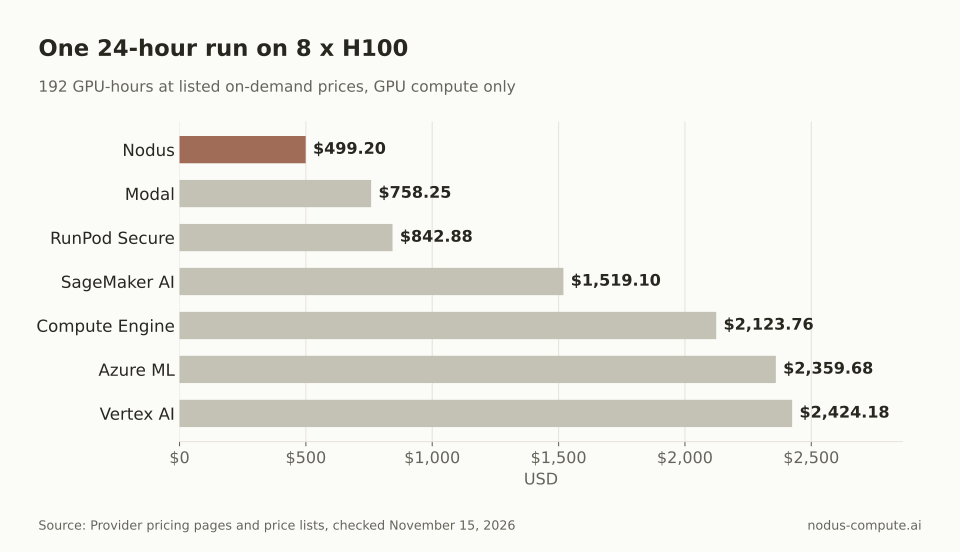 The same 192 H100-hours cost $1,924.98 less on Nodus than as a Vertex AI custom training job.
One row deserves a second look. The a3-highgpu-8g machine is $101.007 per hour as a Vertex training job and $88.49 per hour as a plain Compute Engine VM in the same region. That is $12.52 more per hour, about 14%, for the managed training service. Over our 24 hours it adds $300.42.
Do Vertex AI discounts close the gap?
Section titled “Do Vertex AI discounts close the gap?”They narrow it, but not by much at these rates. Gemini platform pricing lists a Gemini Enterprise Flexible Savings Plan for the same machine at $90.907 per hour for one year and $80.806 per hour for three years. Our 24-hour run then costs $2,181.76 or $1,939.34.
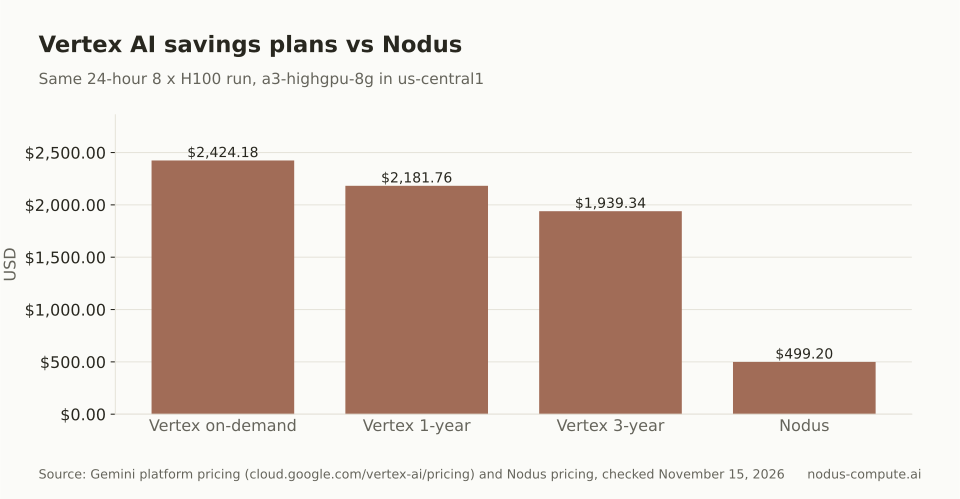 Even a 3-year Vertex savings plan leaves the run $1,440.14 above the Nodus listed rate.
Spot capacity is the other lever. Vertex custom training can use Spot VMs, billed at Compute Engine Spot prices plus a Vertex management fee, which the training accelerator table on Gemini platform pricing lists at $1.47 per H100-hour. Compute Engine lists A3 High Spot at $52.70 per hour. The catch is what happens on preemption, which is the next question.
What happens to a Vertex AI training job when a machine goes away?
Section titled “What happens to a Vertex AI training job when a machine goes away?”It starts your code again from the beginning. Google’s training code requirements say Vertex VMs restart occasionally, for example for maintenance, and that a restarted job runs your code from its start. Google asks you to export progress to Cloud Storage at least every four hours and to reload it on startup. The AIP_CHECKPOINT_DIR variable gives you a Cloud Storage path for that.
On Spot, the Spot VM docs say a preempted job fails with a STOCKOUT error and Compute Engine tries to restart it up to six times. You are not billed while the job is queued or preempted.
Nodus works on the same file contract with less code. You write model, optimizer and step to /nodus/state. Nodus copies that directory while the job runs, and when capacity is reclaimed the next attempt starts with it restored, per the checkpoints guide.
Your script still has to load what it finds there. We covered the pattern step by step in How do you make spot GPU training survive preemption?.
What do you lose and keep when you leave Vertex AI?
Section titled “What do you lose and keep when you leave Vertex AI?”You keep your container and your training script. You lose the Vertex services wrapped around them. That second list decides whether a move pays off, so check it before you price anything.
| Vertex AI piece | On Nodus | What changes |
|---|---|---|
| Custom job | A Job, started with nodus run |
Same image and command |
AIP_CHECKPOINT_DIR (Cloud Storage) |
/nodus/state, in NODUS_STATE_DIR |
Local path, saved and restored by Nodus |
AIP_MODEL_DIR |
--output NAME=/path |
Outputs instead of a Cloud Storage URI |
| Hyperparameter tuning job | A Sweep | Every combination you list, not a Bayesian search |
| Training pipeline | A Pipeline | Stages share one spending cap |
| Custom container in a registry | The same image, via a registry Secret or nodus image push |
No rebuild |
| Managed datasets, Model Registry | No direct equivalent | Keep them on Google Cloud |
| TPUs | Not offered | Stay on Google Cloud |
Sources: Google’s training overview, hyperparameter tuning overview and code requirements; Nodus nodus run reference, Sweeps, Pipelines and Images.
Two rows need care. Vertex hyperparameter tuning chooses trials with search algorithms, including Bayesian optimization. A Nodus Sweep runs the grid you write down and reports cost, time and throughput per cell, which suits small grids and GPU comparisons better than wide searches. And if your models go from a training pipeline into the Model Registry and then to a Vertex endpoint, leaving training means rebuilding that handoff yourself.
Can you leave Vertex AI and still spend your GCP credits?
Section titled “Can you leave Vertex AI and still spend your GCP credits?”Yes, for single-node work. Nodus can connect a GCP project and run your Jobs and other single-node work in it first, so Google Cloud credits are used before Nodus capacity, per the cloud accounts docs. This is a Beta feature. Multi-node runs and Sandboxes use Nodus capacity.
The bill splits in two. Google bills the machine and disk at your project’s Compute Engine rates, so no Vertex training premium applies. Nodus adds a Route fee of $0.02 per device-hour on GPU jobs. For our 192 GPU-hours, that is 192 x $0.02 = $3.84.
Setup is an OAuth grant limited to read-only scopes, then a separate project-owner approval that creates a dedicated network and a service account limited to machines Nodus creates. Machines run in us-central1, us-east1, us-east4 or us-west1, subject to your project’s GPU quota. When the project is full or out of credit, you choose whether work moves to Nodus capacity at Nodus rates or waits. After setup, the CLI step from the docs is one line:
nodus cloud connect gcp gcp-lab --credit-limit 500 --gcp-project lab-ml-prodIf you hold Google credits, this is usually the cheapest way out of Vertex training. Our startup GPU credits guide covers how to get and stack them.
Which Vertex AI alternative should you pick?
Section titled “Which Vertex AI alternative should you pick?”Start from the reason you are leaving. This is the rule we give teams who ask us.
- Your release process depends on managed datasets, the Model Registry, Vertex endpoints or TPUs: stay on Vertex AI, and move only standalone training jobs if price matters.
- You hold GCP credits: connect the project to Nodus, spend the credits on single-node jobs first, and let overflow decide what happens after.
- You want the lowest listed H100 price and runs that restore their own checkpoints: Nodus.
- Your code is Python functions and you also serve models from the same place: Modal.
- You want a GPU pod you configure and manage yourself: RunPod. Our Nodus vs RunPod post compares the two directly.
- Your company is committed to AWS or Azure spend: Amazon SageMaker AI or Azure Machine Learning. The SageMaker alternatives post covers that side.
If your main question is raw Compute Engine GPUs rather than Vertex training, read Nodus vs Google Cloud GPUs instead.
Where is Vertex AI the better choice?
Section titled “Where is Vertex AI the better choice?”Vertex AI wins when the platform does real work for you. If a training pipeline reads a managed dataset, writes a model into the Model Registry and deploys it to an endpoint, that chain is what you are paying for. Rebuilding it on any alternative costs engineering time.
It also wins for TPU work. Vertex training supports TPU VMs, and Nodus does not offer TPUs. Multi-node GPU training inside Google Cloud is another case: the training overview documents Reduction Server, an all-reduce algorithm for multi-node training on NVIDIA GPUs, while our GCP project routing covers single-node work only.
Finally, money already committed changes the math. A Gemini Enterprise savings plan or a negotiated Google agreement can make Vertex the cheaper option for your company even when list prices say otherwise. Price the move against what you actually pay, not against the on-demand row.
How do you move a Vertex AI training job to Nodus?
Section titled “How do you move a Vertex AI training job to Nodus?”Change the checkpoint path, then run the same image with a cost cap. Vertex scripts read AIP_CHECKPOINT_DIR. On Nodus, the checkpoints guide uses this line:
import osfrom pathlib import Path
# Vertex AI: os.environ["AIP_CHECKPOINT_DIR"], a Cloud Storage URISTATE_DIR = Path(os.environ.get("NODUS_STATE_DIR", "/nodus/state"))
Then install the CLI, sign in, check the estimate with a dry run and submit, using flags from the nodus run reference:
pip install nodus-computenodus loginnodus run --gpu H100:8 --image nodus/pytorch --max-cost 550 --dry-run -- torchrun train.pynodus run --gpu H100:8 --image nodus/pytorch --max-cost 550 -d -- torchrun train.pyThe --max-cost 550 cap sits just above our $499.20 example, so a run that goes wrong is suspended at the cap instead of running on. If your data stays in Cloud Storage, store a Google credential as a Secret and read your gs:// paths from the script as you do today.
Is Gemini Enterprise Agent Platform a different product from Vertex AI?
Section titled “Is Gemini Enterprise Agent Platform a different product from Vertex AI?”Google describes it as an evolution of Vertex AI, not a separate service. Custom training, hyperparameter tuning and training pipelines are documented under the new name, and their prices are on the page at the old Vertex AI pricing address.
Does Vertex AI charge for time a training job spends waiting?
Section titled “Does Vertex AI charge for time a training job spends waiting?”Gemini platform pricing says training is charged in 30-second increments with no minimum usage duration. On Spot VMs, Google says you are not billed while the job is queued or preempted.
What is the cheapest Vertex AI alternative for H100 training?
Section titled “What is the cheapest Vertex AI alternative for H100 training?”Of the seven platforms priced on November 15, 2026, Nodus had the lowest listed on-demand H100 rate at $2.60 per GPU-hour. If you have Google credits, running in your own project through Nodus means the credits pay Google for the machine, and the only Nodus charge is the $0.02 per device-hour Route fee.
Can I use Nodus and keep Vertex AI for serving?
Section titled “Can I use Nodus and keep Vertex AI for serving?”Yes. Have your script upload the trained weights to Cloud Storage, then import them into the Model Registry as you would any other artifact. Google’s docs cover importing model artifacts.
More from the blog
inference6 min read
How do you test whether an LLM follows corrections across a conversation?
A model can acknowledge a correction and still act on the old request. Test the final answer against the current request, preserved constraints and withdrawn instructions.
Read the postgpu9 min read
How do you move RunPod training jobs over to Nodus?
A practical Runpod to Nodus migration for training: what each Runpod concept becomes, the commands, checkpoint carry-over, cost and what to leave behind.
Read the post