
How do you move RunPod training jobs over to Nodus?
A practical Runpod to Nodus migration for training: what each Runpod concept becomes, the commands, checkpoint carry-over, cost and what to leave behind.
You move a Runpod training job to Nodus by running the same container image and script with nodus run, with datasets in a Nodus Volume and checkpoints written to /nodus/state. Nodus saves that directory while the job runs and restores it on a new machine if capacity is lost, so most single-node jobs need one changed path and one command. Serverless endpoints and multi-node Instant Clusters are the parts to leave on Runpod for now.
Runpod is still written RunPod in many older guides and searches; we use its current spelling. We build Nodus, so weigh our view accordingly. If you are still deciding whether to move, read Nodus vs RunPod or the RunPod alternatives list first. This post covers only the move, and every Nodus command in it is copied from our docs.
What does each Runpod concept become on Nodus?
Section titled “What does each Runpod concept become on Nodus?”A Runpod Pod used for a training run becomes a Nodus Job, and almost everything around it has a direct counterpart. We built this table from Runpod’s storage, templates, secrets, CLI and Pod pricing docs, and our Jobs, Volumes, Secrets, Images and Workspaces guides.
| On Runpod | On Nodus | What changes |
|---|---|---|
| Pod running a training script | Job, started with nodus run |
The Job ends when your command exits, so nothing idles afterwards |
| Pod you SSH or Jupyter into | Workspace | Home directory lives on a Volume and is saved every time it stops |
| Template (a Docker image plus settings) | --image with any public or private registry image |
Or upload a local image with nodus image push |
| Container disk (lost on stop) | The Job’s local disk, sized with --disk |
Scratch space, as before |
Checkpoints on the /workspace volume disk |
The state directory, /nodus/state |
Nodus copies it and restores it on the next attempt |
| Network volume | Volume, mounted with --volume NAME:/path[:ro] |
Every change is a numbered revision |
| Env vars in a template | --env K=V |
Same idea |
{{ RUNPOD_SECRET_name }} |
nodus secret create, then --secret |
Values arrive as env vars and as files under /run/secrets/ |
runpodctl pod create |
nodus run |
One command uploads code, launches, streams logs and prints the cost |
| Account spend limit (default $80/hour) | --max-cost per run, plus Budgets |
The cap is on each run, not only the account |
Runpod’s own CLI overview launches a Pod from a template with runpodctl pod create --template-id runpod-torch-v21 --gpu-id "NVIDIA RTX 4090". That Pod then runs until you stop it. The Nodus equivalent runs one command to completion and releases the machine, which is the change that matters most for cost.
What is the smallest real job submission on Nodus?
Section titled “What is the smallest real job submission on Nodus?”The smallest submission is one line, copied from the nodus run reference:
nodus run --gpu L4 --image nodus/pytorch -- python train.pyIt uploads your current directory, creates a Job on one NVIDIA L4, streams the logs and ends with a cost line. Install and sign in first with pip install nodus-compute and nodus login. Our quickstart adds the habits worth keeping from day one, a dry run and a spending cap:
nodus run --name cli-quickstart --gpu L4 --image nodus/pytorch \ --max-cost 1 --timeout 10m --no-warm --dry-run \ --output metrics=/nodus/outputs/metrics.json -- python train.py--dry-run prints the estimate without creating the Job. Drop it to start paid compute, then fetch the declared output with nodus cp job/cli-quickstart:outputs/metrics metrics.json, which checks the file against its SHA-256 digest. Finished Jobs keep their logs and outputs for 30 days.
How do you bring your image, data and secrets over?
Section titled “How do you bring your image, data and secrets over?”Bring the image first, because it carries your environment. If your Runpod template points at a registry image, pass the same reference to --image. For a private registry, store a Registry Secret and name it under imagePullSecrets, as the Images guide describes. For an image you only have locally, upload it straight to your project:
IMAGE=$(nodus image push my-app:latest --name my-app:trial -p my-project)Nodus resolves the tag to a digest when you submit, so a retry or recovery runs exactly the same bytes.
Data comes next. Runpod’s S3-compatible API reads network volumes in select data centers without launching a Pod, so you can download a volume without paying for a GPU. Then upload it to a Nodus Volume; uploads only send what changed, so a second attempt moves almost nothing:
nodus create volume data --size 100Ginodus volume put data ./data /dataIf the dataset or base model came from Hugging Face, skip the round trip. A Volume can import from a pinned Hugging Face revision, a git repo, an https:// URL or an S3 bucket, and the import runs on Nodus (Volumes guide). An S3 Connection also takes an s3.endpoint field, which in principle covers Runpod’s endpoint, but we have not tested that path.
Secrets last. Each {{ RUNPOD_SECRET_name }} reference in your template becomes a Nodus Secret, created once:
nodus secret create hf-token --from-literal HF_TOKEN=hf_xxxName it with --secret hf-token and every key arrives as an env var and as a read-only file under /run/secrets/hf-token/. Nodus never returns a value through the API, console or CLI and redacts secret values from logs (Secrets guide).
How do you carry a checkpoint over without losing progress?
Section titled “How do you carry a checkpoint over without losing progress?”Upload your last Runpod checkpoint to a Volume, mount it read-only, and resume from it only when the Nodus state directory is empty. After the first Nodus checkpoint, the state directory wins. We wrote this Hugging Face Trainer version from the recipe in our checkpoints guide and have not run it end to end on a real model. The /workspace fallback keeps the script working on a Runpod Pod:
import osfrom transformers import Trainer, TrainingArguments
STATE = os.environ.get("NODUS_STATE_DIR", "/workspace/ckpt")  # /workspace on RunpodSEED = "/seed/checkpoint-12000"                                # last Runpod checkpoint
def has_checkpoint(d):    return os.path.isdir(d) and any(n.startswith("checkpoint-") for n in os.listdir(d))
args = TrainingArguments(output_dir=STATE, save_steps=500, save_total_limit=2)trainer = Trainer(model=model, args=args, train_dataset=train_ds)
if has_checkpoint(STATE):    trainer.train(resume_from_checkpoint=True)   # Nodus restored the state directoryelif os.path.isdir(SEED):    trainer.train(resume_from_checkpoint=SEED)   # first start after the moveelse:    trainer.train()
We check for a checkpoint- folder rather than only NODUS_RESTORED, because Trainer refuses to resume from an empty directory. Upload the seed with nodus volume put into a Volume named seed, then review the estimate and launch:
nodus run --dry-run --gpu H100:4 --image "$IMAGE" --secret hf-token \ --volume seed:/seed:ro --expected-duration 18h -- torchrun --nproc_per_node 4 train.pynodus run --gpu H100:4 --image "$IMAGE" --secret hf-token \ --volume seed:/seed:ro --max-cost 210 -d -- torchrun --nproc_per_node 4 train.pyWhat you gain is recovery. The checkpoints guide says a Job gets at least four checkpoints over its expected run time, plus one when capacity gives notice it is about to be reclaimed. An empty state directory never replaces an earlier checkpoint.
Setting recovery.checkpoint.integration: HFTrainer in a Job manifest also makes Trainer save when Nodus asks, with no change to your image. Why this matters on Runpod is covered in keeping training alive without spot Pods.
What does the same job cost on Runpod and on Nodus?
Section titled “What does the same job cost on Runpod and on Nodus?”At list prices, the 4 x H100, 18-hour fine-tune above costs $187.20 on Nodus, against $316.08 on Runpod Secure Cloud and from $193.68 on Runpod Community Cloud. That is 72 GPU-hours on each. Runpod lists the H100 SXM at $4.39/hr on Secure Cloud and from $2.69/hr on Community Cloud, billed per second (Runpod pricing). The H100 SXM is listed at $2.60/hr on the Nodus pricing page.
| 4 x H100 SXM, 18 hours (72 GPU-hours) | Hourly rate per GPU | Total |
|---|---|---|
| Runpod Secure Cloud | $4.39 | 72 x $4.39 = $316.08 |
| Runpod Community Cloud | from $2.69 | 72 x $2.69 = $193.68 |
| Nodus | $2.60 | 72 x $2.60 = $187.20 |
Prices checked November 15, 2026. Storage is extra on both and is left out.
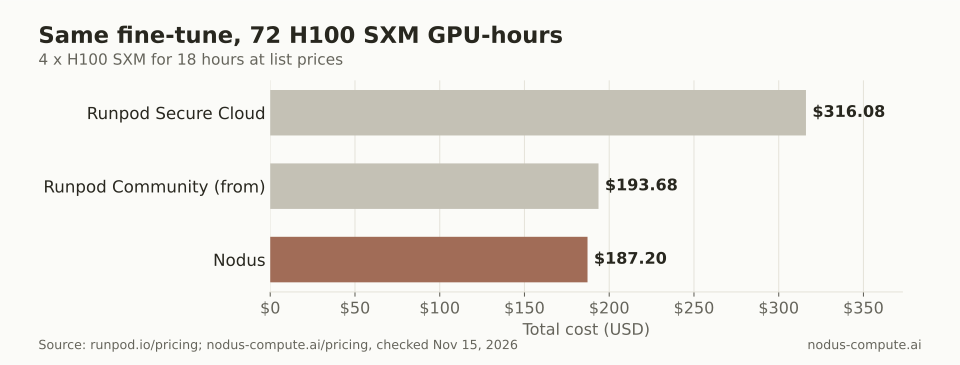 At list prices, the same 72 GPU-hour fine-tune costs 41% less on Nodus than on Runpod Secure Cloud.
The gap is not the same on every GPU. Runpod lists the H200 at $5.29/hr on Secure Cloud and from $3.59/hr on Community Cloud (Runpod pricing), while the H200 SXM is listed at $3.593/hr on the Nodus pricing page. On H200 Community Cloud, Runpod is a fraction of a cent cheaper per hour. For a longer breakdown of Runpod’s storage and idle costs, see Runpod pricing explained.
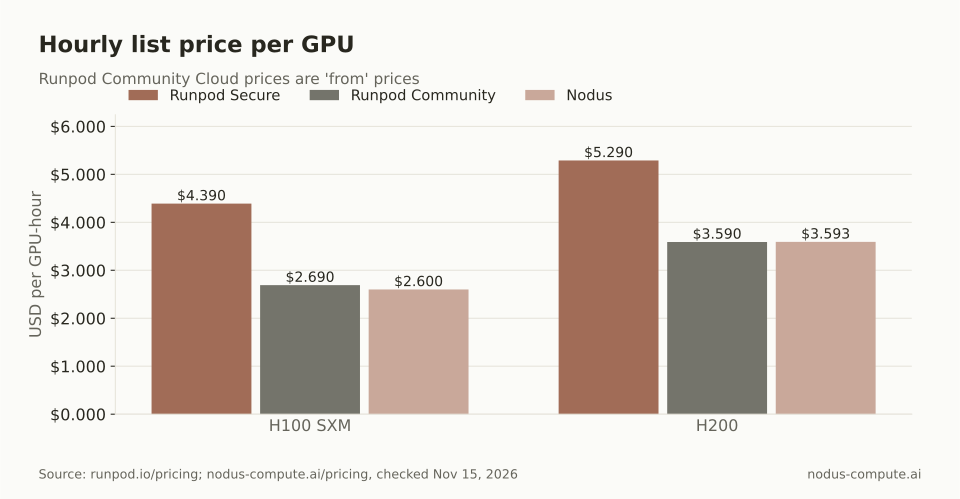 To the tenth of a cent: H100 SXM is $4.390, from $2.690 and $2.600; H200 is $5.290, from $3.590 and $3.593. Nodus leads on H100, and H200 on Community Cloud is a near tie.
Which training jobs should you move first?
Section titled “Which training jobs should you move first?”Move a job first when it passes four checks. We use this rule because each failed check adds manual work to the move:
- It runs on one machine. Multi-node training on Nodus is in Beta.
- A script starts it, not a person typing in a shell.
- It can resume from checkpoint files, or can be made to with the pattern above.
- Its inputs can be fetched again: Hugging Face, git, a URL, a bucket or one
volume put.
A job that passes all four needs only the steps above. A job that fails only the second check belongs in a Workspace first, then becomes a Job once its steps are scripted. Jobs that fail the first check stay where they are until you have tested multi-node on Nodus with a small run.
Can you keep using your Runpod account through Nodus?
Section titled “Can you keep using your Runpod account through Nodus?”Yes, in Beta: Nodus can connect to a Runpod account with its API key, and it does this in two separate steps (connect your cloud accounts). The default, view existing resources, lists the CPU and GPU Pods in the account and never creates, changes or deletes anything. Read-only observation is free.
Running work there is an explicit Beta upgrade, and the docs say no internal enablement or operator qualification step is required. It needs an execution credit limit and a fresh check of the key.
Nodus then places your Jobs, Workspaces and other single-node work in that account first, within its limits. Sandboxes and multi-node runs use Nodus capacity. The nodus cloud connect reference reads the API key from standard input, so a Runpod connection looks like this:
printf '%s' "$RUNPOD_API_KEY" | nodus cloud connect runpod my-runpod --credit-limit 200For a GPU Job in your own account, the estimate shows a Route fee of $0.02 per device-hour, and Runpod bills the machine and disk separately. On the 72 GPU-hour job above, that fee is 72 x $0.02 = $1.44 on top of your Runpod bill. --burst decides what happens when the account is full or out of credit: use Nodus capacity (the default), ask for approval, or deny. Nodus’s spending limit uses its own estimate of cloud cost, which can differ from what Runpod actually charges.
When should you stay on Runpod?
Section titled “When should you stay on Runpod?”Stay on Runpod for the workloads Nodus does not yet cover as well:
- Multi-node clusters. Runpod Instant Clusters offer managed multi-node compute with 1600 to 3200 Gbps between nodes and managed Slurm. Multi-node training on Nodus is in Beta.
- Inference endpoints. Runpod Serverless bills inference workers based on usage (Runpod pricing). Hosted inference on Nodus is in Beta, so a working Serverless endpoint is a poor first candidate.
- Data-heavy work. Runpod states no fees for data ingress or egress on Pods (Pod pricing).
- H200 on Community Cloud, where Runpod’s listed rate already matches ours.
None of these require an all-or-nothing choice. The account connection above lets single-node jobs move while clusters and endpoints stay put.
Do I have to rewrite my training code to run it on Nodus?
Section titled “Do I have to rewrite my training code to run it on Nodus?”Usually not. Code that runs in a container with a command line runs as a Nodus Job; the one change worth making is writing checkpoints to NODUS_STATE_DIR so Nodus can restore them.
Can I SSH into a Nodus machine like a Runpod Pod?
Section titled “Can I SSH into a Nodus machine like a Runpod Pod?”Yes, through a Workspace, which offers SSH, VS Code in the browser and JupyterLab. While it is stopped you pay only for the saved files in its home directory.
What happens to a migrated job if my Nodus credit runs out?
Section titled “What happens to a migrated job if my Nodus credit runs out?”Nodus warns you, stops work gracefully and resumes it when credits, a raised Budget or a raised cap return, as described in when money runs out. Setting --max-cost on each run keeps one job from using the whole balance.
Does Nodus run my work on Runpod capacity?
Section titled “Does Nodus run my work on Runpod capacity?”Only if you connect your own Runpod account and enable running work there. Otherwise your Jobs run on Nodus capacity, and the job page’s Attempts view says where each attempt ran.
Can a coding agent do this migration?
Section titled “Can a coding agent do this migration?”Yes. Once connected with nodus mcp install claude or the hosted server, Claude Code, Codex or Cursor can review an estimate and run a Job through MCP (MCP guide).
More from the blog
inference5 min read
How do you compare two LLMs with the same overall accuracy?
Two models can score 90% while failing on different requests. A paired comparison shows who benefits, who loses and whether a cheaper candidate is acceptable.
Read the posttraining9 min read
How do you fix CUDA out of memory errors in PyTorch?
Read what the OOM error says, then cut the biggest consumer: activations, optimizer state or fragmentation. An ordered checklist with GB math and code.
Read the post