
What are the best SageMaker alternatives for training in 2026?
SageMaker alternatives for model training compared on price, recovery and lock-in, with one 8 x H100 run priced on seven platforms.
Nodus is the best Amazon SageMaker AI alternative for training if you want the lowest listed H100 price and runs that recover on their own, while Modal suits Python functions, Google Cloud Vertex AI and Azure Machine Learning suit teams committed to those clouds, and RunPod or Lambda suit teams that manage their own machines. At list prices, one 10-hour run on 8 NVIDIA H100 GPUs cost $632.96 on SageMaker and $208.00 on Nodus. Stay on SageMaker when your data, IAM roles and pipelines already live there and moving them would cost more than the compute you save.
We build Nodus, so read this list with that in mind. Every competitor price links to the provider’s own page, and the arithmetic is written out so you can redo it with your own region and instance.
Why do teams look for SageMaker alternatives?
Section titled “Why do teams look for SageMaker alternatives?”Mostly price per GPU-hour, and the amount of AWS you have to learn to run one script. SageMaker AI is a full ML platform: training jobs, notebooks, pipelines, a model registry and hosting. If you only need to run torchrun train.py on eight GPUs until it finishes, you pay for an instance with the platform built around it.
SageMaker bills training by instance. An ml.p5.48xlarge (8 x H100) is listed at $63.296 per hour for training in US East (N. Virginia), which is $7.91 per GPU-hour, according to the AWS price list for SageMaker behind the SageMaker AI pricing page. Storage, data transfer and other AWS services are billed on top.
The second reason is setup. A SageMaker CreateTrainingJob request names an IAM role SageMaker can assume, a Docker image with your training code, input channels in S3, EFS or FSx, and an S3 output location. Teams already deep in AWS have all of that. Teams that are not have to build it before the first run.
How much does the same training run cost on each platform?
Section titled “How much does the same training run cost on each platform?”We priced one job on every platform: 8 x H100 for 10 hours, or 80 GPU-hours, at each provider’s listed on-demand rate. GPU compute only, so storage and egress are excluded everywhere.
| Platform | Listed rate | Per H100-hour | 8 x H100 for 10 hours |
|---|---|---|---|
| Nodus | $2.60 per GPU-hour | $2.60 | $208.00 |
| Modal | $0.001097 per GPU-second | $3.95 | $315.94 |
| Lambda | $3.99 per GPU-hour (8-GPU instance) | $3.99 | $319.20 |
| RunPod | $3.99 per GPU-hour (H100 SXM) | $3.99 | $319.20 |
| Amazon SageMaker AI | $63.296 per hour, ml.p5.48xlarge |
$7.91 | $632.96 |
| Azure Machine Learning | $98.32 per hour, ND96isr H100 v5 | $12.29 | $983.20 |
| Google Cloud Vertex AI | $101.007 per hour, a3-highgpu-8g |
$12.63 | $1,010.07 |
Prices checked November 1, 2026: Nodus pricing, Modal pricing, Lambda pricing, RunPod pricing, the AWS SageMaker price list (US East, N. Virginia), Azure’s Linux VM pricing via its retail prices API (East US) and Vertex AI pricing (Iowa, us-central1). Instance prices are divided by 8 GPUs, and Modal’s per-second price is multiplied by 3,600.
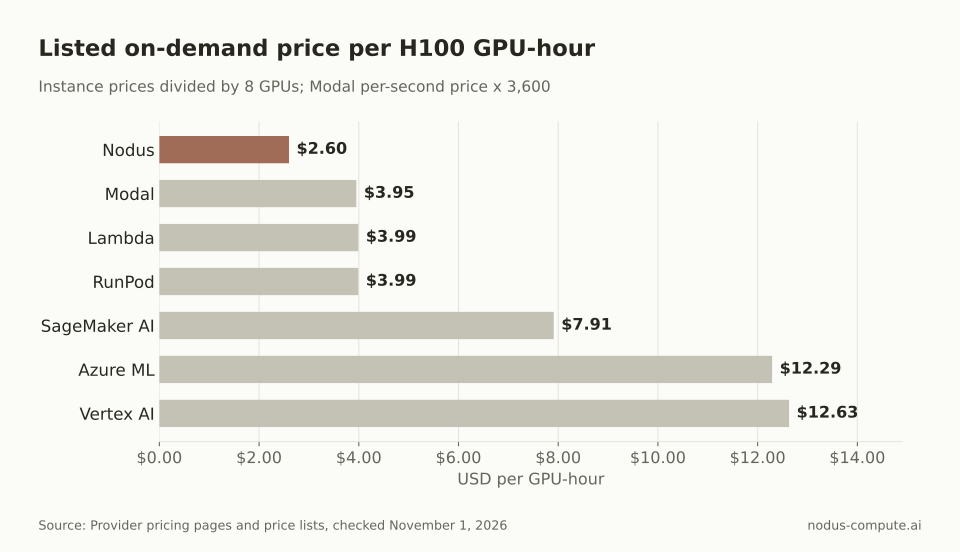 The three hyperscaler ML platforms list H100 time at two to five times the GPU-first platforms.
The run itself works out like this. On SageMaker, 10 hours x $63.296 = $632.96. On Nodus, 80 GPU-hours x $2.60 = $208.00, which is $424.96 or 67% less.
Azure Machine Learning adds no charge of its own, per its pricing page, so its cost is the VM price: 10 x $98.32 = $983.20. Vertex AI lists its custom training machine at $101.007352832 per hour, so 10 hours cost $1,010.07.
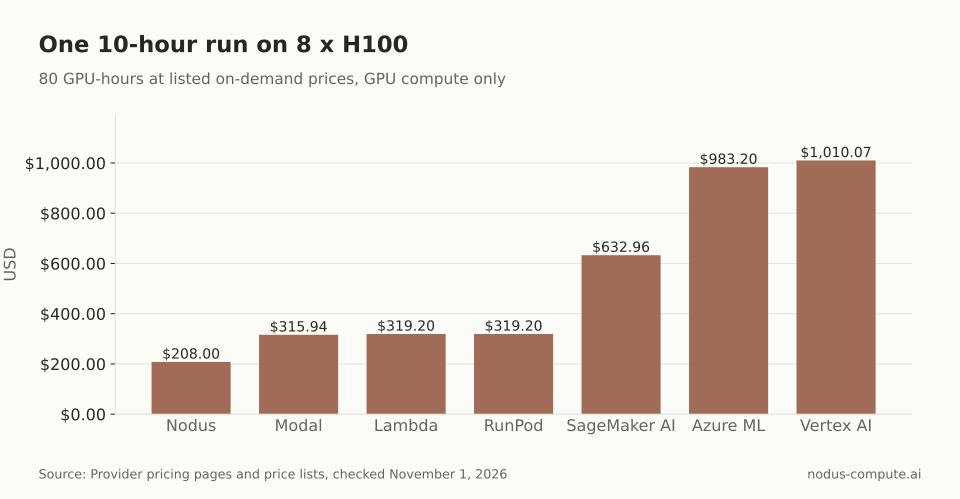 One 80 GPU-hour run costs $424.96 less on Nodus than on SageMaker at list prices.
Two caveats keep this honest. Hyperscaler list prices are where discounts start, not where they end: SageMaker offers Savings Plans and managed spot, and Google and Azure have committed-use and spot pricing. And a cheaper hour only matters if the run finishes, so the next question is what happens when a machine disappears.
Is SageMaker managed spot training a good enough answer?
Section titled “Is SageMaker managed spot training a good enough answer?”It can be, if your job checkpoints and can wait. AWS says managed spot training can cut training cost by up to 90% compared with on-demand instances. SageMaker copies checkpoints from /opt/ml/checkpoints to Amazon S3 and writes them back when the job restarts, per its checkpoint docs.
The limit is capacity. The same managed spot page says spot jobs do not fall back to on-demand instances. If spot capacity is unavailable, the job waits until MaxWaitTimeInSeconds and then stops. That is fine for a weekend experiment and a problem for a run with a deadline.
Our decision rule: use SageMaker managed spot when the run can slip by a day. Use a platform that moves the run to other capacity when it cannot.
Which SageMaker alternative fits your job?
Section titled “Which SageMaker alternative fits your job?”Start from the reason you are leaving.
- You want the lowest listed H100 price and runs that recover on their own: Nodus. Each run executes as a series of attempts, and a new attempt restores the latest committed checkpoint on a replacement machine, as the attempts and recovery docs describe.
- Your training code is already Python functions and you also serve endpoints: Modal. It bills per second, and its preemption docs say a preempted Function restarts on the same input, so you still write the checkpoints.
- You want whole 8-GPU machines or a reserved cluster at a fixed price: Lambda. Its pricing page lists 1-Click Clusters from 16 to 2,000+ H100 or B200 GPUs.
- You want a GPU pod you configure and manage yourself, billed per hour or per second: RunPod. Compare it with Nodus in our Nodus vs RunPod post.
- Your company runs on Google Cloud or Azure and committed spend matters more than the hourly rate: Vertex AI or Azure Machine Learning.
Can you leave SageMaker without leaving AWS?
Section titled “Can you leave SageMaker without leaving AWS?”Yes. Many teams keep their AWS account because of credits, data in S3 or procurement. Nodus can connect an AWS account and run work in it, so your AWS credits are spent before Nodus capacity, per the cloud accounts docs. Running work in your own account is a Beta feature that Nodus support turns on per organization.
The cost model is different from both SageMaker and Nodus capacity. For a GPU job in your own account, the estimate shows a Nodus route fee of $0.02 per device-hour, and AWS bills the machine and disk directly. For our 80 GPU-hour run, the route fee is 80 x $0.02 = $1.60 on top of your AWS bill. You keep AWS pricing and credits and drop the SageMaker training job format.
When is SageMaker still the better choice?
Section titled “When is SageMaker still the better choice?”Stay when the platform is doing real work for you. SageMaker is the better choice if your training reads from S3 under IAM roles your security team approved, if SageMaker Pipelines and the model registry run your release process, or if an AWS Savings Plan already covers the spend. It is also the safer pick when compliance requires every workload to stay inside AWS-managed services.
Price the move honestly.
If moving one pipeline takes an engineer two days, that cost has to come back through cheaper runs. At $424.96 saved per 80 GPU-hour run, a few runs repay a small migration. A team that trains once a quarter may never earn it back. Our Nodus vs AWS SageMaker post walks through that break-even and the recovery test to run first.
How do you move a SageMaker training script to Nodus?
Section titled “How do you move a SageMaker training script to Nodus?”Change where the script saves its state, then run it with a cost cap. SageMaker scripts write checkpoints to /opt/ml/checkpoints. On Nodus, the checkpoint guide uses /nodus/state, which is also in NODUS_STATE_DIR:
import osfrom pathlib import Path
# SageMaker: Path("/opt/ml/checkpoints")STATE_DIR = Path(os.environ.get("NODUS_STATE_DIR", "/nodus/state"))
Your script still has to load the latest checkpoint at startup, exactly as it does for SageMaker managed spot. Then review the estimate with a dry run and submit, using the flags from the nodus run reference:
pip install nodus-computenodus loginnodus run --gpu H100:8 --image nodus/pytorch --max-cost 250 --dry-run -- torchrun train.pynodus run --gpu H100:8 --image nodus/pytorch --max-cost 250 -d -- torchrun train.pyThe --max-cost 250 cap sits just above our $208.00 example, so a run that goes wrong stops at the cap instead of running on.
Does SageMaker managed spot bill you for time spent waiting?
Section titled “Does SageMaker managed spot bill you for time spent waiting?”No. AWS’s managed spot page says the job’s wall-clock time includes interruptions, restarts and waits for spot capacity, but only BillableTimeInSeconds is billed. The wait still costs you calendar time, which is why deadlines matter more than price here.
Does Vertex AI or Azure Machine Learning handle spot interruptions?
Section titled “Does Vertex AI or Azure Machine Learning handle spot interruptions?”Both support spot capacity: Vertex AI custom training can use Spot VMs billed at Compute Engine spot rates, per its pricing page, and Azure’s VM pricing lists spot and low-priority rates for its ND H100 v5 machines. In both cases your script still needs to save and reload checkpoints.
What is the cheapest SageMaker alternative for H100 training?
Section titled “What is the cheapest SageMaker alternative for H100 training?”At listed on-demand prices on November 1, 2026, Nodus was lowest of the seven platforms here at $2.60 per H100-hour. Marketplace offers and spot prices can go lower, with less predictable availability.
Can I keep using S3 for data if I train on Nodus?
Section titled “Can I keep using S3 for data if I train on Nodus?”Yes. Nodus Connections can link an S3 bucket once and use it from Jobs, per the connections guide, so your datasets do not have to move first.
More from the blog
training7 min read
Nodus vs Baseten: which should you use for training jobs?
Nodus vs Baseten for training: per-GPU rates, one 8 x H100 run priced on both, checkpoint recovery, multi-node, serving and where Baseten wins.
Read the postcapacity8 min read
How do you run training jobs across multiple GPU clouds?
Three ways to run training across AWS, GCP, RunPod, Lambda and more: one scheduler, spend order, fallback, checkpoints, and what a run costs each way.
Read the post