
How do you run training jobs across multiple GPU clouds?
Three ways to run training across AWS, GCP, RunPod, Lambda and more: one scheduler, spend order, fallback, checkpoints, and what a run costs each way.
You run training across several GPU clouds by putting one scheduler in front of all of them: a job names the hardware it needs, and the scheduler decides where it runs and where it goes when a machine disappears. Nodus does this for you: it places each job on the cheapest capacity that can start it, spends the credits in the cloud accounts you connect first, and restores the run from its last checkpoint on another machine if one is reclaimed. The other two options are an open-source orchestrator you operate yourself, or a script per cloud, which works until the first preemption at 3 a.m.
Why would you spread one team’s training over several clouds?
Section titled “Why would you spread one team’s training over several clouds?”The usual reason is money you already have, not a grand multi-cloud strategy. A small AI team often holds AWS credits from an accelerator program, a GCP grant, and a prepaid balance on a GPU provider such as RunPod or Lambda. Each pile expires on its own schedule, and none of them alone has the right GPU free every time you need it.
The second reason is availability. The GPU you want is often sold out in one place and free in another, and interruptible capacity gets reclaimed. We collected the published numbers in how often spot GPUs are interrupted.
A job that can only run in one account waits or dies. A job that can run in any of five has five chances to start.
The cost of doing this by hand is coordination: five consoles, five quota limits, five ways to launch a machine, and no single place that says which run is where and what it cost.
What are the three ways to do it?
Section titled “What are the three ways to do it?”Each approach moves the same three jobs (choosing a location, falling back, recovering a run) to a different owner.
| Approach | Who picks where a job runs | Who handles a lost machine | Who runs the control plane |
|---|---|---|---|
| A launch script per cloud | You, by hand | You, by relaunching | Nobody |
| Open-source orchestrator (SkyPilot, dstack) | The orchestrator, from a search space you define | The orchestrator, with your checkpoint code | You (or a hosted tier) |
| Nodus | Nodus, from your connected accounts and its own capacity | Nodus, restoring the last committed checkpoint | Nodus |
Sources: SkyPilot overview, SkyPilot managed jobs, dstack docs, Nodus cloud accounts. Checked November 1, 2026.
Our decision rule: if you have one cloud and one GPU type, a script is fine. Once you have two credit balances or you use interruptible capacity, you want a scheduler, and the real question becomes whether you want to operate it.
How does Nodus decide which cloud a job runs on?
Section titled “How does Nodus decide which cloud a job runs on?”Nodus places each run on the cheapest offering that fits the request, has a machine free and stays inside your limits, according to the placement docs. If that offering cannot be used, the next cheapest takes the run. You can switch the trade-off with a placement profile: Balanced (the default), Cost for the lowest expected cost to completion including lost work, or Speed for the fastest finish within 1.5 times the cheapest expected cost.
Deadlines and money filter the list before anything is picked. Offerings whose p90 finish is later than your deadline are dropped, and so are offerings whose expected cost exceeds your remaining budget. If nothing is left, the job waits in Queued and the estimate says why, for example ExceedsRemainingBudget. nodus describe then shows the chosen offering, the fallbacks in order and every rejected offering with its reason.
From the command line, a job asks for hardware, not for a cloud:
nodus run --gpu H100:8 --max-cost 40 -d -- torchrun train.pyThat example is copied from the nodus run reference, which also documents --profile and --interruptible.
How do you spend credits in your own cloud accounts first?
Section titled “How do you spend credits in your own cloud accounts first?”You connect each account once and give it a credit limit, and Nodus places your Jobs, Workspaces and other single-node work there before its own capacity. This is a Beta feature, turned on per organization, and the cloud accounts guide lists AWS, GCP, Azure, Kubernetes and API-key providers including Lambda, RunPod, Nebius and DigitalOcean.
Here is a setup for a team with AWS credits and a RunPod balance. The commands are copied from the nodus cloud connect reference, with --priority added to set the order:
nodus cloud connect aws aws-main --credit-limit 500 --priority 1printf '%s' "$RUNPOD_API_KEY" | nodus cloud connect runpod my-runpod --credit-limit 200 --priority 2Work goes to priority 1 first, then 2. Accounts with the same priority, or none, go to whichever has the cheapest machine for the work. The credit limit is spent at the Nodus list estimate, which can differ from what your cloud bills you, so the docs advise setting it a little below the credit you actually hold.
What happens when an account is full or out of credit is your choice, set with --burst:
--burst |
When the account cannot take the job |
|---|---|
Allow (default) |
The job runs on Nodus capacity at Nodus rates |
Approve |
The job waits until you approve it with nodus request approve-burst |
Deny |
The job waits for your account |
One honest limit: multi-node runs and Sandboxes use Nodus capacity, not your connected accounts. If your plan is an 8-node gang inside your own AWS account, this feature does not do that today.
What does a run cost each way?
Section titled “What does a run cost each way?”Take one 8 x H100 run of 10 hours, which is 80 GPU-hours. In your own connected account, the job estimate shows a Nodus route fee of $0.02 per device-hour, so the Nodus charge is 80 x $0.02 = $1.60. Your cloud bills the machine and disk separately, against your credits.
If your accounts are full and the run bursts to Nodus capacity, the H100 SXM 80 GB is listed at $2.600/hr on the Nodus pricing page, so the same run costs 80 x $2.600 = $208.00, all in.
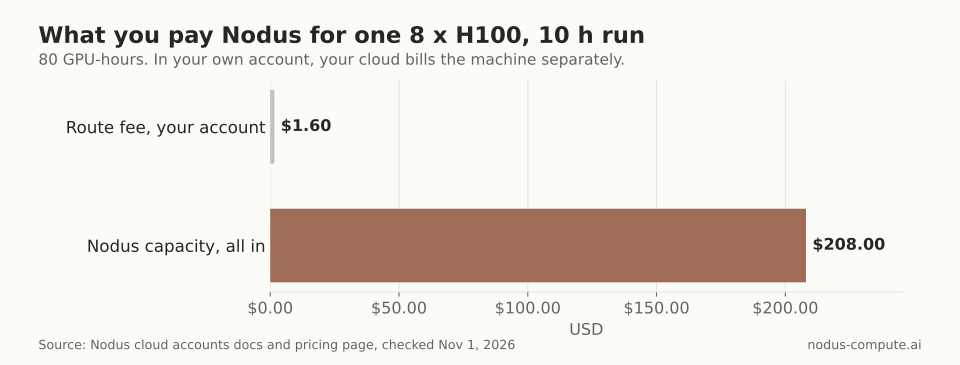 The route fee is all Nodus adds in your own account; the machine itself is paid from your cloud credits.
The two numbers are not a like-for-like price comparison, because the first excludes your cloud’s bill. They show what you pay Nodus in each case, which is the number to plan around when your credits run out mid-project.
If the job bursts, these are the other rates you would see on the same page:
| GPU | Listed Nodus rate per GPU-hour |
|---|---|
| NVIDIA B200 180 GB | $5.500 |
| NVIDIA H200 SXM 141 GB | $3.593 |
| NVIDIA H100 SXM 80 GB | $2.600 |
| NVIDIA A100 80 GB | $1.090 |
| NVIDIA L4 24 GB | $0.430 |
Prices checked November 1, 2026 on the Nodus pricing page.
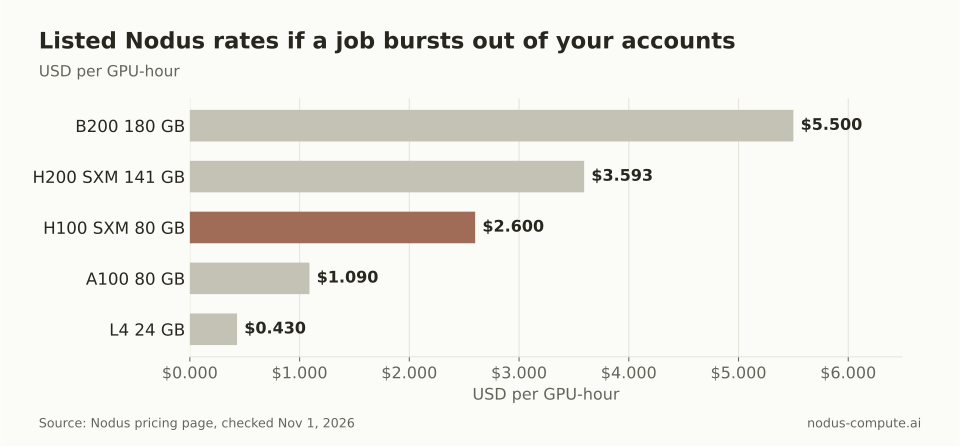 A burst to an L4 or A100 is cheap; a burst to B200 for a long run is where a budget cap matters most.
What happens when a machine in one cloud disappears mid-run?
Section titled “What happens when a machine in one cloud disappears mid-run?”A run survives a lost machine only if it saves checkpoints, whichever scheduler you use. On Nodus, a machine that stops sending heartbeats gets a replacement prepared after 20 seconds, and after 60 seconds of silence an attempt on shared capacity is declared lost and replaced, per the attempts and recovery docs. The replacement starts only once the old machine is provably gone, so two copies never write the same checkpoint.
A Checkpointed run loses at most the work since its last committed checkpoint. Recovery has limits: by default 8 recoveries per run, and 3 for distributed Jobs. Failures caused by your own code, such as a non-zero exit or out of memory, fail fast and are not retried. The checkpoint guide shows the save and resume pattern in Python.
With a connected AWS account, one extra rule helps across clouds: if AWS refuses a machine because your GPU quota for that family is used up, Nodus skips that family in that region for an hour and runs the work elsewhere.
Where is an open-source orchestrator the better choice?
Section titled “Where is an open-source orchestrator the better choice?”SkyPilot or dstack is the better choice when you need things Nodus does not do in your own accounts today, or when you want to own the control plane.
Pick SkyPilot if you run multi-node training inside your own clouds, Kubernetes clusters or Slurm, because it combines them into one pool with automatic failover across the search space you give it, per its overview. Its managed jobs recover from preemptions, GPU errors and node crashes, and clean up resources when done. It is open source, so nothing sits between you and your cloud bill.
Pick dstack if you want a self-hosted control plane across GPU clouds, Kubernetes and on-prem clusters, described in its docs as a unified interface for development, training and inference.
The trade is operating it. You configure each cloud’s credentials and quotas, keep the controller running, and write the checkpoint and resume logic your jobs need. Pick Nodus when you would rather not run that layer, want one prepaid bill with per-job cost caps, and are happy for multi-node runs to use Nodus capacity.
How do you move an existing training script onto this?
Section titled “How do you move an existing training script onto this?”Keep your script, make it write checkpoints to the checkpoint path, and launch it with a GPU request instead of a cloud name. The quickstart runs a script from your own directory with this command:
nodus run --name cli-quickstart --gpu L4 --image nodus/pytorch \ --max-cost 1 --timeout 10m --no-warm --dry-run \ --output metrics=/nodus/outputs/metrics.json -- python train.pyDrop --dry-run once the estimate looks right. Connect your cloud accounts afterwards; nothing in the job changes, and Attempts › Ran on on the job page shows whether each attempt ran in your account or on Nodus capacity. For multi-GPU code, our PyTorch multi-GPU training guide covers the torchrun side.
Does connecting a cloud account let Nodus change my existing machines?
Section titled “Does connecting a cloud account let Nodus change my existing machines?”No. Viewing an account is read-only and does not create, change or delete resources. Running work is a separate, explicit upgrade, and Nodus then creates, labels and deletes only its own machines there.
Can one training run span two clouds at once?
Section titled “Can one training run span two clouds at once?”Not by default. A multi-node run is placed with network: Colocated, which keeps every node in one location on one network. Regional and Global placement are possible, and the placement docs note that relayed paths between nodes have lower bandwidth, so most distributed training should stay in one place.
What does it cost to run CPU work in my own account?
Section titled “What does it cost to run CPU work in my own account?”CPU work has no Nodus routing fee; your cloud provider bills the machine and disk within your account’s spending cap. The $0.02 per device-hour route fee applies to own-account GPU Jobs.
How do I stop using a connected account?
Section titled “How do I stop using a connected account?”Disconnect it in Nodus first. Nodus stops placing work there, moves running work to the next source and terminates the machines it started, and only then should you remove its access on the cloud side.
More from the blog
training7 min read
Nodus vs Baseten: which should you use for training jobs?
Nodus vs Baseten for training: per-GPU rates, one 8 x H100 run priced on both, checkpoint recovery, multi-node, serving and where Baseten wins.
Read the postagents7 min read
Which sandbox is best for running AI agent code?
E2B, Modal, Daytona and Nodus Sandboxes compared for agent code: isolation, network defaults, session limits, GPUs and what 1,000 sandbox-hours cost.
Read the post