
How do you run continued pretraining on an open LLM?
A tested walkthrough of continued pretraining: pack domain text with EOS, mix in replay by tokens, re-warm the learning rate, and checkpoint a multi-day run.
Continued pretraining is the same next-token training an open model started with, run on your own domain text: append an end-of-sequence token to every document, pack the text into fixed-length blocks, mix in 5 to 30% general text by tokens, and re-warm then re-decay the learning rate. On Nodus you launch the training script with nodus run, and Nodus restores your checkpoint directory on a new machine if the capacity under a multi-day run is reclaimed. The data pipeline is where most runs go wrong quietly, so test it on a CPU before you pay for a GPU.
If you are still deciding whether you need continued pretraining at all, start with continued pretraining vs fine-tuning. This post assumes you have decided and want the run to work.
How should you prepare and pack the text?
Section titled “How should you prepare and pack the text?”Keep one row per whole document, append the end-of-sequence (EOS) token yourself, and pack across document boundaries into blocks of your training length. We wrote and ran the script below on a CPU with transformers 5.24.0 and datasets 5.2.0. Our own 131 blog posts stood in for a domain corpus, and the WikiText-2 test split stood in for general text.
"""Tokenize a domain corpus and a general replay corpus, pack both intofixed-length blocks, and mix them by token share. One JSON row per document."""import osfrom datasets import Dataset, interleave_datasets, load_datasetfrom transformers import AutoTokenizer
MODEL = os.environ.get("BASE_MODEL", "Qwen/Qwen2.5-0.5B")BLOCK = int(os.environ.get("BLOCK", "2048"))REPLAY = float(os.environ.get("REPLAY", "0.05"))  # share of training tokens from general text
tok = AutoTokenizer.from_pretrained(MODEL)

def tokenize(batch):    # Mark every document end, so the model learns where one text stops.    ids = tok(batch["text"])["input_ids"]    return {"input_ids": [x + [tok.eos_token_id] for x in ids]}

def pack(path):    docs = load_dataset("json", data_files=path)["train"]    docs = docs.map(tokenize, batched=True, remove_columns=["text"])
    def blocks():        buf = []  # carries across documents and map batches, so nothing is dropped mid-corpus        for ids in docs["input_ids"]:            buf.extend(ids)            while len(buf) >= BLOCK:                yield {"input_ids": buf[:BLOCK], "labels": buf[:BLOCK]}                buf = buf[BLOCK:]
    return Dataset.from_generator(blocks)

domain, general = pack("domain.jsonl"), pack("general.jsonl")# Every block holds BLOCK tokens, so these probabilities are token shares.train = interleave_datasets(    [domain, general], probabilities=[1 - REPLAY, REPLAY], seed=0,    stopping_strategy="first_exhausted",)train.save_to_disk("blocks")
The EOS line matters more than it looks. With the Qwen2.5-0.5B tokenizer, none of our 194 test documents came back ending in EOS, because the tokenizer does not add one. The group_texts recipe in the Hugging Face causal language modeling guide concatenates rows as they are. Without that line, the model trains on documents running into each other with no boundary.
That guide’s group_texts also trims each map batch to a whole number of blocks, so it drops up to one block minus one token per batch. The generator above keeps a single buffer across the whole corpus and loses at most one partial block at the very end.
Which data collator should you use?
Section titled “Which data collator should you use?”Use default_data_collator with labels copied from the input, not DataCollatorForLanguageModeling, whenever the tokenizer’s pad token is the same as its EOS token. The LM collator sets the label to -100 wherever it sees the pad token, which removes every EOS from the loss.
We checked this directly. Qwen2.5-0.5B’s tokenizer uses <|endoftext|> (id 151643) as both pad and EOS. Passing [3896, 2197, 151643, 5569, 2197] through DataCollatorForLanguageModeling(tok, mlm=False) returned labels [3896, 2197, -100, 5569, 2197], so the model would never be trained to end a document. Packed blocks are all full length, which means there is no padding to mask in the first place.
How much general text should you mix back in?
Section titled “How much general text should you mix back in?”Mix in roughly 5% general text when your domain looks like ordinary web text, and around 25% for a large shift such as a new language. Those numbers come from Ibrahim et al., “Simple and Scalable Strategies to Continually Pre-train Large Language Models”. With learning-rate re-warming and re-decaying, 5% replay matched full retraining for an English to English shift, and 25% replay did so for English to German.
The same paper points to later work that used more: 30% replay when DeepSeek-AI continued pretraining DeepSeek-V2 for code, and 60% in a decay phase by Glorioso et al. Its own advice is to try several replay fractions on a small token budget, because the differences show up early in training.
Mix by tokens, not by documents. Our script interleaves packed blocks, so a 5% probability means 5% of tokens. If you interleave raw documents instead, the token share depends on document length. In our test corpora the general documents averaged 4,745 tokens and the domain posts 3,448, so a 5% document share works out to about 6.8% of tokens: 0.05 x 4,745 / (0.05 x 4,745 + 0.95 x 3,448).
For an open model you rarely have the original pretraining mix. Use a public general corpus close to what the model saw, and keep a held-out slice of it to measure forgetting.
What does replay add to the compute bill?
Section titled “What does replay add to the compute bill?”Replay added on top of your domain data multiplies the token count by 1 / (1 - replay share). The Ibrahim et al. experiments instead held compute fixed and replaced domain tokens, which costs nothing extra but trains on less of your domain.
Take a 7B model trained on 1 billion domain tokens. Our continued pretraining vs fine-tuning post estimates about 29.5 NVIDIA H100 GPU-hours for that, at an assumed 40% utilization. The H100 is listed at $2.60/hr on the Nodus pricing page.
| Replay share | Total tokens | H100-hours | Cost at $2.60/hr |
|---|---|---|---|
| 0% | 1.000 B | 29.5 | $76.70 |
| 5% | 1.053 B | 31.1 | $80.74 |
| 25% | 1.333 B | 39.3 | $102.27 |
| 30% | 1.429 B | 42.1 | $109.57 |
Prices checked November 22, 2026. Hours scale with tokens from the 29.5-hour estimate; the utilization is an assumption, not a measurement.
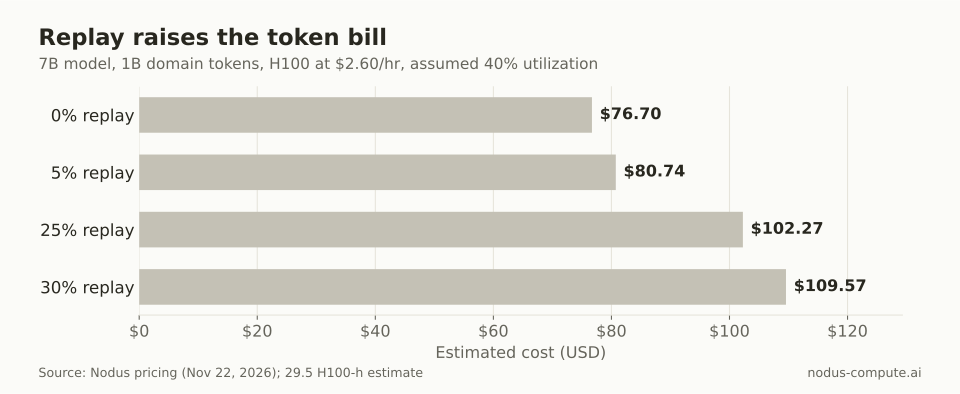 Weak-shift replay is close to free; strong-shift replay adds about a third to the bill.
For the general method behind the hour estimate, see how much it costs to train an LLM.
What learning rate schedule should continued pretraining use?
Section titled “What learning rate schedule should continued pretraining use?”Re-warm to a peak, then decay again over your new token budget. Ibrahim et al. report that re-warming and re-decaying adapts better than continuing at the small learning rate the base model ended on. They also found a lower peak forgets less, while a higher peak adapts more. Pick the peak with a short sweep on a slice of your data, scored on both domain and general held-out loss.
Gupta et al. (2023) saw the same shape: re-warming first raises loss on both old and new data, then improves downstream results over a longer run. Expect that early bump and do not stop the run because of it.
If you train LoRA adapters with Unsloth instead of full weights, the Unsloth continued pretraining docs add lm_head and embed_tokens to the target modules. They also give those two a separate learning rate 2 to 10 times smaller, through UnslothTrainingArguments:
args = UnslothTrainingArguments( learning_rate = 5e-5, embedding_learning_rate = 5e-6, # 2-10x smaller than learning_rate)Know the trade before you pick LoRA. Biderman et al., “LoRA Learns Less and Forgets Less” found LoRA substantially underperformed full fine-tuning in continued pretraining on 20B tokens of code and math. It did keep more of the base model’s skills outside the target domain. Our Unsloth on a cloud GPU post covers GPU sizing for that route.
How do you make the training script resume itself?
Section titled “How do you make the training script resume itself?”Point Hugging Face Trainer at the Nodus state directory and resume from the last checkpoint it finds there. This is the full-weight training script we ran:
"""Continued pretraining with Hugging Face Trainer, resumable from the Nodus state directory."""import osfrom datasets import load_from_diskfrom transformers import AutoModelForCausalLM, Trainer, TrainingArguments, default_data_collatorfrom transformers.trainer_utils import get_last_checkpoint
MODEL = os.environ.get("BASE_MODEL", "Qwen/Qwen2.5-0.5B")STATE = os.environ.get("NODUS_STATE_DIR", "./state")  # /nodus/state on NodusOUT = os.path.join(STATE, "trainer")
model = AutoModelForCausalLM.from_pretrained(MODEL, dtype="bfloat16")args = TrainingArguments(    output_dir=OUT,    max_steps=2000, per_device_train_batch_size=8, gradient_accumulation_steps=4,    learning_rate=2e-5, lr_scheduler_type="cosine",    warmup_steps=0.01,  # a float below 1 is a fraction of max_steps    save_steps=200, save_total_limit=2, logging_steps=10,    bf16=True, seed=0, report_to="none",)trainer = Trainer(model=model, args=args, train_dataset=load_from_disk("blocks"),                  data_collator=default_data_collator)trainer.train(resume_from_checkpoint=get_last_checkpoint(OUT) if os.path.isdir(OUT) else None)trainer.save_model(os.environ.get("NODUS_OUTPUT_DIR", "./outputs") + "/model")
The learning rate of 2e-5 is a placeholder for your sweep result, not a recommendation. get_last_checkpoint returns nothing on a first start, so the same line covers a fresh run and a restored one.
To test it on a CPU, we swapped the pretrained weights for a 2-layer, 9.8 million parameter model with the same Qwen2 architecture. We packed 128-token blocks and ran 12 steps with a save every 4, once straight through. Then we ran it again, killed the process with kill -9 right after the step-8 save, and restarted the unchanged script.
The restart picked up at step 9 with learning rate 0.0004132, the same value as the uninterrupted run, and finished at step 12. The schedule continued rather than re-warming. Losses after the restart were close to the uninterrupted run but not bit-identical, so do not expect identical weights after a resume.
How big will the checkpoints get, and does that matter?
Section titled “How big will the checkpoints get, and does that matter?”In our test each checkpoint stored about 6 bytes per parameter: 2 for the bf16 weights and 4 for the two AdamW moments, which Trainer kept in the same dtype. The 9.8 million parameter model wrote a 19.6 MB model.safetensors and a 39.2 MB optimizer.pt. Keeping fp32 weights and moments doubles that to 12 bytes per parameter.
With save_total_limit=2, two checkpoints sit in the state directory at once. For a 0.5B model that is about 6 GB in bf16 and 12 GB in fp32. It is about 84 GB for a 7B model in bf16 and 168 GB in fp32. A 70B model reaches 840 GB in bf16 and 1,680 GB in fp32.
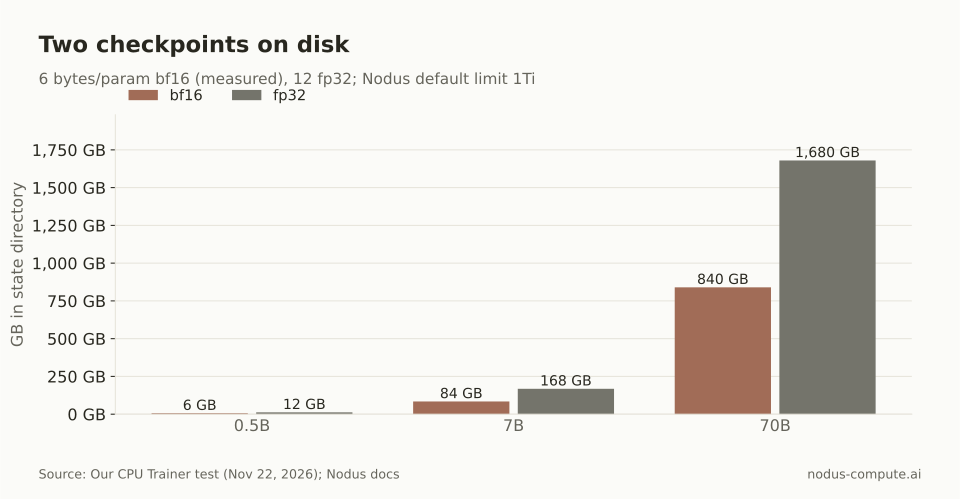 Only the 70B fp32 case exceeds the default 1Ti checkpoint limit on Nodus.
The Nodus checkpoints guide sets a default maxSize of 1Ti, about 1,100 GB, and a larger checkpoint fails with CheckpointTooLarge. Size also drives how long each save takes. Keep only what you need to resume in the state directory, and send the finished model to /nodus/outputs.
How do you launch a multi-day run on Nodus so it survives interruptions?
Section titled “How do you launch a multi-day run on Nodus so it survives interruptions?”Run the script with nodus run, checkpoint /nodus/state, and put a spending cap on it. Every flag below is from the nodus run reference. Price it with --dry-run first:
nodus run --name cpt-run --gpu H100 --image nodus/pytorch \ --checkpoint /nodus/state --max-cost 120 --dry-run \ --output model=/nodus/outputs/model -- python train.pyDrop --dry-run and add -d to start it and return. This single-process script suits models that fit one GPU; full-weight AdamW on a 7B model usually needs --gpu H100:8 and a sharded setup, covered in FSDP vs DeepSpeed. The H100-hours in the table above are GPU-hours either way.
Nodus checkpoints the state directory at least four times over the expected run and spends no more than about a tenth of it checkpointing. It also checkpoints when the capacity gives notice that it is about to be reclaimed. The next attempt starts your command again with the state directory restored, which is why the script must load its own progress.
Trainer only saves every save_steps, so a Nodus checkpoint taken between saves holds the last Trainer save, not the current step. To have Trainer save when Nodus asks, set the documented integration in the Job spec:
recovery: continuity: Checkpointed checkpoint: paths: [/nodus/state] integration: HFTrainerFor how much work an interruption costs at different save intervals, see resuming training after spot preemption. In our small continued pretraining benchmark against Modal, Nodus recorded 42.5% lower charges for byte-identical weights, on one 0.5B model and one run per platform.
Should continued pretraining use the base model or the instruct model?
Section titled “Should continued pretraining use the base model or the instruct model?”Usually the base model, since continued pretraining uses the same raw-text objective the base model was trained with. Fine-tune for instructions afterwards, on the model you just adapted.
How many domain tokens do you need?
Section titled “How many domain tokens do you need?”Enough that the model sees your domain far beyond what a prompt could hold. For scale, our 131 blog posts came to 451,658 Qwen2.5 tokens, about 3.5 characters per token, so a billion tokens is over 2,000 times that collection.
Can you add new tokens to the tokenizer?
Section titled “Can you add new tokens to the tokenizer?”You can, but the new embedding rows start untrained, so embed_tokens and lm_head must be trained too. Try the existing tokenizer first and add tokens only if your domain text tokenizes very inefficiently.
What should you evaluate during the run?
Section titled “What should you evaluate during the run?”Held-out loss on domain text and on the general replay corpus, logged at every save. If general loss keeps rising while domain loss flattens, raise the replay share or lower the peak learning rate for the next run.
More from the blog
pricing10 min read
What are the best Databricks alternatives for LLM training?
Databricks alternatives for LLM training: one 8 x H100 day priced on six platforms, a break-even speed rule, and when Databricks AI Runtime still wins.
Read the postgpu7 min read
How do you fine-tune a model and then run it in Ollama?
Ollama cannot train. Fine-tune on a GPU, merge the LoRA, convert to GGUF with llama.cpp, then ollama create with a Modelfile that matches the chat template.
Read the post