
What are the best TensorDock alternatives for training in 2026?
TensorDock alternatives for training: how TensorDock handles a host going offline, TensorDock vs RunPod, and what one lost host costs on each.
If your training runs are long enough that a host going offline would cost you real work, the best TensorDock alternative is a platform that restarts the run for you. Nodus does that: it restores your latest checkpoint on a replacement machine, and lists the NVIDIA H100 at $2.60 per GPU-hour on the Nodus pricing page. Pick RunPod for fixed prices and containers, Lambda for dedicated instances of up to 8 GPUs, and stay on TensorDock when the lowest hourly rate matters most and you already handle your own recovery.
We build Nodus, so weigh this list with that in mind. Every fact about another company links to its own pricing page or docs, and the arithmetic is written out so you can redo it with today’s prices.
How does TensorDock handle a host going offline?
Section titled “How does TensorDock handle a host going offline?”TensorDock pays you credits for downtime, and its own docs tell you to checkpoint training jobs. Its docs home page describes a marketplace that aggregates a global network of hosts, and its homepage says hosts are vetted, held to a 99.99% uptime standard, and must schedule maintenance two weeks ahead.
Hosts come in two grades. TensorDock’s downtime compensation policy credits 10 times the hourly rate for downtime on Top Hosts, usually in data centers, and 5 times on Standard Hosts, which may run in residential or business facilities. For Standard Hosts the same page says to expect that a system will eventually experience downtime. Credits start at $5 and are capped at 100% of your previous month’s spend.
The same policy lists the habits it expects from you: offsite backups, and checkpoints for AI training. That matters because of where your disk lives. TensorDock’s Core Compute page says a stopped Core Compute VM with network storage can start on any server in the same location with that GPU free, unlike Distributed Compute VMs, which start on one server.
Spot capacity adds a second kind of interruption. Per TensorDock’s spot instances docs, spot is in beta, you bid per virtual machine rather than per GPU, and when you are outbid you keep paying for storage. Hosts set a minimum bid, typically around 50% of the on-demand price.
So the fair answer is that TensorDock compensates you for downtime, but restarting the run and restoring its state is your job.
What does one lost host cost on a training run?
Section titled “What does one lost host cost on a training run?”On a long run, one restart from zero costs more than the whole price gap between TensorDock and the alternatives. We worked this example from listed prices, GPU compute only, for 8 x NVIDIA H100 SXM running 10 hours, which is 80 GPU-hours.
At TensorDock’s typical $2.25/hr, 80 GPU-hours cost $180.00. RunPod Community Cloud at $2.69/hr comes to $215.20, and Nodus at $2.60/hr comes to $208.00.
Now say the host goes offline at hour 6. A run that restarts from zero pays again for 6 x 8 = 48 GPU-hours: $108.00 on TensorDock, for $288.00 in total, or $129.12 on RunPod Community, for $344.32. A run that restores a checkpoint saved every 30 minutes loses at most 0.5 x 8 = 4 GPU-hours. That is $9.00 on TensorDock if you copied the checkpoint off the machine yourself, for $189.00, and $10.40 on Nodus, where the restore is automatic, for $218.40.
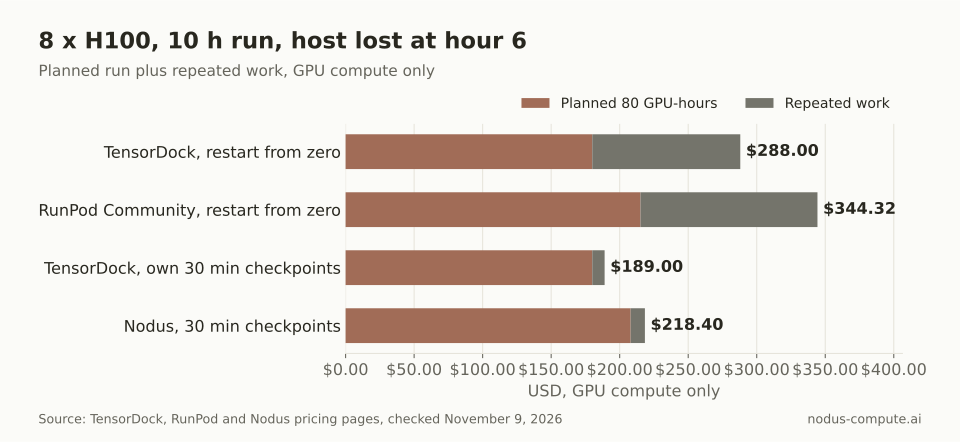 With good checkpoints TensorDock stays cheapest; without them, one lost host costs more than the price gap to every alternative.
The decision rule we take from this: the $28.00 gap per run buys automation, not a lower bill. If your training script already writes checkpoints to storage off the host and someone is watching, TensorDock’s price wins. If nobody wants to be paged at hour 6, pay for recovery.
How do TensorDock and its alternatives compare?
Section titled “How do TensorDock and its alternatives compare?”TensorDock and Vast.ai prices vary by host, so read their rows as snapshots and the others as list prices.
| Platform | How the price is set | H100 SXM per GPU-hour | What you get | If the host fails |
|---|---|---|---|---|
| TensorDock | Hosts set it; on-demand or spot bids | $2.25 typical; CPU, RAM and disk billed separately | KVM virtual machine with root access | Downtime credits of 5x or 10x the hourly rate; you restore your own state |
| Vast.ai | Supply and demand; on-demand, interruptible or reserved | from $2.20, median $2.67 | Instance on a chosen host | See our Vast.ai guide |
| Nodus | Listed price, prepaid credits | $2.60 | Jobs, sandboxes, functions and agents | Latest checkpoint restored on a replacement machine |
| RunPod | Fixed per tier, billed per second | $2.69 Community Cloud, $3.99 Secure Cloud | Container pods | Container disk is lost when a pod stops; network volumes persist |
| Modal | Per second | $3.95 | Python functions in containers | Not stated on the pricing page |
| Lambda | Fixed per GPU-hour | $4.59 on an 8-GPU instance, from November 16, 2026 | Instances of 1 to 8 GPUs | Not stated on the pricing page |
Prices checked November 9, 2026: TensorDock GPU pricing, Vast.ai pricing, Nodus pricing, RunPod pricing and Pods overview, Modal pricing and Lambda pricing. TensorDock labels $2.25 a typical price that varies by host and points to its dashboard for live prices. Modal’s $0.001097 per second is multiplied out to an hour. Lambda’s page says its new prices start November 16, 2026, and shows current prices after login.
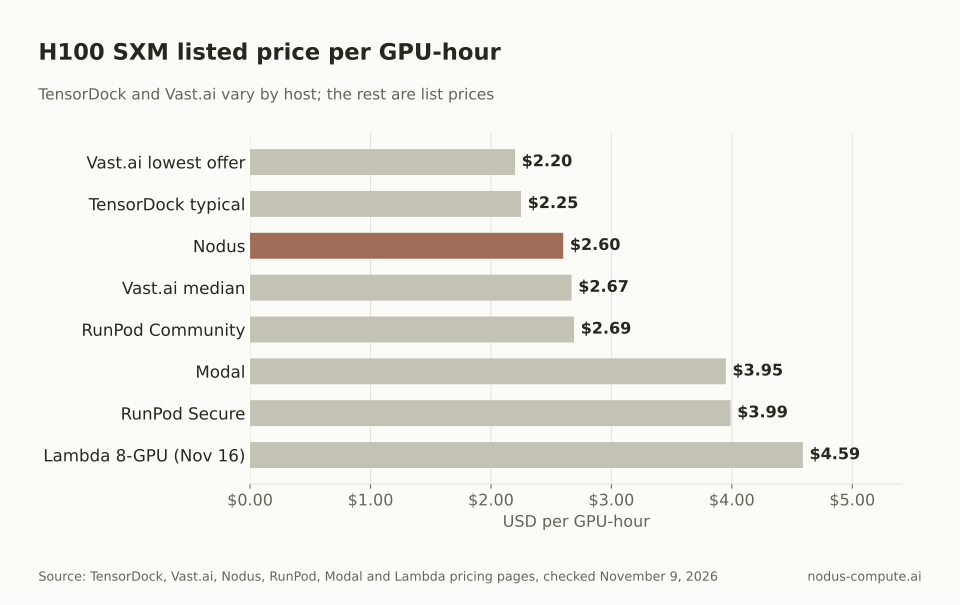 TensorDock and Vast.ai sit at the low end, and Nodus is the lowest fixed list price we found.
For the hands-on marketplace option, our Vast.ai alternatives guide covers Vast.ai’s reliability scores and rental types in detail.
TensorDock vs RunPod: which should you pick for training?
Section titled “TensorDock vs RunPod: which should you pick for training?”Pick TensorDock if you want a full virtual machine and the lowest H100 rate. Pick RunPod if you want a container with a fixed price and the CPU and RAM already included.
The products differ at the bottom of the stack. TensorDock provisions KVM virtual machines with root access, your own drivers and Docker included, per its homepage. RunPod runs Docker containers as pods, and its Pods overview separates Secure Cloud in T3/T4 data centers from Community Cloud, which connects individual providers through a vetted peer-to-peer system.
Billing differs too. TensorDock bills GPU, vCPU, RAM and NVMe storage a la carte, per second, per its GPU pricing page. RunPod’s Pods pricing docs bill compute and storage per second, with no ingress or egress fees and a default spend limit of $80/hour.
Running out of money is handled differently on RunPod. Pods stop when the balance reaches $0, and pods without a network volume are terminated with data that cannot be recovered. Container disk is lost whenever a pod stops, so checkpoints belong on a network volume. Our RunPod alternatives guide goes deeper on that side.
How does Nodus keep a training run going?
Section titled “How does Nodus keep a training run going?”Nodus runs each job as a series of attempts, and a new attempt starts from your latest committed checkpoint. The attempts and recovery docs set the order: on a reclaim notice, Nodus asks for an urgent checkpoint and prepares a replacement machine, then starts it only once the old one is provably gone.
A machine that stops sending heartbeats gets a replacement prepared after 20 seconds. After 60 seconds of silence, an attempt on shared capacity is declared lost and replaced. A Checkpointed run loses at most the work since its last committed checkpoint.
Your code still owns the save and the load. You write weights, optimizer state and step under /nodus/state and read them back on start; Nodus restores files, never process memory, and never adds resume flags to your command.
Where is TensorDock the better choice?
Section titled “Where is TensorDock the better choice?”TensorDock wins on price and on control of the machine. Its typical H100 SXM rate of $2.25/hr is below every fixed list price in our table, and it lists cards from the RTX 4090 at $0.35/hr to the A100 SXM4 at $1.80/hr on its GPU pricing page.
It also gives you a real VM. Root access, your own drivers and Windows support suit work that does not fit in a container, and a la carte billing means you pay only for the CPU and RAM you choose.
Its downtime policy is unusually concrete. Credits of 10 times the hourly rate on Top Hosts are a written commitment, with the caveats on the policy page. If your runs are short, already copy checkpoints off the host, and someone watches them, moving will not save you money.
How do you move a TensorDock training job to Nodus?
Section titled “How do you move a TensorDock training job to Nodus?”Make your script save to and load from /nodus/state, then run the same command through the Nodus CLI. Install and sign in, as the install docs show:
pip install nodus-computenodus loginThen submit the job. This line is the example from the nodus run CLI reference, with a $40 spend cap; raise --max-cost to fit your run:
nodus run --gpu H100:8 --max-cost 40 -d -- torchrun train.pyThere is no VM to keep alive and no SSH session to hold open. -d returns as soon as the job is created, and the cap stops spending if the run goes long.
Is TensorDock cheaper than Nodus?
Section titled “Is TensorDock cheaper than Nodus?”Often, at its typical price. TensorDock lists the H100 SXM5 at a typical $2.25/hr, varying by host, against $2.60/hr on Nodus, though TensorDock bills CPU, RAM and disk on top. The gap disappears if a run has to restart from zero after a lost host.
Can I connect my TensorDock account to Nodus?
Section titled “Can I connect my TensorDock account to Nodus?”No. The accounts Nodus can connect are listed in the cloud accounts docs, and TensorDock is not among them.
Do TensorDock spot instances resume on the same machine?
Section titled “Do TensorDock spot instances resume on the same machine?”TensorDock’s spot docs describe bidding and priority, and say storage keeps billing while you are outbid, but they do not say where a VM resumes. Plan for your own checkpoints either way.
What happens to data if a TensorDock host loses it?
Section titled “What happens to data if a TensorDock host loses it?”TensorDock’s downtime policy credits 40 times the hourly rate you were paying for unexpected data loss. Credits do not bring back the files, so keep checkpoints offsite.
More from the blog
datacenter7 min read
How much does an NVIDIA B200 cost to buy or rent?
NVIDIA B200 price: $5.50 to $7.99 per GPU-hour on demand, or $591,114.20 for an 8-GPU DGX B200. Buying beats Nodus above about 60% utilization.
Read the postpricing9 min read
What are the best Crusoe Cloud alternatives for AI teams?
Crusoe Cloud alternatives for small AI teams: Nodus, RunPod, Lambda and Modal compared on single-GPU access, H100 price, spot and spend caps.
Read the post