
What are the best Vast.ai alternatives for AI training in 2026?
Vast.ai alternatives for AI training, how reliable Vast.ai is for long runs, Vast.ai vs RunPod, and what a lost machine costs on each.
On Vast.ai, independent hosts set their own prices, and its own docs warn that two A100s at the same price can be very different machines. That makes Vast.ai a good place to find a cheap GPU and a place where long training runs need their own recovery plan. Pick Nodus to have your checkpoint restored on a fresh machine automatically, RunPod or Lambda for fixed prices, CoreWeave or Together AI for large clusters, and Vast.ai itself when you are happy to pick hosts and watch runs.
We build Nodus, so weigh this list accordingly. Every fact about another company links to that company’s own pricing page or docs, and the arithmetic is written out so you can rerun it with today’s prices.
Is Vast.ai reliable for training?
Section titled “Is Vast.ai reliable for training?”It depends on the machine you rent, and Vast.ai gives you the numbers to judge it. Its pricing overview describes a marketplace where hosts compete, and prices vary with supply, demand, location and host reliability.
Each offer shows a reliability score. Vast.ai’s RunPod migration guide defines it as historical uptime and suggests 0.95 or higher for production work, or the Secure Cloud filter for datacenter-grade hosts. Machines also earn a verified status through automated checks on uptime, hardware and network, per its verification page.
The rental type matters as much as the host. Vast.ai’s instance types page says on-demand and reserved instances are never interrupted. Interruptible instances run on bids, can be paused when outbid, keep their data, and resume on the same machine when priority returns. Its rental types FAQ adds that a paused instance may wait a long time and tells you to implement checkpointing for long jobs.
Two storage details shape any recovery plan. Volumes are tied to the physical machine and cannot move to another one, per the storage types page, so a checkpoint that must survive a dead host belongs in cloud storage. When your credit balance reaches zero, instances stop, and without a saved card they are scheduled for deletion, per instance pricing.
So the fair answer is yes, if you filter for reliable or Secure Cloud hosts, use on-demand for runs that cannot pause, and copy checkpoints off the machine.
What does a lost machine cost on a marketplace?
Section titled “What does a lost machine cost on a marketplace?”A single unrecovered failure can cost more than the price gap between platforms. We worked this example from listed prices, GPU compute only, for 8 x NVIDIA H100 SXM running 10 hours.
At Vast.ai’s listed median of $2.40/hr, 80 GPU-hours cost $192.00. On Nodus, listed at $2.60/hr on the Nodus pricing page, the same run costs $208.00, which is $16.00 more.
Now say the machine is lost at hour 6. If the run restarts from zero, you pay again for 6 x 8 = 48 GPU-hours, or $115.20 at $2.40. If it restores a checkpoint saved every 30 minutes, it loses at most 0.5 x 8 = 4 GPU-hours, or $10.40 at $2.60. That puts the two runs at $307.20 and $218.40.
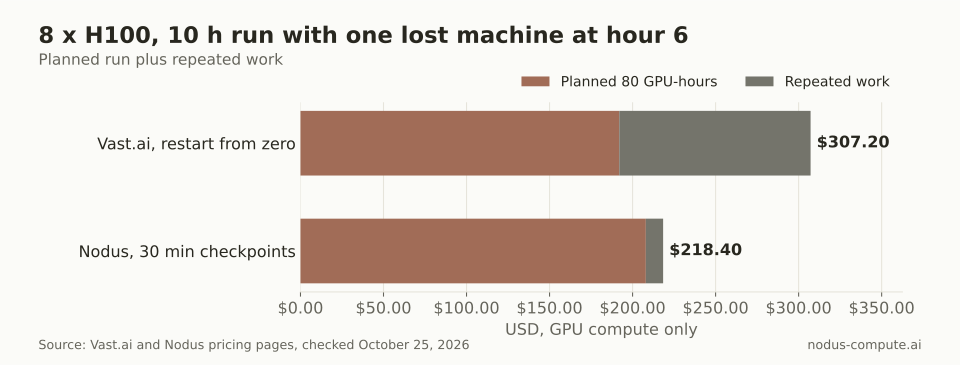 One restart from zero costs about seven times the $16.00 price gap between the two platforms.
The rule we take from this: if a run is long enough that one restart from zero is plausible, recovery is worth more than a few cents per GPU-hour. For a short experiment, take the cheapest reliable host and move on.
How do Vast.ai and its alternatives compare?
Section titled “How do Vast.ai and its alternatives compare?”Prices on Vast.ai move by the minute, so read its row as a snapshot and the others as list prices.
| Platform | How the price is set | H100 SXM per GPU-hour | If the machine is interrupted or lost | Best for |
|---|---|---|---|---|
| Vast.ai | Hosts set it; you pick an offer or bid | from $1.73, median $2.40 | On-demand never interrupted; interruptible pauses and resumes on the same host | Lowest prices, hands-on users |
| Nodus | Listed price, prepaid credits | $2.60 | Latest checkpoint restored on a replacement machine | Long or interruptible training without babysitting |
| RunPod | Fixed per tier, per second | $2.69 Community Cloud, $3.99 Secure Cloud | On-demand pods not displaced by other users | Interactive pods, fixed prices |
| Lambda | Fixed, per GPU-hour | $3.99 (8-GPU instance) | Not stated on the pricing page | Whole 8-GPU machines at a fixed rate |
| Modal | Per second | $3.95 | Function restarts on the same input; you write the checkpoints | Short Python jobs and endpoints |
| Together AI | Per GPU-hour | $1.99 preemptible, $3.99 on demand | Not stated on the pricing page | Clusters and a hosted fine-tuning API |
| CoreWeave | Per 8-GPU node-hour | $6.16 on demand, about $2.46 spot | Not stated on the pricing page | Large multi-node runs |
Prices checked October 25, 2026: Vast.ai pricing, Nodus pricing, RunPod pricing and Pods docs, Lambda pricing, Modal pricing and preemption docs, Together AI pricing and CoreWeave pricing. Modal’s $0.001097 per second is multiplied out to an hour, and CoreWeave’s node prices ($49.24 on demand, $19.71 spot) are divided by 8.
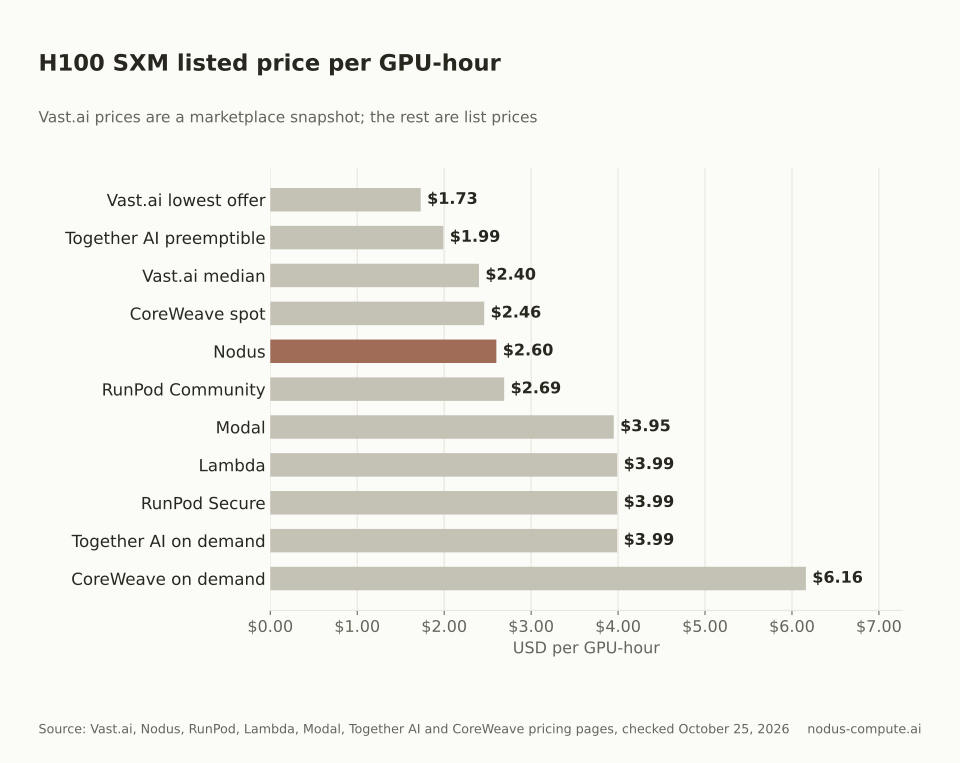 Vast.ai’s median is below every other listed price except Together AI’s preemptible tier.
Vast.ai vs RunPod: which should you pick?
Section titled “Vast.ai vs RunPod: which should you pick?”Pick Vast.ai if you want to choose the exact machine and chase the lowest price. Pick RunPod if you want a fixed price per GPU type and fewer decisions.
Vast.ai’s own migration guide frames the difference well. RunPod presents a curated list of GPUs at set prices, while Vast.ai lists individual host machines with their specs, reliability and location. Vast.ai bills bandwidth per GB in both directions at host-set rates. RunPod’s Pods pricing docs state no fees for data ingress or egress.
Both bill compute by the second. On RunPod, pods stop when the balance hits $0, and pods without a network volume are terminated with unrecoverable data. If moving large datasets is a big part of your bill, compare bandwidth before you compare hourly rates.
Which Vast.ai alternative fits your job?
Section titled “Which Vast.ai alternative fits your job?”Start from what hurts most today.
- Runs die and someone has to restart them by hand: Nodus, which restores the latest checkpoint on a new machine.
- You want one fixed price and no host shopping: RunPod Secure Cloud or Lambda instances.
- You need more than 8 nodes on one fabric: CoreWeave, Together AI or Lambda 1-Click Clusters.
- You want a fine-tuning API rather than your own training loop: Together AI fine-tuning.
- Your jobs are short Python functions next to web endpoints: Modal.
- You mostly want the cheapest consumer GPU for a few hours: stay on Vast.ai.
How does Nodus keep a training run alive?
Section titled “How does Nodus keep a training run alive?”Nodus runs every job as a series of attempts, and each new attempt starts from your latest committed checkpoint. The attempts and recovery docs describe the order: on a reclaim notice, Nodus requests an urgent checkpoint and prepares a replacement machine, then starts it only once the old one is gone.
A machine that stops sending heartbeats gets a replacement prepared after 20 seconds, and an attempt on shared capacity is declared lost after 60 seconds of silence. A Checkpointed run loses at most the work since its last committed checkpoint. Your code writes weights, optimizer state and step to /nodus/state and reads them back on start; the checkpoints guide has a full example.
Nodus also stops gracefully when credits run out. A checkpointed Job takes an urgent checkpoint, suspends, and resumes from it once funded. The same account runs fine-tuning, inference endpoints and agents, and coding agents can drive it through the Nodus MCP server.
Where is Vast.ai still the better choice?
Section titled “Where is Vast.ai still the better choice?”Vast.ai wins on price discovery and choice. Its pricing page showed H100 SXM offers from $1.73/hr when we checked, below every fixed list price in our table, and it lists consumer and workstation cards alongside datacenter GPUs.
It suits people who like control. You see each machine’s reliability, network speed and location before you rent, you can reserve an on-demand instance for up to 50% off by prepaying, per its pricing overview, and it ships an agent skill so coding agents can rent and manage instances.
If your runs are short, already checkpoint to cloud storage, and you are watching them, the savings are real and moving may not be worth it.
How do you move a Vast.ai training job to Nodus?
Section titled “How do you move a Vast.ai training job to Nodus?”Point your checkpoint writes at /nodus/state, then run your existing command through the Nodus CLI. Install and sign in first:
pip install nodus-computenodus loginThen dry-run the job to see the estimate. Every flag below is documented in the nodus run CLI reference; the torchrun part is your own command:
nodus run --name ft-h100 --gpu H100:8 --image nodus/pytorch \ --checkpoint /nodus/state --continuity Checkpointed --interruptible \ --max-cost 250 --dry-run -- torchrun --nproc_per_node 8 train.pyRemove --dry-run to submit. The --max-cost 250 cap sits above the $208 estimate, so a run that goes long stops at the cap. For more on when interruptible capacity pays off, see spot vs on-demand GPUs and resuming training after spot preemption.
Is Vast.ai cheaper than Nodus?
Section titled “Is Vast.ai cheaper than Nodus?”Often, at the median. Vast.ai’s listed H100 SXM median was $2.40/hr against $2.60/hr on Nodus when we checked, and its cheapest offers were lower still. The gap closes quickly if a run has to restart from zero.
Does a Vast.ai interruptible instance move to another machine when outbid?
Section titled “Does a Vast.ai interruptible instance move to another machine when outbid?”No. Vast.ai’s docs say it pauses with its data kept and resumes on the same machine when it regains priority.
Can I connect my Vast.ai account to Nodus?
Section titled “Can I connect my Vast.ai account to Nodus?”Not today. The accounts you can connect are listed in the cloud accounts docs, and Vast.ai is not among them.
What reliability score should I filter for on Vast.ai?
Section titled “What reliability score should I filter for on Vast.ai?”Vast.ai’s own guides suggest 0.95 or higher for production work, or the Secure Cloud filter when reliability is critical.
Do I need to change my training code to use Nodus?
Section titled “Do I need to change my training code to use Nodus?”Only where it saves and loads state. Write to /nodus/state and load whatever is there on start; Nodus restores files, never process memory, and never adds resume flags to your command.
More from the blog
pricing9 min read
Modal vs RunPod: which is better for training and fine-tuning?
Modal vs RunPod for training and fine-tuning: billing, cold starts, GPUs, storage, multi-node limits and one 8 x H100 job priced on each.
Read the postcomparisons8 min read
Nodus vs CoreWeave: which fits your training workload?
Nodus vs CoreWeave for training: reserved clusters vs per-run pricing, spot preemption, Kubernetes and Slurm, startup access and one 8 x H100 run priced.
Read the post