
Nodus vs CoreWeave: which fits your training workload?
Nodus vs CoreWeave for training: reserved clusters vs per-run pricing, spot preemption, Kubernetes and Slurm, startup access and one 8 x H100 run priced.
Pick CoreWeave if you need a large GPU cluster for months, run it with Kubernetes or Slurm, and can commit to a reservation. Pick Nodus if your training comes in runs rather than a standing cluster: you pay for each run from prepaid credit, sign no contract, and Nodus restores your checkpoint on a new machine if capacity is reclaimed. The deciding number is utilization: a node that stays busy almost all month favors a CoreWeave reservation, and anything burstier favors paying per run.
We build Nodus. Every CoreWeave fact here links to CoreWeave’s own pricing page or docs, and there is a full section on where CoreWeave is the better choice.
How do Nodus and CoreWeave compare at a glance?
Section titled “How do Nodus and CoreWeave compare at a glance?”They are built for different buyers. CoreWeave sells bare-metal capacity through capacity plans and runs it on its Kubernetes service. Nodus runs individual jobs, functions and sandboxes and picks the capacity for each one.
| CoreWeave | Nodus | |
|---|---|---|
| How you buy | Four capacity plans: Reserved Instances, Flex Reservations, Spot and On-Demand | Prepaid credits; each run is priced and capped before it starts |
| Unit you get | Whole instances, usually 8 GPUs (GH200 is 1 GPU) | 1, 2, 4 or 8 GPUs per machine |
| GPUs | A100, L40, L40S, RTX PRO 6000, GH200, H100, H200, B200, B300, GB200 and GB300 NVL72 | RTX 3070 up to B300 |
| Getting access | Organization approved, then CoreWeave Sales sends an invitation | Sign up with a verified email and card |
| Interruption | Spot instances can be reclaimed with up to a seven-minute window | You choose whether a run may use interruptible capacity; the state directory is checkpointed and restored |
| How you run training | CoreWeave Kubernetes Service (CKS), or Slurm through SUNK | nodus run, the Python SDK, or Jobs |
| Multi-node | InfiniBand instance types; Slurm on Kubernetes with SUNK | Beta, up to 8 nodes |
| Storage and egress | Object storage from $0.06/GB/month (hot); egress free | Volumes and declared job outputs |
| Coding agents | CoreWeave Skills (public preview) and the Mission Control MCP server | Nodus MCP server for Claude Code, Codex and Cursor |
| Free credit | None listed on the pricing page | $2 on verification, $28 more after a first paid top-up, both expiring in 30 days |
Sources: CoreWeave pricing, capacity plans, Spot Node Pools, get started, GPU instances, SUNK, CoreWeave Skills, Mission Control MCP; the Nodus pricing page and Nodus credits docs. Checked October 25, 2026.
Is CoreWeave or Nodus cheaper for a single training run?
Section titled “Is CoreWeave or Nodus cheaper for a single training run?”For one run with no commitment, Nodus costs less than CoreWeave On-Demand, and CoreWeave Spot is slightly cheaper still if you can live with preemption. We priced a full fine-tune on 8 x NVIDIA H100 for 24 hours using each company’s public rates.
| Option | Listed rate | 24 hours on 8 x H100 |
|---|---|---|
| CoreWeave On-Demand, HGX H100 instance | $49.24/hr per 8-GPU instance | $1,181.76 |
| CoreWeave Spot, HGX H100 instance (North America) | $19.71/hr per 8-GPU instance | $473.04 |
| Nodus, H100 SXM | $2.60/hr per GPU | $499.20 |
Prices checked October 25, 2026, from CoreWeave pricing and the hourly rate listed on the Nodus pricing page.
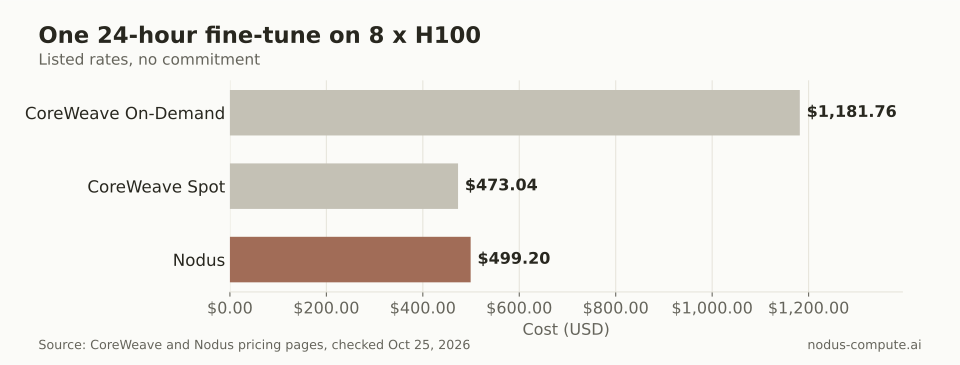 For one run with no commitment, Nodus costs 58% less than CoreWeave On-Demand and $26.16 more than CoreWeave Spot.
The CoreWeave instance price buys more than GPUs. Its HGX H100 instance lists 128 vCPUs, 2,048 GB of RAM and 61.44 TB of local storage, so a data-heavy job gets a lot of host around its GPUs. Spot works out to about $2.46 per GPU-hour, below the Nodus rate, but CoreWeave’s docs say Spot capacity is not guaranteed and depends on the region (Spot Node Pools). On-Demand has no capacity guarantee either and may be unavailable at peak demand (capacity plans).
When does a CoreWeave reservation beat paying per run?
Section titled “When does a CoreWeave reservation beat paying per run?”When the node is busy almost every hour of the month. CoreWeave says committed usage gets up to 60% off its On-Demand prices (CoreWeave pricing), and a Reserved Instance is billed for every hour of the billing period, whether it runs or sits idle (capacity plans).
Here is the break-even, assuming you get the full 60%. Forty percent of $49.24 is $19.696 an hour for 8 x H100, or $14,378 over a 730-hour month. The same eight GPUs on Nodus cost 8 x $2.60 = $20.80 for each hour you actually use them.
Divide $14,378 by $20.80 and you get about 691 hours, which is 95% of the month. Run all 730 hours and Nodus comes to 730 x $20.80 = $15,184, so at full use the reservation wins.
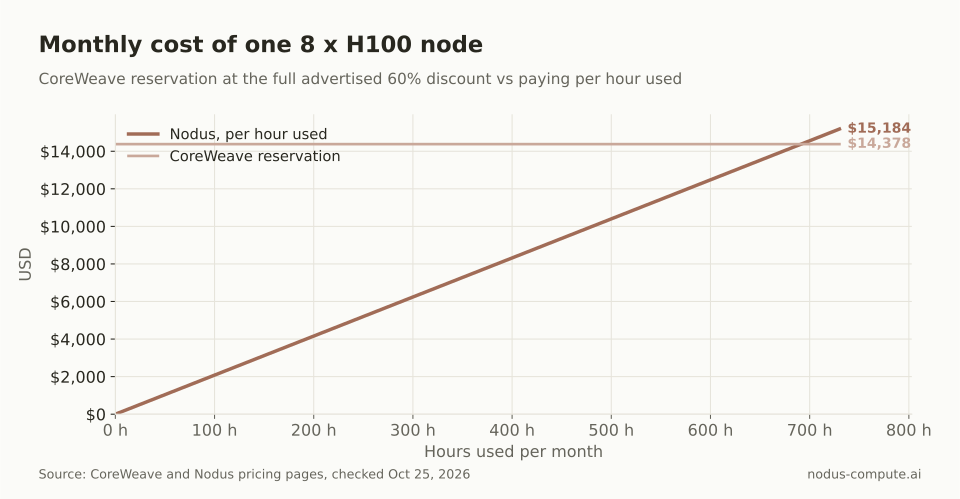 The lines cross at about 691 hours, so per-run pricing wins unless the node is busy about 95% of the month.
So the rule we use: if your 8-GPU node will be training more than about 95% of the time, a reservation at CoreWeave’s best advertised discount is cheaper. Below that, per-run pricing wins, and the gap grows quickly. A team that trains 300 hours a month pays $6,240 on Nodus against the same $14,378 reservation. A smaller discount moves the break-even below 95%; CoreWeave sets the actual rate in your contract.
CoreWeave’s Flex Reservations sit in between: a holding rate for guaranteed peak capacity plus a usage rate only while instances run. That model suits uneven usage, but the rates come from your contract, not a public page.
What happens when capacity is reclaimed mid-run?
Section titled “What happens when capacity is reclaimed mid-run?”On CoreWeave Spot, your job gets a warning and up to seven minutes, and the rest is up to you. CoreWeave cordons the node, sends a Preemption pending event, starts draining two minutes later with SIGTERM and a grace period, and removes the instance by the seven-minute mark. When all instances are preempted, the Spot Node Pool scales back up once capacity returns (Spot Node Pools). Saving state, rescheduling the pod and resuming from the right step are your training code’s job and your cluster’s job.
On Nodus, your script writes its state to /nodus/state and reads it on start. Nodus decides when to checkpoint, asks for an urgent checkpoint when a reclaim notice arrives, and starts the next attempt on a replacement machine with that directory restored (checkpoints guide). You opt in per run with --interruptible, and you lose at most the work since the last committed checkpoint.
The cost of getting this wrong is easy to see. Losing 3 hours on an 8 x H100 instance at CoreWeave’s Spot rate wastes 3 x $19.71 = $59.13 of compute, plus the time to notice and relaunch.
Do you need Kubernetes or Slurm to train on each?
Section titled “Do you need Kubernetes or Slurm to train on each?”On CoreWeave, yes, one of the two. Its getting-started path is to install kubectl and Helm for CKS, or use Git and SSH to reach Slurm login nodes on SUNK (get started). SUNK runs Slurm nodes as Kubernetes pods, so batch training and inference services share one GPU pool (SUNK). For a platform team that already runs Slurm or Kubernetes, that is exactly what they want.
On Nodus there is no cluster to manage. A training run is one command, and the dry run prints the expected cost before anything starts:
nodus run --dry-run --gpu H100:8 --expected-duration 24h -- torchrun train.pynodus run --gpu H100:8 --checkpoint /nodus/state --max-cost 520 -d -- torchrun train.pySet --max-cost a little above the $499.20 estimate; it is a hard cap in USD. Multi-node runs add --nodes and --launcher torchrun, and Nodus sets the rendezvous variables so torchrun needs no extra flags (multi-node guide).
Can a startup use CoreWeave without a contract?
Section titled “Can a startup use CoreWeave without a contract?”Yes for usage, but not for sign-up. On-Demand and Spot have no long-term commitment (capacity plans). Access itself starts with approval: CoreWeave’s docs say that when it approves your organization, its Sales team sends an invitation email to activate the Cloud Console (get started). Extra capacity is requested through an Account Executive or support.
On Nodus you create an org with a verified email and card, buy credits from $5, and run. That difference matters most in the first week, when you want to try a recipe today rather than after a sales call.
Where is CoreWeave the better choice?
Section titled “Where is CoreWeave the better choice?”CoreWeave is the better choice in these cases, and they are common ones:
- You will keep a cluster busy nearly all month and can sign a term. Reserved Instances and Flex Reservations give guaranteed capacity, and the advertised discount reaches 60%.
- You need more than 8 nodes in one job. Nodus multi-node is Beta and capped at 8 nodes.
- You want InfiniBand-connected B200, B300 or GB300 NVL72 systems for large pretraining.
- Your team already runs Slurm or Kubernetes and wants to keep those tools. SUNK and CKS give you both on the same compute.
- You need single-tenant isolation. CoreWeave offers Dedicated Access Availability Zones reserved for select customers (regions and AZs).
- You move a lot of data out. CoreWeave lists egress and data transfer to the internet as free.
How do you move a Slurm training job to Nodus?
Section titled “How do you move a Slurm training job to Nodus?”Keep your training script and replace the scheduler. If your sbatch file ends in a torchrun call, that call becomes the command after --. Then make the script save to /nodus/state and load from it on start:
pip install nodus-computenodus loginnodus run --name torchrun-2-node --gpu H100 --nodes 2 --launcher torchrun --max-cost 2.00 -- torchrun train.pyThe last line is the two-node smoke test from the multi-node guide. Run it once with the small cap, check that rank 0 prints world_size=2, then raise the cap for the real run. If your team likes CoreWeave for the big pretraining run and Nodus for fine-tunes and evals, the two split cleanly: pass weights through your own object storage.
What are the best CoreWeave alternatives for a small team?
Section titled “What are the best CoreWeave alternatives for a small team?”It depends on why you are leaving. If you want per-run pricing and automatic recovery without running a cluster, Nodus fits; if you want serverless Python functions, compare Nodus vs Modal as well.
Does CoreWeave charge for its Kubernetes control plane or Slurm?
Section titled “Does CoreWeave charge for its Kubernetes control plane or Slurm?”The CKS control plane is listed as free. SUNK is listed as free too, excluding the CPU resources needed to operate it (CoreWeave pricing).
Can I reserve GPUs through Nodus instead of paying per run?
Section titled “Can I reserve GPUs through Nodus instead of paying per run?”Yes, in Beta. Nodus Reserved Compute is dedicated capacity supplied by Nodus for an agreed configuration and window, reviewed by hand and confirmed in a proposal (Reserved Compute).
Does CoreWeave Spot work for GH200 or GB200?
Section titled “Does CoreWeave Spot work for GH200 or GB200?”No. CoreWeave’s docs list Spot for all instance types in General Access zones except Superchip instances such as GH200, GB200 and GB300 (Spot Node Pools).
More from the blog
pricing9 min read
Modal vs RunPod: which is better for training and fine-tuning?
Modal vs RunPod for training and fine-tuning: billing, cold starts, GPUs, storage, multi-node limits and one 8 x H100 job priced on each.
Read the postcomparisons8 min read
Nodus vs Lambda: which is better for GPU training?
Nodus vs Lambda for GPU training: listed H100 and A100 rates, two jobs priced both ways, idle billing, recovery, and when Lambda is the better pick.
Read the post