
How do you speed up PyTorch training on cloud GPUs?
The PyTorch speed levers in payoff order, from BF16 autocast to CUDA graphs, with sourced speedups, a timing harness and what each is worth in dollars.
Turn on the compute levers in order of payoff: BF16 autocast, fused attention through scaled_dot_product_attention, torch.compile, TF32 for whatever still runs in FP32, the fused AdamW step, then the largest micro-batch that fits, and CUDA graphs only if launch overhead is still visible. On Nodus, where an H100 SXM is listed at $2.60 per hour, a 1.51x speedup on a 192 GPU-hour run cuts the bill from $499.20 to $330.60. Measure each lever on your own model before trusting anyone’s number, including the ones below.
This post covers the math side of the step. If your GPU sits idle waiting on data or on .item() calls, fix that first with the low GPU utilization guide; none of the levers here help a starved GPU. Spreading the work across more GPUs is a separate decision, covered in how to train PyTorch on multiple GPUs.
Which PyTorch speedups pay off most?
Section titled “Which PyTorch speedups pay off most?”The ones that move matrix math onto Tensor Cores and cut memory traffic. Here are the levers with the best published numbers we could find, and the hardware each was measured on.
| Lever | One-line change | Published speedup | Measured on | Skip it when |
|---|---|---|---|---|
| BF16 autocast | torch.autocast("cuda", dtype=torch.bfloat16) |
Up to 3x overall | Volta and newer GPUs | Pre-Ampere GPU: use FP16 with GradScaler |
| Fused attention | F.scaled_dot_product_attention(q, k, v, is_causal=True) |
3.5x vs Hugging Face GPT-2 small, 1.7x vs Megatron-LM | 8 x A100 | Model already uses SDPA or FlashAttention |
torch.compile |
model = torch.compile(model) |
1.21x average in FP32, 1.51x with AMP | A100, 163 models | Short runs, graphs that break on every step |
| TF32 matmul | torch.set_float32_matmul_precision("high") |
About 7x on one FP32 matmul | A100 | Everything already runs under BF16 autocast |
| Fused AdamW | torch.optim.AdamW(params, fused=True) |
No figure published; docs rank fused > foreach > for-loop | n/a | Optimizer step is a tiny share of the step |
| CUDA graphs | torch.compile(model, mode="reduce-overhead") |
1.70x Mask R-CNN, 1.12x BERT | MLPerf v1.0, 272 and 4,096 GPUs | Dynamic shapes, large batches |
Sources: the PyTorch performance tuning guide for mixed precision, the FlashAttention paper (Table 2), the PyTorch 2.0 announcement, the CUDA semantics notes for TF32, the torch.optim docs and the PyTorch CUDA graphs post.
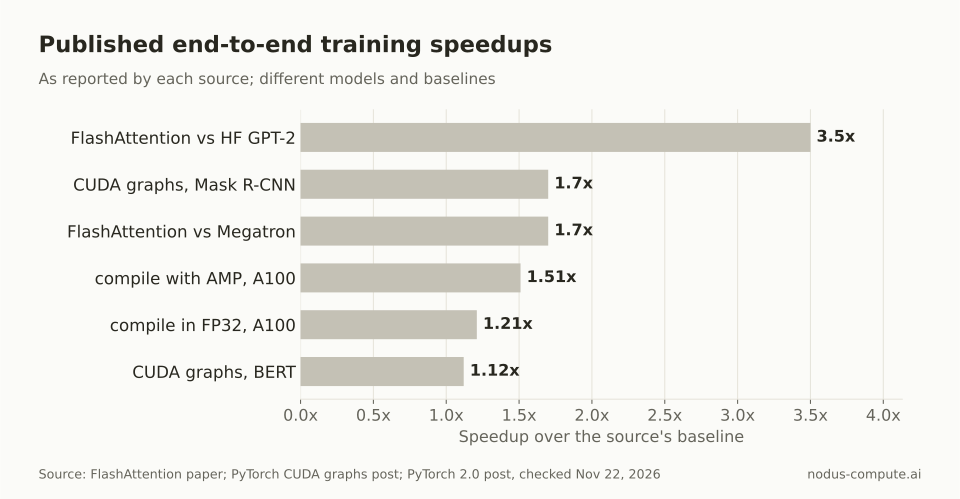 Every number comes from a different model and baseline, so read the chart as “what is possible”, not as a ranking you will reproduce.
These numbers do not stack by multiplication. Once BF16 autocast is on, TF32 only touches the operations autocast leaves in FP32. torch.compile already fuses many of the pointwise kernels a fused optimizer would save. The CUDA semantics notes also warn that the TF32 ratio “depends on the hardware generation”, and the PyTorch 2.0 team measured lower compile speedups on an NVIDIA RTX 3090 than on an A100.
How do you apply each lever without breaking training?
Section titled “How do you apply each lever without breaking training?”Most are one line, and the order matters for debugging. Turn them on one at a time and check that the loss curve over the first few hundred steps matches the baseline.
import torchimport torch.nn.functional as F
torch.set_float32_matmul_precision("high")            # TF32 for any matmul left in FP32model = MyModel().cuda()opt = torch.optim.AdamW(model.parameters(), lr=3e-4, fused=True)model = torch.compile(model)                          # compile after moving to the GPU
for x, y in loader:    x, y = x.cuda(non_blocking=True), y.cuda(non_blocking=True)    with torch.autocast(device_type="cuda", dtype=torch.bfloat16):        loss = F.cross_entropy(model(x), y)           # forward and loss only    loss.backward()    opt.step()    opt.zero_grad(set_to_none=True)
BF16 keeps the FP32 exponent range, so it needs no loss scaler. Pick FP16 only on GPUs without BF16, and then follow the GradScaler section of the AMP docs.
For attention, check what your model already calls. Hugging Face models usually expose an attention implementation setting. Hand-written attention that computes q @ k.transpose(-2, -1), then softmax, then @ v stores the full score matrix and should become one scaled_dot_product_attention call.
The SDPA docs explain that PyTorch picks FlashAttention, memory-efficient attention or a plain C++ kernel based on your inputs. The FlashAttention-2 paper reports about 2x over the first version and up to 225 TFLOPs/s per A100 when training GPT-style models.
torch.compile pays its compile time at the start of the run, and recompiles when input shapes change. Pad variable-length batches to a few fixed lengths, and keep the tuning guide’s advice to use sizes in multiples of 8 so Tensor Core kernels apply.
What batch size should you use, and does gradient accumulation help?
Section titled “What batch size should you use, and does gradient accumulation help?”Use the largest micro-batch that fits in memory, then use gradient accumulation only to reach the effective batch your optimizer settings expect. Accumulation does not make a step faster. It runs the same forward and backward work per sample and trades memory for more steps. A bigger micro-batch is what gives each kernel enough work to keep the GPU busy.
When a larger micro-batch runs out of memory, the CUDA out of memory guide lists what to cut first. Pinned host memory with non_blocking=True copies, as in the loop above, belongs to the data side and is already covered in the utilization guide.
When are CUDA graphs worth the trouble?
Section titled “When are CUDA graphs worth the trouble?”When a profile still shows the GPU idle between many tiny kernels after compile and a larger batch. The PyTorch CUDA graphs post explains that CPU launch overhead is a fixed cost per kernel, so it matters most at small batch sizes. Their Mask R-CNN case ran at a per-GPU batch of 1 and gained 1.70x; BERT at much larger scale gained 1.12x.
Graphs need static shapes and no CPU syncs inside the captured region. The easiest way in is torch.compile(model, mode="reduce-overhead"), which the torch.compile docs describe as using CUDA graphs for small batches, at the cost of more memory. With a large batch and long kernels, expect little.
How do you measure the speedup on your own model?
Section titled “How do you measure the speedup on your own model?”Time the training step, not the epoch, and synchronize before reading the clock. We wrote this harness for that: a small GPT-style model where each lever is a flag. We checked that each flag, alone and stacked, runs and returns a finite loss on a CPU build of PyTorch 2.15. We have not published GPU timings from it here, because CPU numbers say nothing about Tensor Cores.
"""bench.py: time one training step with each speed lever on or off. Prints tokens/s."""import argparse, json, math, timeimport torch, torch.nn as nn, torch.nn.functional as F
p = argparse.ArgumentParser()for flag in ("--bf16", "--tf32", "--compile", "--fused", "--sdpa"):    p.add_argument(flag, action="store_true")p.add_argument("--batch", type=int, default=8)p.add_argument("--seq", type=int, default=1024)p.add_argument("--dim", type=int, default=1024)p.add_argument("--layers", type=int, default=8)p.add_argument("--steps", type=int, default=30)p.add_argument("--warmup", type=int, default=10)a = p.parse_args()dev = "cuda" if torch.cuda.is_available() else "cpu"torch.set_float32_matmul_precision("high" if a.tf32 else "highest")
class Block(nn.Module):    def __init__(s, d, h=16):        super().__init__()        s.h, s.ln1, s.ln2 = h, nn.LayerNorm(d), nn.LayerNorm(d)        s.qkv, s.out = nn.Linear(d, 3 * d), nn.Linear(d, d)        s.mlp = nn.Sequential(nn.Linear(d, 4 * d), nn.GELU(), nn.Linear(4 * d, d))    def attn(s, x):        B, T, D = x.shape        q, k, v = s.qkv(x).view(B, T, 3, s.h, D // s.h).permute(2, 0, 3, 1, 4)        if a.sdpa:            y = F.scaled_dot_product_attention(q, k, v, is_causal=True)        else:  # eager attention: stores the T x T score matrix            att = (q @ k.transpose(-2, -1)) / math.sqrt(q.size(-1))            mask = torch.ones(T, T, device=x.device, dtype=torch.bool).tril()            y = att.masked_fill(~mask, float("-inf")).softmax(-1) @ v        return s.out(y.transpose(1, 2).reshape(B, T, D))    def forward(s, x):        x = x + s.attn(s.ln1(x))        return x + s.mlp(s.ln2(x))
vocab = 32768model = nn.Sequential(nn.Embedding(vocab, a.dim), *[Block(a.dim) for _ in range(a.layers)],                      nn.LayerNorm(a.dim), nn.Linear(a.dim, vocab)).to(dev)opt = torch.optim.AdamW(model.parameters(), lr=3e-4, fused=True if a.fused else None)run = torch.compile(model) if a.compile else modelx = torch.randint(0, vocab, (a.batch, a.seq), device=dev)y = torch.randint(0, vocab, (a.batch, a.seq), device=dev)
def step():    with torch.autocast(device_type=dev, dtype=torch.bfloat16, enabled=a.bf16):        loss = F.cross_entropy(run(x).flatten(0, 1).float(), y.flatten())    loss.backward(); opt.step(); opt.zero_grad(set_to_none=True)    return loss
def sync():    if dev == "cuda":        torch.cuda.synchronize()
for _ in range(a.warmup):  # compile and autotuning happen here, outside the timer    step()sync(); t0 = time.perf_counter()for _ in range(a.steps):    loss = step()sync(); dt = (time.perf_counter() - t0) / a.stepsprint(json.dumps({"device": torch.cuda.get_device_name() if dev == "cuda" else "cpu",                  "flags": {k: v for k, v in vars(a).items() if isinstance(v, bool)},                  "step_ms": round(dt * 1000, 1), "tokens_per_s": round(a.batch * a.seq / dt),                  "loss": round(loss.item(), 3)}))
Swap in your own model and a real batch for the most useful result. Then run it once per configuration on the GPU you plan to train on, adding one flag at a time. On Nodus that is the documented nodus run pattern with a cost cap:
nodus run --name bench-bf16 --gpu H100 --image nodus/pytorch \ --max-cost 1 --timeout 10m --no-warm --dry-run -- python bench.py --bf16Drop --dry-run once the estimate looks right. Five configurations that each hit the 10-minute timeout on one H100 use 50 GPU-minutes, or $2.17 at $2.60 per hour. A Nodus Sweep can run the same Job once per parameter value and report cost, time and throughput per cell, which turns the five runs into one submission.
What is each speedup worth in dollars?
Section titled “What is each speedup worth in dollars?”A speedup of s divides the GPU-hours by s, so the saving is the baseline cost times (1 - 1/s). Take one run of 8 GPUs for 24 hours, which is 192 GPU-hours, at the hourly rates listed on the Nodus pricing page: $2.60 for an H100 SXM, $1.09 for an A100 80GB and $0.793 for an L40S. The speedups are the published ones from the table above, applied as if your run saw the same ratio.
| GPU, 192 GPU-hours | Baseline | At 1.21x | At 1.51x | At 3.5x |
|---|---|---|---|---|
| H100 SXM | $499.20 | $412.56 (saves $86.64) | $330.60 (saves $168.60) | $142.63 (saves $356.57) |
| A100 80GB | $209.28 | $172.96 (saves $36.32) | $138.60 (saves $70.68) | $59.79 (saves $149.49) |
| L40S | $152.26 | $125.83 (saves $26.43) | $100.83 (saves $51.43) | $43.50 (saves $108.76) |
Prices checked November 22, 2026, on the Nodus pricing page.
The arithmetic for the H100 row at 1.51x: 192 x $2.60 = $499.20, then $499.20 / 1.51 = $330.60, a saving of $168.60. The 1.21x and 1.51x columns are the PyTorch 2.0 compile averages; 3.5x is FlashAttention’s GPT-2 small result against the Hugging Face baseline.
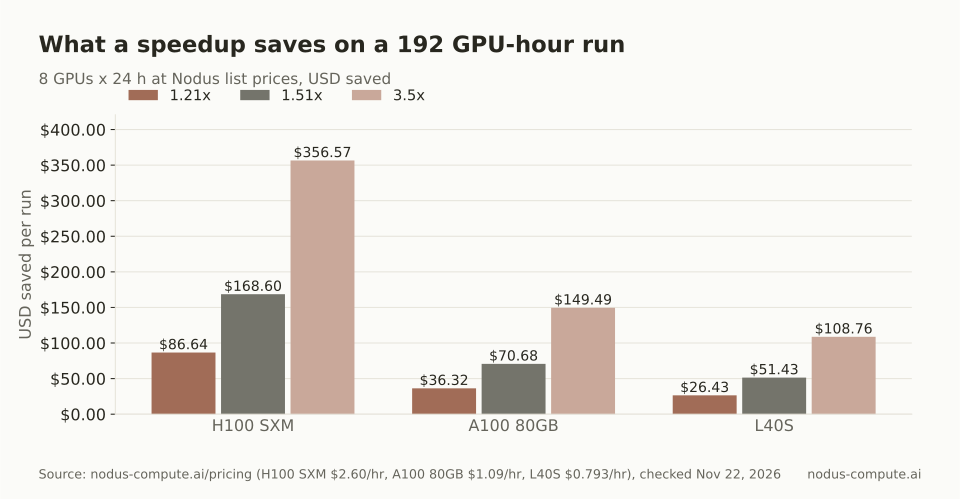 Against $2.17 of measurement time, even the smallest published speedup returns its test cost about 40 times over on one H100 run.
The decision rule we use follows from that table. If a lever’s measured saving on your next run is larger than the cost of measuring it, turn it on. For anything longer than a few GPU-hours, that is nearly always true of BF16, SDPA and compile, so test them first. Leave CUDA graphs for last, because they cost engineering time rather than GPU time.
Do speedups measured on an A100 carry over to an H100?
Section titled “Do speedups measured on an A100 carry over to an H100?”The ratios change by generation. The CUDA semantics notes say the TF32 gain depends on the balance of memory bandwidth and compute on each GPU, so rerun the harness on the GPU you will actually train on.
Is torch.compile worth it for a short fine-tune?
Section titled “Is torch.compile worth it for a short fine-tune?”Only if the time saved beats the compile time, which is spent on the first steps and again on every recompile. Run the harness with a realistic --warmup and --steps and compare total wall time, not only step time.
Does mixed precision change the final model quality?
Section titled “Does mixed precision change the final model quality?”BF16 autocast keeps weights and optimizer state in FP32 and runs selected operations in BF16, as described in the AMP docs. Compare the loss curve of the first few hundred steps against an FP32 baseline before committing a long run.
Does Nodus apply these optimizations for me?
Section titled “Does Nodus apply these optimizations for me?”They are code changes, so they are yours to make. A Nodus Job runs your command as written on the GPU you request, and every GPU-hour these levers save is a GPU-hour that does not show up in the run’s cost.
More from the blog
inference9 min read
What are the best Cerebrium alternatives for serverless GPUs?
Cerebrium alternatives for serverless GPUs: Nodus, Modal, RunPod Serverless and Baseten priced on Cerebrium's own L4 billing example.
Read the postpricing10 min read
What are the best Databricks alternatives for LLM training?
Databricks alternatives for LLM training: one 8 x H100 day priced on six platforms, a break-even speed rule, and when Databricks AI Runtime still wins.
Read the post