
What are the best Cerebrium alternatives for serverless GPUs?
Cerebrium alternatives for serverless GPUs: Nodus, Modal, RunPod Serverless and Baseten priced on Cerebrium's own L4 billing example.
The best Cerebrium alternatives for serverless GPUs are Nodus, Modal, RunPod Serverless and Baseten, and which one wins depends on whether your callers need an HTTP endpoint on your own code. Nodus lists the NVIDIA L4 at $0.430 per hour, so Cerebrium’s own billing example, 500,000 requests of 2.4 seconds, costs $143.33 on Nodus against $308.76 on Cerebrium’s default tier and $617.52 on its protected tier. Cerebrium stays the better pick for REST, streaming and WebSocket endpoints on your own server code, region pinning for data residency, and self-hosted voice models.
We build Nodus, so weigh this accordingly. Every fact about another company links to its own pricing page or docs, and every cost is written out so you can redo it with your prices.
What does Cerebrium actually charge for a serverless GPU?
Section titled “What does Cerebrium actually charge for a serverless GPU?”Cerebrium bills the GPU, CPU and memory you allocate, per second, while your code runs. Its pricing page lists the L4 at $0.000222 per second, the A10 at $0.000306, the H100 at $0.000944 and the B200 at $0.00167. CPU is $0.00000655 per vCPU-second and memory is $0.00000222 per GB-second, on top of the GPU.
Two details change the real bill. First, those are interruptible rates. Cerebrium’s scaling docs say the default interruptible tier prefers preemptible capacity and can be relocated during consolidation, while the protected tier is not interrupted by preemption or consolidation and is billed at 2x across GPU, CPU and memory.
Second, cold starts are free but model loading is not. Cerebrium’s cost guide says cold-start time is not billed, while code that runs once at startup, such as loading weights onto the GPU, is. Builds are a flat $0.08 per minute.
Plans matter too. The free Hobby plan covers the T4, A10, L4 and L40s with 5 concurrent GPUs. The A100, H100, H200, B200 and RTX PRO 6000 need the Standard plan at $100 a month plus compute, per the GPU docs.
How do the main Cerebrium alternatives compare?
Section titled “How do the main Cerebrium alternatives compare?”They split by what each bill covers and by how you call the model. This table uses each platform’s L4 or nearest 24 GB option.
| Platform | 24 GB option | Listed rate | CPU and memory | How you call it |
|---|---|---|---|---|
| Cerebrium | L4 | $0.000222/s GPU | Extra: $0.00000655/vCPU-s, $0.00000222/GB-s | REST, streaming, WebSocket, any ASGI app |
| Nodus | L4 | $0.430/hr | Offering rate covers the whole machine | Python .remote(), .map(), .spawn() |
| Modal | L4 | $0.000222/s GPU | Extra: $0.0000131/core-s, $0.00000222/GiB-s | Python calls and web functions |
| RunPod Serverless | L4, A5000, 3090 | $0.75/hr | Included | Endpoint requests |
| Baseten | L4 | $0.01414/min | Per instance | Model deployments |
Prices checked November 22, 2026: Cerebrium pricing, Nodus pricing, Modal pricing, RunPod pricing with RunPod Serverless billing, and Baseten pricing. Nodus rates are live quotes frozen when capacity is acquired, and an offering’s hourly rate applies to the whole machine, per the usage and costs guide. Modal counts one physical core as 2 vCPU.
Cerebrium’s per-second GPU rates for the L4, A10 and L40S match Modal’s to the digit. On those cards the choice between the two comes down to features, not price.
What does Cerebrium’s own example cost on each platform?
Section titled “What does Cerebrium’s own example cost on each platform?”We priced the workload Cerebrium uses on its pricing page: transcription on an L4 with 2 vCPU and 10 GB, 2.4 seconds per request, 500,000 requests a month. That is 1,200,000 GPU-seconds, or 333.33 busy hours. Idle windows, builds, storage and egress are left out.
| Platform and configuration | Per busy second or hour | 500,000 requests |
|---|---|---|
| Nodus, L4 | $0.430/hr | $143.33 |
| RunPod Serverless, 24 GB tier | $0.75/hr | $250.00 |
| Baseten, L4 | $0.01414/min | $282.80 |
| Cerebrium, L4, 2 vCPU, 10 GB, interruptible | $0.0002573/s | $308.76 |
| Modal, L4, 1 core (2 vCPU), 10 GiB | $0.0002573/s | $308.76 |
| Cerebrium, same, protected tier | $0.0005146/s | $617.52 |
Same sources and check date as the table above. Cerebrium is $0.000222 + 2 x $0.00000655 + 10 x $0.00000222 = $0.0002573 per second, times 1,200,000 = $308.76, which its page rounds to “roughly $309”. Protected doubles that. Nodus is $0.430 x 333.33 hours, RunPod is $0.75 x 333.33, and Baseten is $0.01414 x 20,000 minutes.
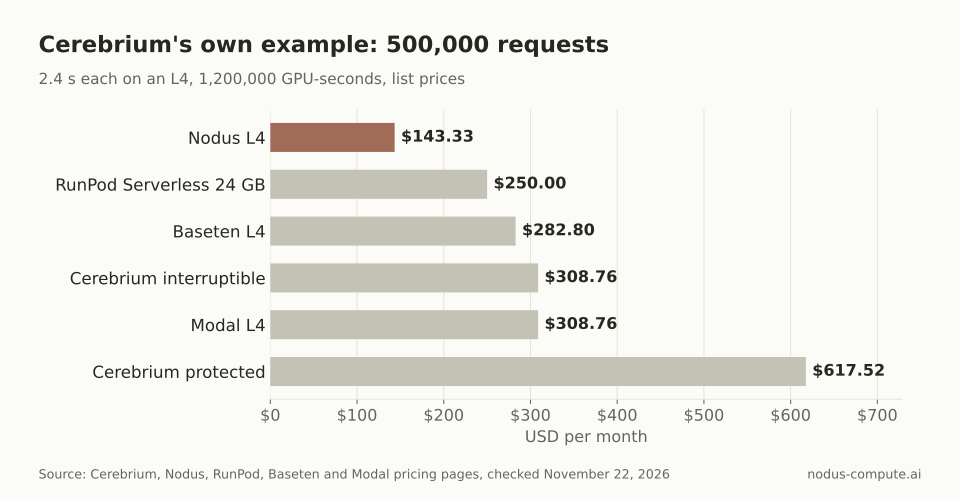 On Cerebrium’s own example, Nodus costs $165.43 less than Cerebrium’s default tier and $474.19 less than its protected tier.
Two caveats keep this fair. Cerebrium and Modal default to capacity that can be preempted, and Modal’s pricing page lists non-preemptible execution at 3x base prices. Nodus lists one hourly rate per GPU on its pricing page, and a Function can opt into cheaper interruptible capacity with interruptible=True, per the Nodus for Modal users guide. And the Nodus, RunPod and Baseten rates cover whatever CPU and memory the offering comes with, which may not be exactly 2 vCPU and 10 GB.
What does keeping one GPU warm all month cost?
Section titled “What does keeping one GPU warm all month cost?”Keeping a worker warm is where per-second rates add up fastest, because you pay every second whether requests arrive or not. Cerebrium’s cold start guide recommends min_replicas = 1 for latency-sensitive apps, and notes that it increases cost while idle.
For 30 days, 2,592,000 seconds or 720 hours, the same L4 configuration comes to $0.0002573 x 2,592,000 = $666.92 on Cerebrium’s interruptible tier and $1,333.84 on protected. One warm Nodus L4 worker with min_workers=1 is $0.430 x 720 = $309.60 at the listed rate.
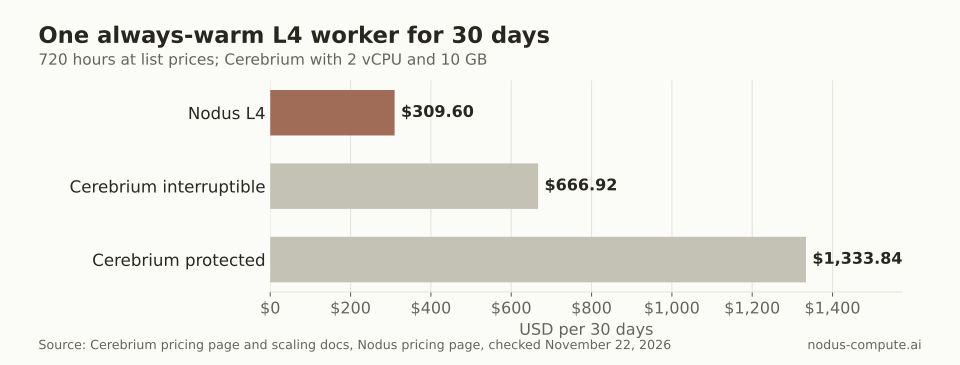 An always-warm worker turns a per-second rate into a monthly rent, so compare the hourly total, not the per-second sticker.
Both platforms let you avoid most of that. Cerebrium’s cooldown keeps an instance up through brief dips before scaling down. On Nodus, scaledown_window does the same, defaulting to 1 minute with a maximum of 20, per the scaling guide. Our what is a serverless GPU guide explains which parts of a serverless bill grow with traffic.
Is Cerebrium cheaper on bigger GPUs?
Section titled “Is Cerebrium cheaper on bigger GPUs?”No, not on list rates. Converted to hours, Cerebrium’s pricing page puts the H100 at $3.40, the H200 at $4.20, the B200 at $6.01, the A100 80GB at $2.10, the L40S at $1.95 and the L4 at $0.80, before CPU and memory. The Nodus pricing page lists the H100 SXM at $2.600, the H200 at $3.593, the B200 at $5.500, the A100 80GB at $1.090, the L40S at $0.793 and the L4 at $0.430.
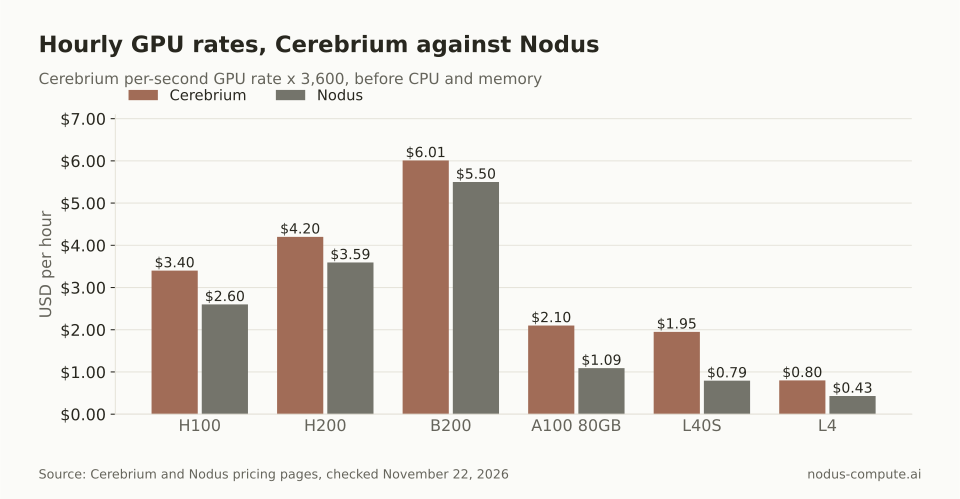 Nodus lists a lower hourly rate on every GPU the two share, and Cerebrium’s rates exclude CPU and memory.
Nodus also lists cards Cerebrium does not, such as the RTX 3090 24 GB at $0.180 per hour, the RTX 4090 24 GB at $0.290 and the RTX A6000 48 GB at $0.333. If your model fits a 24 GB consumer card, those are the cheapest lines on either page. Our best serverless GPU platforms guide prices the same H100 job across more platforms.
How do cold starts compare?
Section titled “How do cold starts compare?”Cerebrium has put real work into cold starts. Its pricing page says containers scale up and down in 1 to 3 seconds. Its memory and GPU checkpointing, in early beta, snapshots CPU and GPU memory after startup so later containers skip imports, weight loading and kernel compilation.
Nodus has a similar Beta feature. In the GPU snapshots guide, a vLLM worker serving Qwen3-0.6B on an NVIDIA A10 restored on another machine and served 16.3 to 17.0 seconds after starting, against 91.5 to 95.5 seconds cold. Nodus publishes no fixed cold-start figure; f.estimate(...) returns the expected cold and warm start for your Function before you run it.
Neither number is a promise for your model. If first-request latency is the reason you are on Cerebrium, run your own model on the alternative before moving traffic.
Where is Cerebrium the better choice?
Section titled “Where is Cerebrium the better choice?”Cerebrium wins when your callers need a URL. It serves REST APIs, server-sent-event streaming, WebSockets and any ASGI app such as FastAPI, per its introduction. Nodus Functions are called from Python, and the Nodus for Modal users guide says web endpoints are not available; nodus.InferenceEndpoint serves catalog models instead.
It also wins on these:
- Region control. Cerebrium’s multi-region deployment, in beta, can run an app globally, in a
usoreuzone, or pinned to one region for data residency. - Voice. Cerebrium runs self-hosted Deepgram speech-to-text and Rime text-to-speech as partner services.
- Compliance. Its security page states SOC 2 Type I, HIPAA, GDPR and ISO compliance.
- Guaranteed burst capacity. Its pricing FAQ gives an example of up to 50 H100s on call with a $10,000 minimum monthly spend, without a 24/7 reservation.
- Other accelerators. Cerebrium offers AWS Inferentia2, and Trainium on Enterprise, per its GPU docs.
- A free plan. Hobby has no monthly fee. Nodus has no free plan: new accounts add prepaid credit or use an approved promotional offer, per its credits guide.
Cerebrium is not one of the cloud accounts you can connect to Nodus; the supported providers are in the cloud accounts guide.
Which Cerebrium alternative should you pick?
Section titled “Which Cerebrium alternative should you pick?”Pick by how the model is called first, then by the busy-hour price of your exact configuration. We wrote this rule from the worked examples above.
- Your backend calls the model from Python, traffic is bursty, or you also run fine-tunes and batch jobs: Nodus. Cerebrium’s own example was $143.33 of L4 time here against $308.76.
- You need an HTTP endpoint with CPU and memory included in the rate: RunPod Serverless. Our RunPod alternatives guide covers its other products.
- You want dedicated model deployments billed per minute: Baseten. We compare it directly in Nodus vs Baseten.
- You want Python-defined functions plus web endpoints at the same L4, A10 and L40S GPU rates as Cerebrium: Modal. Our Modal alternatives guide covers the training side.
- You serve voice or streaming apps over WebSockets, need region pinning, or need its compliance reports: stay on Cerebrium, and consider the protected tier for production.
If you are also weighing Beam, our Beam Cloud alternatives guide runs the same kind of math on a 24 GB endpoint.
How do you move a Cerebrium app to Nodus?
Section titled “How do you move a Cerebrium app to Nodus?”Map Cerebrium’s settings one to one, then move the model load into an enter hook. compute = "ADA_L4" becomes gpu="L4", min_replicas becomes min_workers, max_replicas becomes max_workers, cooldown becomes scaledown_window, and replica_concurrency becomes target_concurrency. Install the SDK and sign in:
pip install nodus-computenodus loginThen define a class whose model loads once per worker. The decorator arguments come from the Functions and classes guide and the scaling guide; load_model() stands in for your own loader:
import nodus
app = nodus.App("transcriber")

@app.cls(gpu="L4", min_workers=0, max_workers=10, scaledown_window="1m")class Model:    @nodus.enter()    def load(self) -> None:        self.model = load_model()
    @nodus.method()    def predict(self, audio_url: str) -> dict:        return self.model(audio_url)
Deploy it with nodus deploy app.py. With min_workers=0 it scales to zero, and scaledown_window="1m" matches a Cerebrium cooldown = 60. Your backend then calls predict.remote(...) instead of sending an HTTP POST; the Functions guide shows how another program looks up a deployed App.
Can you use AWS or GCP credits on Cerebrium?
Section titled “Can you use AWS or GCP credits on Cerebrium?”No. Cerebrium’s pricing FAQ says AWS and GCP credits cannot be applied to its usage. Nodus can place Jobs and other single-node work in a connected AWS, GCP or Azure account, a Beta feature described in the cloud accounts guide.
How many GPUs can one Cerebrium app use?
Section titled “How many GPUs can one Cerebrium app use?”Up to 8 per container on every listed GPU type, per its GPU docs. Concurrency across containers is capped by plan: 5 GPUs on Hobby, 30 on Standard and unlimited on Enterprise.
Does Cerebrium bill for idle time?
Section titled “Does Cerebrium bill for idle time?”Only for instances that are running. Cerebrium’s cost guide says compute is billed every time code runs or you configure a machine to stay running, so min_replicas and a long cooldown cost money. With no running instances you pay no compute, only persistent storage, where the first 100 GB are free per its pricing page.
How do you check live GPU prices on Nodus?
Section titled “How do you check live GPU prices on Nodus?”Run nodus get gpus. Adding --gpu L4 -o wide shows typical and list rates, startup time and interruption rate for that card, per the GPUs guide, so you see the price before you deploy.
More from the blog
pricing10 min read
What are the best Databricks alternatives for LLM training?
Databricks alternatives for LLM training: one 8 x H100 day priced on six platforms, a break-even speed rule, and when Databricks AI Runtime still wins.
Read the postgpu7 min read
How do you fine-tune a model and then run it in Ollama?
Ollama cannot train. Fine-tune on a GPU, merge the LoRA, convert to GGUF with llama.cpp, then ollama create with a Modelfile that matches the chat template.
Read the post