
What are the best Hyperstack alternatives for AI training?
Hyperstack alternatives for AI training: Nodus, RunPod, Lambda and Modal compared on H100 price, idle billing, spot interruptions and recovery.
Nodus is the Hyperstack alternative to pick for AI training if you want a lower H100 price and no bill for idle machines: it lists the NVIDIA H100 SXM at $2.60 per GPU-hour on the Nodus pricing page, against $3.20 on demand at Hyperstack. It runs training as a job that stops billing when it ends and restores your latest checkpoint if a machine is lost. Pick RunPod for pods at a fixed price, Lambda for whole 8-GPU machines, Modal for short Python functions, and stay on Hyperstack for VMs with free data transfer.
We build Nodus, so read this with that in mind. Every fact about another company links to its own pricing page or docs, and the arithmetic is written out so you can redo it with the prices you see today.
What does Hyperstack do well, and why do teams look elsewhere?
Section titled “What does Hyperstack do well, and why do teams look elsewhere?”Hyperstack sells GPU virtual machines with per-minute prepaid billing and no bandwidth charges. Its pricing page lists everything from an NVIDIA RTX A4000 at $0.15 per hour to an NVIDIA B300 at $7.40, plus reservations, spot VMs and free ingress and egress.
If you are comparing alternatives, the reason is usually one of these. You want a lower H100 SXM rate without signing a reservation. You are tired of paying for machines that sit idle between runs. Or you want spot prices without writing your own recovery logic, because Hyperstack spot VMs come with no termination notice.
None of these is a flaw in the product. They come with running your own VM, and some alternatives move them onto the platform.
How much does the same training run cost on each platform?
Section titled “How much does the same training run cost on each platform?”We priced one run, GPU compute only: 8 x NVIDIA H100 SXM for 10 hours, which is 80 GPU-hours. Storage, CPU-only machines and taxes are left out on every platform.
| Platform | H100 SXM per GPU-hour | 80 GPU-hours | How billing works |
|---|---|---|---|
| Nodus | $2.60 | $208.00 | Prepaid credits; a Job is charged only for the time it used |
| RunPod Community Cloud | $2.69 | $215.20 | Per second, pods |
| Hyperstack on demand | $3.20 | $256.00 | Per minute, prepaid, VMs |
| Modal | $3.95 | $315.94 | Per second, functions |
| RunPod Secure Cloud | $3.99 | $319.20 | Per second, pods |
| Lambda (8-GPU instance) | $4.59 | $367.20 | Per GPU-hour, instances |
Prices checked November 7, 2026: Nodus pricing, Hyperstack pricing, RunPod pricing, Modal pricing and Lambda pricing. Modal’s $0.001097 per second is multiplied by 288,000 seconds for the Modal row.
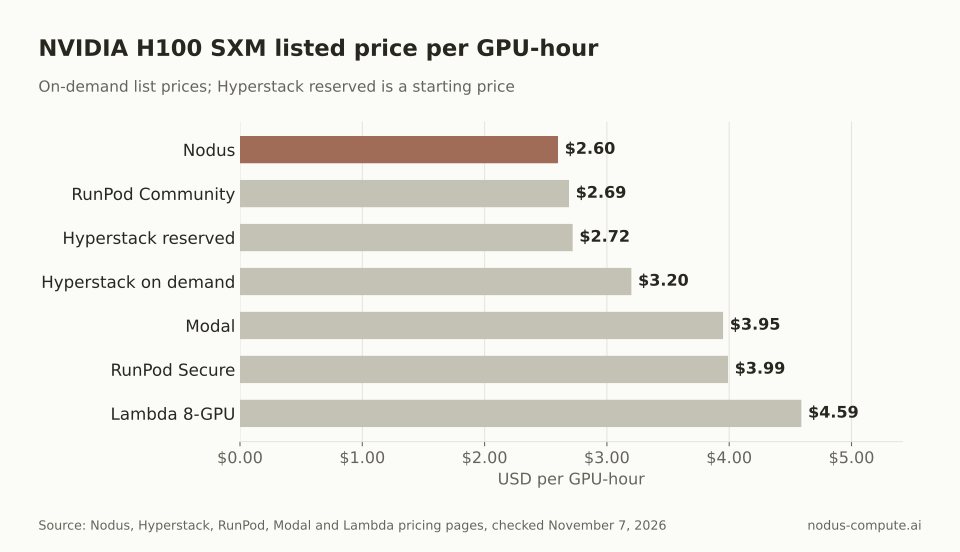 Nodus lists the H100 SXM below Hyperstack’s on-demand rate and below its reservation starting price.
Hyperstack’s reservation pricing narrows the gap. Its pricing page shows H100 SXM reservations starting from $2.72 per hour, which would make the same run $217.60, but that rate needs a reservation and Hyperstack invoices reservations monthly.
Do you pay for a Hyperstack VM after you stop it?
Section titled “Do you pay for a Hyperstack VM after you stop it?”Yes, and it is the easiest cost to miss. Hyperstack’s VM states and billing page says a stopped VM enters the SHUTOFF state and billing continues for all its resources, because they stay reserved for that VM. To stop GPU charges you have to hibernate it or delete it.
Here is what that means for our example. Say the 10-hour run ends at 6 pm and the VM is shut off until 8 am, a 14-hour gap.
- Shut off: 8 GPUs x $3.20 x 14 hours = $358.40, more than the run itself.
- Hibernated: GPU, CPU and RAM are not billed, but the root disk is saved at $0.000096774 per GB-hour. For a 500 GB root disk, that is 500 x $0.000096774 x 14 = $0.68.
- Deleted: $0.00.
On Nodus there is no VM to forget. A Job that has finished shows Succeeded, Failed or Cancelled, and the Jobs guide says nothing is running or billed in those states. The overnight cost of a finished Job is $0.00.
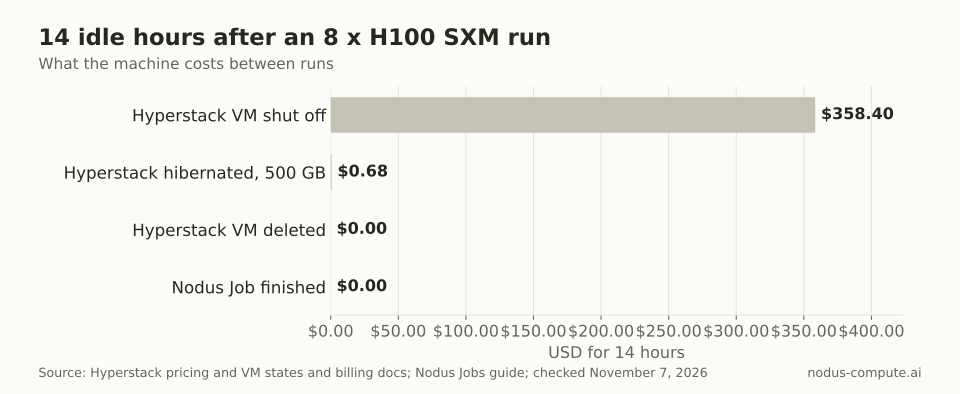 A shut-off VM keeps billing at the full GPU rate; hibernating or deleting it fixes that, and a finished Job never starts.
The rule we take from this: if your team runs training in bursts, the platform that bills only while work runs often beats a lower hourly rate. If you keep one machine busy all day, the hourly rate is what matters.
Can you train on Hyperstack spot VMs safely?
Section titled “Can you train on Hyperstack spot VMs safely?”You can, but recovery is your job. Hyperstack’s spot VM docs say spot VMs carry a non-zero risk of termination without prior notice, with no email or in-platform alert. Its spot VMs page adds that they cannot be paused or saved as custom images, and that spot prices are a fixed 20% below on demand.
That 20% is real money. Hyperstack’s spot NVIDIA H100 PCIe was $2.00 per hour when we checked, against $2.50 on demand. But a run that is not checkpointing off the machine gives the savings back fast. If an 8-GPU spot run is lost at hour 6 of 10 and restarts from zero, you pay again for 48 GPU-hours, which is $96.00 at $2.00.
Nodus handles interruptible capacity differently. Its attempts and recovery docs say that on a reclaim notice Nodus asks your job for an urgent checkpoint and prepares a replacement machine at the same time. A machine that goes silent gets a replacement prepared after 20 seconds and is declared lost after 60.
A Checkpointed run restarts from its latest committed checkpoint, so it loses only the work since that checkpoint. Our spot vs on-demand guide covers when interruptible capacity is worth it.
Which Hyperstack alternative fits your training job?
Section titled “Which Hyperstack alternative fits your training job?”Start from the problem you want gone.
- You want to stop babysitting machines and paying for idle ones: Nodus. Jobs bill only while they run, a
--max-costcap stops a run at a dollar limit, and checkpoints are restored on a new machine. - You want a fixed hourly price and a pod you can SSH into: RunPod. Its Community Cloud H100 SXM was $2.69 per hour; our RunPod alternatives guide compares it in more depth.
- You want a whole 8-GPU machine or a reserved cluster: Lambda, at $4.59 per GPU-hour for an 8 x H100 instance, with 2-week to 1-year cluster terms on its pricing page. See Nodus vs Lambda for the trade-offs.
- Your work is short Python functions next to web endpoints: Modal, billed per second.
- You want a VM with root access, free egress and a reservation: stay on Hyperstack.
Hyperstack is not a cloud account you can connect to Nodus today. The supported clouds are listed in the cloud accounts guide.
Where is Hyperstack the better choice?
Section titled “Where is Hyperstack the better choice?”Hyperstack wins when data movement and control matter more than the hourly rate. Ingress and egress are free on its pricing page, which matters if you move large datasets or checkpoints in and out every day. You get a full VM, hibernation that keeps your root disk while GPU billing stops, and an On-Demand Kubernetes service with a free master node.
It also has the cheapest H100 in our research. Its spot H100 PCIe at $2.00 per hour is below every H100 SXM rate in the table above, if your job checkpoints and tolerates sudden loss.
Location can decide it too. Hyperstack’s regions page lists data centers in Norway, Canada and Texas, and marks the Norway and Canada regions as sustainably powered. It quotes up to 350 Gbps of inter-VM bandwidth in SR-IOV environments in Canada and Texas. If you need those regions or that networking, the switch may not be worth it.
How do you move a Hyperstack training job to Nodus?
Section titled “How do you move a Hyperstack training job to Nodus?”Point your checkpoint writes at /nodus/state and run your existing command with the Nodus CLI. Install it and sign in:
pip install nodus-computenodus loginThen dry-run the job to see the estimate. Every flag below is in the nodus run CLI reference; the torchrun part is your own command:
nodus run --name ft-h100 --gpu H100:8 --image nodus/pytorch \ --checkpoint /nodus/state --continuity Checkpointed --interruptible \ --max-cost 250 --dry-run -- torchrun --nproc_per_node 8 train.pyRemove --dry-run to submit. The --max-cost 250 cap sits above the $208.00 list-price estimate for 80 GPU-hours. If the run would spend more, it saves its state and suspends instead of billing past the cap.
Is Hyperstack cheaper than Nodus?
Section titled “Is Hyperstack cheaper than Nodus?”For the NVIDIA H100 SXM, no: Hyperstack listed $3.20 per hour on demand and reservations from $2.72, against $2.60 on Nodus when we checked. Hyperstack’s spot H100 PCIe at $2.00 is cheaper per hour, for jobs that can handle termination without notice.
Does Hyperstack charge for data transfer?
Section titled “Does Hyperstack charge for data transfer?”No. Its pricing page lists ingress and egress traffic as free. A retained public IP costs $0.00672 per hour.
What happens when a Hyperstack prepaid balance runs out?
Section titled “What happens when a Hyperstack prepaid balance runs out?”Hyperstack’s pricing FAQ says resources are scheduled for termination after a short grace period, and may be permanently deleted if the account is not recharged within a week. On Nodus, a Job that runs out of credits saves its state, suspends and resumes on its own once funded, per the Jobs guide.
Does Hyperstack bill per second?
Section titled “Does Hyperstack bill per second?”No. Hyperstack bills on-demand usage per minute. Nodus, RunPod and Modal all list per-second or exact usage billing, so short runs cost slightly less on them.
Can I keep using Hyperstack and Nodus together?
Section titled “Can I keep using Hyperstack and Nodus together?”Yes. You can keep a VM for interactive work and send long or interruptible training runs to Nodus as Jobs. Nodus does not run on your Hyperstack account, so the two bill separately.
More from the blog
agents9 min read
How do you run AI agent evals in parallel on cloud GPUs?
Run each agent eval episode in its own sandbox with a per-run cap and a batch cap, grade answers separately, and size the batch for a useful error bar.
Read the postgpu7 min read
Where can you get NVIDIA B300 GPUs by the hour?
Where to get NVIDIA B300 GPUs by the hour: Nodus, Modal, RunPod and Nebius list on-demand rates from $6.943 to $9.50 per GPU-hour. Shape matters too.
Read the post