
Where can you get NVIDIA B300 GPUs by the hour?
Where to get NVIDIA B300 GPUs by the hour: Nodus, Modal, RunPod and Nebius list on-demand rates from $6.943 to $9.50 per GPU-hour. Shape matters too.
You can get NVIDIA B300 GPUs by the hour, with no contract, from several platforms that publish a self-serve rate. Nodus lists the B300 at $6.943/hr on its pricing page, next to Modal at about $7.10, RunPod at $8.99 and Nebius at $9.50 per GPU-hour. The cheapest rate is not always the cheapest run, because some offers only come as a full 8-GPU machine and some need a specific CUDA version.
Below we price the same job at each listed rate. We also show how to confirm that the GPU you got is a B300 with the memory you expect.
What is the B300, and do you need one?
Section titled “What is the B300, and do you need one?”The B300 is NVIDIA’s Blackwell Ultra GPU, and its main training gain is memory. NVIDIA’s Blackwell Ultra technical blog lists up to 288 GB of HBM3e and 15 PFLOPS of dense NVFP4 compute per GPU. Dense BF16 and FP8 throughput match the B200.
That makes the B300 a memory purchase for most training jobs. On Nodus the B300 costs 1.26 times the B200’s $5.50/hr, so a BF16 job must run 1.26 times faster to break even. Our B300 vs B200 breakdown works through when 288 GB removes a node and when it does not.
Pick a B300 when your training state does not fit in 180 GB per GPU, when it saves you a second node, or when your recipe trains or serves in NVFP4. Otherwise a B200 or an H200 usually finishes the same work for less.
Which platforms list B300s by the hour?
Section titled “Which platforms list B300s by the hour?”Four platforms publish a self-serve hourly B300 rate on their own pricing pages. Amazon EC2 also offers B300s, as an 8-GPU instance type.
| Where | Listed rate per B300-hour | Smallest shape shown | Notes from their own pages |
|---|---|---|---|
| Nodus | $6.943 | Count per machine is 1, 2, 4 or 8; nodus get gpus shows what is available |
You request by memory or type; Nodus picks the offering by expected cost to finish |
| Modal | $0.001972/sec (about $7.10/hr) | Per GPU, up to 8 per function | Needs CUDA 13.1 or newer; B200+ may run on a B300 at the B200 rate |
| RunPod | $8.99 | One B300 with 32 vCPUs and 251 GB RAM | Pods billed per second, no commitment |
| Nebius | $9.50 on demand | 8-GPU VM preset only | Regions uk-south1, eu-west2 and us-north1 |
| Amazon EC2 | Not compared here | p6-b300.48xlarge, 8 GPUs |
2,144 GB of GPU memory per instance |
Sources: Nodus pricing, Modal pricing and Modal GPU guide, RunPod pricing, Nebius prices and Nebius VM types, Amazon EC2 P6 instances. Prices checked November 7, 2026.
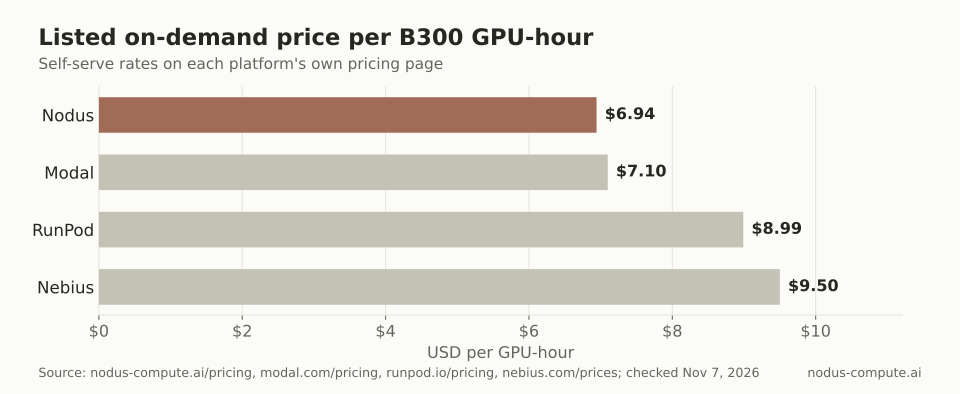 The spread between the lowest and highest listed B300 rate is $2.557 per GPU-hour.
Modal publishes its rate per second: $0.001972 x 3,600 = $7.0992 per hour. We left Amazon EC2 out of the price comparison because its P6 page lists specs, not an hourly rate.
What does the same B300 job cost on each platform?
Section titled “What does the same B300 job cost on each platform?”At list prices, an 8-GPU, 24-hour run costs between $1,333.06 and $1,824.00. That run is 8 x 24 = 192 GPU-hours, priced at each platform’s listed rate.
| Where | 192 B300 GPU-hours |
|---|---|
| Nodus at $6.943 | $1,333.06 |
| Modal at $7.0992 | $1,363.05 |
| RunPod at $8.99 | $1,726.08 |
| Nebius at $9.50 | $1,824.00 |
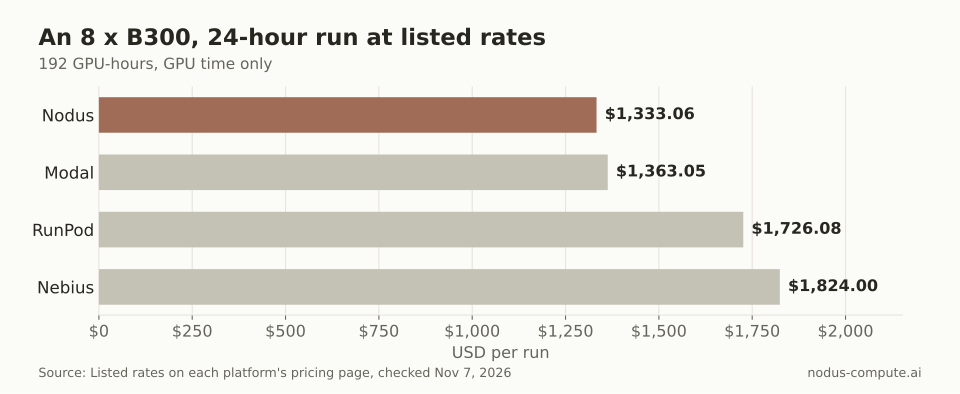 The same 192 GPU-hours cost $490.94 more at the highest listed rate than at the lowest.
Two caveats keep this honest. These are list prices for GPU time only; storage, egress and CPU extras differ by platform. And a list rate says nothing about whether capacity is free when you click launch, so check availability on the day.
On Nodus the same request carries a hard cap. A Job with --max-cost or a budget stops spending at the limit, and the GPU guide shows a dry-run estimate with p50 and p90 cost before anything starts.
Why does machine shape matter more than the hourly rate for small runs?
Section titled “Why does machine shape matter more than the hourly rate for small runs?”Because you pay for every GPU in the smallest machine you can rent. Take a 2-hour smoke test on one B300, the kind you run before committing to a full node.
- On a platform that sells single B300s, it costs 2 GPU-hours: $17.98 at RunPod’s $8.99, about $14.20 at Modal’s rate, and $13.89 at the Nodus rate when a one-GPU offering is available.
- On a platform whose only B300 preset is an 8-GPU VM, it costs 16 GPU-hours: 8 x 2 x $9.50 = $152.00 at Nebius’s on-demand rate.
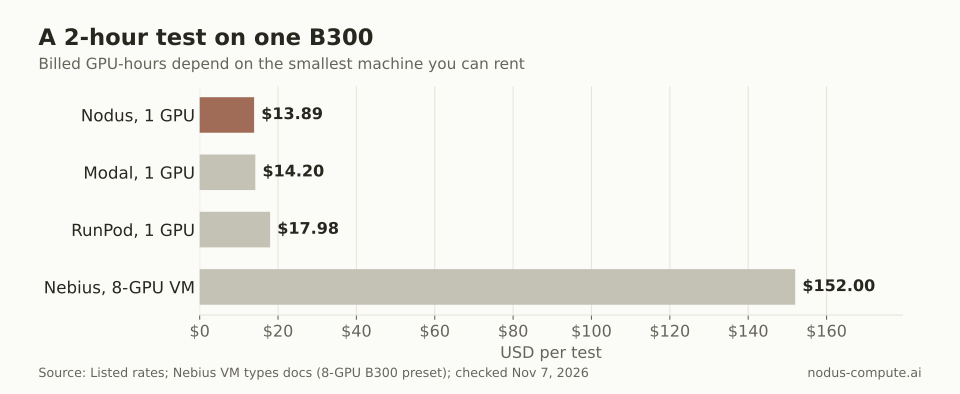 When the smallest B300 machine has eight GPUs, a one-GPU test costs eight times as many GPU-hours.
Our rule: debug and size on the smallest B300 shape you can get, then move to 8-GPU machines for the real run. If your provider only sells full nodes, debug on a cheaper GPU first, and save the B300 hours for work that needs the memory.
How do you ask Nodus for a B300?
Section titled “How do you ask Nodus for a B300?”Ask by memory, not by name. B300 is not in the GPU guide’s list of aliases, but minMemory with no type admits any accelerator with at least that much memory per GPU. Of the GPUs on the Nodus pricing page, only the B300 has more than 180 GB, so a 200 GiB floor selects it.
spec: resources: gpu: {minMemory: 200Gi, count: 8}Check what is on offer and what the run would cost before it starts:
$ nodus get gpus$ nodus apply -f job.yaml --dry-run=server -o estimateThe estimate names the offering Nodus would use, the expected cost at p50 and p90, and the startup time. If nothing fits, it says why, for example CapacityUnavailable, and the run waits in Queued until capacity appears or the 24-hour default queue timeout passes. To accept a B200 as well, lower the floor to 160Gi and let Nodus pick by expected cost to finish.
How do you check that you actually got a B300?
Section titled “How do you check that you actually got a B300?”Ask the driver for the GPU name and memory as soon as the machine starts:
$ nvidia-smi --query-gpu=name,memory.total --format=csvDo not expect exactly 288 GB. NVIDIA’s technical blog says HBM capacity varies by SKU. Amazon EC2 lists 2,144 GB for 8 GPUs, about 268 GB each, and Nebius lists 270 GB per B300. Size your batch and sharding to the memory the driver reports, not the headline figure.
Check the software stack too. Modal’s GPU guide says B300 needs CUDA 13.1 or newer, so build your image against CUDA 13 before you pay for B300 time anywhere.
Where is another platform the better choice?
Section titled “Where is another platform the better choice?”Each of the others wins for a specific kind of team.
- Modal fits teams that already deploy Python functions on Modal. Its
B200+option runs on a B300 or a B200 and bills as a B200, which is cheaper than its B300 rate if your code works on both. - RunPod fits people who want one B300 pod with a shell and a fixed per-GPU price, billed per second.
- Nebius fits teams that want whole 8-GPU B300 VMs in named regions. It also offers usage commitments through sales for long, steady runs.
- Amazon EC2 fits teams whose data, networking and security reviews already live in AWS.
Pick Nodus when you want the lowest listed B300 rate of these with a hard cost cap on every run. Its scheduler can also choose between a B300 and a B200 by expected cost to finish.
Is the B300 the same as the GB300?
Section titled “Is the B300 the same as the GB300?”No. The B300 is the GPU in 8-GPU machines like the ones above. The Amazon EC2 P6 page describes the GB300 as two Blackwell Ultra GPUs joined to one NVIDIA Grace CPU, sold in rack-scale GB300 NVL72 systems rather than by the single GPU.
Can I get B300s on spot or interruptible pricing?
Section titled “Can I get B300s on spot or interruptible pricing?”Check on the day. Nebius publishes live preemptible prices on its price list, and nodus get gpus --interruptible lists interruptible offerings on Nodus, which uses them under interruptible: Allow only when that is cheaper to finish. For any interruptible run, checkpoint often enough that losing a machine costs minutes, not hours.
Can I train in FP8 on a B300 for more speed than a B200?
Section titled “Can I train in FP8 on a B300 for more speed than a B200?”Not on paper. NVIDIA lists the same dense FP8 throughput for both, so FP8 alone does not cover the B300’s higher hourly rate. The extra compute is in NVFP4, which only helps if your recipe uses it.
How fast can I start a B300 job?
Section titled “How fast can I start a B300 job?”It depends on capacity that day, not on the list price. On Nodus, nodus get gpus -o wide shows typical startup time and availability per offering before you launch.
More from the blog
inference8 min read
vLLM vs SGLang: which LLM inference engine is faster?
Neither engine is faster everywhere. SGLang leads on shared-prefix and structured workloads, vLLM on breadth. A decision rule and cost math.
Read the postgpu7 min read
What is an MCP server, and how can it give agents GPUs?
MCP explained: what an MCP server is, why it needs no GPU of its own, and how Nodus uses one to let coding agents price and run GPU jobs.
Read the post