
What are the best FluidStack alternatives for AI training?
FluidStack alternatives for AI training: Nodus, Together AI, Lambda, Nebius and CoreWeave priced on one 16 x H100, 14-day run, plus a quote test.
The best FluidStack alternatives for AI training are Nodus, Together AI GPU Clusters and Lambda, because each publishes a price you can start on this week. Nodus lists the NVIDIA H100 SXM at $2.60 per GPU-hour and restarts interrupted runs from the latest checkpoint, Together AI reserves H100s from $3.69, and Lambda 1-Click Clusters covers 16 to 2,000+ GPUs. FluidStack now builds large data centers for frontier AI labs and publishes no self-serve price list, so it is the call to make when you are planning a dedicated campus rather than a training run.
We build Nodus, so weigh this accordingly. Every competitor number links to that company’s own page, and every total is written out so you can redo it with the rates you see today.
What does FluidStack sell today?
Section titled “What does FluidStack sell today?”FluidStack sells large-scale AI infrastructure by direct agreement, not GPU hours from a public price list. Its homepage lists building 250 MW data centers in six months from breaking ground among the challenges it is working on, on the way to hundreds of gigawatts over the next five years. Its news page announces that Anthropic selected it to deliver custom data centers in New York and Texas, and that SemiAnalysis awarded it a ClusterMAX Gold rating.
What the site no longer shows is a way to buy a few nodes. On November 20, 2026, fluidstack.io/pricing returned a 404 page, and the homepage offered job openings rather than a sign-up or a rate card. We could not find a published GPU-hour price, a minimum order or a self-serve console.
That is why people search for alternatives. A team that needs 8 to 64 GPUs for a few weeks wants a number it can check today, not a build schedule.
How do the alternatives compare at a glance?
Section titled “How do the alternatives compare at a glance?”The table lines up each provider’s published NVIDIA H100 terms. A blank means the page we checked does not say.
| FluidStack | Nodus | Together AI GPU Clusters | Lambda | Nebius | CoreWeave | |
|---|---|---|---|---|---|---|
| How you buy | Direct agreement | Self-serve Jobs with a dollar cap per run; Reserved Compute (Beta) by quote | Published rates; capacity request form | Self-serve instances; clusters through sales | Self-serve; commitments through sales | Published per-instance rates |
| H100 on demand | No public price | $2.60/GPU-hr (SXM) | $3.99/GPU-hr | $4.59/GPU-hr on the 8-GPU instance | $4.50/GPU-hr | $49.24/hr per 8-GPU instance |
| Cheaper or committed tiers | No public price | Reserved by quote, up to 365 days in the console | Preemptible $1.99; reserved $3.69 (3-30 days), $3.45 (31-90 days) | 1-Click Clusters $6.16 at 16 GPUs, $5.85 at 64, $5.54 at 256 | Preemptible from $0.79, dynamic | Spot $19.71/hr per 8-GPU instance |
| Cluster scale | Custom data centers | Multi-node Beta, up to 8 nodes | GB200 and GB300 NVL72 on request | 16 to 2,000+ GPUs | Large clusters on request | |
| When a machine is lost | Gang restarts from the latest checkpoint |
Prices checked November 20, 2026: FluidStack, Nodus pricing, Together AI pricing, Lambda pricing, Nebius prices, CoreWeave pricing. Nodus facts on scale and recovery are from the multi-node training docs and the Reserved Compute page.
What does one 16 x H100 run cost on each alternative?
Section titled “What does one 16 x H100 run cost on each alternative?”On list prices, a two-week run on 16 H100s costs $13,977.60 on Nodus and between $19,837.44 and $33,116.16 elsewhere. We picked 16 GPUs for 14 days because it is the smallest job every option here can take: Lambda’s 1-Click Clusters start at 16 GPUs and two weeks.
The job is 16 GPUs x 336 hours = 5,376 GPU-hours. We used each provider’s cheapest published tier that guarantees the GPUs for the whole run, so preemptible and spot rates are left out.
| Provider and tier | Rate | Cost for 5,376 GPU-hours |
|---|---|---|
| Nodus on demand, 2-node gang (Beta) | $2.60/GPU-hr | 5,376 x $2.60 = $13,977.60 |
| Together AI reserved, 3-30 days | $3.69/GPU-hr | 5,376 x $3.69 = $19,837.44 |
| Nebius on demand | $4.50/GPU-hr | 5,376 x $4.50 = $24,192.00 |
| CoreWeave on demand, two 8-GPU instances | $49.24/instance-hr | 2 x 336 x $49.24 = $33,089.28 |
| Lambda 1-Click Cluster, 16 GPUs | $6.16/GPU-hr | 5,376 x $6.16 = $33,116.16 |
Rates are from the pages linked under the comparison table, checked November 20, 2026. Totals cover GPU compute only, not storage or data transfer.
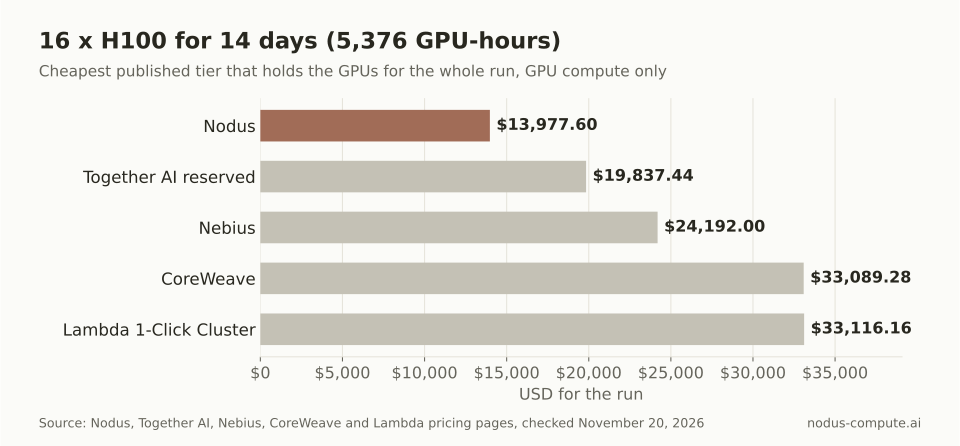 The same two-week, 16-GPU run costs about 30% less on Nodus than on the next cheapest published option.
Two caveats keep this fair. Nodus multi-node training is in Beta, and by default it keeps both nodes on one provider’s private fabric in one region. Lambda’s and CoreWeave’s prices are for dedicated clusters and instances you hold, which matters if your job needs a specific interconnect for the whole two weeks.
What quote should FluidStack, or anyone, have to beat?
Section titled “What quote should FluidStack, or anyone, have to beat?”A reserved price only beats on-demand when the reserved rate is below the on-demand rate times the share of hours you will actually keep the GPUs busy. This is the test to apply to any private quote, including one from FluidStack, because a reservation bills every hour whether or not your job is running.
The formula is short: effective cost per useful GPU-hour = reserved rate / utilization. Against Nodus on demand at $2.60, where you pay only for hours a job runs, a quote must come in under these ceilings:
| Share of reserved hours you keep busy | Highest reserved rate that still wins |
|---|---|
| 90% | $2.60 x 0.9 = $2.34/GPU-hr |
| 70% | $2.60 x 0.7 = $1.82/GPU-hr |
| 50% | $2.60 x 0.5 = $1.30/GPU-hr |
Published reservations show how steep the curve gets. Together AI’s 31-90 day H100 rate of $3.45 works out to $3.45 at full use, $4.60 at 75%, $6.90 at 50% and $13.80 at 25%. Lambda’s 64-GPU cluster rate of $5.85 becomes $5.85, $7.80, $11.70 and $23.40 at the same levels.
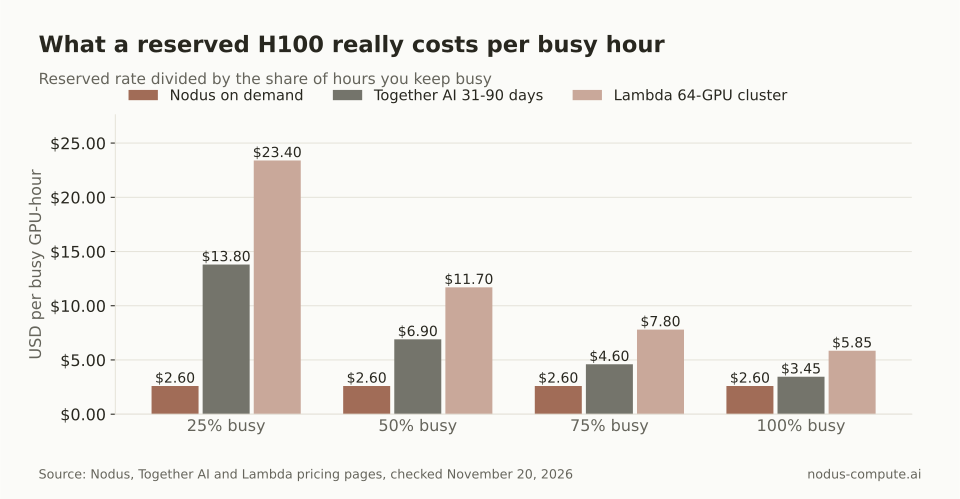 A reservation is only as cheap as the hours you fill; idle hours are billed at the same rate.
The rule has one limit we will state plainly. On-demand pricing assumes capacity is there when you launch. If a deadline depends on 64 GPUs being free on a given Monday, paying for certainty can be the right call, and that is what a reservation buys. For the full break-even method on other GPUs, see reserved vs on-demand GPUs.
Which alternative fits which training job?
Section titled “Which alternative fits which training job?”Pick by the shape of the job, not by brand. These are our recommendations from the prices and terms above.
- One machine, hours to days: Nodus on demand. One to eight H100s at $2.60 per GPU-hour, with a dollar cap on each run and the run restarted from its checkpoint if the machine is lost.
- Two to eight nodes for a few weeks: Nodus multi-node (Beta) if a restartable gang fits, or Together AI’s 3-30 day reservation if you want dedicated machines at a published rate.
- Fault-tolerant sweeps and evals: preemptible tiers, such as Together AI at $1.99 or Nebius from $0.79, if your code saves progress often.
- 64 to 2,000+ GPUs on one fabric: Lambda 1-Click Clusters, or a large-cluster request to Together AI, Nebius or Nodus Reserved Compute (Beta).
The last group is where FluidStack’s buyers usually sit, and it is the group where published prices thin out fastest.
What happens to a long training run when a machine fails?
Section titled “What happens to a long training run when a machine fails?”On Nodus, a lost machine restarts the run instead of ending it. In a multi-node gang, Nodus stops the current epoch on every member, keeps the surviving machines, gets new machines only for the lost ranks and restores the latest checkpoint into each rank’s state directory, as the multi-node docs describe. By default this happens up to three times per run.
Your script still has to save and load its own state. The default checkpoint path for nodus run is /nodus/state, and the checkpoint guide walks through saving and resuming. On a machine or cluster you hold yourself, at any provider in the table, noticing the failure and relaunching is your job, and the idle hours before you notice are still billed.
Where is FluidStack the better choice?
Section titled “Where is FluidStack the better choice?”FluidStack is the better choice when the job is building capacity, not running a training job on it.
- You need a dedicated data center. FluidStack’s stated goal is 250 MW sites in six months from breaking ground, a kind of deal no other option in our table publishes.
- You are a frontier lab buying at campus scale. Its news page shows that is the work it is announcing today.
- You want a provider that a third-party cluster rating has graded. FluidStack’s news page announces a SemiAnalysis ClusterMAX Gold rating.
- You care how the sites are built. FluidStack’s homepage describes closed-loop cooling, off-grid solar plans and US-built infrastructure.
If your plan is measured in GPU-weeks rather than megawatts, the published options above will usually get you running sooner.
How do you start the same training job on Nodus?
Section titled “How do you start the same training job on Nodus?”Keep your training script and change only how it is launched. Install the CLI and sign in, as the install docs show:
pip install nodus-computenodus loginPreview the cost of a two-node, 16-GPU run before you launch it. This dry run comes from the tested examples in the nodus run reference and prints the estimate only:
nodus run --dry-run --no-source --gpu H100 --gpus-per-node 8 --nodes 2 -- torchrun train.pyThen launch it. This is the two-node example from the multi-node docs; raise --max-cost from the example’s $2.00 to your budget. The 14-day run above is $13,977.60 at list price.
nodus run --name torchrun-2-node --gpu H100 --nodes 2 --launcher torchrun --max-cost 2.00 -- torchrun train.pyWrite checkpoints to /nodus/state so a restarted gang picks up where it stopped. If you are also weighing other cluster sellers, SF Compute alternatives and Nodus vs CoreWeave cover the same ground.
What companies are similar to FluidStack?
Section titled “What companies are similar to FluidStack?”CoreWeave, Nebius, Lambda and Together AI publish prices for large NVIDIA GPU clusters for AI training, and Crusoe describes clusters of thousands of GPUs. Nodus is a different kind of option: an AI compute platform that runs your training job on the cheapest capacity that will finish it, with checkpoints and recovery. We compare Crusoe separately in Crusoe Cloud alternatives.
Can I connect a FluidStack account to Nodus?
Section titled “Can I connect a FluidStack account to Nodus?”No. FluidStack is not among the providers in the Nodus cloud-accounts docs, so you cannot run Nodus Jobs inside a FluidStack account. You can run the same script as a Nodus Job or request Nodus Reserved Compute.
Does Nodus offer reserved GPU clusters like FluidStack?
Section titled “Does Nodus offer reserved GPU clusters like FluidStack?”Nodus Reserved Compute (Beta) takes requests from a single GPU up to a connected cluster, for terms up to 365 days in the console. Nodus reviews each request and sends a proposal with price and delivery; submitting a request does not reserve hardware.
Is preemptible capacity a good FluidStack alternative for training?
Section titled “Is preemptible capacity a good FluidStack alternative for training?”Only for runs that save progress often. Together AI lists preemptible H100s at $1.99 and Nebius from $0.79, but Nebius says its spot prices are dynamic and can change as often as every 15 minutes.
More from the blog
h1008 min read
What are the best Denvr Dataworks alternatives for training?
Denvr Dataworks alternatives for H100 training: Nodus, Together AI, Runpod, Lambda and CoreWeave priced on the same 72-hour, 8-GPU job.
Read the postdata9 min read
How do you generate embeddings for millions of documents?
Shard the corpus, run GPU workers that skip finished shards after a restart, and do the math: 10M documents cost $6 to $11 of GPU time vs $102 by API.
Read the post