
How do you generate embeddings for millions of documents?
Shard the corpus, run GPU workers that skip finished shards after a restart, and do the math: 10M documents cost $6 to $11 of GPU time vs $102 by API.
Generating embeddings for millions of documents is a batch job: split the corpus into fixed shards, run GPU workers in parallel, and write each shard’s vectors to its own file so a restarted worker skips finished work. Nodus runs that pattern as one Indexed Job, restores each worker’s saved shards when a machine is reclaimed, and lists the NVIDIA L40S at $0.793/hr on its pricing page. At that rate and NVIDIA’s published throughput for a 300M-parameter open model, 10 million 512-token documents take about $6 of GPU time, against $102.40 through OpenAI’s standard embeddings API.
This post gives you the script, what happened when we killed it halfway, the launch command and the cost math with every assumption shown. If you have not picked a model yet, start with how to evaluate an embedding model for search. A cheap embedding run with the wrong model is still a waste.
How should you split millions of documents into jobs?
Section titled “How should you split millions of documents into jobs?”Split by row ranges of one pinned input file, and give each worker a fixed set of shards. Shard s covers rows s × SHARD_ROWS to (s + 1) × SHARD_ROWS, and it belongs to worker s % WORKERS. Nothing about the assignment depends on timing, so a restarted worker always gets the same shards back.
Pinning matters more than it looks. If someone appends rows to the input while the job runs, shard boundaries move and “already done” stops meaning what you think. Upload the corpus once, mount that exact revision read-only, and treat a changed corpus as a new run.
Size shards so each one takes one to five minutes of GPU time. A lost machine then costs you at most one shard of repeated work. Much smaller shards add file and scheduling overhead, and much larger ones throw away more work on every interruption.
What does a resumable embedding script look like?
Section titled “What does a resumable embedding script look like?”The script below is the one we tested. It reads a Parquet file with id and text columns, embeds only the shards that have no output file yet, and publishes the finished files when its worker is done. It uses Hugging Face sentence-transformers, so any compatible model works by changing MODEL.
"""Sharded, resumable embedding job.
Each shard's vectors go to their own file, written atomically. A restarted runskips every shard whose file already exists, so a reclaimed machine costs youat most the shard that was in flight."""import osimport shutilimport timefrom pathlib import Path
import numpy as npimport pyarrow.parquet as pqimport torchfrom sentence_transformers import SentenceTransformer
try:  # on Nodus, report each shard so the console shows time and cost per shard    import nodus    report = lambda s, ms: nodus.log.unit(f"shard-{s}", ms, kind="embedding_shard")except ImportError:    report = lambda s, ms: None
INPUT = os.environ.get("INPUT", "docs.parquet")  # columns: id, text (pin this file)MODEL = os.environ.get("MODEL", "sentence-transformers/all-MiniLM-L6-v2")SHARD_ROWS = int(os.environ.get("SHARD_ROWS", "10000"))BATCH = int(os.environ.get("BATCH", "128"))INDEX = int(os.environ.get("NODUS_INDEX", "0"))  # which worker this isWORKERS = int(os.environ.get("NODUS_COMPLETIONS", "1"))  # how many workers in totalSTATE = Path(os.environ.get("NODUS_STATE_DIR", "state")) / "embeddings"OUTPUTS = Path(os.environ.get("NODUS_OUTPUTS_DIR", "outputs")) / "embeddings"

def shard_path(s):    return STATE / f"shard-{s:06d}.npz"

def main():    table = pq.read_table(INPUT, columns=["id", "text"])    n_shards = -(-table.num_rows // SHARD_ROWS)    mine = list(range(INDEX, n_shards, WORKERS))  # shard s belongs to worker s % WORKERS    STATE.mkdir(parents=True, exist_ok=True)    todo = [s for s in mine if not shard_path(s).exists()]    print(f"worker {INDEX}: {len(mine)} shards, {len(mine) - len(todo)} already done", flush=True)
    if todo:        device = "cuda" if torch.cuda.is_available() else "cpu"        model = SentenceTransformer(MODEL, device=device)        if device == "cuda":            model.half()        for s in todo:            t0 = time.time()            part = table.slice(s * SHARD_ROWS, SHARD_ROWS)            vecs = model.encode(part.column("text").to_pylist(), batch_size=BATCH,                                normalize_embeddings=True, convert_to_numpy=True)            tmp = STATE / f"shard-{s:06d}.tmp.npz"            np.savez(tmp, ids=np.array(part.column("id").to_pylist()), vectors=vecs.astype(np.float16))            os.replace(tmp, shard_path(s))  # the shard counts as done only after this rename            dt = time.time() - t0            report(s, int(dt * 1000))            print(f"shard {s}: {part.num_rows} docs in {dt:.1f}s ({part.num_rows / dt:.0f} docs/s)", flush=True)
    OUTPUTS.mkdir(parents=True, exist_ok=True)  # publish finished shards for download    for s in mine:        shutil.copy2(shard_path(s), OUTPUTS / shard_path(s).name)

if __name__ == "__main__":    main()
Three details carry the resume logic. The temporary file plus os.replace means a shard file either exists complete or does not exist, so a kill mid-write cannot leave a half shard that later counts as done. The IDs are stored next to the vectors, so you never have to trust row order when you load them into a vector database. Finished shards live in the state directory, which Nodus saves and restores, and they are only copied to the outputs directory at the end.
What happened when we killed it halfway?
Section titled “What happened when we killed it halfway?”It picked up exactly where it stopped, and the vectors matched an uninterrupted run bit for bit. We ran the script on an 8-vCPU sandbox with all-MiniLM-L6-v2, torch 2.15 (CPU build) and sentence-transformers 6.3. The test corpus was 4,000 passages of 60 words cut from Python standard-library docstrings, about 110 tokens each, in 8 shards of 500.
We killed the first run with SIGKILL after 40 seconds. It had finished 4 shards and left no partial file behind.
The second run printed worker 0: 8 shards, 4 already done and embedded only shards 4 to 7. A third run printed 8 already done and exited without loading the model. We compared every vector against a clean, uninterrupted run and against a run split across two workers: the maximum absolute difference was 0.0 in both cases.
On CPU the shards ran at 57 to 89 documents per second. The first full pass averaged about 68 documents per second, roughly 7,400 tokens per second. That is too slow for millions of documents, so the real run goes on GPUs. We did not exercise the GPU code path in this test.
The test also caught a silent problem. The all-MiniLM-L6-v2 model card says input longer than 256 word pieces is truncated. Of our 4,000 passages, 25 were longer than that, and nothing warned us.
If your documents run to 500 tokens, chunk them below the model’s limit or pick a model with a longer window. Count tokens with the model’s own tokenizer before you launch.
How do you run it as parallel GPU jobs on Nodus?
Section titled “How do you run it as parallel GPU jobs on Nodus?”Put the corpus in a Volume, then launch the script as an Indexed Job with one index per worker. Each index sees its number in NODUS_INDEX and the total in NODUS_COMPLETIONS, which is all the script needs to find its shards. The commands below use flags from the Jobs guide, the Volumes guide and the nodus run reference. We assembled them from those pages and have not run this exact launch.
$ pip install nodus-compute$ nodus login$ nodus create volume corpus --size 100Gi$ nodus volume put corpus ./docs.parquet /data/$ nodus run --name embed-corpus --gpu L40S --image nodus/pytorch \ --completions 8 --parallelism 8 --interruptible prefer \ --max-cost 25 --timeout 6h \ --volume corpus:/mnt/corpus:ro \ --env INPUT=/mnt/corpus/data/docs.parquet --env SHARD_ROWS=50000 \ --output embeddings=/nodus/outputs/embeddings \ -d -- bash -lc 'pip install sentence-transformers pyarrow nodus-compute && python embed.py'Before anything runs, nodus run prints the expected cost and start time. --max-cost is a hard cap: at the cap the Job saves its state and suspends instead of spending more. Jobs default to Checkpointed recovery, so when interruptible capacity is reclaimed, the new attempt starts with /nodus/state restored and the script skips the shards it already wrote. That is described in Save and resume a compute job with checkpoints.
One distinction matters. A lost machine is a recovery, and the state directory comes back. A crash in your own code is a failed run, and the docs say a retried index starts fresh on new capacity. Keep the script boring so the only interruptions are the recoverable kind.
The Job succeeds when every index succeeds, and outputs are collected then. Indexed outputs are downloaded per index:
$ for i in 0 1 2 3 4 5 6 7; do nodus cp job/embed-corpus:outputs/embeddings ./embeddings --index $i; doneThe nodus.log.unit call in the script feeds the console’s Work outcomes view, which shows completed shards, median shard time and cost per shard while the Job runs. If capacity loss is a worry for your run length, our post on how often spot GPUs are interrupted has the numbers.
How much does it cost to embed 10 million documents?
Section titled “How much does it cost to embed 10 million documents?”On a GPU it costs a few dollars of compute, roughly a tenth of a hosted API’s list price, if you accept a different model. Here are the assumptions, so you can swap in your own:
- 10,000,000 documents, each chunked to 512 tokens: 5.12 billion tokens.
- Hosted baseline: OpenAI text-embedding-3-small at $0.02 per 1M tokens on its model page. OpenAI’s Batch API guide offers a 50% discount, so $0.01 per 1M tokens through Batch.
- Self-hosted model: Llama Nemotron Embed 300m v2 in FP16. Throughput is NVIDIA’s own measurement for 512-token inputs at batch size 64 on the NVIDIA NIM text embedding performance page: 105 inputs/s on an L4, 357 on an L40S and 926 on an H100 80GB. We picked it because NVIDIA publishes 512-token figures across several GPUs for it.
- GPU rates are the hourly supply prices listed on the Nodus pricing page: L4 $0.43/hr, L40S $0.793/hr, H100 SXM $2.60/hr. The H100 figure NVIDIA measured is the 80GB HBM3 part, which we match to the H100 SXM row.
| Route | Time for 10M documents | Cost |
|---|---|---|
| OpenAI text-embedding-3-small, standard | Set by your rate limit | 5,120 × $0.02 = $102.40 |
| OpenAI text-embedding-3-small, Batch | Up to 24 h per batch | 5,120 × $0.01 = $51.20 |
| Nodus, 1 x L4 | 10M ÷ 105/s = 26.46 h | 26.46 × $0.43 = $11.38 |
| Nodus, 1 x L40S | 10M ÷ 357/s = 7.78 h | 7.78 × $0.793 = $6.17 |
| Nodus, 1 x H100 SXM | 10M ÷ 926/s = 3 h | 3.00 × $2.60 = $7.80 |
Prices checked November 20, 2026. GPU time excludes model download, start-up and the shard that a reclaim repeats.
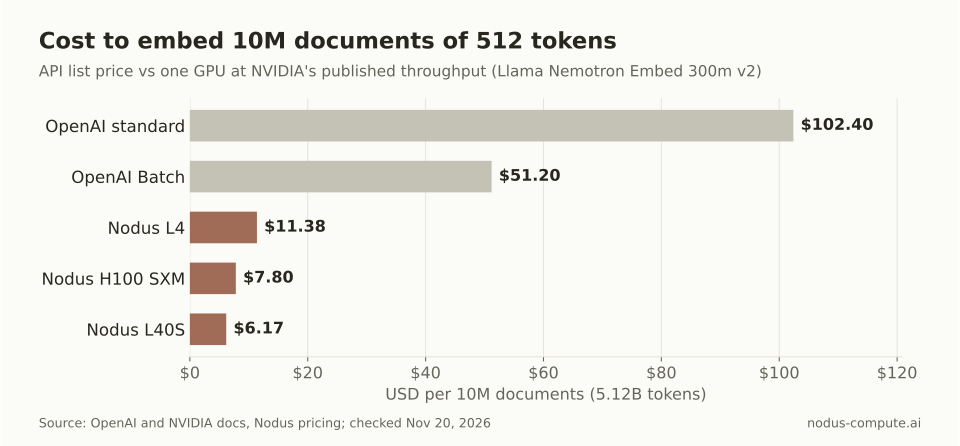 The L40S is the cheapest route here, not the fastest: the H100 finishes in 3 hours but costs more per document.
Splitting across 8 GPUs does not change these totals much, since each GPU does an eighth of the work for an eighth of the time. It changes the wall clock: 8 L40S workers finish the L40S line in under an hour.
The API’s time column depends on your account. The text-embedding-3-small model page lists 1,000,000 tokens per minute on the Build tier and 10,000,000 on the Grow tier. At those limits 5.12 billion tokens take 85.3 h and 8.5 h of uninterrupted sending.
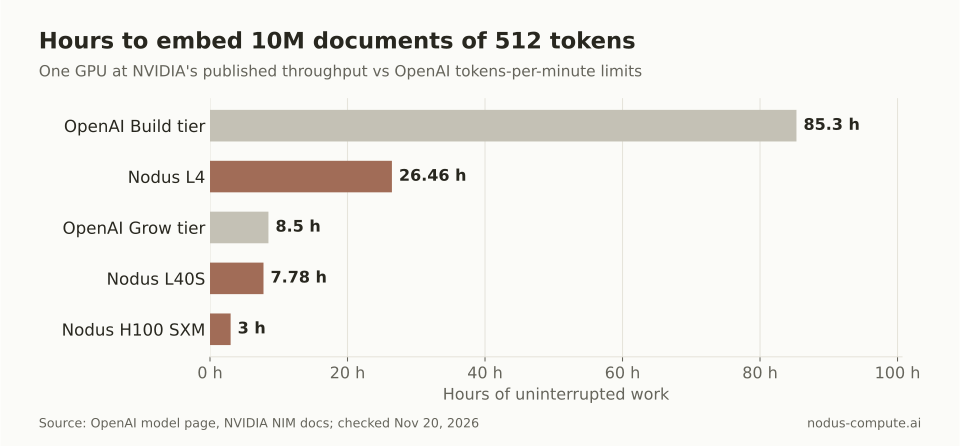 For large corpora, API rate limits can matter more than price.
When does self-hosting embeddings beat an API?
Section titled “When does self-hosting embeddings beat an API?”On raw compute, self-hosting wins once your measured throughput clears a break-even line:
break-even tokens per second = GPU $/hr × 1,000,000 ÷ (API $ per 1M tokens × 3,600)
Against $0.02 per 1M tokens, an L4 at $0.43/hr breaks even at 5,972 tokens/s, an L40S at $0.793/hr at 11,014 tokens/s, and an H100 SXM at $2.60/hr at 36,111 tokens/s. NVIDIA’s published numbers for the 300M model work out to 53,760, 182,784 and 474,112 tokens/s, between 9 and 17 times the line. Against the Batch price, double each break-even figure.
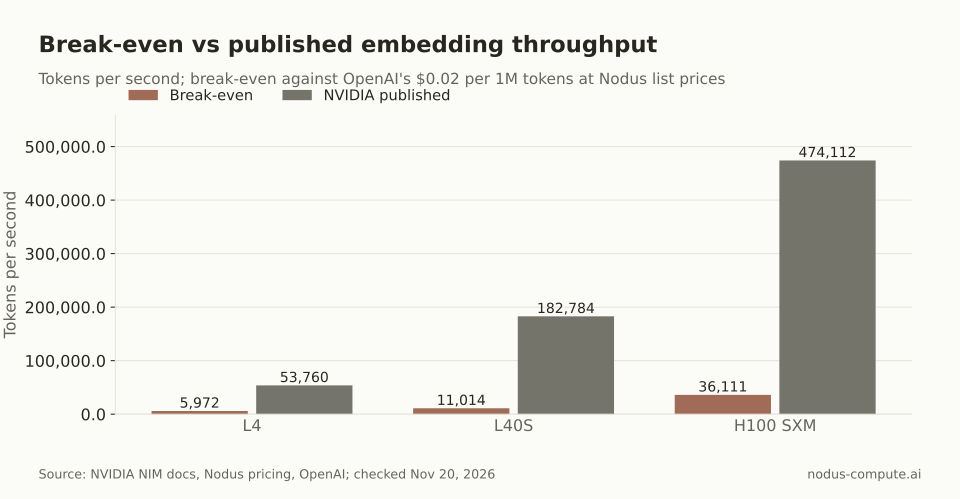 Published throughput clears the break-even line on every GPU here, by 9x on the L4 and 17x on the L40S.
Compute is not the whole decision. Saving about $96 on one 10-million-document run will not pay for a day of engineering. The models also differ: text-embedding-3-small and an open 300M model will not rank your documents the same way, and only an evaluation on your queries tells you which is better. Our post on self-hosting an LLM vs paying for an API makes the same argument for generation.
Our rule: use the API for a one-off corpus of a few billion tokens or less when its model scores well on your queries. Self-host on GPUs when you re-embed often (new chunking, a new model, a growing corpus) or when the corpus runs to tens of billions of tokens. Self-hosting also wins when rate limits would stretch the run into days, or when the text cannot leave infrastructure you control.
Measure your own model’s throughput before trusting any of these numbers. A Sweep runs the same Job on several GPU types and reports cost, time and throughput for each.
How much disk do 10 million embeddings take?
Section titled “How much disk do 10 million embeddings take?”At 384 dimensions stored as float16, each vector is 768 bytes, so 10 million vectors take about 7.68 GB before IDs and index overhead. A 1,024-dimension model at float16 needs about 2.7 times that.
Should I use vLLM or Text Embeddings Inference instead of sentence-transformers?
Section titled “Should I use vLLM or Text Embeddings Inference instead of sentence-transformers?”Use a serving engine when you need an HTTP endpoint or more throughput per GPU than plain sentence-transformers gives you. The sharding and resume logic stays the same: each worker sends its shard to a local server instead of calling model.encode.
Can I write embeddings straight into a vector database from the job?
Section titled “Can I write embeddings straight into a vector database from the job?”You can, but make the writes idempotent, for example upserts keyed by document ID, or a retried shard will create duplicates. Writing shard files first and loading them in a second step keeps the GPU job simple and lets you reload without paying for GPUs again.
Do I need GPUs at all for a few hundred thousand documents?
Section titled “Do I need GPUs at all for a few hundred thousand documents?”Often not. Our 8-vCPU test ran about 7,400 tokens per second with all-MiniLM-L6-v2, so 300,000 passages of 110 tokens would take roughly 74 minutes on CPU. A Nodus Job runs on CPU as well as GPU, and the script picks whichever is available.
More from the blog
gpu9 min read
How do you fine-tune Gemma with LoRA on a cloud GPU?
Gemma 4 LoRA and QLoRA by model size: VRAM, the GPU each size needs, chat-template and attention traps, and a recipe that survives restarts on Nodus.
Read the postdistributed9 min read
FSDP vs DDP: when do you need sharded data parallel?
Use DDP until params, grads and AdamW state stop fitting on one GPU, about 3.75B params on an 80 GB H100. Then shard with FSDP. The memory math, worked.
Read the post