
How do you transcribe thousands of hours of audio with Whisper?
Run faster-whisper as a sharded, resumable GPU batch job with one done marker per file. Cost math, a model and API decision rule, and tested code.
Run Whisper as a sharded GPU batch job with faster-whisper’s batched pipeline, and write one done marker per audio file, so a reclaimed machine repeats one file instead of the archive. Nodus runs each shard as one index of a Job on interruptible capacity and restores the done markers after a reclaim. If your GPU matches faster-whisper’s published 46x real time, 10,000 hours of audio is about 217 GPU-hours: $93.48 on an L4 listed at $0.43/hr, against $2,700 on OpenAI’s gpt-transcribe.
The audio part is what makes this different from batch LLM inference, which uses the same sharding idea. Files are long and uneven, some are silent or corrupt, languages vary, and the unit of work you can safely skip is a whole file, not a row.
Which Whisper model and library should you use?
Section titled “Which Whisper model and library should you use?”For bulk transcription, use the turbo model through faster-whisper unless you need translation. OpenAI’s Whisper README lists six sizes. turbo is an optimized large-v3 with 809M parameters, about 6 GB of VRAM and roughly 8x the speed of large, “with a minimal degradation in accuracy”.
| Model | Parameters | VRAM (approx.) | Speed vs large |
|---|---|---|---|
| tiny | 39M | 1 GB | ~10x |
| base | 74M | 1 GB | ~7x |
| small | 244M | 2 GB | ~4x |
| medium | 769M | 5 GB | ~2x |
| large | 1,550M | 10 GB | 1x |
| turbo | 809M | 6 GB | ~8x |
Source: the openai/whisper README, where relative speed was measured on English speech on an A100.
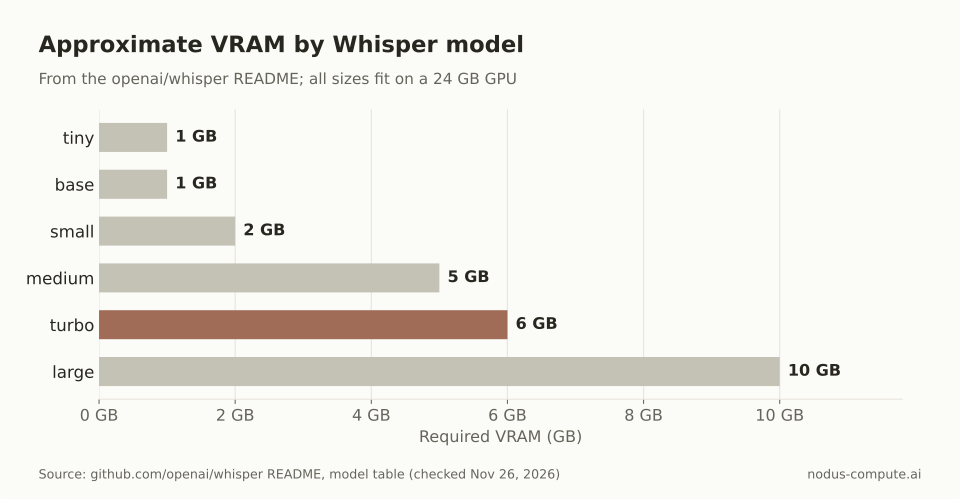 Every Whisper size fits on a 24 GB card, so pick the GPU on cost per audio hour, not memory.
Two exceptions change the choice. turbo is not trained for translation, so for non-English speech into English the README points to medium or large. The .en models tend to do better on English-only audio, mostly at the tiny and base sizes.
The library matters as much as the model. The faster-whisper README says it is up to 4 times faster than openai-whisper at the same accuracy. In its own large-v2 benchmark on an NVIDIA RTX 3070 Ti, 13 minutes of audio took 2 minutes 23 seconds with openai-whisper and 17 seconds with faster-whisper at batch_size=8 in fp16, using 6,090 MB of VRAM.
How many GPU-hours do 10,000 hours of audio take?
Section titled “How many GPU-hours do 10,000 hours of audio take?”GPU time is audio duration divided by your real-time factor. That 17-second figure is 780 seconds of audio in 17 seconds, about 46x real time. It came from one consumer card and one 13-minute file, so treat it as a starting parameter and measure your own.
Take an archive of 10,000 hours, and an NVIDIA L4 24 GB listed at $0.43/hr on the Nodus pricing page.
- At 46x: 10,000 / 46 = 217.4 GPU-hours, and 217.4 x $0.43 = $93.48, under a cent per audio hour.
- At 20x: 500 GPU-hours, or $215.00.
- At 10x: 1,000 GPU-hours, or $430.00.
The same audio is 600,000 minutes. OpenAI’s pricing page lists gpt-transcribe at an estimated $0.0045 per minute, which is $2,700, and the deprecated whisper-1 model at $0.006 per minute, which is $3,600. Prices checked November 26, 2026.
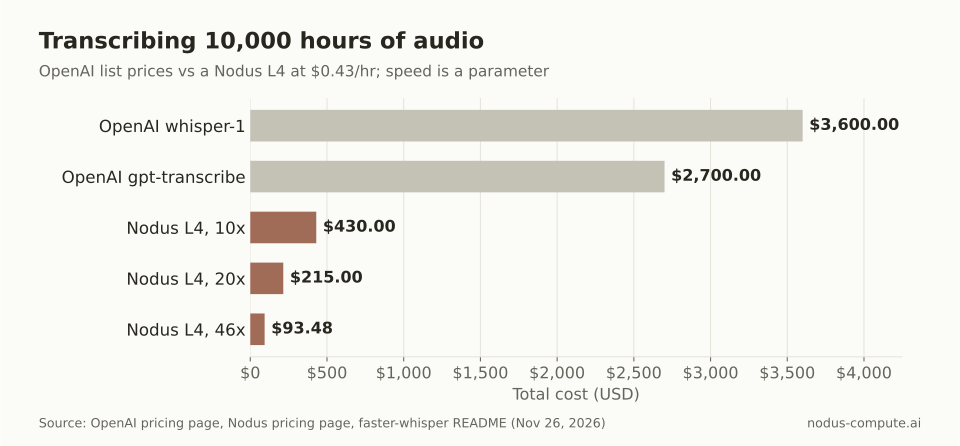 At under half of faster-whisper’s published speed, self-hosting still costs less than a tenth of gpt-transcribe, before engineering time.
The GPU-hour figure leaves out model loads, audio decoding on the CPU and the hours you spend building the job. Our turbo script should beat the large-v2 benchmark speed, but we have not measured it on Nodus GPUs, so the 46x stays an assumption. An RTX 4090 24 GB at $0.29/hr is worth calibrating against the L4.
How do you handle long files, silence and mixed languages?
Section titled “How do you handle long files, silence and mixed languages?”Let the batched pipeline split each file, and fix the settings that matter for an archive. Whisper reads audio in 30-second windows, as the openai-whisper README describes. The faster-whisper BatchedInferencePipeline turns on voice activity detection (VAD) by default, cuts speech into chunks of at most 30 seconds and decodes up to batch_size chunks at once, per its transcribe.py.
That means you never cut audio files yourself. VAD also skips long silences, so a two-hour recording with forty minutes of speech costs roughly forty minutes of decoding.
Language detection needs a decision. The batched pipeline detects language from one segment by default (language_detection_segments=1). If your archive is known to be one language, pass language="en" and skip detection. If it is mixed, keep language_probability in every record and send low-confidence files to a second pass.
Ask for word timestamps up front. word_timestamps=True adds per-word start and end times, which subtitles, search and alignment all need, and a rerun to add them costs the whole job again. Store one JSON record per file with segments, words and the detected language, and render SRT from that.
How do you make the job survive preemption?
Section titled “How do you make the job survive preemption?”Make the audio file the unit of work, and record each finished file in the checkpoint directory. Interruptible capacity can be reclaimed, and how often that happens depends on the GPU and region. A shard that restarts from zero gives the savings back.
The script below follows four rules:
- A manifest lists every file with an ID and its duration in seconds.
- Files are split by duration, longest first, each to the least-loaded shard, so shards finish together and the split is identical on every attempt.
- Each finished file becomes a done marker written to a temp file and renamed, so a marker is complete or absent.
- Missing or corrupt files get a failed marker and are skipped; any other error stops the run.
It reads NODUS_INDEX, NODUS_COMPLETIONS, NODUS_CHECKPOINT_DIR and NODUS_OUTPUTS_DIR, which every Nodus Job sees, per the Jobs guide.
import json, osfrom pathlib import Pathimport avfrom faster_whisper import WhisperModel, BatchedInferencePipeline, decode_audio
INDEX = int(os.environ["NODUS_INDEX"])SHARDS = int(os.environ["NODUS_COMPLETIONS"])STATE = Path(os.environ["NODUS_CHECKPOINT_DIR"])OUT = Path(os.environ["NODUS_OUTPUTS_DIR"]) / "transcripts"AUDIO = Path("/data/audio")
def my_files(manifest):    # Longest file first, always to the least-loaded shard: the same split on every attempt.    load, mine = [0.0] * SHARDS, []    for r in sorted(manifest, key=lambda r: (-r["seconds"], r["id"])):        s = min(range(SHARDS), key=lambda i: (load[i], i))        load[s] += r["seconds"]        if s == INDEX:            mine.append(r)    return mine
def srt(segments):    def ts(t):        ms = round(t * 1000)        return f"{ms // 3600000:02}:{ms // 60000 % 60:02}:{ms // 1000 % 60:02},{ms % 1000:03}"    return "".join(f"{i}\n{ts(s['start'])} --> {ts(s['end'])}\n{s['text'].strip()}\n\n"                   for i, s in enumerate(segments, 1))
manifest = [json.loads(line) for line in open(AUDIO / "manifest.jsonl")]done_dir, fail_dir = STATE / "done", STATE / "failed"done_dir.mkdir(parents=True, exist_ok=True)fail_dir.mkdir(parents=True, exist_ok=True)
model = WhisperModel("turbo", device="cuda", compute_type="float16")pipe = BatchedInferencePipeline(model=model)
for r in my_files(manifest):    done = done_dir / f"{r['id']}.json"    if done.exists() or (fail_dir / f"{r['id']}.txt").exists():        continue  # finished (or recorded as bad) by an earlier attempt    try:        audio = decode_audio(str(AUDIO / r["path"]))  # 16 kHz mono float32    except (OSError, av.error.FFmpegError) as e:  # missing or corrupt file only        (fail_dir / f"{r['id']}.txt").write_text(repr(e))        continue    segments, info = pipe.transcribe(audio, batch_size=16, word_timestamps=True)    segs = [{"start": s.start, "end": s.end, "text": s.text,             "words": [{"start": w.start, "end": w.end, "word": w.word} for w in s.words]}            for s in segments]  # transcription runs here    rec = {"id": r["id"], "language": info.language,           "language_probability": info.language_probability, "segments": segs}    tmp = done.with_suffix(".tmp")    tmp.write_text(json.dumps(rec))    os.replace(tmp, done)  # a done marker is either complete or absent
(OUT / "srt").mkdir(parents=True, exist_ok=True)with open(OUT / f"part-{INDEX}.jsonl", "w") as f:    for p in sorted(done_dir.glob("*.json")):        rec = json.loads(p.read_text())        f.write(json.dumps(rec) + "\n")        (OUT / "srt" / f"{rec['id']}.srt").write_text(srt(rec["segments"]))failed = sorted(p.stem for p in fail_dir.glob("*.txt"))(OUT / f"failed-{INDEX}.txt").write_text("\n".join(failed))
We tested it on a CPU in two ways. First, with the real tiny.en model on three LibriSpeech clips plus one missing file: three transcripts with word timestamps and valid SRT, one failed marker, and a rerun that skipped everything. Second, with the transcriber replaced by a stub: 200 files in 4 shards, two of them missing, each process killed after 20 files and restarted. The restarts transcribed only the remaining files, every file was transcribed exactly once, and the shards each held 47.3 to 47.4 hours of audio.
The narrow except comes from a failure we hit. Our first version caught every exception, and with faster-whisper 1.2.1 and PyAV 19.0.2 every file failed with TypeError: open() got an unexpected keyword argument 'metadata_errors'. A broad catch would have marked the whole archive as bad files and exited cleanly.
Pinning PyAV 15.1.0 fixed it, and an environment error now stops the run instead of hiding. Pin both versions in your image.
How do you run the shards on Nodus?
Section titled “How do you run the shards on Nodus?”Upload the audio and manifest to a Volume, then submit the script as an Indexed Job on interruptible capacity. Every flag below is from the nodus run CLI reference. The image needs faster-whisper with CUDA 12 and cuDNN 9, which its README notes are in nvidia/cuda:12.3.2-cudnn9-runtime-ubuntu22.04.
nodus run --name transcribe-archive --gpu L4 --image YOUR_WHISPER_IMAGE \ --completions 8 --parallelism 8 --interruptible --profile Cost \ --volume audio:/data/audio:ro --max-cost 120 --dry-run \ --output transcripts=/nodus/outputs/transcripts -- python transcribe.py--dry-run prints the expected cost before anything runs, so review it, then drop the flag. --interruptible with no value means prefer.
Checkpointed is the default recovery mode, so after a reclaim the new attempt starts with /nodus/state restored and skips every file it finds there. On a reclaim notice, Nodus also asks for an urgent checkpoint before the old machine goes away, per attempts and recovery. --max-cost is a hard cap: at $120 the Job saves its state and suspends rather than spending more.
The split decides what a reclaim costs. Using the 46x example on an L4 at $0.43/hr:
| Setup | Work at risk per reclaim | Cost |
|---|---|---|
| One run, nothing saved | Up to 217.4 GPU-hours | Up to $93.48 |
| 8 shards, restart the shard | Up to 27.2 GPU-hours | Up to $11.68 |
| 8 shards, per-file markers | One file in flight, 78 seconds for a 1-hour file | Under $0.01 |
A file that is mid-transcription when the machine goes is transcribed again, which is why very long recordings are worth keeping under a few hours each.
When is a hosted transcription API the better choice?
Section titled “When is a hosted transcription API the better choice?”Use the API when the job is small, one-off or needs a model you cannot run. At $0.0045 per minute, 100 hours of audio costs $27 on gpt-transcribe, less than the engineering time to build an image and calibrate speed. OpenAI also says its GPT-4o transcription models improve word error rate over the original Whisper models, so the API can win on accuracy too.
Our decision rule, from the numbers above:
- Under a few hundred hours, or a one-off: use the API.
- Thousands of hours, recurring archives, or audio that must stay on hardware you control: self-host.
- Before committing, run one hour of your own audio through
turboon an L4 and an RTX 4090, and through the API. Compare word error on a hand-checked sample and cost per audio hour, and keep the cheapest option that passes. - Need English translation of other languages: use multilingual
large-v3ormedium, notturbo.
Does Whisper do speaker diarization?
Section titled “Does Whisper do speaker diarization?”No. Whisper outputs text and timestamps, not speakers. The faster-whisper README lists community projects such as WhisperX that add diarization on top of it.
Do I need FFmpeg in the image?
Section titled “Do I need FFmpeg in the image?”Not for faster-whisper, which decodes audio with PyAV and its bundled FFmpeg libraries. openai-whisper does need the ffmpeg command-line tool installed.
Can Whisper invent text that was not said?
Section titled “Can Whisper invent text that was not said?”Yes. OpenAI’s model card warns about hallucinations and repetitive text, likely worse in low-resource languages. Spot-check a sample of transcripts, especially in low-resource languages, before you rely on them.
Can I see the cost per audio file on Nodus?
Section titled “Can I see the cost per audio file on Nodus?”Yes, if your script calls nodus.log.unit(id, ms) after each file. The Job’s Work outcomes view then shows completed units, median and p95 time per unit, and cost per reported unit.
Is CPU transcription an option?
Section titled “Is CPU transcription an option?”For small models, yes. In the faster-whisper README, the small model in int8 at batch_size=8 transcribed the 13-minute file in 51 seconds on 8 threads of an Intel Core i7-12700K. Larger models are where the GPU earns its cost.
More from the blog
gpu11 min read
AMD vs NVIDIA for AI: which GPU should you use?
NVIDIA is the safer default because of CUDA. AMD Instinct wins when memory per GPU decides how many GPUs a model needs. The fit math and a decision rule.
Read the postspot8 min read
How do you run batch LLM inference cheaply on GPUs?
Skip the server: run vLLM offline on sharded, resumable jobs on interruptible GPUs. Cost math, a batch API vs self-host rule, and resume code.
Read the post