
How do you save and resume PyTorch training checkpoints?
Save model, optimizer, scheduler, scaler, RNG and data position in one atomic torch.save, then load all of it. Tested code and what breaks if you skip a part.
To save and resume PyTorch training, put the model, optimizer, LR scheduler, GradScaler, step, RNG states and data loader position into one dict, write it with torch.save to a temporary file and rename it, then load every piece back with load_state_dict before the loop continues. On Nodus you write that file to /nodus/state, and Nodus copies it during the run and restores it into the next attempt when a machine is reclaimed, so the same code survives restarts. In our test, a resume with every piece matched an uninterrupted run bit for bit, and leaving out only the scheduler moved final eval loss by 2.21%.
This post is the PyTorch API side: the exact save/load code, the loading errors current PyTorch throws, and a test that proves your resume is exact. For checkpoint cadence and preemption handling, see how to make spot GPU training survive preemption. Training checkpoints are not gradient checkpointing, which recomputes activations to save GPU memory and writes nothing to disk.
What goes into a complete PyTorch checkpoint?
Section titled “What goes into a complete PyTorch checkpoint?”Everything the next step depends on. The weights are the obvious part. The optimizer holds AdamW’s moment estimates, the scheduler knows where you are in warmup and decay, the GradScaler holds the current loss scale for mixed precision, and the RNG states decide the next dropout mask. The data loader position decides which batch comes next.
This pair saves and restores all of it. It runs as written on PyTorch 2.15, and we checked it with a stop-and-resume test that matched an uninterrupted 300-step run exactly.
import os, randomimport numpy as npimport torch

def capture_rng():    kind, keys, pos, has_gauss, gauss = np.random.get_state()    state = {        "python": random.getstate(),        # numpy's key array stored as a tensor, so the default weights_only=True load accepts it        "numpy": (kind, torch.from_numpy(keys.astype(np.int64)), pos, has_gauss, gauss),        "torch": torch.get_rng_state(),    }    if torch.cuda.is_available():        state["cuda"] = torch.cuda.get_rng_state_all()    return state

def restore_rng(state):    random.setstate(state["python"])    kind, keys, pos, has_gauss, gauss = state["numpy"]    np.random.set_state((kind, keys.numpy().astype(np.uint32), pos, has_gauss, gauss))    torch.set_rng_state(state["torch"])    if "cuda" in state and torch.cuda.is_available():        torch.cuda.set_rng_state_all(state["cuda"])

def save_checkpoint(path, step, model, optimizer, scheduler, scaler, loader):    state = {        "step": step,        "model": model.state_dict(),        "optimizer": optimizer.state_dict(),        "scheduler": scheduler.state_dict(),        "scaler": scaler.state_dict(),        "loader": loader.state_dict(),  # torchdata StatefulDataLoader: position in the epoch        "rng": capture_rng(),    }    tmp = f"{path}.tmp"    torch.save(state, tmp)    os.replace(tmp, path)  # atomic: a crash mid-save leaves the old checkpoint intact

def load_checkpoint(path, model, optimizer, scheduler, scaler, loader):    state = torch.load(path, map_location="cpu")  # weights_only=True is the default    model.load_state_dict(state["model"])    optimizer.load_state_dict(state["optimizer"])  # casts state to the params' device    scheduler.load_state_dict(state["scheduler"])    scaler.load_state_dict(state["scaler"])    loader.load_state_dict(state["loader"])    restore_rng(state["rng"])    return state["step"]
Build everything the same way on every start: create the model, move it to its device, create the optimizer, scheduler, scaler and loader, and only then call load_checkpoint if the file exists. The loop continues from the returned step. The loader is torchdata’s StatefulDataLoader, a drop-in replacement for DataLoader with state_dict and load_state_dict for mid-epoch checkpoints. A plain DataLoader has no position to save, so a restart begins the epoch again.
What breaks if you leave something out?
Section titled “What breaks if you leave something out?”Every omission makes the resumed run a different run, but only some show up in the final loss. We measured this with PyTorch 2.15 on CPU. The model was a three-layer MLP with dropout 0.2, trained on 4,096 synthetic regression samples in batches of 64, with AdamW at a 3e-3 peak LR, 50 warmup steps and cosine decay to zero.
The reference run trained 640 steps without stopping. Every other run trained 352 steps (halfway through the sixth epoch), saved, and finished in a fresh Python process, leaving out one piece of state each time. The data position came from a small resumable sampler in the script rather than StatefulDataLoader. Three extra uninterrupted runs with different seeds show how much results move by chance, and the whole experiment takes about a minute on CPU.
| Resumed at step 352 | Eval MSE at 640 | Change vs uninterrupted | Max weight difference | First step that differs |
|---|---|---|---|---|
| Uninterrupted (reference) | 0.2330 | |||
| Full resume | 0.2330 | 0.00% | 0.000 | none |
| No optimizer state | 0.2334 | +0.18% | 0.037 | 354 |
| No sampler position | 0.2339 | +0.40% | 0.048 | 353 |
| No RNG state | 0.2315 | -0.66% | 0.040 | 353 |
| No scheduler state | 0.2382 | +2.21% | 0.224 | 355 |
| Model weights only | 0.2423 | +3.97% | 0.226 | 353 |
| Other seeds, no resume | 0.2315 to 0.2351 | -0.65% to +0.88% | over 0.5 |
Source: our run on November 26, 2026, PyTorch 2.15 on CPU with deterministic algorithms on. Eval MSE on 1,024 held-out samples.
The full resume reproduced all 640 training losses exactly, with zero weight difference.
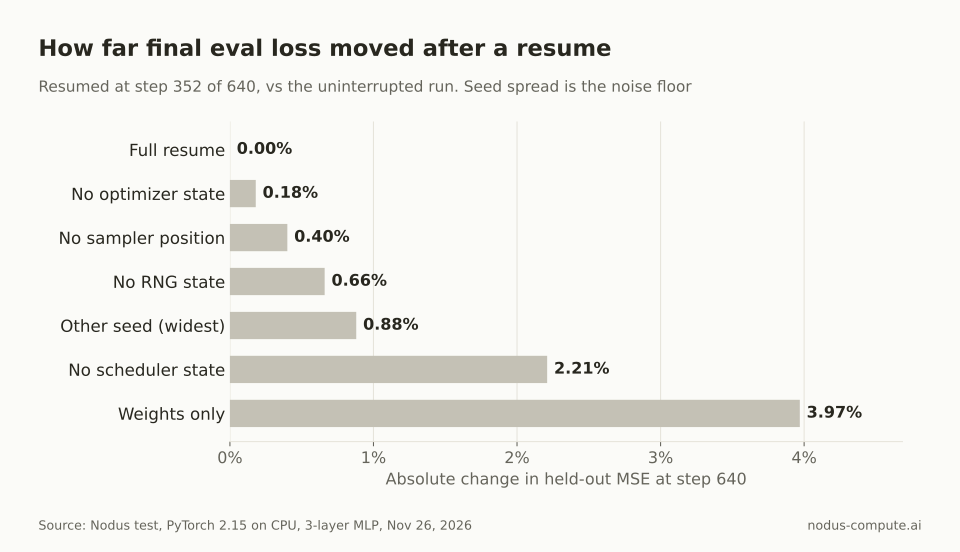 Only the missing scheduler moved the result beyond the seed-to-seed spread of 0.88%; the other omissions hid inside the noise.
The missing scheduler did the most damage. A fresh scheduler restarts warmup and cosine decay from step zero, so the run ended at an LR of 0.001948 instead of 0, about 65% of the peak. Training loss over the last 64 steps came out 2.55% worse. The damage showed up at step 355, not 353, because the optimizer’s own state dict carries the current LR for one step before the fresh scheduler overwrites it.
The missing sampler position looked like an improvement at first. Training loss over the 20 steps after the resume read 4.82% lower than the reference, because the run replayed the first 32 batches of the sixth epoch, 2,048 samples it had just trained on. It then ended before the last 2,048 samples of the final epoch.
Missing optimizer or RNG state stayed within noise on final loss here, which is a property of this small model, not a guarantee. The weights still drifted by up to 0.040.
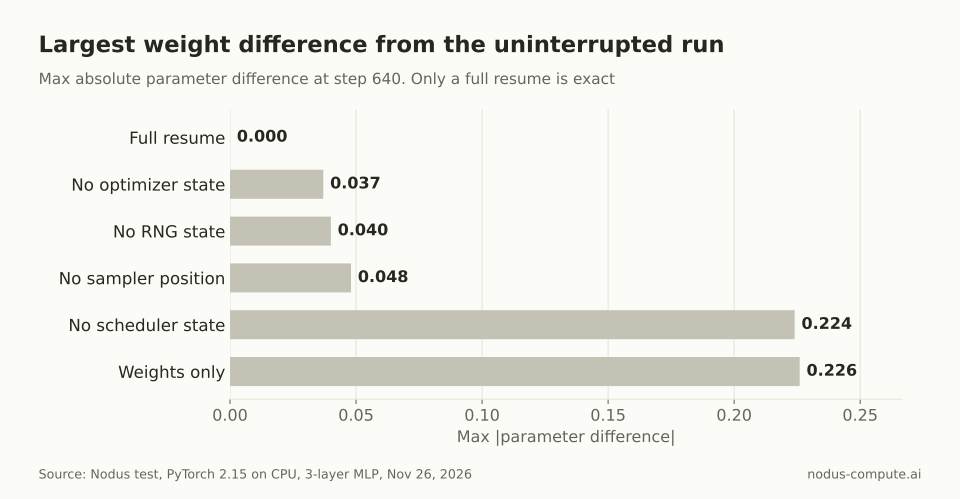 Every omission changed the weights; only comparing them, or the per-step losses, catches all of it.
How do you test that your resume is exact?
Section titled “How do you test that your resume is exact?”Compare per-step losses, not the final number. Our table shows why: three of the five broken resumes moved final eval loss by less than the 0.88% a different seed did. The test takes five steps:
- Fix every seed and call
torch.use_deterministic_algorithms(True). - Run N steps without stopping and record the loss of every step.
- Run K steps, save, and exit the process. Pick K in the middle of an epoch and before the LR schedule ends.
- Start a new process, load, run to N, and record losses.
- Check that every loss matches exactly. On CPU, demand bitwise equality.
On GPU, some kernels are nondeterministic. PyTorch’s reproducibility notes explain that torch.use_deterministic_algorithms() makes PyTorch throw an error when an operation has no deterministic implementation. If you cannot make the run deterministic, compare the resume against a second uninterrupted run instead: the resumed curve should sit as close to the reference as the two references sit to each other.
Run the test across at least one epoch boundary. We found a case where the resumed epoch was right and the next one was not. With torchdata 0.11.0, a StatefulDataLoader given its own generator and num_workers=0 restored the interrupted epoch exactly, then shuffled the following epochs differently from the uninterrupted run. With num_workers=2 all four epochs matched.
Our stop-and-resume test of the template above uses num_workers=2 and passes.
Which errors does current PyTorch throw when you load a checkpoint?
Section titled “Which errors does current PyTorch throw when you load a checkpoint?”Most loading failures come from one default and a handful of wrapper prefixes. We reproduced each of these on PyTorch 2.15.
weights_only=True rejects anything that is not a tensor or a plain Python type. The torch.load docs show it as the default, and the serialization notes say the default changed in version 2.6. A checkpoint holding np.random.get_state() fails with Unsupported global: GLOBAL numpy._core.multiarray._reconstruct. So does torch.save(model) of a whole module.
We hit a less obvious one too: an LR lambda that returned np.cos(...) put a NumPy scalar into the scheduler state, and loading failed on numpy._core.multiarray.scalar. Store NumPy values as tensors or Python numbers, as the template does. Use weights_only=False only for files you created yourself.
map_location="cpu" loads a GPU checkpoint on a machine without that GPU. The torch.load docs note that GPU tensors otherwise load back to the GPU they were saved from.
torch.compile adds _orig_mod. to every key. A compiled model’s state_dict() gives _orig_mod.0.weight, and a plain model rejects it. Save model._orig_mod.state_dict(), or compile after loading.
DistributedDataParallel adds module.. Save model.module.state_dict(), or strip the prefix with torch.nn.modules.utils.consume_prefix_in_state_dict_if_present(sd, "module.").
The DDP tutorial suggests saving on one process and loading on all, and warns that no process should start loading before the save finishes. Call dist.barrier() between the two. Each rank has its own RNG state, so an exact multi-rank resume saves RNG state per rank.
strict=False can load nothing and say nothing. We loaded the compiled model’s keys into a plain model with strict=False: it reported 4 missing and 4 unexpected keys, raised no error, and left every weight unchanged. If you use it, assert that missing_keys and unexpected_keys are what you expect.
A disabled GradScaler saves an empty dict. torch.amp.GradScaler("cuda", enabled=False), the usual setup on a CPU-only box, has state_dict() == {}. Loading that into an enabled scaler raises “The source state dict is empty, possibly because it was saved from a disabled instance of GradScaler”.
FSDP and other sharded models need Distributed Checkpoint. The DCP docs describe it as saving and loading from multiple ranks in parallel, with load-time resharding to a different cluster topology. The DCP recipe wraps get_state_dict and set_state_dict in a Stateful object passed to dcp.save and dcp.load; a single-process round trip of that pattern restored our weights exactly.
How big is each part of a checkpoint?
Section titled “How big is each part of a checkpoint?”The optimizer is usually the largest part. In our 74,497-parameter test model, AdamW state serialized to 601.6 kB against 300.7 kB for the weights, because AdamW keeps two moment tensors per parameter. All three RNG states together came to 18.2 kB: 6.6 kB for torch, 6.6 kB for NumPy and 5.0 kB for Python.
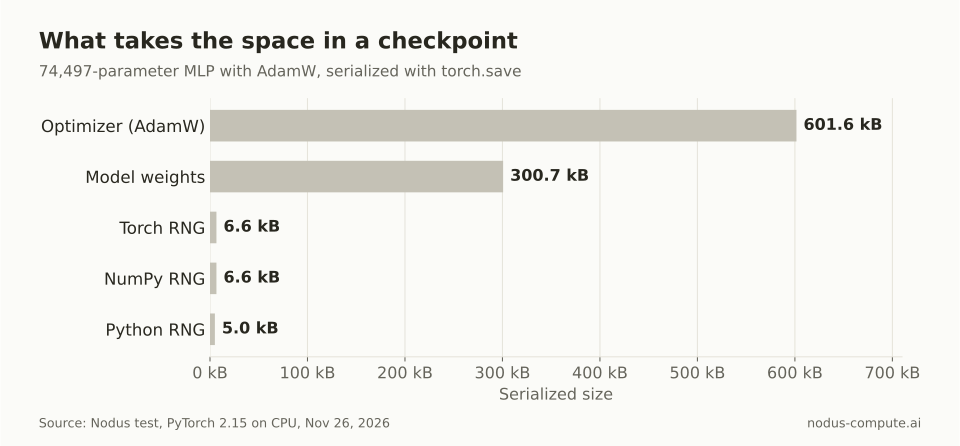 Plan storage for about three times the weights with AdamW; the RNG and loader state cost almost nothing.
How does Nodus save and resume PyTorch checkpoints?
Section titled “How does Nodus save and resume PyTorch checkpoints?”Nodus decides where checkpoints live and when they are taken; your code decides what goes in them. Point the save/load pair above at the state directory and load on start:
import os
STATE_DIR = os.environ.get("NODUS_STATE_DIR", "/nodus/state")CKPT = os.path.join(STATE_DIR, "last.pt")
# after building model, optimizer, scheduler, scaler and loader:step = load_checkpoint(CKPT, model, optimizer, scheduler, scaler, loader) if os.path.exists(CKPT) else 0
Launch it as a Job with that directory declared:
nodus run --gpu L4 --image nodus/pytorch --checkpoint /nodus/state -- python train.pyFrom there, according to the Nodus checkpoint guide and attempts and recovery:
- Nodus copies
/nodus/statewhile the Job runs. Withinterval: autoit picks the cadence from how often the capacity is interrupted and how long a save takes, gives a Job at least four checkpoints, and keeps time spent checkpointing to no more than about a tenth of the run. - It also checkpoints on
nodus suspendand when capacity gives notice that it is about to be reclaimed. The replacement attempt starts with the directory restored. - Checkpoints restore files, not memory. Your command runs again from the top, which is why the load-on-start line matters. Nodus never adds resume flags to your command, and sets
NODUS_RESTORED=1in an attempt that started from a checkpoint. - An empty state directory never replaces an earlier checkpoint that had files in it, so an attempt that crashes before saving cannot erase progress.
- With the SDK,
nodus.checkpoint.on_request(save)registers a save callback for checkpoint requests, and does nothing outside Nodus, so the same script runs on your laptop. - Multi-node Jobs (Beta) use
recovery.checkpoint.format: Dcp, where every rank saves throughnodus.checkpoint.dcpat the same step.
For how Nodus compares with other platforms on who saves, restarts and resumes, see automatic checkpointing and resume for training. Rates are on the pricing page.
Should I save the whole model with torch.save(model)?
Section titled “Should I save the whole model with torch.save(model)?”No. Save model.state_dict(). A pickled module depends on your class’s import path, and on PyTorch 2.15 the default torch.load refuses it with an Unsupported global error for the module class.
How do I resume a Hugging Face Trainer run on Nodus?
Section titled “How do I resume a Hugging Face Trainer run on Nodus?”Set Trainer’s output_dir to the state directory and call trainer.train(resume_from_checkpoint=True) when NODUS_RESTORED is 1. The Nodus checkpoint guide notes that Trainer refuses to resume from an empty directory, so call plain trainer.train() on a first start.
Can I resume on a different number of GPUs?
Section titled “Can I resume on a different number of GPUs?”The weights and optimizer state, yes: a full, unsharded state dict loads on any number of ranks. The data position and per-rank RNG will not line up exactly, and sharded FSDP state needs DCP, whose load-time resharding is built for this case.
Why does my loss jump right after resuming?
Section titled “Why does my loss jump right after resuming?”Check the scheduler first. In our test, a forgotten scheduler restarted warmup and left the LR at 65% of its peak at the end of the run. A dip instead of a jump usually means the loader restarted the epoch and is replaying batches the model just saw.
Do I need the CUDA RNG state if I save the CPU one?
Section titled “Do I need the CUDA RNG state if I save the CPU one?”Yes, if anything random runs on the GPU, such as dropout. torch.get_rng_state() covers the CPU generator only; torch.cuda.get_rng_state_all() returns one state per visible device.
More from the blog
gpu8 min read
DoRA vs LoRA: is DoRA worth using for fine-tuning?
DoRA beat LoRA by 1.0 to 4.4 points in its paper and adds few parameters, but trains and serves slower unmerged. When to try it, with the math.
Read the postdata8 min read
How do you transcribe thousands of hours of audio with Whisper?
Run faster-whisper as a sharded, resumable GPU batch job with one done marker per file. Cost math, a model and API decision rule, and tested code.
Read the post