
How do you move training jobs from Modal to Nodus?
A step-by-step Modal to Nodus migration for training jobs: what maps one to one, the code you change, checkpoints, spend caps and what to leave on Modal.
You move a Modal training job to Nodus by changing import modal to import nodus, adding a checkpoint path, and running it with nodus run app.py. Nodus keeps Modal’s names for App, @app.function, Image, Volume, Secret and the GPU strings, so a plain training function usually needs only a few edited lines. Web endpoints, modal.Dict, modal.Queue and parametrized classes have no Nodus equivalent, so apps built on them should stay on Modal or be split.
This is the hands-on version. If you are still deciding whether to move at all, read Nodus vs Modal or the Modal alternatives for training list first. Every Nodus command below is copied from our Modal users guide and the pages it links to.
What maps one to one from Modal to Nodus?
Section titled “What maps one to one from Modal to Nodus?”Most of a training app maps without changes beyond the import. We built this table from the side-by-side list in our Modal users guide and the argument table in the Functions guide, with Modal’s behavior taken from Modal’s own docs.
| Modal concept | Nodus equivalent | What changes |
|---|---|---|
modal.App("x") |
nodus.App("x") |
Only the import |
@app.function(gpu="H100", timeout=3600) |
@app.function(gpu="H100", timeout="1h") |
Timeouts also take Go-style strings such as "6h"; bare numbers are still seconds |
modal.Image.debian_slim().pip_install("torch") |
nodus.Image.debian_slim().pip_install("torch") |
from_registry, apt_install, run_commands, env, add_local_dir work the same |
modal.Volume.from_name("v", create_if_missing=True) |
The same | vol.commit() and vol.reload() behave as in Modal |
modal.Secret.from_name("hf") |
The same | Nodus adds Secret.from_dotenv(".env") |
gpu="H100", "H100:2", "A100-80GB", "L40S" |
The same spellings | "H100!" pins the exact variant; a list such as ["H100", "H200"] accepts either |
retries (Modal) |
retries, an int or nodus.Retries(...) |
Retries cover exceptions raised in the function |
| No built-in equivalent (Modal preemption guide) | checkpoint="/nodus/state" |
Files there are saved and restored when a worker is lost |
.remote(), .map(), .spawn(), call.get(), @app.local_entrypoint() and @app.cls() with enter and exit hooks also carry over as they are. The two rows that matter most for training are the last two, because they decide what a long run costs when something goes wrong.
What is the smallest real migration for a training function?
Section titled “What is the smallest real migration for a training function?”The smallest migration is the import swap plus one checkpoint argument. This is the training function from our Functions guide, unchanged:
import nodus
app = nodus.App("finetune")image = nodus.Image.debian_slim().pip_install("torch", "transformers==4.57.6")
@app.function(gpu="H100", image=image, timeout="6h", checkpoint="/nodus/state")def train(lr: float) -> dict:    ...
Compared with a Modal version, three things moved. modal became nodus in three places, the timeout became "6h" (21600 seconds would also work), and checkpoint was added. Install the SDK, sign in once, then run it the way you ran modal run:
pip install nodus-computenodus login # opens the console, stores a key for each org you picknodus run app.py # like `modal run`: an ephemeral App, deleted when the entrypoint returnsnodus deploy app.py # like `modal deploy`: a persistent AppIn CI, set NODUS_API_KEY instead of running nodus login. Before the first real run, call train.estimate(3e-4) from your entrypoint. It returns the expected cost, start time and hold for one call without running anything, which is the cheapest test that the port worked.
Two checks catch most failed first runs. The image’s Python minor version must equal yours, as on Modal, and a mismatch is refused before anything starts. If your app calls a class with constructor arguments, move that setup into an @nodus.enter() hook, because MyClass(arg=...) raises nodus.errors.Unsupported.
How do you make a migrated run survive a lost machine?
Section titled “How do you make a migrated run survive a lost machine?”You write your progress under /nodus/state and load it on start; Nodus copies that directory and restores it on the next machine. This is the part that changes behavior, not just syntax. Modal’s preemption guide says all Functions are preemptible by default, that the non-preemptible option is not supported for GPU Functions, and that an interrupted Function restarts on the same input. Resuming from where it stopped is left to your code.
On Nodus the save and restore of that directory is the platform’s job, and your program decides what to write. Our checkpoints guide, written for Jobs, says a Job gets at least four checkpoints over its expected run time. It also checkpoints when the capacity gives notice that it is about to be reclaimed. A restored attempt starts your command again from the beginning with the directory as it was, so the loop must read its step back.
If you train with Hugging Face Trainer, the guide’s recipe for Jobs is short. Set output_dir to the state directory and set save_steps and save_total_limit. Call trainer.train(resume_from_checkpoint=True) when NODUS_RESTORED is 1, and plain trainer.train() on a first start. That last condition matters because Trainer refuses to resume from an empty directory.
With checkpoints in place you can also add interruptible=True to the decorator. That allows cheaper interruptible capacity while the checkpoint keeps your progress, according to the Modal users guide.
How do you put a hard spending cap on a migrated job?
Section titled “How do you put a hard spending cap on a migrated job?”Run the training script as a Nodus Job with --max-cost, not as a Function. This is the one gotcha we found while writing this guide. The Modal users page shows max_cost=40 on a Function, but the current Functions guide says max_cost is not available for Functions yet and a deploy that sets it is refused. Jobs and Sandboxes take it.
If your Modal function was a thin wrapper around a train.py, the Job path is also the shorter port. These examples are copied from the nodus run reference:
nodus run --gpu L4 --image nodus/pytorch -- python train.py nodus run --gpu H100:8 --max-cost 40 -d -- torchrun train.pyThe first runs a script on one NVIDIA L4. The second runs on eight NVIDIA H100s, stops at $40 of spend and returns as soon as the Job is created. Add --dry-run to print the estimate only. The checkpoint path defaults to /nodus/state, so the resume logic above works unchanged.
How do you move your data and secrets?
Section titled “How do you move your data and secrets?”Copy each Volume once and recreate each Secret by name; the code that mounts them does not change. On the Modal side, the Modal volume CLI downloads a whole Volume to a local folder:
modal volume get <volume_name> / volume_data_dumpOn the Nodus side, create a Volume and upload the folder with nodus volume put. These lines follow our Volumes guide, with its example Volume renamed to data:
nodus create volume data --size 100Ginodus volume put data ./data /data # uploads ./data and prints the new revisionFor model weights, skip the round trip: a Nodus Volume can import straight from Hugging Face, git, a URL or S3. For secrets, nodus.Secret.from_name("hf") reads the same as on Modal, and Secret.from_dotenv(".env") saves retyping keys you already keep in a local file.
What does the same training job cost on each?
Section titled “What does the same training job cost on each?”At list prices, the 6-hour H100 job above costs about a third less on Nodus, and more on older GPUs. We priced one call of that function, 6 hours on one GPU, from each company’s public pricing page.
Modal bills an NVIDIA H100 at $0.001097 per second on its pricing page. Six hours is 21,600 seconds, so the GPU meter alone comes to 21,600 x $0.001097 = $23.70. Modal bills CPU and memory on separate meters on top of that.
The H100 SXM is listed at $2.60/hr on the Nodus pricing page, so the same 6 hours is 6 x $2.60 = $15.60. That is $8.10, or 34%, less.
On an A100 80 GB the gap is wider. Modal lists $0.000694 per second, so 21,600 seconds cost $14.99. Nodus lists $1.09/hr, so 6 hours cost $6.54.
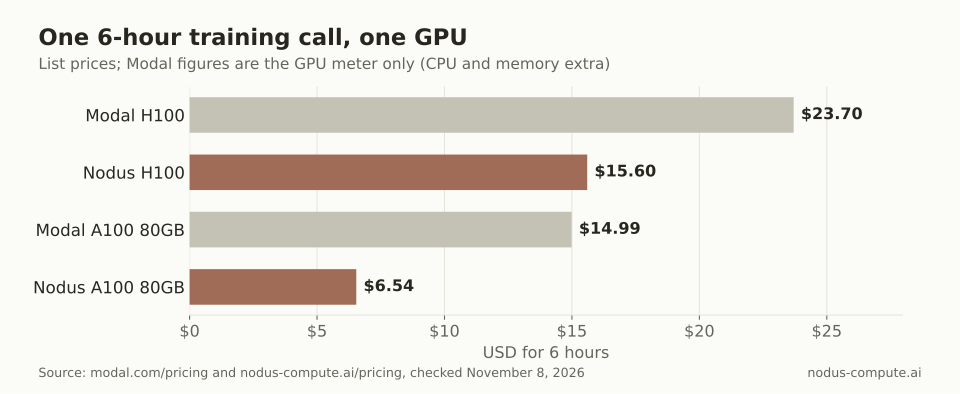 The same 6-hour function, priced at each company’s list rate: the move saves more on the A100 than on the H100.
For a full Modal bill with CPU, memory and region pricing, see Modal pricing explained. Real Nodus runs also record boot and teardown in their cost, which is why train.estimate() beats rate x hours for planning.
Which training jobs should you move first?
Section titled “Which training jobs should you move first?”Move first the long single-node jobs on the GPU types with the widest price gap, then the rest. We derived this rule from the list prices below and the feature limits in the Modal users guide.
| GPU | Modal per hour | Nodus listed per hour | Lower on Nodus |
|---|---|---|---|
| L40S | $1.9512 | $0.793 | 59.4% |
| A100 80 GB | $2.4984 | $1.09 | 56.4% |
| H100 | $3.9492 | $2.60 | 34.2% |
| H200 | $4.5396 | $3.593 | 20.9% |
| B200 | $6.2496 | $5.50 | 12.0% |
Prices checked November 8, 2026. Modal hourly figures are its per-second list prices ($0.000542, $0.000694, $0.001097, $0.001261 and $0.001736) times 3,600, GPU meter only. Nodus figures are from the Nodus pricing page.
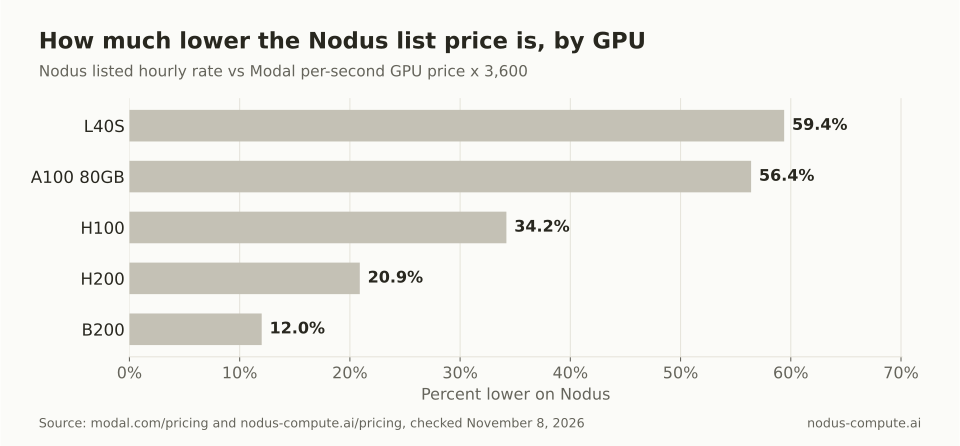 Start the migration where the gap is largest: L40S and A100 jobs first, B200 jobs last.
Our order, in practice:
- Fine-tunes and training runs on L40S, A100 or H100 that last more than an hour and use only
App, functions,Image,VolumeandSecret. These are import swaps with the biggest savings. - Sweeps written with
.map(), which works the same, so each parameter runs as its own call. - Multi-node jobs.
@nodus.clustered(size=2)replaces@modal.experimental.clustered(size=2), but it is Beta, it needs the distributed training beta for your org, and checkpointed resume of a gang is not yet qualified. - B200 work last, unless it is a long run where the 12% still adds up.
When should you stay on Modal?
Section titled “When should you stay on Modal?”Stay on Modal for anything that serves your own web traffic. Nodus has no @modal.web_endpoint or @modal.asgi_app; nodus.InferenceEndpoint serves models instead. A training pipeline that trains on one platform and serves from a Modal endpoint is a fine split.
Stay too if the app leans on modal.Dict or modal.Queue. Nodus has no equivalent, so you would pass data through return values, a Volume or your own database. The same goes for code built around parametrized classes or sb.tunnels.open(8080), which Nodus does not offer yet.
Short jobs inside an app your team already runs on Modal rarely repay the effort, and Modal’s Starter plan includes $30 a month of free credits (pricing). A few minutes of experiments a day may never leave that allowance.
Can I keep part of an app on Modal and move only the training function?
Section titled “Can I keep part of an app on Modal and move only the training function?”Yes. The two SDKs are separate packages, so the training function can live in its own file that imports nodus while the serving code keeps import modal. Pass weights between them through Hugging Face or your own object storage.
Do I need to change how I call a deployed function?
Section titled “Do I need to change how I call a deployed function?”Only the import. nodus.Function.from_name("app", "f") replaces modal.Function.from_name("app", "f"), and Function.lookup also works. Calls through .remote(), .spawn() and .map() read the same, and every blocking call has an .aio form.
Does Nodus have Modal’s 24-hour timeout per attempt?
Section titled “Does Nodus have Modal’s 24-hour timeout per attempt?”Modal’s timeouts guide allows 1 second to 24 hours per attempt. Nodus timeouts take seconds or strings such as "6h", and days are not a unit. For runs that outlast any single machine, the checkpoint argument carries progress across attempts.
Will my existing Modal checkpoint files work on Nodus?
Section titled “Will my existing Modal checkpoint files work on Nodus?”They are ordinary files, so yes, if your code wrote them. Copy them into the Nodus Volume or state directory, and your load-on-start logic picks them up the same way.
How do I know the port is correct before paying for a long run?
Section titled “How do I know the port is correct before paying for a long run?”Run the function once on a small input, and call .estimate() first. Nodus prints the expected wait when a GPU call has no warm worker, so a slow first start is not mistaken for a broken port.
More from the blog
datacenter7 min read
How much does an NVIDIA B200 cost to buy or rent?
NVIDIA B200 price: $5.50 to $7.99 per GPU-hour on demand, or $591,114.20 for an 8-GPU DGX B200. Buying beats Nodus above about 60% utilization.
Read the postpricing9 min read
What are the best Crusoe Cloud alternatives for AI teams?
Crusoe Cloud alternatives for small AI teams: Nodus, RunPod, Lambda and Modal compared on single-GPU access, H100 price, spot and spend caps.
Read the post