
Nodus vs Daytona: which sandbox should AI agents use?
Nodus Sandboxes vs Daytona for AI agent code: idle rules, network defaults, lifetimes, GPUs, Windows and VMs, and what an agent fleet costs per month.
Nodus Sandboxes are the better fit for agents that run long Linux commands on a budget. Daytona is the better fit when the agent needs Windows, macOS, a VM that keeps its memory across a pause, or cheap preemptible GPUs. The difference most teams hit first is idle handling: Daytona stops a sandbox after 15 minutes without outside interaction even if a process is still running, while a Nodus sandbox treats any running command as activity.
We build Nodus. Every Daytona fact below links to Daytona’s own docs or pricing page, prices were checked on November 2, 2026, and there is a section on where Daytona is the better choice. For a wider field that also covers E2B and Modal, see which sandbox is best for running AI agent code and our Nodus vs E2B comparison.
How do Nodus and Daytona compare at a glance?
Section titled “How do Nodus and Daytona compare at a glance?”| Nodus Sandboxes | Daytona | |
|---|---|---|
| Sandbox types | Linux containers on CPU, plus GPU sandboxes on dedicated on-demand machines | Linux containers by default, plus Linux VM, Windows, macOS and GPU sandboxes |
| Isolation | User-space kernel filtering system calls, per-sandbox network namespace and firewall, non-root process | Each sandbox gets its own kernel, filesystem and network stack, per Daytona’s docs |
| Network by default | No outbound traffic (Deny); AllowList and Open are opt-in |
Set by billing tier: restricted on Tiers 1 and 2, full internet on Tiers 3 and 4 |
| Idle stop | After 5 minutes by default; a running command counts as activity | Containers after 15 minutes by default; a running process alone does not reset the timer |
| Hard lifetime | maxLifetime, 24 hours by default, up to 720 hours |
Optional wall-clock TTL in minutes |
| What a stop keeps | Files (/workspace first); processes restart |
Files on containers; VM sandboxes can pause with memory kept |
| Per-sandbox dollar cap | maxCostUSD stops the sandbox at the cap |
Tier compute pools limit total vCPU, memory and disk |
| GPUs | Dedicated on-demand, never preempted | On-demand up to 8 GPUs, plus spot sandboxes with no preemption warning |
| 4 vCPU, 16 GiB price | $0.1054/hr, 64 GiB disk included | $0.4608/hr, first 5 GiB of storage free |
Prices checked November 2, 2026. Sources: Nodus pricing, Nodus Sandboxes guide, Nodus sandbox isolation, Daytona pricing, Daytona sandboxes, Daytona network limits, Daytona limits.
Will the sandbox stop while my agent’s command is still running?
Section titled “Will the sandbox stop while my agent’s command is still running?”On Daytona it can, and this is the detail to check before you migrate a long task. Daytona’s auto-stop interval defaults to 15 minutes, and its docs warn that a task like LLM inference running longer than that without external interaction may stop mid-process, because the process itself does not count as activity. The fix on Daytona is to set auto_stop_interval=0 and rely on a TTL instead.
Nodus counts work differently. Per the Sandboxes guide, every command counts as activity, so a sandbox never stops as idle while a command runs. Each command has its own timeout, 10 minutes unless you set one and at most 24 hours, and the sandbox keeps running when a command hits it.
Our decision rule from reading both lifecycles: check whether your agent ever launches a test suite, a build or a model call that runs longer than 15 minutes without polling. If it does, either disable Daytona’s auto-stop and add a TTL, or use a platform that treats the running process as work. Skipping both is how a sandbox dies halfway through a 40-minute build.
What does an agent fleet cost on Nodus vs Daytona?
Section titled “What does an agent fleet cost on Nodus vs Daytona?”At list prices, the same sandbox-hours cost roughly a fifth to a quarter as much on Nodus. Daytona bills $0.0504 per vCPU-hour and $0.0162 per GiB of memory per hour on its pricing page. Nodus lists fixed CPU and memory sizes on its pricing page.
| Sandbox size | Nodus | Daytona | Daytona math |
|---|---|---|---|
| 1 vCPU, 2 GiB | $0.0179/hr | $0.0828/hr | 0.0504 + 2 x 0.0162 |
| 2 vCPU, 4 GiB | $0.0357/hr | $0.1656/hr | 2 x 0.0504 + 4 x 0.0162 |
| 4 vCPU, 16 GiB | $0.1054/hr | $0.4608/hr | 4 x 0.0504 + 16 x 0.0162 |
Prices checked November 2, 2026. Daytona storage beyond the first 5 GiB is $0.000108 per GiB-hour; the Nodus sizes include disk (64 GiB at 4 vCPU, 16 GiB).
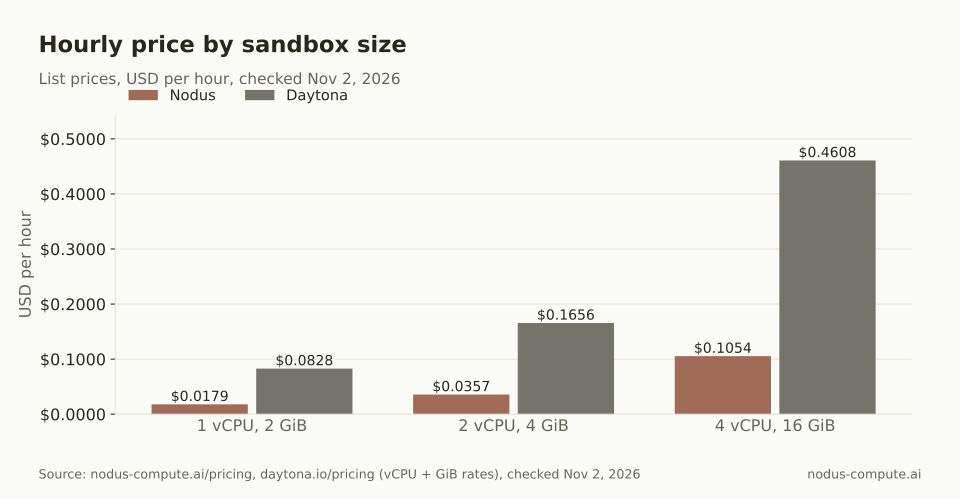
The gap holds at every size: each Nodus shape is listed at 22% to 23% of Daytona’s compute price.
Here is a worked example. Take 20 coding agents, each with a 4 vCPU, 16 GiB sandbox, busy 6 hours a day for 22 working days. That is 20 x 6 x 22 = 2,640 sandbox-hours a month.
- Nodus: 2,640 x $0.1054 = $278.26.
- Daytona: 2,640 x $0.4608 = $1,216.51, before any storage above the free 5 GiB.
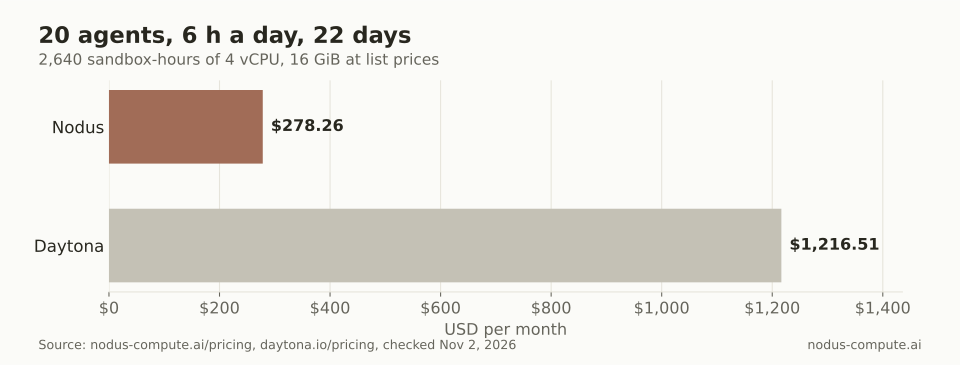
Same fleet, same hours: $938.25 a month apart at list prices.
Two things change this in practice. Daytona includes $200 of free compute, which covers about 434 hours of the 4 vCPU, 16 GiB size. Fleet size also hits Daytona’s tier pools: 20 sandboxes at 16 GiB need 320 GiB of memory at once, above Tier 2’s 200 GiB pool, so this fleet needs Tier 3, which requires a $500 top-up.
How do the network defaults differ?
Section titled “How do the network defaults differ?”Nodus starts closed. A sandbox has no route out until you choose AllowList, which permits named hosts such as github.com through an injected proxy, or Open. Private ranges and cloud metadata addresses stay blocked under every policy, and no public inbound connections are accepted, per the isolation docs.
Daytona ties defaults to your billing tier. Its network limits page says Tiers 1 and 2 get restricted access that cannot be overridden per sandbox, while Tiers 3 and 4 get full internet access by default and can set networkAllowList, domainAllowList or networkBlockAll per sandbox. That means a Tier 3 team gets open egress unless each create call sets a policy.
For agents that read untrusted input, such as web pages, issues or emails, default-deny is the safer starting point. Our guide on how to sandbox an AI agent covers why egress is where prompt injection turns into data loss.
How do you stop a runaway sandbox from running up a bill?
Section titled “How do you stop a runaway sandbox from running up a bill?”On Nodus you put the limit on the sandbox itself. maxCostUSD stops a sandbox once it has cost that amount, maxLifetime deletes it 24 hours after creation by default, and a project Budget can block new work across every sandbox, per the Sandboxes guide and Budgets docs. A stopped sandbox wakes on the next command, unless it stopped for a full budget or cap.
Daytona gives you time-based controls: auto-stop, auto-archive, auto-delete and a wall-clock TTL, all in minutes, per its sandbox lifecycle docs. Its tier pools cap how much vCPU, memory and storage all running sandboxes can hold. Both stop runaway compute; Nodus can also stop it at a dollar figure.
Where is Daytona the better choice?
Section titled “Where is Daytona the better choice?”Daytona wins on breadth of machine types. If your agent drives Windows software, needs a desktop, or must run on Apple silicon, Daytona offers Windows, Linux VM and macOS sandboxes, and Nodus Sandboxes are Linux only.
It also wins when an agent must pause and resume with its processes intact. Daytona VM sandboxes can pause with filesystem and memory state preserved. On Nodus, files survive a stop but processes do not, so long-lived servers must be started again from your code.
Daytona is the cheaper option for interruptible GPU work. Its pricing page lists preemptible GPU sandboxes, for example an NVIDIA H100 at $2.27/hr, and on-demand GPU sandboxes scale to 8 GPUs. Spot sandboxes can be terminated without notice, so they suit work you can retry. Daytona also offers linked sandboxes that share a local network, SDKs in Python, TypeScript, Ruby, Go and Java, and $200 of free compute.
How do you move a Daytona sandbox to Nodus?
Section titled “How do you move a Daytona sandbox to Nodus?”The smallest migration is a create call and an exec. This is a Daytona medium sandbox (2 vCPU, 4 GiB) with a 15-minute auto-stop and a 2-hour TTL, from Daytona’s sandbox docs:
from daytona import Daytona, CreateSandboxFromSnapshotParams
daytona = Daytona()sandbox = daytona.create(CreateSandboxFromSnapshotParams(    snapshot="daytona-medium",    auto_stop_interval=15,    ttl_minutes=120,))sandbox.process.exec("python -c 'print(6 * 7)'")
The same sandbox on Nodus, using the Python SDK (pip install nodus-compute), adds a dollar cap and keeps egress denied by default:
import nodus
sb = nodus.Sandbox.create(    name="agent-1",    cpu=2, memory="4Gi",    idle_timeout="15m", timeout="2h",    max_cost=5,)p = sb.exec("python", "-c", "print(6 * 7)")print(p.stdout.read().strip(), p.wait())
Creating agent-1 again with the same arguments reconnects to the existing sandbox instead of making a second one, so an agent can run the same create call after every restart. Allow-list egress, ports and volumes are not yet available from the Python SDK; use the manifest or CLI for allow-list egress.
Can I keep sandboxes in the US on either platform?
Section titled “Can I keep sandboxes in the US on either platform?”Yes. On Nodus, pass regions=["us"] (or spec.placement.regions in a manifest), and the request waits rather than falling back to another region. On Daytona, set target="us" in the client config, as its sandbox docs show.
Does Nodus have GPU sandboxes like Daytona?
Section titled “Does Nodus have GPU sandboxes like Daytona?”Yes. Nodus GPU sandboxes run on dedicated on-demand machines that are never preempted, and their local files do not survive a stop, so keep durable data in an external filesystem. Daytona offers both on-demand and spot GPU sandboxes.
Can an AI agent keep using the same sandbox across sessions?
Section titled “Can an AI agent keep using the same sandbox across sessions?”On both. On Nodus, creating a sandbox with the same name and spec returns the existing one and starts it if stopped, with /workspace restored. On Daytona you keep the sandbox ID and start it again. Stopped containers are archived to object storage after 7 days by default and are not auto-deleted unless you set an interval.
What happens to a Nodus sandbox if its machine fails?
Section titled “What happens to a Nodus sandbox if its machine fails?”A CPU sandbox in the default Snapshotted mode restarts on another machine from its last snapshot. Snapshots are taken at every stop and about every 10 minutes while it runs, so at most the work since the last snapshot is lost.
More from the blog
fine-tuning6 min read
How do you decide which synthetic examples belong in a fine-tuning dataset?
A generated answer can be correct and still add little training value. Audit the target, the available evidence and the decision it teaches before training.
Read the postcheckpointing7 min read
What happens to your training job when GPU capacity runs out?
Capacity can run out before a training job starts or halfway through it. What each platform does in both cases, and what a reclaim costs you.
Read the post