
How do you run GRPO with TRL or Unsloth on a cloud GPU?
A minimal TRL GRPOTrainer script, the Unsloth swap for one GPU, GPU sizing by model size, and checkpoint settings that survive a reclaimed GPU.
Running GRPO on a cloud GPU takes one Python file and one launch command: a reward function, a Hugging Face TRL GRPOConfig and GRPOTrainer, and checkpoints saved where a restart can find them. Nodus runs that file as an ordinary Job, for example on an RTX 3090 listed at $0.18/hr on the Nodus pricing page, and restores the checkpoints on a new machine if the GPU is reclaimed. Swap in Unsloth when the model only fits one GPU with its memory savings.
This post is the bring-your-own-script path. If you want the theory first, read what GRPO is and how its advantages are computed, or how it compares with PPO and DPO.
What does a minimal TRL GRPOTrainer script look like?
Section titled “What does a minimal TRL GRPOTrainer script look like?”It needs a dataset with a prompt column, a reward function that returns one float per completion, and a config. This one trains a LoRA adapter on Qwen3-1.7B to answer GSM8K math problems, and rewards an exact match on the number inside \boxed{}. The reward function follows Example 3 in the TRL GRPO Trainer docs, adapted to the conversational format.
import osimport re
import nodusfrom datasets import load_datasetfrom peft import LoraConfigfrom transformers.trainer_utils import get_last_checkpointfrom trl import GRPOConfig, GRPOTrainer
STATE = os.environ.get("NODUS_STATE_DIR", "state")        # Nodus checkpoints this directoryOUTPUTS = os.environ.get("NODUS_OUTPUTS_DIR", "outputs")  # collected when the Job succeedsMODEL = os.environ.get("MODEL", "Qwen/Qwen3-1.7B")

def to_prompt(row):    question = row["question"] + "\nPut the final number inside \\boxed{}."    return {        "prompt": [{"role": "user", "content": question}],        "ground_truth": row["answer"].split("####")[-1].strip().replace(",", ""),    }

def correct(completions, ground_truth, **kwargs):    texts = [c[0]["content"] for c in completions]    found = [re.search(r"\\boxed\{([^}]*)\}", t) for t in texts]    return [1.0 if m and m.group(1).strip().replace(",", "") == gt else 0.0            for m, gt in zip(found, ground_truth)]

dataset = load_dataset("openai/gsm8k", "main", split="train")dataset = dataset.map(to_prompt, remove_columns=["question", "answer"])
args = GRPOConfig(    output_dir=STATE,    num_generations=8,              # group size G    per_device_train_batch_size=8,  # 8 x 1 GPU x 4 accumulation = 32 completions, divisible by 8    gradient_accumulation_steps=4,    max_completion_length=512,    beta=0.0,                       # no KL term, so no reference model in memory    learning_rate=1e-5,    max_steps=500,    save_steps=25,    save_total_limit=2,    logging_steps=10,    # use_vllm=True,                # generate with vLLM, colocate mode by default)
trainer = GRPOTrainer(    model=MODEL,    reward_funcs=correct,    args=args,    train_dataset=dataset,    peft_config=LoraConfig(r=16, lora_alpha=32, target_modules="all-linear", task_type="CAUSAL_LM"),    callbacks=[nodus.checkpoint.HFTrainerCallback()],  # also save when Nodus asks)last = get_last_checkpoint(STATE) if os.path.isdir(STATE) else Nonetrainer.train(resume_from_checkpoint=last)trainer.save_model(os.path.join(OUTPUTS, "adapter"))
We ran this exact file with TRL 1.18.2 and PEFT 0.22.0 on a CPU, with a tiny test model, completions cut to 16 tokens and a save every step. That checks the config, the reward plumbing and the resume path. It says nothing about speed or learning. Two things it showed are worth knowing before you pay for a GPU, and they are in the sections below.
Which GRPOConfig settings actually matter?
Section titled “Which GRPOConfig settings actually matter?”Five settings decide whether the run starts, fits and learns. The defaults below are from the GRPOConfig reference, checked November 19, 2026.
num_generations(default 8) is the group size. The effective batch, processes × per-device batch × accumulation steps, must divide evenly by it. With one GPU, 8 × 4 = 32 completions per generation, which is 4 prompts of 8 answers each.max_completion_length(default 512) caps each answer. Generation is usually most of a GRPO step, so this is your main cost knob. Watchcompletions/clipped_ratioin the logs: if most answers hit the cap, the model is being cut off mid-reasoning.beta(default 0.0) is the KL coefficient. At 0 the reference model is not loaded, which saves memory. The docs note DeepSeek-R1 used 0.001 if you want the KL term back.use_vllm(default False) andvllm_mode(default"colocate"). Colocate runs vLLM inside the training process on the same GPU, holdingvllm_gpu_memory_utilizationof it (default 0.3). Server mode runs vLLM on separate GPUs. The docs warn that a server sharing GPUs with the trainer can hit NCCL errors.peft_configmakes it a LoRA run, and addingquantization_configto the trainer makes it QLoRA. TRL’s LoRA Without Regret page recommends rank 1 to 32 for RL, all linear layers, and a learning rate of 1e-5 for LoRA against 1e-6 for full fine-tuning. GRPOConfig’s own default is 1e-6, which is why the script sets it.
The divisibility rule is the one that fails fast. When we set num_generations=12 with the batch above, TRL 1.18.2 stopped before loading the model:
ValueError: generation_batch_size (32) must be divisible by num_generations (12).That is cheap to hit on a laptop and annoying to hit after a model download on a paid GPU. Pick the group size first, then make per-device batch × accumulation × GPU count a multiple of it.
The other thing our test showed is what a dead reward looks like. The tiny random model never produced a \boxed{} answer, so every reward was 0. The logs read loss 0, grad_norm 0 and frac_reward_zero_std 1, which TRL defines as the share of samples whose group rewards have zero spread. A real run that logs that is learning nothing: make the task easier or start from a model that solves it some of the time.
When should you pick Unsloth instead of plain TRL?
Section titled “When should you pick Unsloth instead of plain TRL?”Pick Unsloth when you are on one GPU and memory is the limit, especially with long completions. Unsloth patches the model and then hands it to the same GRPOTrainer, so the reward function and config above carry over.
Its RL guide publishes a component breakdown for Llama 3.1 8B at 20K context with 8 generations per prompt. Unsloth needs 54.3 GB in total; a standard implementation with Flash Attention 2 needs 510.8 GB. Most of the gap is training memory (42 GB against 414 GB) and the GRPO loss logits (9.8 GB against 78.3 GB).
Unsloth also shares one memory pool with vLLM, which removes a separate 16 GB inference copy, so its inference line is 0 GB. The 2.5 GB KV cache is the same in both.
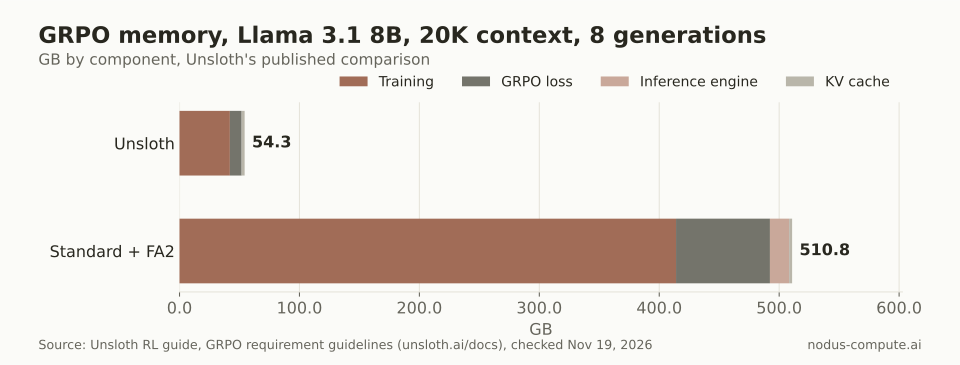 At long context, Unsloth’s numbers put an 8B GRPO run on one 80 GB card instead of several.
The change is the model loading. This is adapted from Unsloth’s Qwen3 (4B) GRPO notebook:
from unsloth import FastLanguageModel
lora_rank = 32model, tokenizer = FastLanguageModel.from_pretrained(    model_name = "unsloth/Qwen3-4B-Base",    max_seq_length = 2048,    load_in_4bit = False,           # False for LoRA 16bit    fast_inference = True,          # Enable vllm fast inference    max_lora_rank = lora_rank,    gpu_memory_utilization = 0.9,   # Reduce if out of memory)model = FastLanguageModel.get_peft_model(    model,    r = lora_rank,    target_modules = ["q_proj", "k_proj", "v_proj", "o_proj",                      "gate_proj", "up_proj", "down_proj"],    lora_alpha = lora_rank * 2,    use_gradient_checkpointing = "unsloth",)
Then pass model=model and processing_class=tokenizer to GRPOTrainer and drop peft_config, because the model already has its adapter. For models vLLM does not support, Unsloth says to set fast_inference=False.
Stay on plain TRL when you need several GPUs. TRL’s docs cover vLLM server mode and a 70B-plus recipe with DeepSpeed ZeRO Stage 3 across nodes, while Unsloth’s GRPO guide and notebooks are written for a single GPU. For how sharding works across GPUs, see FSDP vs DDP.
Which GPU do you need for your model size?
Section titled “Which GPU do you need for your model size?”Use Unsloth’s rule and add headroom. For 4-bit QLoRA GRPO, the RL guide says the VRAM you need in GB roughly equals the parameter count in billions, and 16-bit LoRA uses “at minimum 4x more.” Longer context needs more. We add 25% on top and pick the cheapest card on the Nodus pricing page with at least that much memory.
| Model | QLoRA rule × 1.25 | Cheapest card that fits | LoRA rule × 1.25 | Cheapest card that fits |
|---|---|---|---|---|
| 1.5B | 1.9 GB | RTX 3070 8 GB, $0.133/hr | 7.5 GB | RTX 3070 8 GB, $0.133/hr |
| 4B | 5 GB | RTX 3070 8 GB, $0.133/hr | 20 GB | RTX 3090 24 GB, $0.18/hr |
| 8B | 10 GB | RTX A4000 16 GB, $0.173/hr | 40 GB | RTX A6000 48 GB, $0.333/hr |
| 14B | 17.5 GB | RTX 3090 24 GB, $0.18/hr | 70 GB | A100 80 GB, $1.09/hr |
| 32B | 40 GB | RTX A6000 48 GB, $0.333/hr | 160 GB | B200 180 GB, $5.50/hr |
| 70B | 87.5 GB | RTX PRO 6000 96 GB, $1.35/hr | 350 GB | more than one GPU |
Prices checked November 19, 2026 (listed as hourly supply prices on the Nodus pricing page).
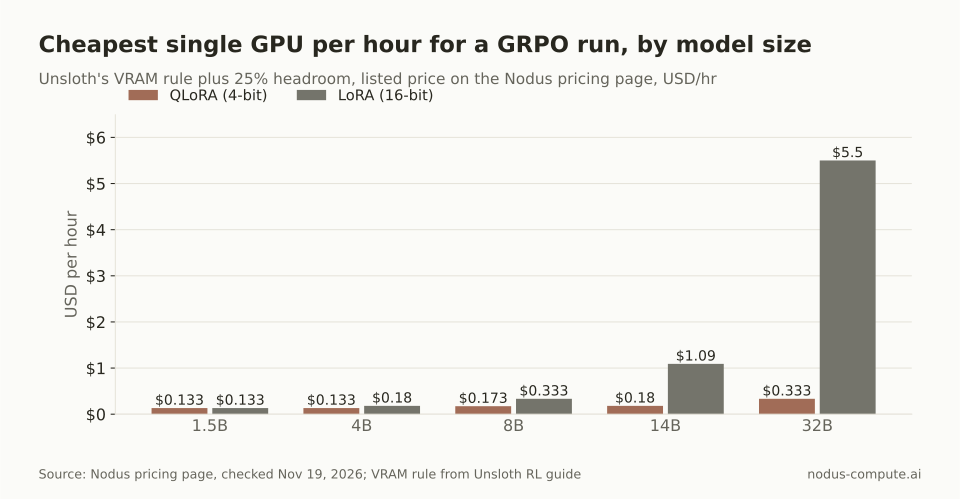 QLoRA keeps every size up to 32B under $0.35/hr; 16-bit LoRA at 32B costs about 16.5x more per hour.
Two caveats. The rule is Unsloth’s and assumes Unsloth’s memory savings, so plain TRL at long completion lengths needs more. That is why the script above, a 1.7B model the rule would put on a 16 GB card, runs on a 24 GB RTX 3090. And if you would rather not name a card, the Jobs guide lets you set resources.gpu.minMemory and Nodus picks any GPU with at least that much.
How do you make a GRPO run survive a reclaimed GPU?
Section titled “How do you make a GRPO run survive a reclaimed GPU?”Write Trainer checkpoints into /nodus/state, save often, and resume from the newest one on restart. Per the Nodus checkpoints guide, Nodus copies that directory while the Job runs and restores it into the next attempt. It restores files, not memory: your command starts again from the top and must load its own progress.
The guide’s Hugging Face Trainer recipe maps to three lines of the script. output_dir points at NODUS_STATE_DIR. save_steps and save_total_limit=2 keep regular saves without filling the disk. HFTrainerCallback() makes the Trainer save at the end of the current step when Nodus asks, including when capacity gives notice before it is reclaimed.
We changed one thing from the guide. It suggests resume_from_checkpoint=True when NODUS_RESTORED is 1, but as the guide notes, the Trainer refuses to resume from an empty directory. In our test, True on an empty folder raised No valid checkpoint found in output directory. Passing get_last_checkpoint(STATE) resumes when a checkpoint-N folder exists and starts fresh when none does; our second run, pointed at a folder holding checkpoint-2, trained only steps 3 and 4.
Why save_steps=25? GRPOConfig’s default is 500, and an interruption with no warning repeats everything since the last save, up to save_steps - 1 steps.
Read step_time from your logs. At an example 30 s per step, the default can redo 499 × 30 s = 249.5 minutes, every 100 steps 49.5 minutes, and every 25 steps 12 minutes. On an RTX A6000 at $0.333/hr, that is $1.38, $0.27 and $0.07 of repeated work.
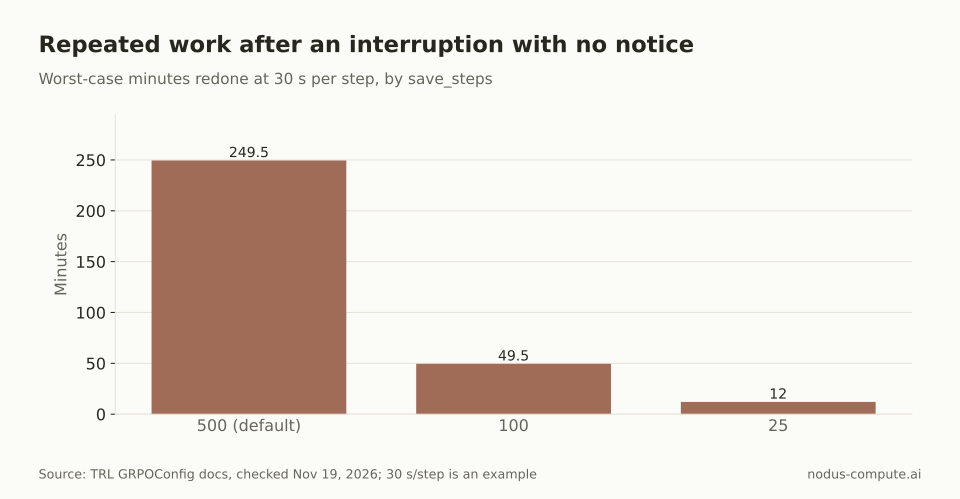 Frequent saves are cheap for LoRA, because a checkpoint holds the adapter and optimizer state, not the base model.
That last point is from our test: each checkpoint-N folder held the adapter weights, optimizer, scheduler, RNG state and trainer state, and no base model weights. The wider pattern is in how to make spot GPU training survive preemption.
How do you launch the script as a Nodus Job?
Section titled “How do you launch the script as a Nodus Job?”Run it from the folder that holds train_grpo.py. The flags come from the nodus run reference and the checkpoints guide:
$ pip install nodus-compute$ nodus login$ nodus run --name grpo-qwen3 --gpu A6000 --image nodus/pytorch:2.8-cuda12.8 \ --checkpoint /nodus/state --interruptible \ --max-cost 5 --timeout 24h -d \ --output adapter=/nodus/outputs/adapter \ -- sh -c 'pip install trl==1.18.2 peft==0.22.0 datasets nodus-compute && python train_grpo.py'$ nodus logs -f job/grpo-qwen3$ nodus cp job/grpo-qwen3:outputs/adapter ./adapterAdd --dry-run first to see the estimate without starting anything. A6000 is a type name the GPU guide uses; nodus get gpus lists the exact type names, including cheaper cards such as the RTX 3090. The nodus/pytorch:2.8-cuda12.8 catalog image ships PyTorch 2.8, which meets the torch>=2.6.0 that TRL 1.18.2 declares. --interruptible allows capacity that can be reclaimed, which is the case the checkpoint setup covers.
--max-cost 5 is a cap, not a quote. Per the budgets guide, a Job that reaches its cap checkpoints and suspends with MaxCostReached, and raising the cap resumes it. Every restored attempt reinstalls the packages and downloads the model again, so that time is billed; for repeat runs, build an Image with the packages baked in.
What will the run cost, and is a faster GPU worth it?
Section titled “What will the run cost, and is a faster GPU worth it?”Budget hours first. Unsloth’s guide says to wait at least 300 steps for the reward to rise, and that decent results “may need” a minimum of 12 hours. Twelve hours of an 8B QLoRA run costs:
| GPU | Listed rate | 12 hours | Must be this much faster than the A4000 to cost less |
|---|---|---|---|
| RTX A4000 16 GB | $0.173/hr | $2.08 | 1x |
| RTX A6000 48 GB | $0.333/hr | $4.00 | 1.92x |
| A100 80 GB | $1.09/hr | $13.08 | 6.30x |
| H100 SXM 80 GB | $2.60/hr | $31.20 | 15.03x |
Prices checked November 19, 2026 (listed as hourly supply prices on the Nodus pricing page).
The last column is our decision rule: a bigger card is cheaper per finished run only if it cuts step_time by more than its price ratio. We have not measured that ratio for this script, so measure it. Run 20 steps on two candidate cards with a small cap on each, read step_time, and multiply by your step count and the hourly rate.
When should you skip the script and use the managed runtime?
Section titled “When should you skip the script and use the managed runtime?”Use the managed nodus/grpo-lora runtime when your model is one of its presets and your task fits an Environment. The runtime reference lists presets for Qwen3 0.6B, 1.7B, 4B and 8B. Per the training guide, the trainer never sees the expected answers or grades itself; Nodus grades completions and runs a baseline and final evaluation. The GRPO explainer walks through it.
Write your own script when you need a model outside those presets or a reward that is not a catalog Environment. The same goes for TRL features the runtime does not expose, such as a custom loss_type or vLLM server mode. For agent RL with sandboxes in the loop, see RL training for LLM agents.
Can I run TRL’s vLLM server mode inside one Nodus Job?
Section titled “Can I run TRL’s vLLM server mode inside one Nodus Job?”On paper, yes: request two GPUs of one machine with --gpu A6000:2, start the vLLM server on one GPU and the trainer on the other, separated with CUDA_VISIBLE_DEVICES as TRL’s docs say. We have not run this setup on Nodus yet, so start with colocate mode on one GPU and move to server mode when generation dominates step_time.
Does my reward function run on the GPU?
Section titled “Does my reward function run on the GPU?”Not unless you make it. TRL calls it as ordinary Python with the prompts, completions and any extra dataset columns as keyword arguments, and it runs for every completion in every step. If you use several slow reward functions, write them as async def and TRL awaits them concurrently so their latency overlaps.
Why is my loss exactly zero?
Section titled “Why is my loss exactly zero?”Usually because every completion in each group got the same reward, so every advantage is zero. A cheap fix is to sample the base model on your prompts before training and drop the ones it always or never solves, since those groups cost generation time and teach nothing.
Should I keep the default save_steps for a short run?
Section titled “Should I keep the default save_steps for a short run?”No. Unsloth’s Qwen3 notebook trains for 100 steps, so with the default of 500 the run would end before its first save. Set save_steps to a fraction of max_steps so an interruption always has a checkpoint to fall back on.
More from the blog
gpu9 min read
How do you fine-tune Gemma with LoRA on a cloud GPU?
Gemma 4 LoRA and QLoRA by model size: VRAM, the GPU each size needs, chat-template and attention traps, and a recipe that survives restarts on Nodus.
Read the postdistributed9 min read
FSDP vs DDP: when do you need sharded data parallel?
Use DDP until params, grads and AdamW state stop fitting on one GPU, about 3.75B params on an 80 GB H100. Then shard with FSDP. The memory math, worked.
Read the post